Nano Banana 2.1 on zzo.ai costs 10 credits ($0.10) per image at 1K quality. No subscription: buy credits once and they never expire.
Nano Banana 2.1 is Google’s image model for generating and editing pictures, released on 6 October 2026 as the update to Nano Banana 2. Google says it improves visual quality, prompt adherence, text in images and keeping the same character across edits, and it accepts several reference photos in one edit.
Up to 4K
Up to 4 images per run
Prompt from this image. Edit it or write your own.
Made with Nano Banana 2.1
Each one shows the prompt, model and what it costs here. Pick one to start from it.
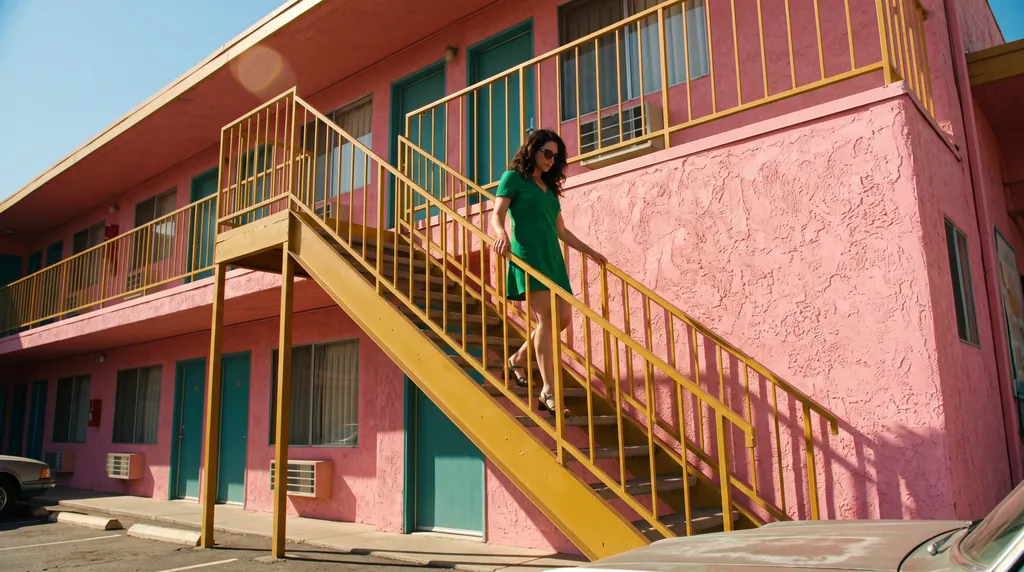
“A 16:9 horizontal cinematic still, shot from street level looking up at the sharp diagonal steel exterior staircase of a two-story retro motel painted vibrant mustard-yellow against a flamingo-pink stucco facade. An adult woman in an emerald-green mini dress descends the staircase, her hand trailing along the yellow railing. The bright yellow, pink, and green color clash creates a delightful, sun-drenched cinematic mood.”Nano Banana 2.1, 15 credits
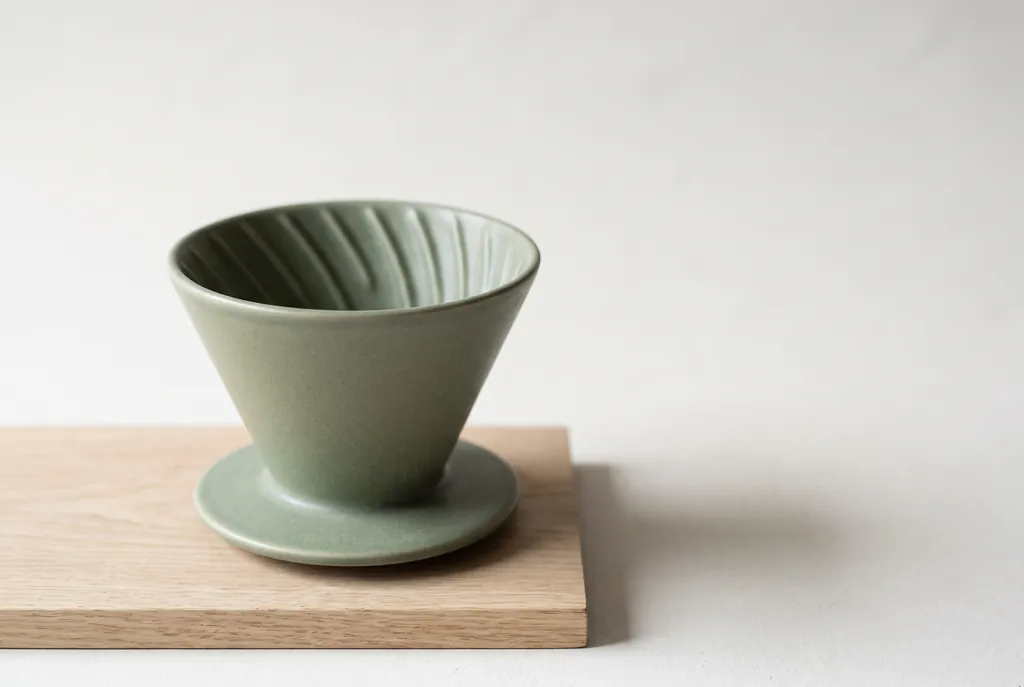
“Studio product photograph of a matte sage-green ceramic pour-over coffee dripper sitting on a pale oak board. Soft window light from the left, a gentle shadow to the right, clean off-white background, with empty space on the right third of the frame for ad copy. Real photograph, no props.”Nano Banana 2.1, 15 credits
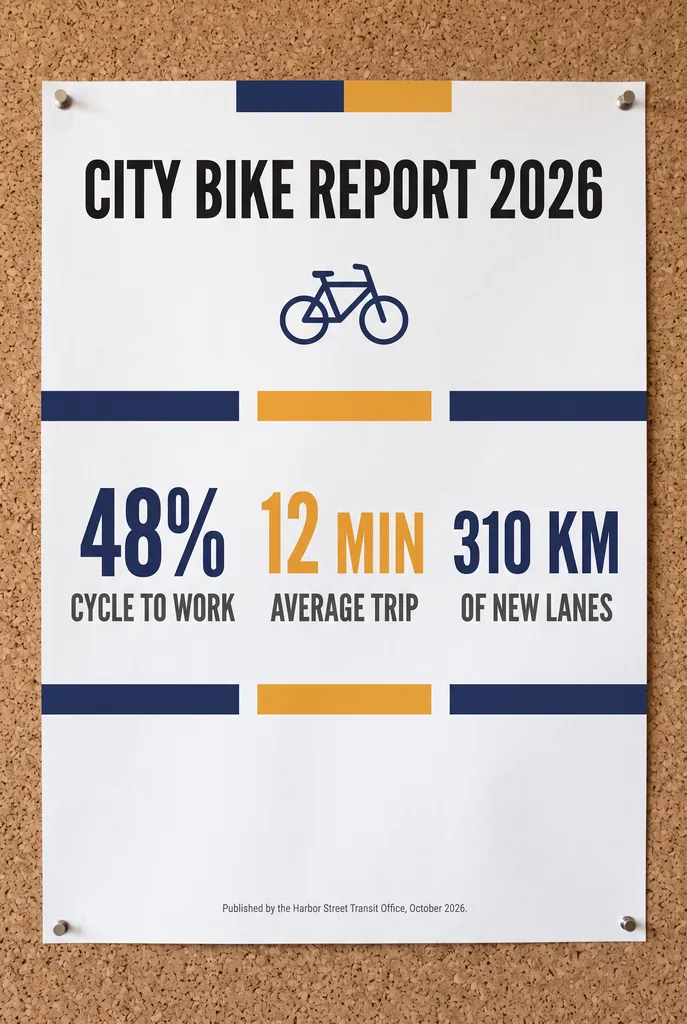
“A clean A2 infographic poster pinned to a cork board in a bright office, photographed straight on. Headline at the top in bold black sans-serif: CITY BIKE REPORT 2026. Below it, three large statistics in a row, each with a short label underneath: 48% CYCLE TO WORK, 12 MIN AVERAGE TRIP, 310 KM OF NEW LANES. At the bottom a small gray footer line: Published by the Harbor Street Transit Office, October 2026. Flat navy and amber color blocks, one simple bicycle icon, generous white space, no other words anywhere on the poster. Photorealistic matte print texture, soft daylight.”Nano Banana 2.1, 15 credits
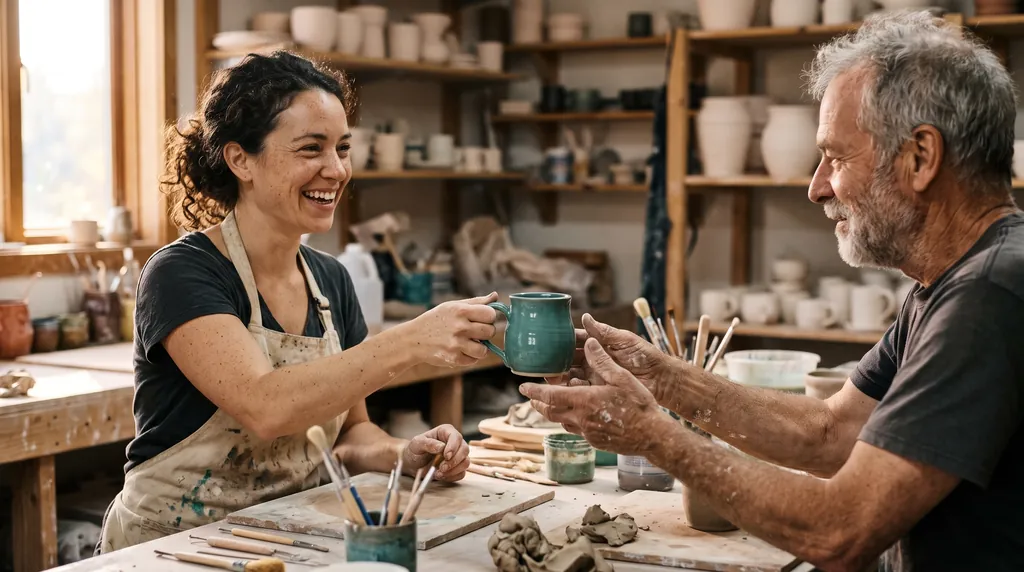
“Candid documentary photograph inside a small ceramics studio. A woman in her early thirties with freckles and curly dark hair laughs while handing a freshly glazed teal mug across a worktable to an older man with a short gray beard and clay-dusted hands. Both faces fully visible and in sharp focus, natural skin texture with visible pores and fine lines, no retouching. Late afternoon window light from the left, dust in the air, shelves of unglazed pots softly blurred behind them. Shot on a 50mm lens at f/2, warm film grain.”Nano Banana 2.1, 15 credits
“A panoramic banner of a Mediterranean coastal town at sunset, colorful houses along the harbor, film photography. No text.”Nano Banana 2.1, 15 credits
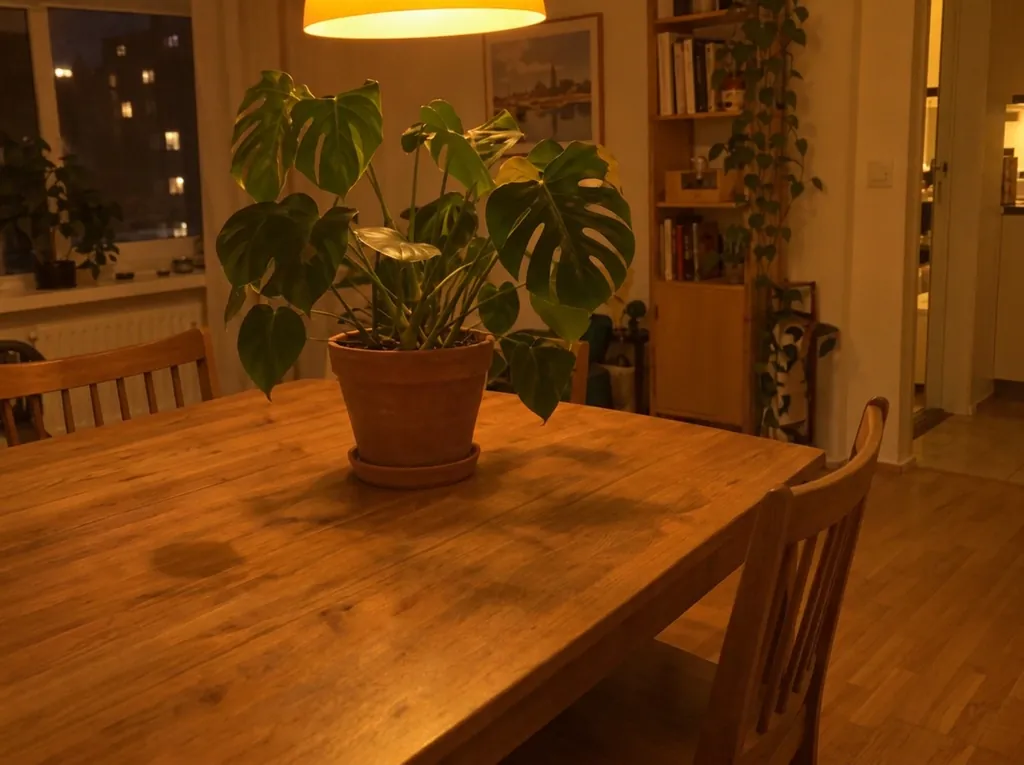
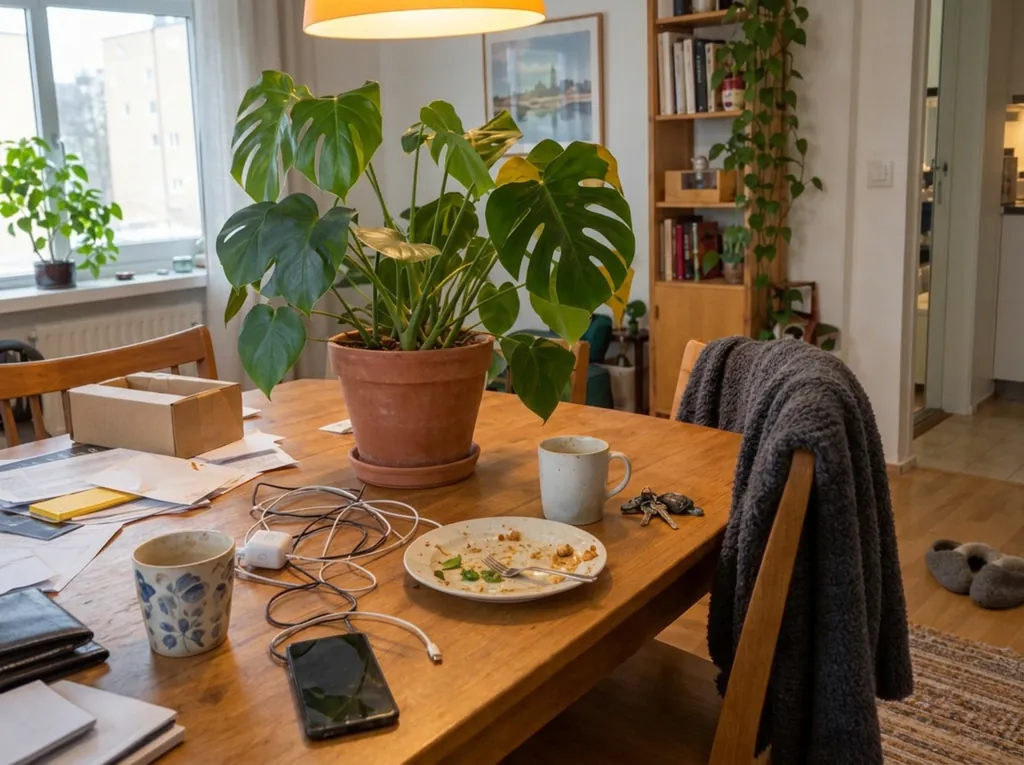
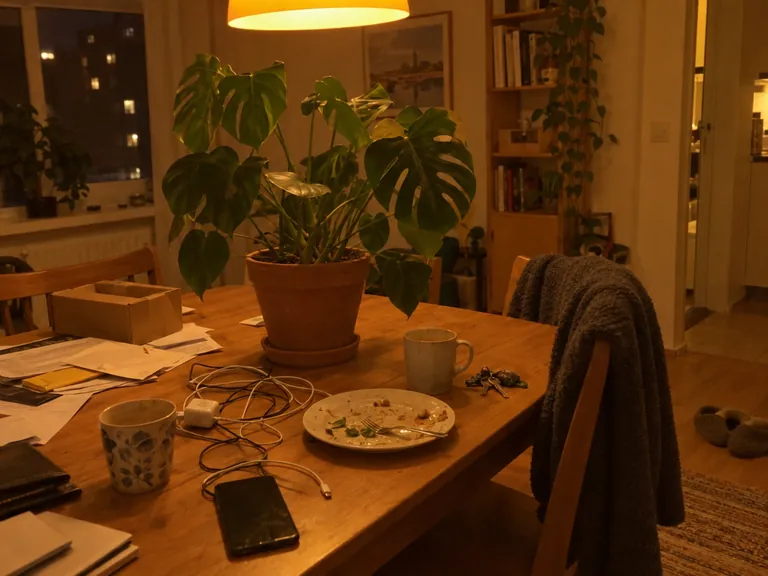
“Clean up this photo: remove the loose clutter around the plant (cables, mugs, dishes, food, papers, envelopes, boxes, clothes, laundry rack, vacuum, cleaning bottles, keys, slippers, toys, tissues) and fill the gaps naturally with the same surface, floor and wall. Keep the furniture, the room, the lighting and any date stamp as they are. Keep the plant, every leaf, the pot and the camera angle exactly as they are in the reference photo; do not add, remove or redesign any leaves, and do not change the pot.”Nano Banana 2.1, edit, 10 credits, input image made with GPT Image 2.5
“Fix the lighting and color of this photo: correct the yellow-orange cast to a neutral white balance, brighten the exposure so it looks like soft daylight, and make it slightly sharper. Do not add, remove or move any object; keep the room, the clutter, the framing and any date stamp exactly as they are. Keep the plant, every leaf, the pot and the camera angle exactly as they are in the reference photo; do not add, remove or redesign any leaves, and do not change the pot.”Nano Banana 2.1, edit, 10 credits, input image made with GPT Image 2.5
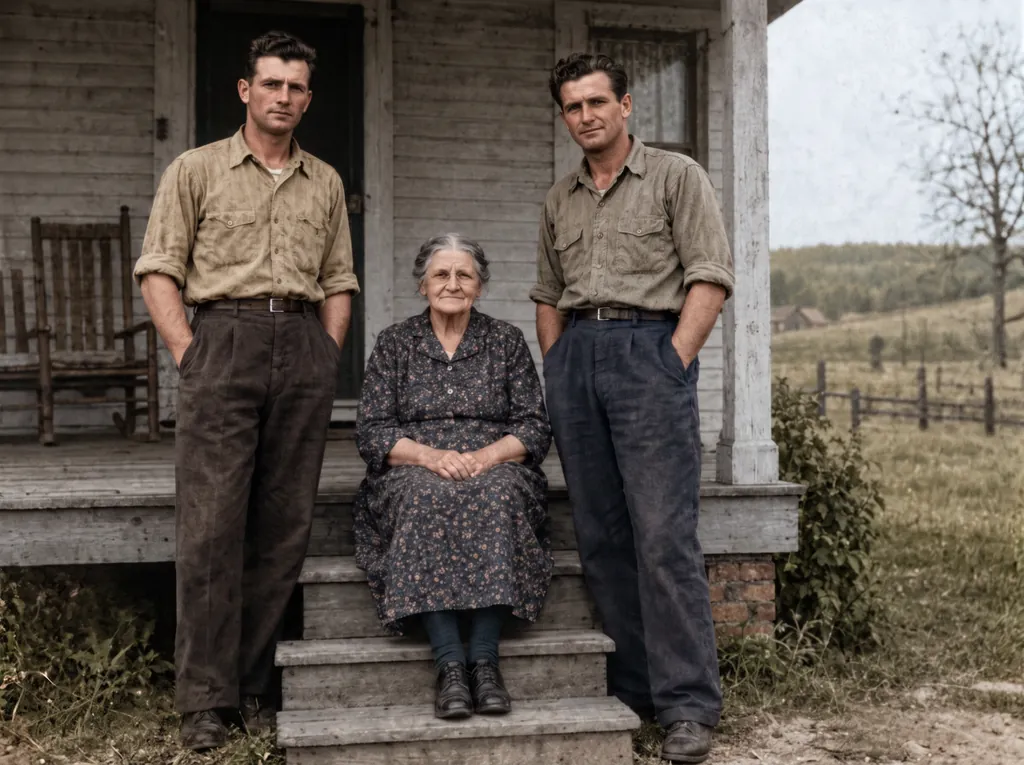
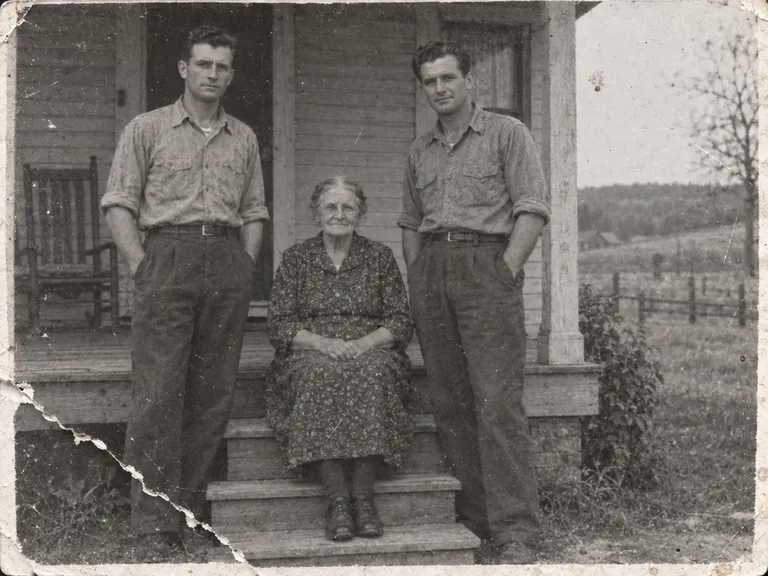
“Restore this damaged 1948 black-and-white family photograph while preserving the exact identities, ages, facial proportions, poses, clothing, porch architecture, framing, and historical period.
Repair the lower-left tear, remove scratches and dust, recover balanced contrast and fine facial detail, and add restrained historically plausible natural color: weathered gray porch boards, muted cream and brown clothing, natural skin tones, and subdued green countryside.
Do not beautify faces, change expressions, invent jewelry, alter clothing, add people, remove people, crop, modernize, add text, logo, or watermark. Keep subtle film grain so it remains an archival photograph rather than a modern digital portrait.”Nano Banana 2.1, edit, 15 credits, input image made with GPT Image 2.5
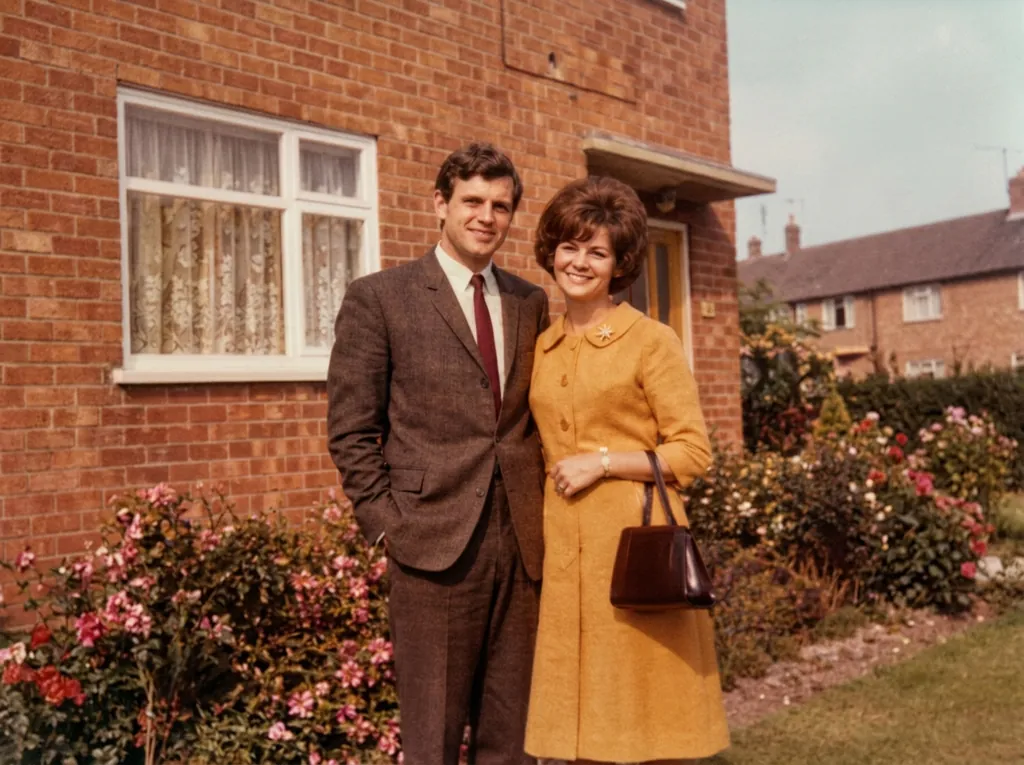
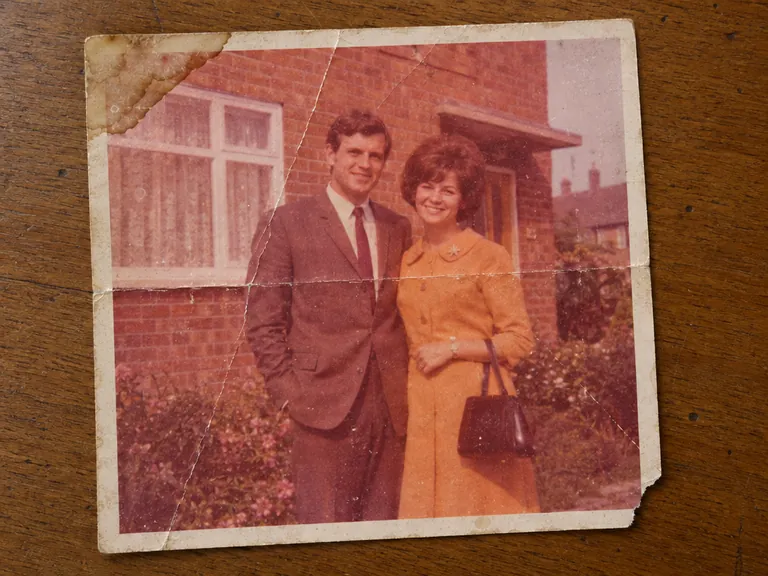
“Restore the old photograph from the reference image. Show only the photo itself, filling the frame: no table, no paper border, no background around it. Remove all creases, folds, scratches, dust, stains and tears, rebuild any missing corner, and fix the faded and shifted colors. Colorize it with natural, realistic skin tones and period-appropriate clothing colors. Keep every person exactly as they are: same face, same features, same expression, same age, same hairstyle, same pose and same clothing. Do not beautify, slim, smooth or modernize anyone. Keep the original composition and framing. The result should look like a clean, well-preserved original photograph from the same era, not a modern photo.”Nano Banana 2.1, edit, 10 credits, input image made with GPT Image 2.5
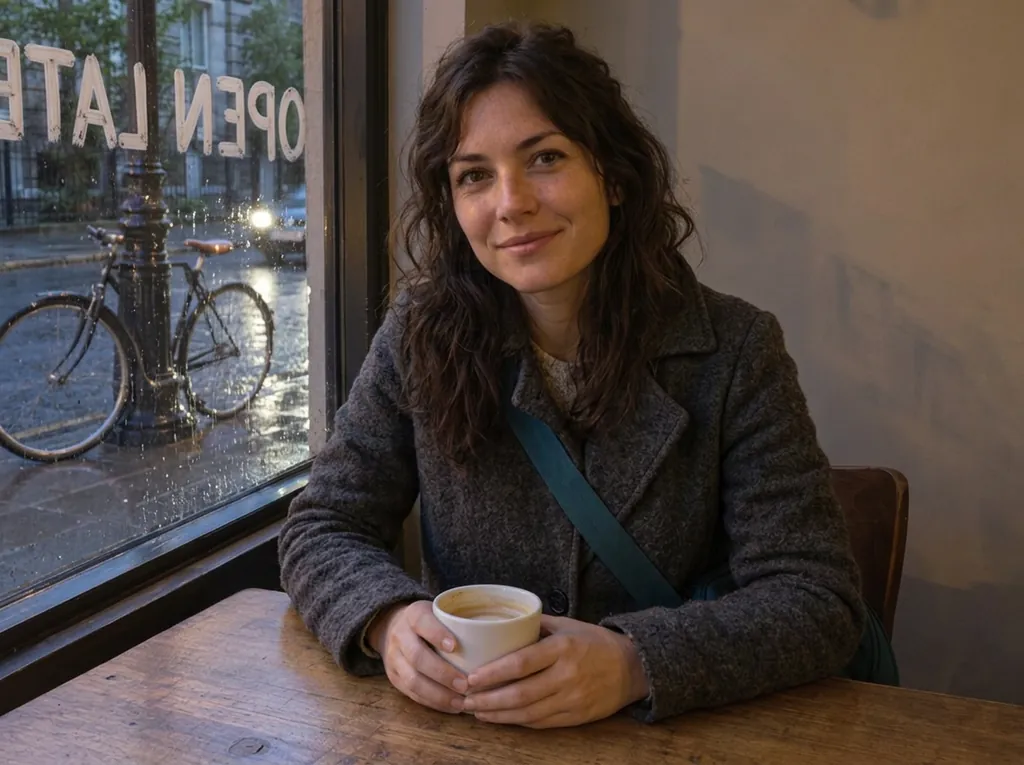
“Change her yellow rain jacket to a charcoal-grey wool coat. Make it a rainy evening outside the window, with wet street reflections. Write the words OPEN LATE in white painted letters on the window glass. Keep her face, hair, pose, the coffee cup, the table and the bicycle exactly the same.”Nano Banana 2.1, edit, 10 credits, input image made with GPT Image 2.5
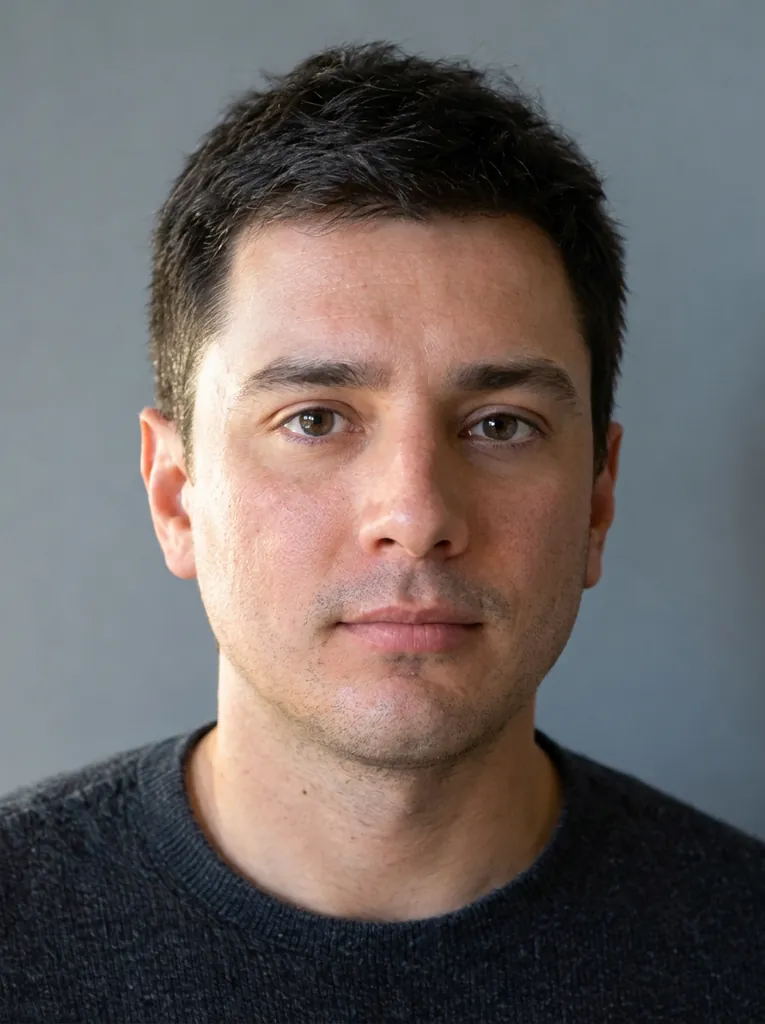
“Retouch this photo professionally: even out skin tone, reduce blemishes, sharpen focus, and balance lighting and color. Do not change the person's face shape, features, proportions, hairstyle, or expression. Keep the result looking like a real, unedited photo of the same person.”Nano Banana 2.1, edit, 10 credits, input image made with GPT Image 2.5
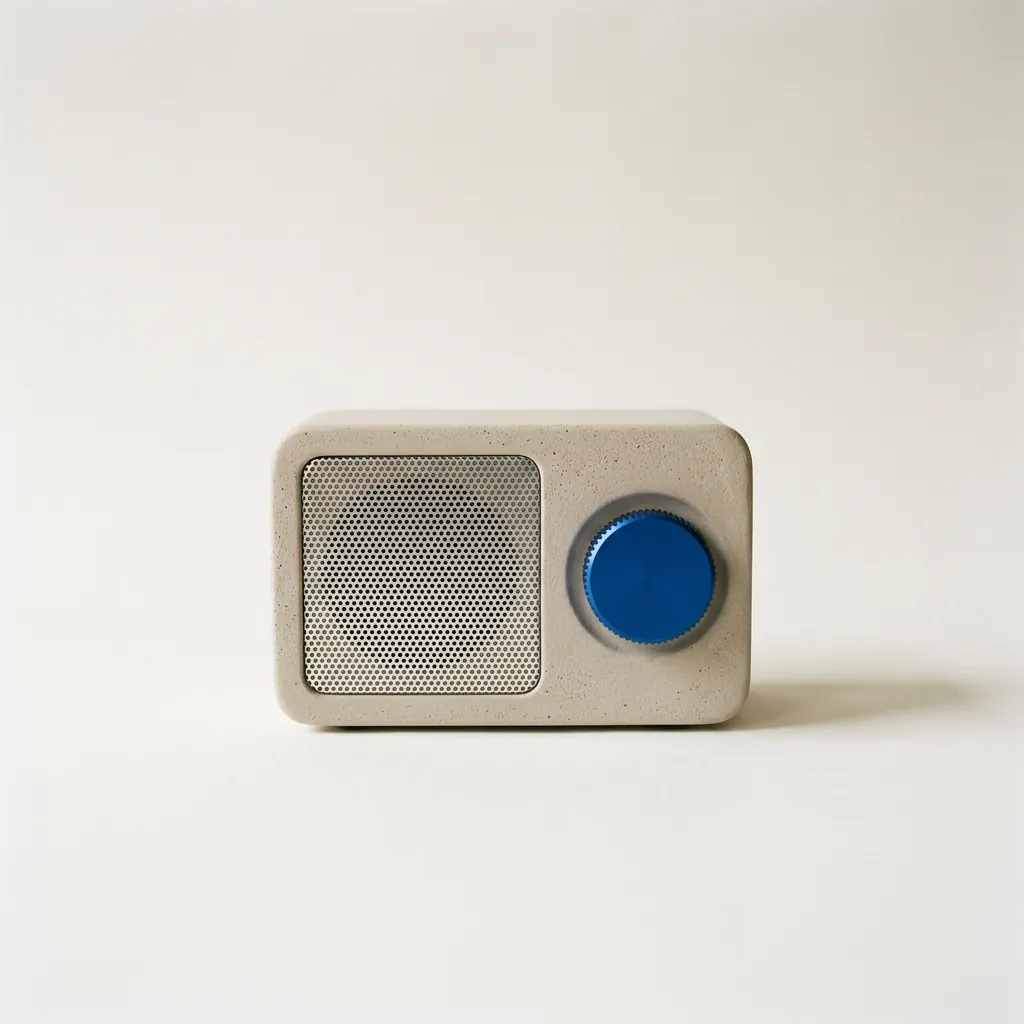
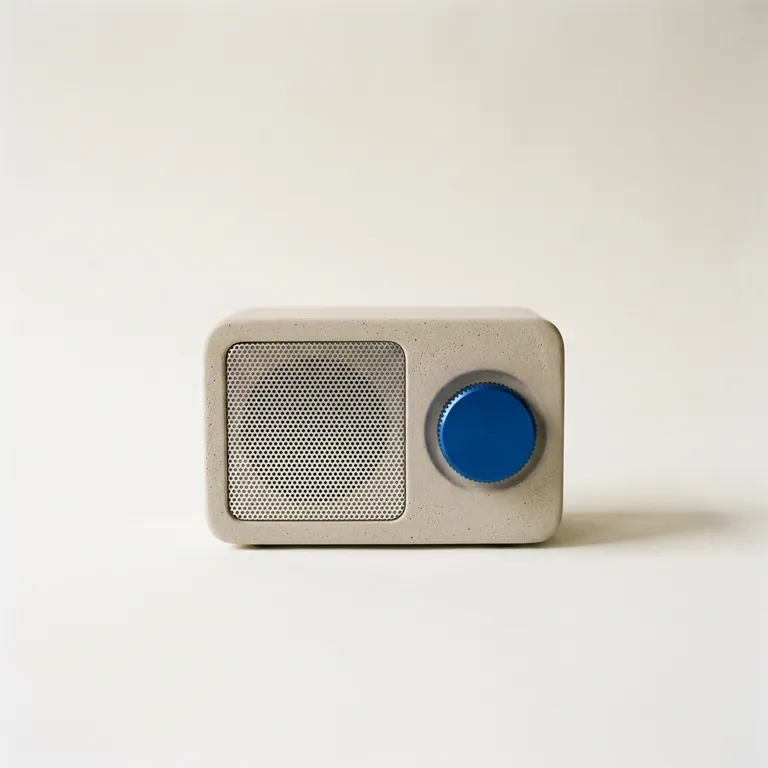
“A studio product photograph of a compact tabletop radio with a pale warm-grey plaster-textured body, a perforated aluminium speaker grille and a single cobalt-blue tuning dial, standing on seamless off-white paper. Soft north-window light from the left gives a gentle falloff and a short, soft shadow to the right. Shot straight-on at eye level on medium-format film, with the radio in the centre of a square frame and generous space around it. Sharp focus on the dial's knurled edge. No logos or text anywhere.”Nano Banana 2.1, 10 credits
What you can make with Nano Banana 2.1
Each one comes with the settings and the prompt we would start from, and what it costs. Use it as is or edit it.
Product photos that follow the brief
Fuser’s product prompt, which Nano Banana 2.1 won against GPT Image 2.5, Nano Banana 2 and Pro. Our run matched every line of the brief: a separate oak board, light from the left, the shadow to the right and the right third left empty for ad copy.
Text to image
2K
3:2
“Studio product photograph of a matte sage-green ceramic pour-over coffee dripper sitting on a pale oak board. Soft window light from the left, a gentle shadow to the right, clean off-white background, with empty space on the right third of the frame for ad copy. Real photograph, no props.”
Tip: Write the set, the light direction and where the empty space goes; it takes them literally.
15 credits
Posters and infographics with exact text
Atlas Cloud’s 26-word poster, a round 2.1 won. In our run every word and number was right, down to the small footer line, and nothing extra was added.
Text to image
2K
2:3
“A clean A2 infographic poster pinned to a cork board in a bright office, photographed straight on. Headline at the top in bold black sans-serif: CITY BIKE REPORT 2026. Below it, three large statistics in a row, each with a short label underneath: 48% CYCLE TO WORK, 12 MIN AVERAGE TRIP, 310 KM OF NEW LANES. At the bottom a small gray footer line: Published by the Harbor Street Transit Office, October 2026. Flat navy and amber color blocks, one simple bicycle icon, generous white space, no other words anywhere on the poster. Photorealistic matte print texture, soft daylight.”
Tip: Use 2K for small text, and end with “no other words anywhere”.
15 credits
Natural, documentary-style photos
Two people, both faces sharp, real skin texture, clay on his hands and window light from the left, as the prompt from Atlas Cloud’s test asks. Testers there called it a tie with GPT Image 2.5, with 2.1 framing wider.
Text to image
2K
16:9
“Candid documentary photograph inside a small ceramics studio. A woman in her early thirties with freckles and curly dark hair laughs while handing a freshly glazed teal mug across a worktable to an older man with a short gray beard and clay-dusted hands. Both faces fully visible and in sharp focus, natural skin texture with visible pores and fine lines, no retouching. Late afternoon window light from the left, dust in the air, shelves of unglazed pots softly blurred behind them. Shot on a 50mm lens at f/2, warm film grain.”
15 credits
Cinematic stills
Google’s own 2.1 example. The yellow staircase, pink stucco and green dress came out as described, shot from below in hard sun.
Text to image
2K
16:9
“A 16:9 horizontal cinematic still, shot from street level looking up at the sharp diagonal steel exterior staircase of a two-story retro motel painted vibrant mustard-yellow against a flamingo-pink stucco facade. An adult woman in an emerald-green mini dress descends the staircase, her hand trailing along the yellow railing. The bright yellow, pink, and green color clash creates a delightful, sun-drenched cinematic mood.”
15 credits
Very wide banners (8:1)
An 8:1 panorama from reAPI’s side-by-side test, at 2K. One continuous harbour from end to end, with no repeating tiles or seams. GPT Image 2.5 can’t make this shape.
Text to image
2K
8:1
“A panoramic banner of a Mediterranean coastal town at sunset, colorful houses along the harbor, film photography. No text.”
Tip: Use 2K or 4K for 4:1 and 8:1: Google fixed the tiling of very wide images at those sizes.
15 credits
OriginalEdited
input image made with GPT Image 2.5
Clean up a photo
BulkImagen’s clean-up prompt, which worked on all six of their photos. On ours every cable, plate and paper is gone and the plant, the pot and the lamp are untouched. Two slips: the rug went too, and a faint dark patch is left where a mug stood.
Edit image
1K
4:3
“Clean up this photo: remove the loose clutter around the plant (cables, mugs, dishes, food, papers, envelopes, boxes, clothes, laundry rack, vacuum, cleaning bottles, keys, slippers, toys, tissues) and fill the gaps naturally with the same surface, floor and wall. Keep the furniture, the room, the lighting and any date stamp as they are. Keep the plant, every leaf, the pot and the camera angle exactly as they are in the reference photo; do not add, remove or redesign any leaves, and do not change the pot.”
Tip: Name what stays (the rug, the chairs) as well as what goes.
10 credits
OriginalEdited
input image made with GPT Image 2.5
Fix the light and the colour
The same photo, with only the light changed: the orange cast is gone, it is brighter, and the clutter stayed where it was. It also turned the night outside the window into day, which the prompt didn’t ask for.
Edit image
1K
4:3
“Fix the lighting and color of this photo: correct the yellow-orange cast to a neutral white balance, brighten the exposure so it looks like soft daylight, and make it slightly sharper. Do not add, remove or move any object; keep the room, the clutter, the framing and any date stamp exactly as they are. Keep the plant, every leaf, the pot and the camera angle exactly as they are in the reference photo; do not add, remove or redesign any leaves, and do not change the pot.”
10 credits
OriginalEdited
input image made with GPT Image 2.5
Restore and colourise an old photo
WeShop’s restoration prompt, the one published 2.1 test of this job. The tear is gone, the colours are muted and period, and all three faces, poses and clothes match the original.
Edit image
2K
4:3
“Restore this damaged 1948 black-and-white family photograph while preserving the exact identities, ages, facial proportions, poses, clothing, porch architecture, framing, and historical period.
Repair the lower-left tear, remove scratches and dust, recover balanced contrast and fine facial detail, and add restrained historically plausible natural color: weathered gray porch boards, muted cream and brown clothing, natural skin tones, and subdued green countryside.
Do not beautify faces, change expressions, invent jewelry, alter clothing, add people, remove people, crop, modernize, add text, logo, or watermark. Keep subtle film grain so it remains an archival photograph rather than a modern digital portrait.”
Tip: Keep the scan of the original: a restoration is a new picture, not a repair of the old file.
15 credits
input image made with GPT Image 2.5
Restore a faded colour print
The old-photo prompt from BulkImagen’s test, run on the same print with both models. Nano Banana 2.1 kept the framing, the faces and the brown suit; GPT Image 2.5 cropped in, redrew the faces more and turned the suit grey.
Edit image
1K
4:3
“Restore the old photograph from the reference image. Show only the photo itself, filling the frame: no table, no paper border, no background around it. Remove all creases, folds, scratches, dust, stains and tears, rebuild any missing corner, and fix the faded and shifted colors. Colorize it with natural, realistic skin tones and period-appropriate clothing colors. Keep every person exactly as they are: same face, same features, same expression, same age, same hairstyle, same pose and same clothing. Do not beautify, slim, smooth or modernize anyone. Keep the original composition and framing. The result should look like a clean, well-preserved original photograph from the same era, not a modern photo.”
10 credits
12
input image made with Nano Banana 2.1
Put your logo on a product
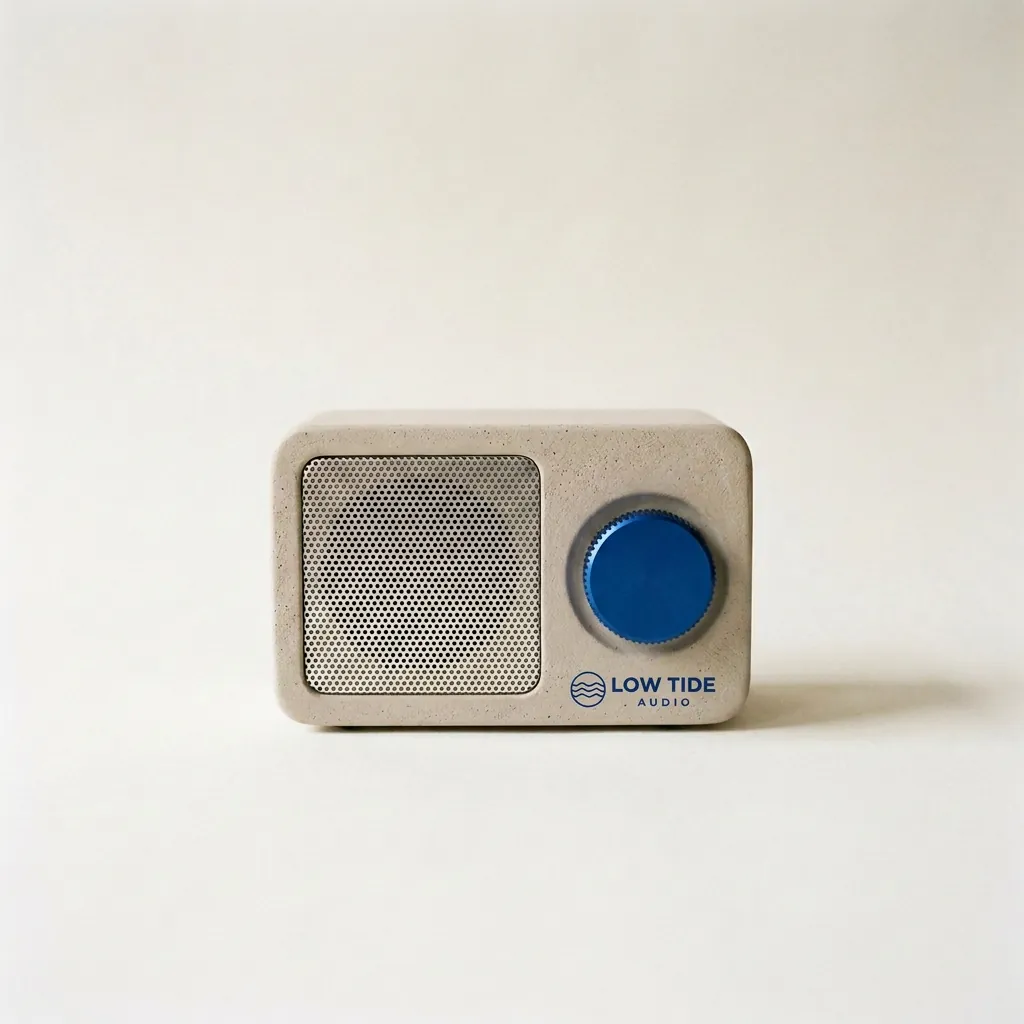
The last of Fuser’s three steps: a radio and a logo, both made with 2.1, then combined. The logo sits under the dial as a small print, and the radio, the backdrop and the shadow didn’t move.
Edit image
1K
1:1
“Take the radio from the first image. Print the LOW TIDE AUDIO logo from the second image onto the radio's front panel, below the cobalt dial, as a small, crisp cobalt-blue screen print that sits flat on the plaster texture. Keep the radio's shape, the cobalt dial, the speaker grille, the paper backdrop, the window light and the shadow exactly the same.”
Tip: Upload the product first and the logo second, and say where the logo goes.
10 credits
What Nano Banana 2.1 is good at, and where it struggles
Good at
Edits by instruction: say what to change and what to keep. In our tests it cleared a cluttered table, fixed a colour cast and restored two old photos while keeping the faces and the framing.
Better at keeping the same character or product across images. In Google’s own side-by-side ratings it beat Nano Banana 2 most clearly at keeping several characters consistent.
Output up to 4K, for print and large screens, and very wide 4:1 and 8:1 banners, which Google says it fixed at 2K and 4K.
Combines several photos in one edit: a person from one, a jacket from another, a room from a third.
Limits
Small text can come out blurry at 1K, and long paragraphs are unreliable; Google lists both as known limits. Use 2K or 4K for small print, and proofread.
Faces are not always identical to your photo, and an edit can keep the original pose when you asked for a new one (Google’s model card).
It can add words you didn’t ask for, and signs in the background of a photo often come out as made-up lettering. Say “use only the text given above”.
Edits are redrawn, not pixel-locked: it can re-crop the photo or restage the scene, and exact counts can be off.
Left and right can get mixed up. Describe positions plainly and check the result.
When you mark an area to edit, the mark can stay in the picture. Ask for it to be removed.
Added or removed objects can look wrong: in our edits a hand stayed closed around a removed flower, and an added dog stood on the bench, larger than life. For these edits GPT Image 2.5 did better in our side-by-side tests.
In our own runs it numbered a water-cycle diagram with two stages called “Condensation”, and wrote “OPEN LATE” on a café window mirrored, as if read from the street.
Every image carries Google’s invisible SynthID watermark.
Settings, explained
What each option does and what it does to the price.
Modes
Generate starts from your words. Edit changes the photos you upload: one to change, or several to combine.
Same price: 10 credits (1K)
Quality
1K is for trying ideas and for most social posts. Use 2K or 4K when the image has small text (Google says it can blur at 1K) or will be printed or shown large.
1K: 10 · 2K: 15 · 4K: 30 credits (one image)
Aspect ratios
1:1 for feeds and product photos, 3:4 or 2:3 for posters, 16:9 for banners and thumbnails, 9:16 for stories, 21:9 for wide headers, 4:1 and 8:1 for website banners and panoramas. Google fixed the repeating-tile look of very wide images at 2K and 4K, so use one of those for 4:1 and 8:1. In an edit, choose the shape of your photo to keep the framing.
Up to four images per request. Google notes the model doesn’t always return the exact number you ask for in the prompt, so set it here instead. In an edit, each image is charged with its photos again; the button shows the total.
From Google’s image generation guide and its Nano Banana 2.1 model card:
Be specific. Instead of “fantasy armor”, describe the materials, the patterns and the shape. Say what the image is for: “a logo for a high-end, minimalist skincare brand” beats “a logo”.
Describe what you want, not what you don’t. “An empty, deserted street with no signs of traffic” works better than “no cars”.
Use camera words for framing: wide-angle shot, macro shot, low-angle perspective.
Break a busy scene into steps: first the background, then the foreground, then the details.
In an edit, say what stays the same, and refer to several photos by their order.
Refine with a follow-up edit instead of starting over: “Keep everything the same, but change the character’s expression to be more serious.”
When a result goes wrong
The usual problems with Nano Banana 2.1, why they happen and what to change.
Small text is blurry or misspelled
Why: Google lists small text at 1K, long paragraphs and full pages of text among the model’s limits.
Fix: Use 2K or 4K, keep the text short, and put the exact words in quotes. Google suggests writing the text first and then asking for the image with it.
The face doesn’t quite match the photo
Why: Google’s model card: character consistency between the input and the result “is not always perfect”.
Fix: Name what must stay (face, features, hairstyle, expression), change one thing per edit, and start the next edit from your original rather than from the edit.
The pose didn’t change
Why: In edits the model sometimes keeps the structure of the input photo, pose included.
Fix: Describe the new pose explicitly, or add a photo of the pose you want as a second reference.
Left and right are swapped
Why: Google notes occasional confusion about left and right.
Fix: Describe positions in plain terms (“in the bottom-right corner”, “on her left hand”) and check the result before you use it.
Your marks are still in the picture
Why: When you circle or paint over the area to change, the ink can persist (Google’s model card).
Fix: Say “edit only inside the marked area and remove the mark” in the prompt.
Extra words or a logo appeared
Why: In BulkImagen’s tests it added lines to two of three text images, and in MeltFlex’s it copied a designer’s logo from a reference photo into 5 of 29 results.
Fix: End the prompt with “Use only the text given above. Do not add any other words.” Use reference photos without logos or signatures.
The edit re-cropped the photo
Why: CellCog found it made each change correctly but cropped every photo tighter.
Fix: Choose the same aspect ratio as your photo, say “keep the framing and the camera angle”, or use GPT Image 2.5 when the frame must not move.
The request was refused
Why: Google checks the prompt and the images you upload.
Fix: Nothing is charged: the credits come back. Reword the prompt, or use a photo without a real, identifiable person.
Nano Banana 2.1 vs Nano Banana 2
Google released Nano Banana 2.1 on 6 October 2026 as an update to Nano Banana 2, which it deprecated the same day. Google says it keeps the speed of its Flash models and improves on Nano Banana 2 in these ways:
Better visual quality and realism at 1K, 2K and 4K.
Closer prompt following, and better text and infographic layouts.
More consistent characters over several edits, for up to four characters and ten objects in one request.
Edits inside a marked area (draw on the photo, then describe the change).
Fixed tiling on very wide and tall images at 2K and 4K.
It reasons a little more before drawing by default. The small 0.5K size of Nano Banana 2 is gone.
Describe the image or the edit. The price updates as you change quality and count.
3
Generate and download
Results land in your workspace, ready to download. If a generation fails, the credits come back.
Questions
How much does Nano Banana 2.1 cost?
Nano Banana 2.1 on zzo.ai costs 10 credits ($0.10) per image at 1K quality. No subscription: buy credits once and they never expire. Depending on quality, one image costs 10 to 30 credits ($0.10 to $0.30 at the standard rate); more images or reference images add to that, and the button shows the total first. As low as $0.09 with the $199.99 pack. Failed generations are refunded automatically.
Do I need a subscription to use Nano Banana 2.1?
No. zzo.ai has no subscription: buy a credit pack once and spend it on Nano Banana 2.1 or any other model. Credits never expire.
What can I make with Nano Banana 2.1?
Nano Banana 2.1 generates new images and edits uploaded ones, up to 4 per request, in 1:1, 16:9, 9:16, 4:3, 3:4, 3:2, 2:3, 21:9, 4:1, 8:1 aspect ratios.
Can I use Nano Banana 2.1 through an API or in Claude?
Yes. Create an API key in Settings, then use Nano Banana 2.1 from Claude, Cursor or your own code through the zzo.ai MCP server. It draws from the same balance at the same prices as the website.
What is Nano Banana 2.1?
Nano Banana 2.1 (gemini-nano-banana-2.1) is Google’s image generation and editing model, released on 6 October 2026 as the update to Nano Banana 2 and generally available from day one. It is built on Gemini 3.6 Flash. In the Gemini app it comes with paid Google AI plans; zzo.ai is an independent site that runs it per image, without a subscription.
What changed from Nano Banana 2?
Google lists better visual quality and realism, closer prompt following, better text and infographic layouts, more consistent characters across edits, and fixed tiling on very wide images at 2K and 4K. In Google’s own side-by-side ratings, 2.1 was preferred over Nano Banana 2 in every category, most of all for keeping several characters consistent and for edits inside a marked area. These are Google’s tests, not independent ones.
Is Nano Banana 2 still available?
Google marked Nano Banana 2 as deprecated on the day 2.1 came out and recommends 2.1 for all new work, but as of 27 October 2026 it has announced no shutdown date. zzo.ai now runs Nano Banana 2.1 in its place, and links to Nano Banana 2 lead here.
Is Nano Banana 2.1 better than Nano Banana Pro?
In Google’s own side-by-side ratings (October 2026), Nano Banana 2.1 with thinking scored higher than Nano Banana Pro in every category, for example 1050 against 935 for overall text-to-image preference. These are Google’s evaluations, not independent ones. zzo.ai doesn’t offer Nano Banana Pro.
Nano Banana 2.1 vs GPT Image 2.5: which should I use?
Pick GPT Image 2.5 for most photo edits and for transparent cutouts. Pick Nano Banana 2.1 for 4K output, very wide banners and restoring old photos. In our 14 same-prompt tests GPT Image 2.5 did better on four edits, Nano Banana 2.1 on two restorations, and the rest were ties; CellCog’s 24-prompt test (25 October 2026) went 9 to 5 for GPT Image 2.5, with 10 ties. Both are on zzo.ai, so you can run the same prompt on each.
Can Nano Banana 2.1 make 4K images?
Yes. It outputs at 1K, 2K or 4K, which is 4096 × 4096 pixels for a square image. The small 512-pixel size of Nano Banana 2 is gone.
Can Nano Banana 2.1 make a transparent background?
No. Google doesn’t offer transparent output for Nano Banana 2.1, so the background is always filled in. For a transparent PNG, use GPT Image 2.5 with Transparent background switched on.
Why does Nano Banana 2.1 change my face or ignore part of my prompt?
Google’s model card lists these as known limits: character consistency “is not always perfect”, left and right can be confused, and edits inside a marked area follow the instruction only partly. Put the must-have details first, keep exact text short, change one thing per edit and start again from your original photo. A generation that fails is refunded automatically; a result you don’t like is not.
Can I edit my own photo with Nano Banana 2.1?
Yes. Switch to Edit, upload your photo (or up to four to combine) and describe the change, then say what must stay the same. The price, including the uploaded photos, shows on the button before you start.
Can I use Nano Banana 2.1 images commercially?
Yes. Images you generate on zzo.ai are yours to use, including in commercial work, as long as the content doesn’t break our terms or anyone else’s rights, and you have the rights to any photo you upload.
Does Nano Banana 2.1 add a watermark?
zzo.ai adds no visible watermark. Google embeds an invisible SynthID watermark in every image, which some platforms can detect. The visible mark you may have seen on images from the Gemini app is added by that app only.
Why was my Nano Banana 2.1 request refused?
Google’s safety filters block some prompts and images, for example sexual content and deceptive edits of real people. When a request is refused, the credits go back to your balance automatically. Rewording the prompt or using a different photo usually works.