
Updated 2026-11-05
GPT Image 2.6 vs 2.5: What’s New and Which to Use
Use GPT Image 2.6 Flare when speed matters or you want an animated GIF: in our test it made the same high-quality image in 14 seconds, against 27 for GPT Image 2.5 Flare, and only 2.6 makes GIFs. Stay on GPT Image 2.5 for the cheapest drafts, because low and medium quality cost more on 2.6, and for its extra-high and max quality levels, which 2.6 doesn’t have here. In our four same-prompt pairs (one take each), 2.6 drew bolder pictures with larger type and kept the edited product as well as 2.5, while 2.5 stuck closer to the brief and added less text of its own. At high quality the two cost the same, so try the same prompt on each.
GPT Image 2.6 on zzo.ai costs 15 credits ($0.15) per image at High quality. GPT Image 2.5 on zzo.ai costs 15 credits ($0.15) per image at High quality.
Same prompt, both models
We ran each one ourselves on zzo.ai: the same prompt (and, for an edit, the same photo) with the site’s settings, once per model. Nothing was re-run to get a better take.
Coffee bag product shot: GPT Image 2.5
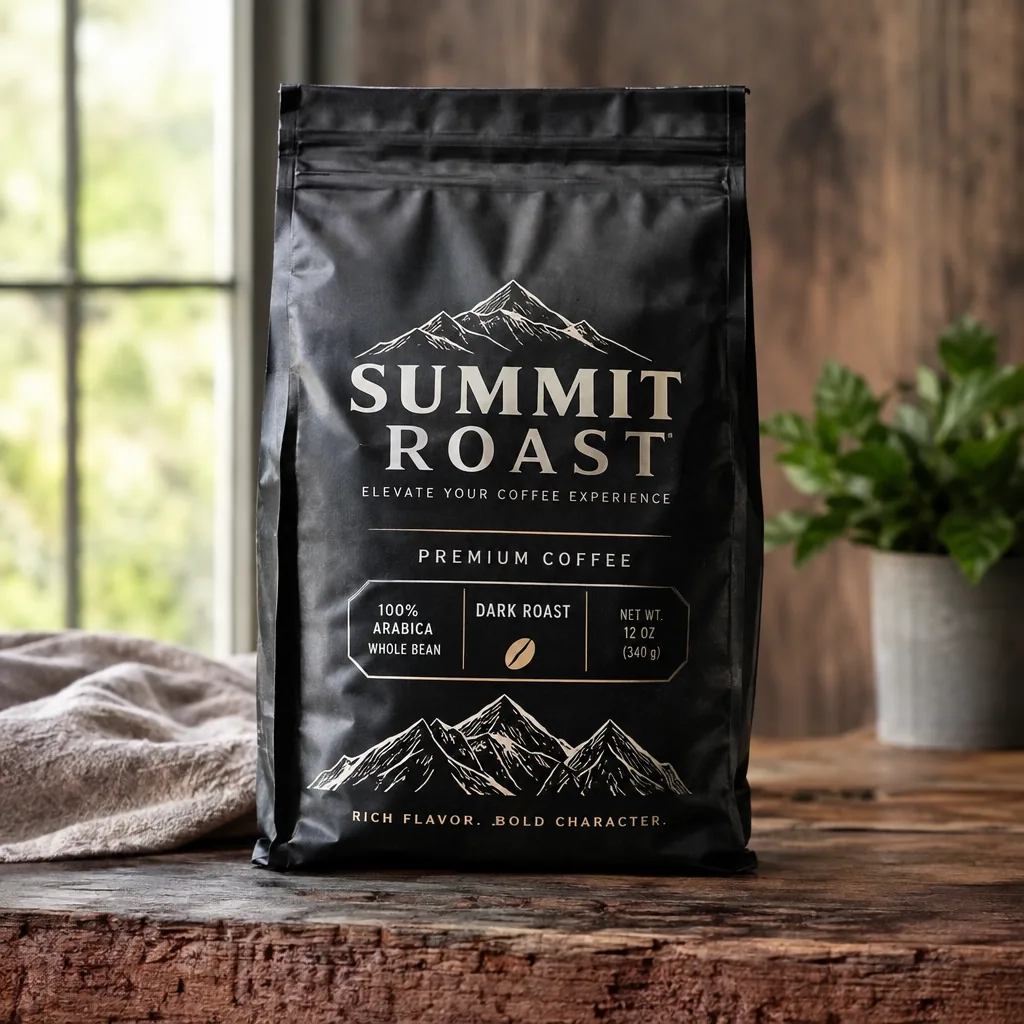
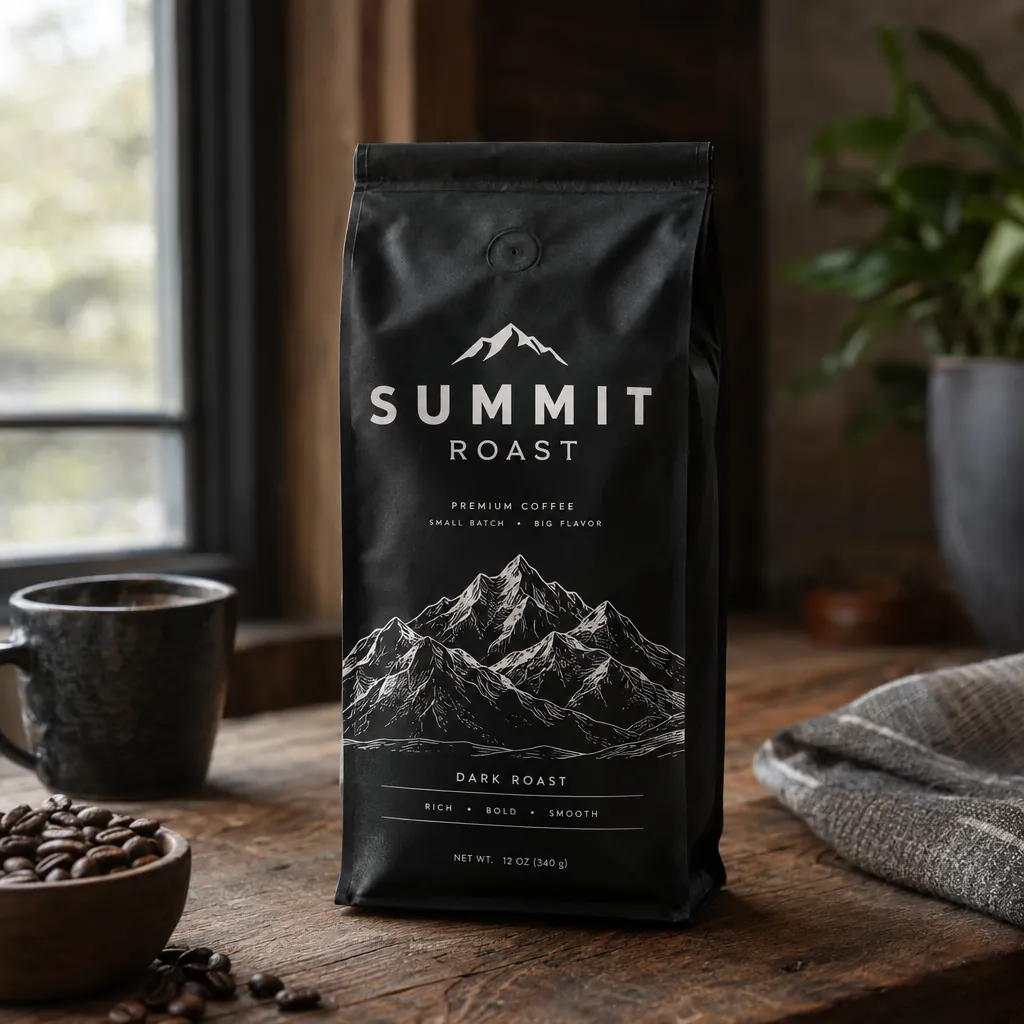
Both spelled SUMMIT ROAST correctly, and both added marketing copy the prompt didn’t ask for; 2.6 added more. It wrote “ELEVATE YOUR COFFEE EXPERIENCE”, “PREMIUM COFFEE”, a “100% ARABICA / DARK ROAST / NET WT. 12 OZ” panel and a small ® mark, and its bottom line reads “RICH FLAVOR. .BOLD CHARACTER.”, with a stray full stop before BOLD. 2.5’s extra lines (PREMIUM COFFEE, SMALL BATCH • BIG FLAVOR, DARK ROAST, RICH • BOLD • SMOOTH, NET WT. 12 OZ (340 g)) were all spelled cleanly. 2.6 drew a wider pouch with larger type, 2.5 a slimmer bag beside a coffee cup and beans. So Design Arena’s finding that 2.6 Flare adds fewer slogans didn’t hold on this prompt; on either model, add “No other text”. This prompt was also our speed test: 14 seconds on 2.6 Flare, 27 on a fresh 2.5 Flare run.
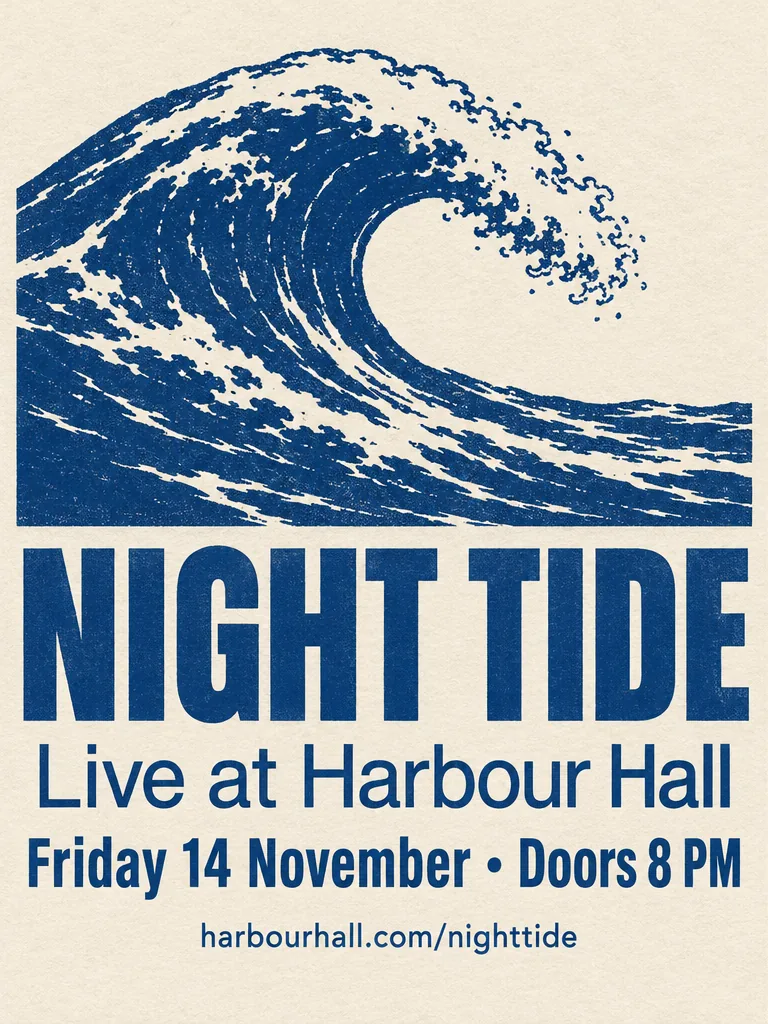
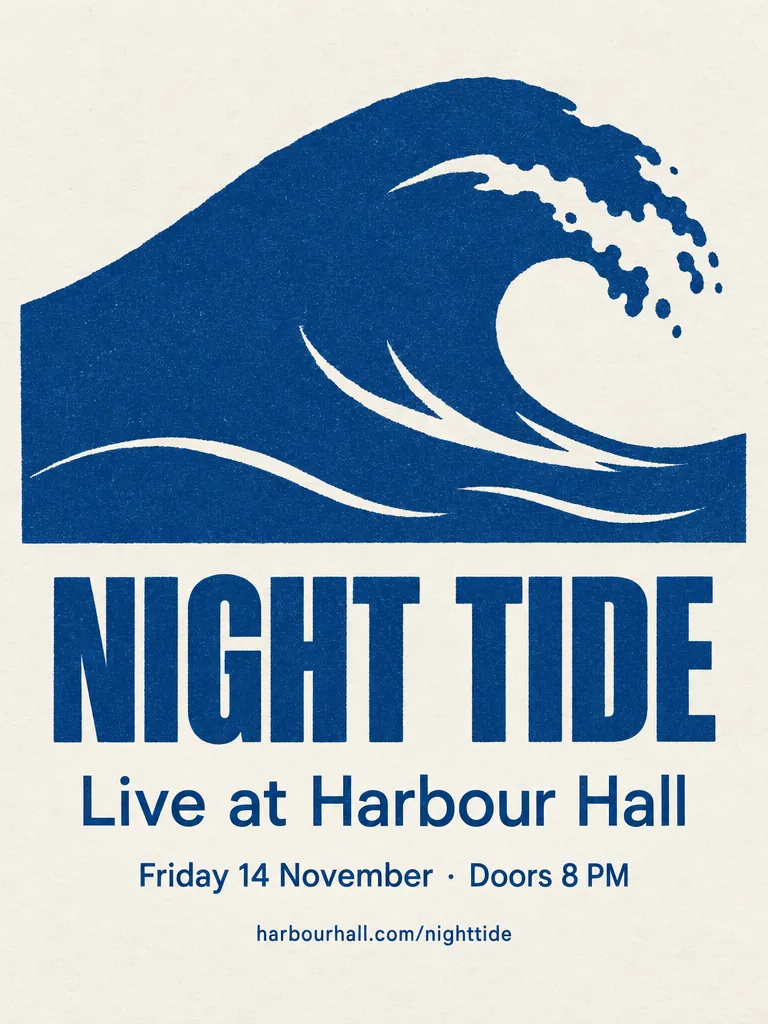
Concert poster with exact text: both publishable
Both rendered all four lines correctly: NIGHT TIDE, Live at Harbour Hall, Friday 14 November · Doors 8 PM and harbourhall.com/nighttide. 2.6 drew a detailed, woodcut-style wave and set the type heavier and larger; 2.5 made a flat screen-print wave, closer to the “minimalist” the prompt asks for. 2.6 also swapped the requested middle dot “·” for a larger bullet “•”. That fits one developer’s launch-day note that 2.6 Flare’s text looks “zoomed in”. Pick 2.5 when the exact characters and a minimal look matter, 2.6 for more detail and stronger type.
How-it-works infographic: a trade-off
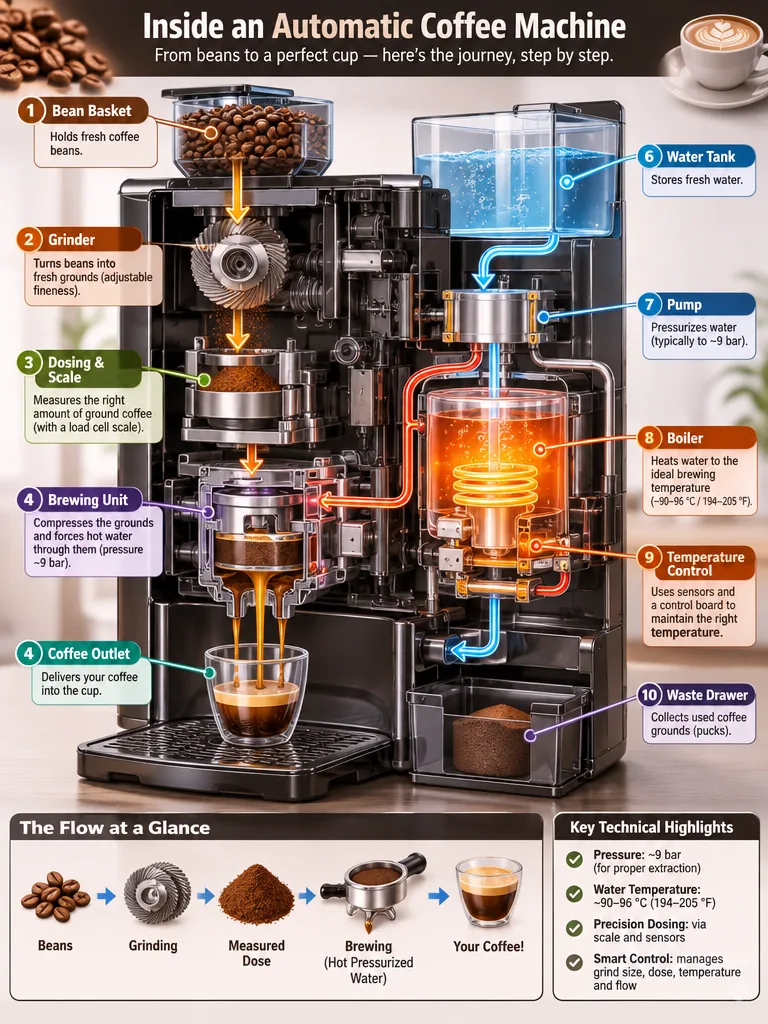
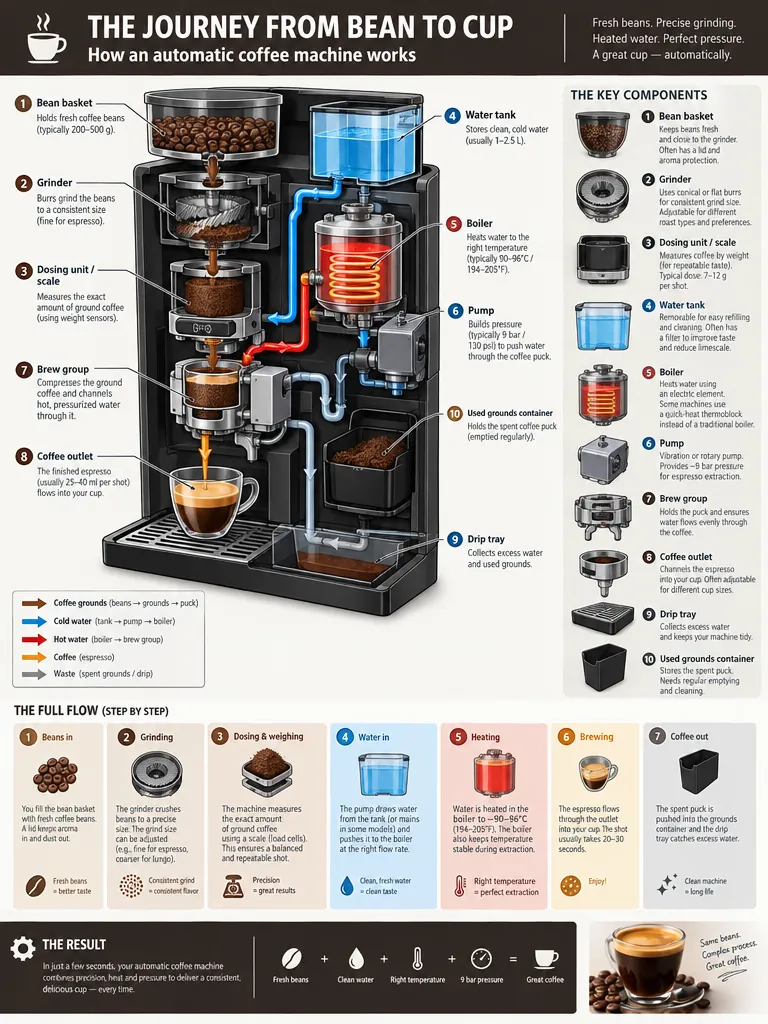
OpenAI’s own prompt for a dense diagram with many small labels, at 768×1024. 2.6 used fewer, larger labels that are easier to read, but numbered two different steps “4” (the brewing unit and the coffee outlet). 2.5 packed in more components and a step-by-step strip in smaller text, and one line of that small text came out garbled. 2.6 is the easier read, 2.5 the more complete diagram: on 2.6 check the numbering, on 2.5 the small print.
Same bottle, new setting: a tie
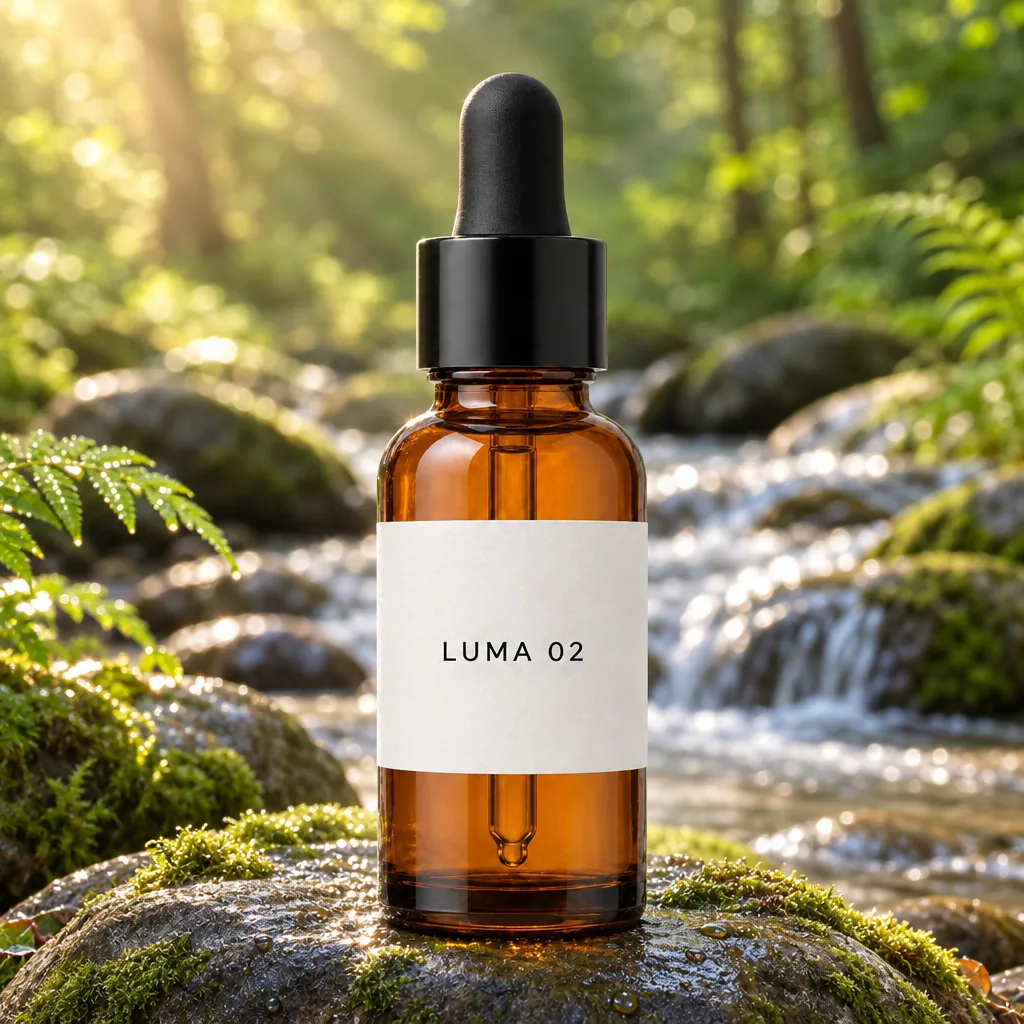
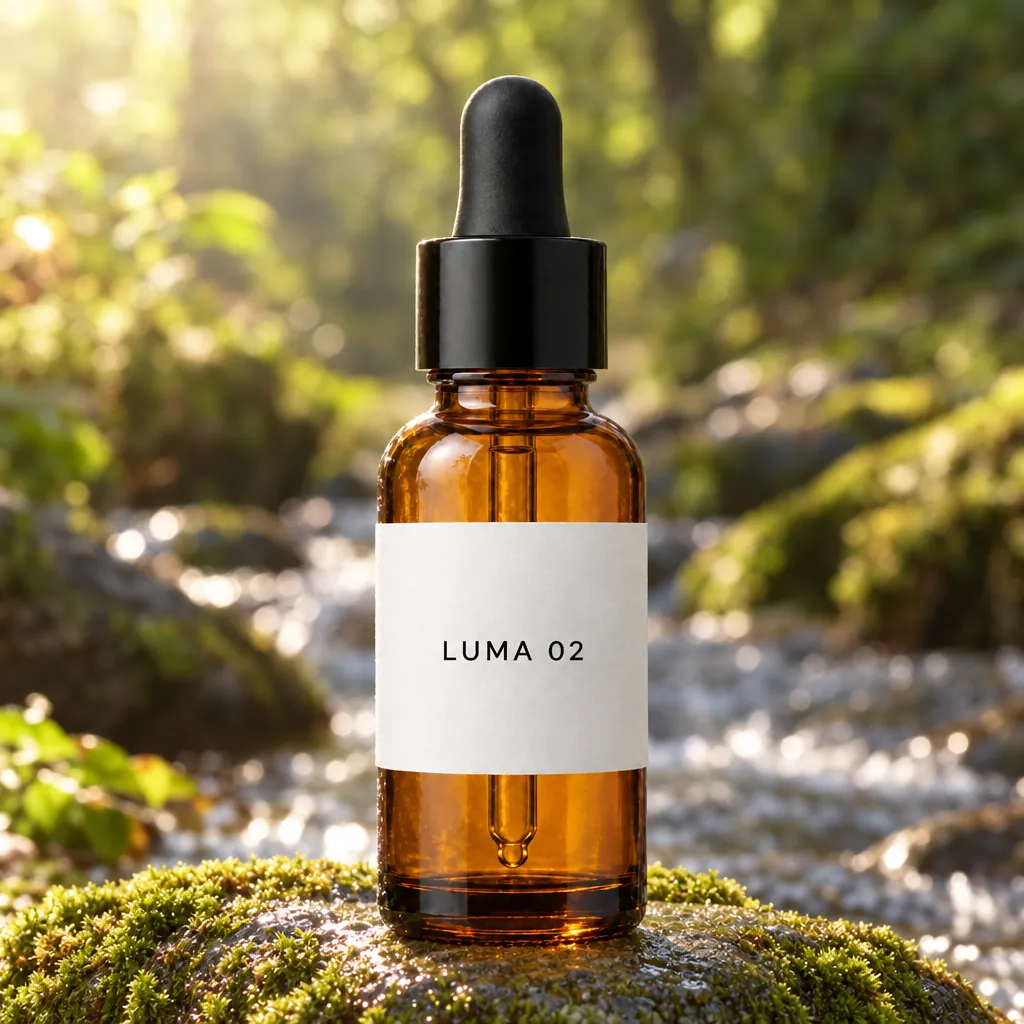
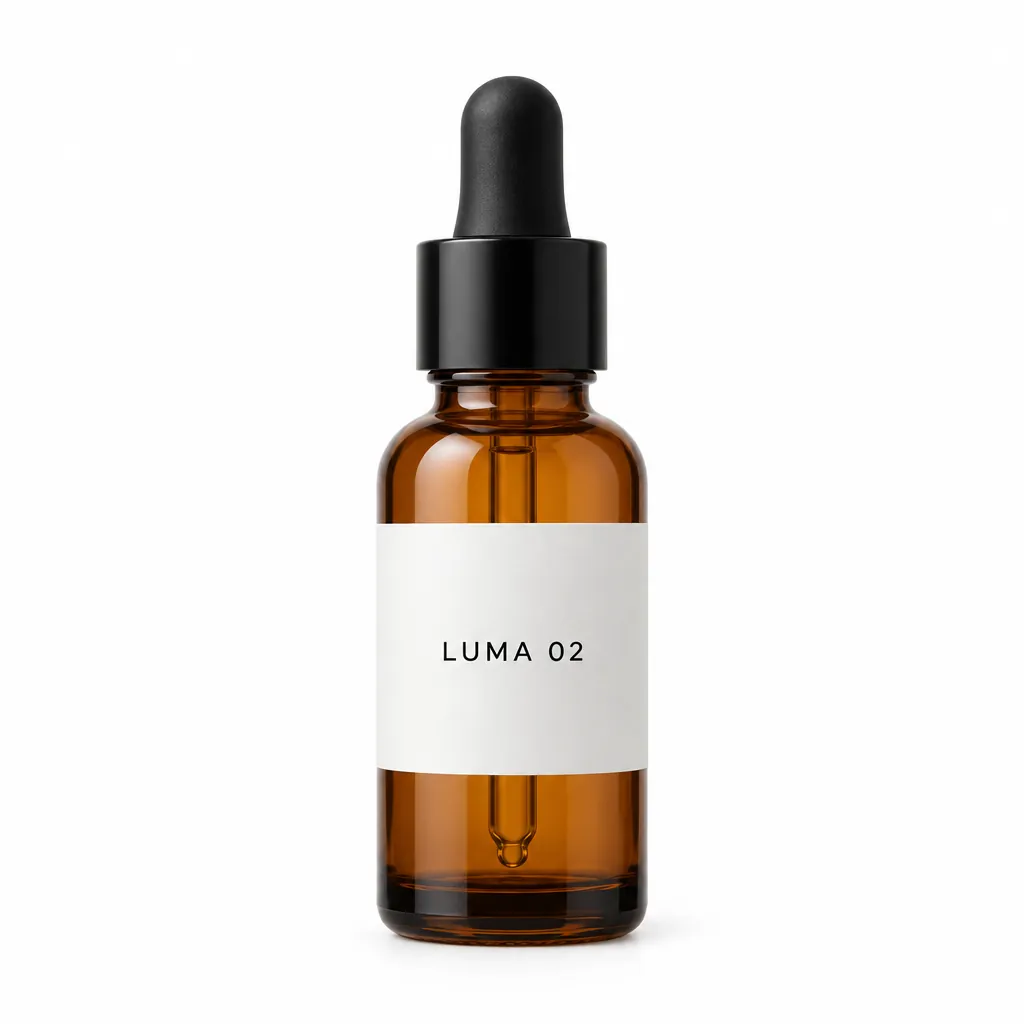
Both edited the same packshot (made with GPT Image 2.5) with the same prompt: move the bottle onto a mossy stone by a stream and keep the bottle as it is. Both kept the amber bottle, the black dropper cap and the “LUMA 02” label unchanged. 2.6’s scene is brighter, with stronger sun rays and a fern added in the foreground; 2.5’s is softer, with more blur behind the bottle. On keeping the product, a tie. Both ran on Flare; OpenAI’s claim of more consistent edits is for 2.6 Sunburst.
Which to pick
zzo.ai sells both models, at the prices on this page. The picks follow the specs and limits listed here.
| Scenario | Pick | Why |
|---|---|---|
| Quick results at high quality | GPT Image 2.6 Flare | In our test on 5 November 2026 (1024×1024, high, one request each) it took 14 seconds, against 27 for GPT Image 2.5 Flare. High costs the same on both, so the speed comes at no extra cost. |
| The cheapest drafts, at low or medium | GPT Image 2.5 | OpenAI charges the same per token for both, but its own calculator gives 2.6 about 4.2 times the output tokens at low and 3.3 times at medium. So low and medium cost more on 2.6; the price shows on the button. |
| An animated GIF | GPT Image 2.6 | Only 2.6 makes GIFs: 4, 6 or 9 frames from a prompt, looping. To animate a photo you already have, use image to video with one of our video models. |
| Very small print and fine detail | GPT Image 2.5, extra high or max | Only 2.5 has the extra-high and max quality levels here. They cost more and take longer; try them when small text still blurs at high, as one line did in our 2.5 infographic. |
| Posters and exact text | Either; 2.5 sticks closer to the brief | In our pairs both spelled the requested words right. 2.5 kept the poster’s exact middle dot and added less copy of its own to the coffee bag; 2.6 set larger, bolder type but swapped the dot for a bullet and added a slogan panel and a stray full stop. In Kingy AI’s test (4 November 2026) both models’ Sunburst versions got every one of 24 requested text strings right. End your prompt with “No other text” on either and read every line. |
| Edit a product photo, keep the product | Either | In our pair both kept the bottle, the black dropper cap and the “LUMA 02” label unchanged; 2.6 made the scene brighter and added a fern, 2.5 kept it softer. OpenAI says 2.6 Sunburst keeps details more consistent from one edit to the next; on launch day users still saw texture build up over repeated edits on both. Change one thing per edit and compare with your original. |
| Sunburst, when time matters | Flare on either | 2.6 Sunburst isn’t the fast one: 46 seconds in our test, and in Kingy AI’s test it was slower than 2.5 Sunburst (16.6 against 13.5 seconds for a thumbnail). Draft on Flare and keep Sunburst for a final. |
| OpenAI’s newest model | GPT Image 2.6 | Released on 4 November 2026, it is the model behind ChatGPT Images 2.6. GPT Image 2.5 stays on zzo.ai, so you can keep using it for what it does better. |
Specs side by side
| GPT Image 2.6 | GPT Image 2.5 | |
|---|---|---|
| Developer | OpenAI | OpenAI |
| Released | 2026-11-04 | 2026-09-08 |
| Type | Image | Image |
| Modes | Text to image, Edit image | Text to image, Edit image |
| Quality | Low, Medium, High | Low, Medium, High, Extra high, Max |
| Images per request | 4 | 4 |
| Aspect ratios | 1:1, 4:3, 3:4, 16:9, 9:16 | 1:1, 4:3, 3:4, 16:9, 9:16 |
| Versions | GPT Image 2.6 Flare, GPT Image 2.6 Sunburst | GPT Image 2.5 Flare, GPT Image 2.5 Sunburst |
| Commercial use | Allowed, under our terms | Allowed, under our terms |
| Failed generations | Credits refunded automatically | Credits refunded automatically |
| Starts at | 5 ($0.05) | 5 ($0.05) |
How we tested
Each pair above is one prompt, and for the edit one photo, run once on each model with the site’s own settings: Flare, high quality and the same pixel sizes, which also means the same price per image. The prompts come from published guides and tests (OpenAI, Fuser and a user on X), and the edit’s input bottle was made with GPT Image 2.5. Each take is the model’s first run of the final prompt at these settings. For speed we timed one request on each model on 5 November 2026, using the coffee-bag prompt at 1024×1024 and high quality: 14 seconds on GPT Image 2.6 Flare, 27 on GPT Image 2.5 Flare and 46 on GPT Image 2.6 Sunburst. One run per model is a tendency, not a benchmark.
What changed in GPT Image 2.6
- Animated GIFs: new in 2.6, from a prompt only. OpenAI’s API allows more frames; zzo.ai offers 4, 6 or 9. All frames share one image’s pixel budget, so a square GIF’s frames are 816×816.
- Speed: OpenAI says the 2.6 models are 50% faster than before. Our own times are above; the gain was on Flare, not on Sunburst.
- Price: OpenAI’s rates per token didn’t change, but 2.6 uses more of them at low and medium quality. OpenAI’s calculator, at 1024×1024: 823 output tokens against 196 at low, 1,449 against 439 at medium, and 1,756 on both at high.
- Quality levels: 2.6 offers low, medium and high here; 2.5 also has extra high and max.
- Planning (complexity): a new 2.6 setting for how much the model plans before drawing, at no extra fee. OpenAI warns that higher settings take longer and can add unwanted changes. We leave it at OpenAI’s default.
- Not on zzo.ai: SVG output (2.6, OpenAI’s API only) and markup-guided edits (2.5 and 2.6 at OpenAI).
- Unchanged here: the same aspect ratios and pixel sizes (up to 1280 pixels on the long side), transparent PNGs on both, and up to four reference images in an edit.
What early tests found
- Kingy AI (4 November 2026, Sunburst at medium quality, one attempt each): both models got all 24 requested text strings right across six images. 2.6 used more output tokens in every matched still image and was slower per request.
- Design Arena (4 November 2026): 2.6 Flare added fewer slogans nobody asked for; in their example 2.5 Sunburst wrote two extra taglines onto the image.
- Hacker News launch thread (4–5 November 2026): developers measured the same token jump at low and medium that OpenAI’s calculator shows. On quality, opinions were split after a few hours.
- Benchmarks: none had been published for 2.6 as of 5 November 2026, so we make no ranking claim.
Where each one slips
- GPT Image 2.6: low and medium cost more than on 2.5. Sunburst is not faster. In our pairs it added more marketing copy nobody asked for to the coffee bag, with a stray full stop, swapped a requested middle dot for a bullet and numbered two infographic steps “4”. GIFs are short loops with simple motion, and frames can flicker or jump at the loop. On launch day users still saw texture build up over repeated edits.
- GPT Image 2.5: slower on Flare, and no GIFs. Without “No other text” it adds words of its own, as on our coffee bag (all spelled correctly). In a dense infographic it packs in more, smaller text, and one line of the smallest print came out garbled at high quality.
Questions
Which is cheaper, GPT Image 2.6 or GPT Image 2.5?
GPT Image 2.6 on zzo.ai costs 15 credits ($0.15) per image at High quality. GPT Image 2.5 on zzo.ai costs 15 credits ($0.15) per image at High quality. There is no subscription: buy credits once, use them on either model, and failed generations are refunded automatically.
Is GPT Image 2.6 better than GPT Image 2.5?
Not across the board. 2.6 is faster on Flare and adds animated GIFs; 2.5 is cheaper at low and medium quality and keeps the extra-high and max levels. In our four pairs neither won outright: both spelled the requested text right and kept the edited bottle and its label, 2.6 drew bolder images with larger type, and 2.5 followed the brief more literally, with less text of its own and the exact punctuation. No independent benchmark had been published for 2.6 as of 5 November 2026, and early opinions were split. Run the same prompt on both and compare.
What is the difference between GPT Image 2.6 and 2.5?
GPT Image 2.6 (4 November 2026) adds animated GIF output and a planning (complexity) setting, and its Flare model was about twice as fast in our test. 2.5 (8 September 2026) keeps the extra-high and max quality levels. OpenAI’s token prices are the same, but 2.6 uses more tokens at low and medium. Both come as Flare and Sunburst, both edit photos and make transparent PNGs, at the same sizes here.
Does GPT Image 2.6 cost more than 2.5?
Only at low and medium quality. OpenAI charges the same per token for both, but its own calculator gives 2.6 about 4.2 times the output tokens at low and 3.3 times at medium; at high the count is the same. So on zzo.ai a high-quality image costs the same on both, and low and medium cost more on 2.6. The exact price shows on the Generate button.
Is GPT Image 2.6 faster than 2.5?
On Flare, yes. OpenAI says the 2.6 models generate images 50% faster than before. In our own test on 5 November 2026 (one 1024×1024 high-quality image each, the same prompt), 2.6 Flare took 14 seconds and 2.5 Flare 27. 2.6 Sunburst took 46 seconds, and Kingy AI also found 2.6 Sunburst slower than 2.5 Sunburst. One request each is a tendency, not a benchmark.
Can GPT Image 2.5 make GIFs?
No. Animated GIFs are new in GPT Image 2.6. On zzo.ai you choose “Animated GIF” under Output and pick 4, 6 or 9 frames; the price grows with the number of frames and shows before you generate. GIFs are made from a prompt only, not from an uploaded photo.
Will GPT Image 2.5 stay available on zzo.ai?
Yes. Both models are on zzo.ai with one account and one credit balance, on the website and through the API. 2.5 remains the cheaper pick at low and medium quality and the only one with extra-high and max.
Does GPT Image 2.6 have extra-high and max quality?
Not on zzo.ai: 2.6 offers low, medium and high. Instead, OpenAI added a planning (complexity) setting that changes how much the model plans before drawing, at no extra fee; we leave it at OpenAI’s default. If you need 2.5’s extra-high or max, pick GPT Image 2.5.
Flare or Sunburst: which should I use?
Start with Flare on either model. Flare and Sunburst cost the same per image within each model, and Sunburst is slower: on 2.6 it took 46 seconds in our test against 14 for Flare. OpenAI positions Sunburst for detailed work and more consistent edits, so switch to it for a final when a detail still isn’t right.
Which model does ChatGPT use now?
OpenAI launched ChatGPT Images 2.6 on 4 November 2026, and ChatGPT doesn’t show which model made a given picture. zzo.ai calls the same API models developers use, gpt-image-2.6-flare and gpt-image-2.6-sunburst (and the 2.5 versions), and you choose which one runs.
Is GPT Image 2.6 the same as MAI-Image-2.6?
No. GPT Image 2.6 is OpenAI’s model. MAI-Image-2.6 is a different image model from Microsoft with a similar name, and search answers sometimes mix the two up. zzo.ai offers OpenAI’s GPT Image 2.6 and 2.5.
Can I make SVG files or markup edits with either model?
Not on zzo.ai yet. OpenAI’s API can return SVG from GPT Image 2.6 and takes markup (circles and notes drawn on a transparent layer) for edits on both 2.5 and 2.6. Here you edit by describing the change, with up to four reference images, on either model.