GPT Image 2.6 on zzo.ai costs 15 credits ($0.15) per image at High quality. No subscription: buy credits once and they never expire.
GPT Image 2.6 is OpenAI’s newest image model, released on 4 November 2026. zzo.ai runs both versions, Flare (fast) and Sunburst (more detail, slower), at the same price. Besides images and edits, it is the first GPT Image model that turns a prompt into an animated GIF.
Up to 4 images per run
Prompt from this image. Edit it or write your own.
Image to edit
Made with GPT Image 2.6
Each one shows the prompt, model and what it costs here. Pick one to start from it.
GIF
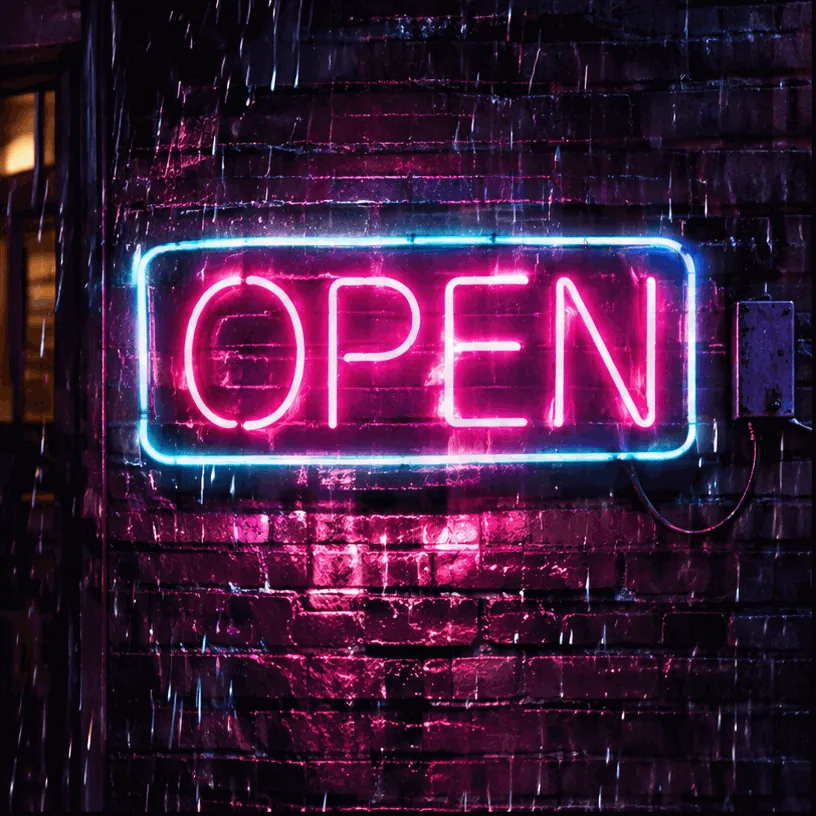
“A neon sign that reads 'OPEN' flickers and buzzes on a dark brick wall at night, light rain falling in front of it, the pink glow reflecting on the wet wall. Seamless loop.”GPT Image 2.6, 30 credits
GIF
“A small orange cat on a windowsill slowly blinks and flicks its tail while snow falls outside the window, soft warm illustration style. Seamless loop.”GPT Image 2.6, 15 credits
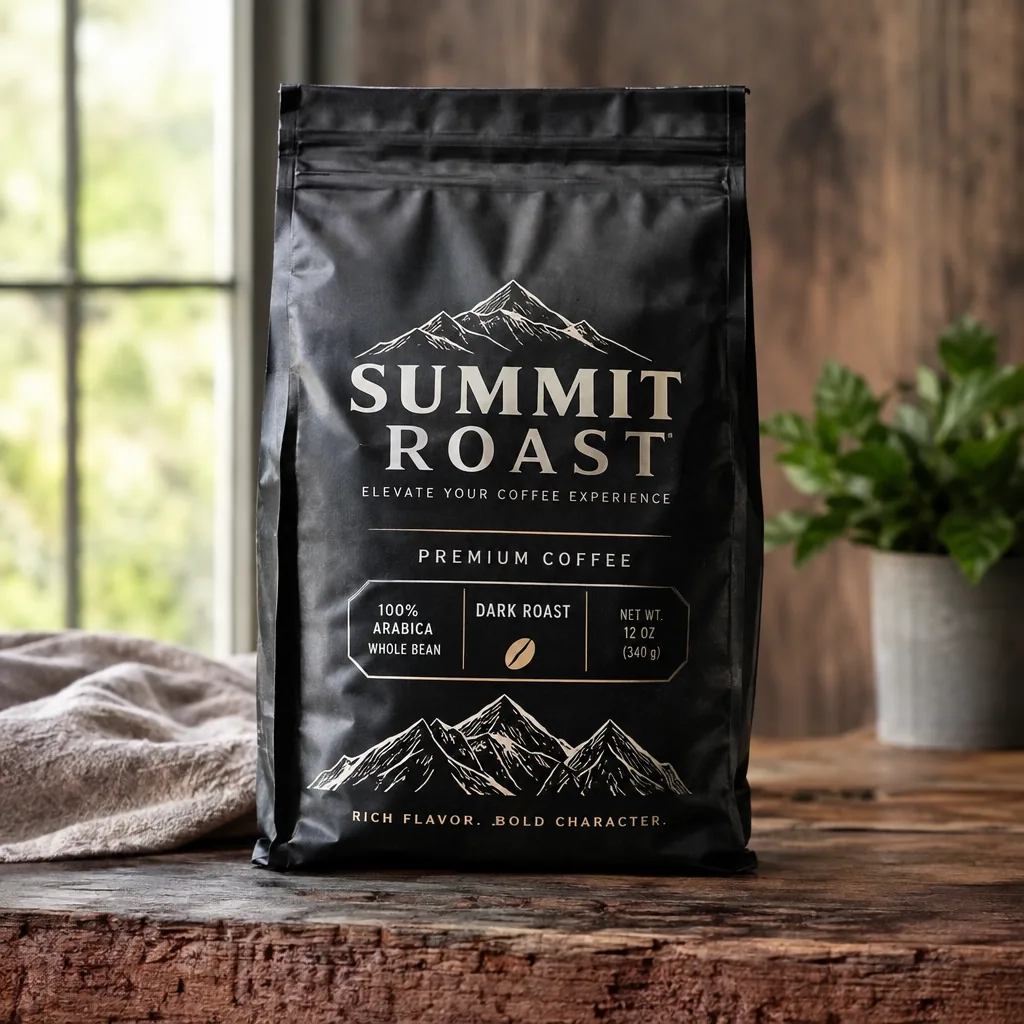
“A premium product photo of a matte black coffee bag labeled SUMMIT ROAST with mountain line-art on rustic wood, soft window light, sharp readable packaging typography, photoreal commercial mockup”GPT Image 2.6, 15 credits
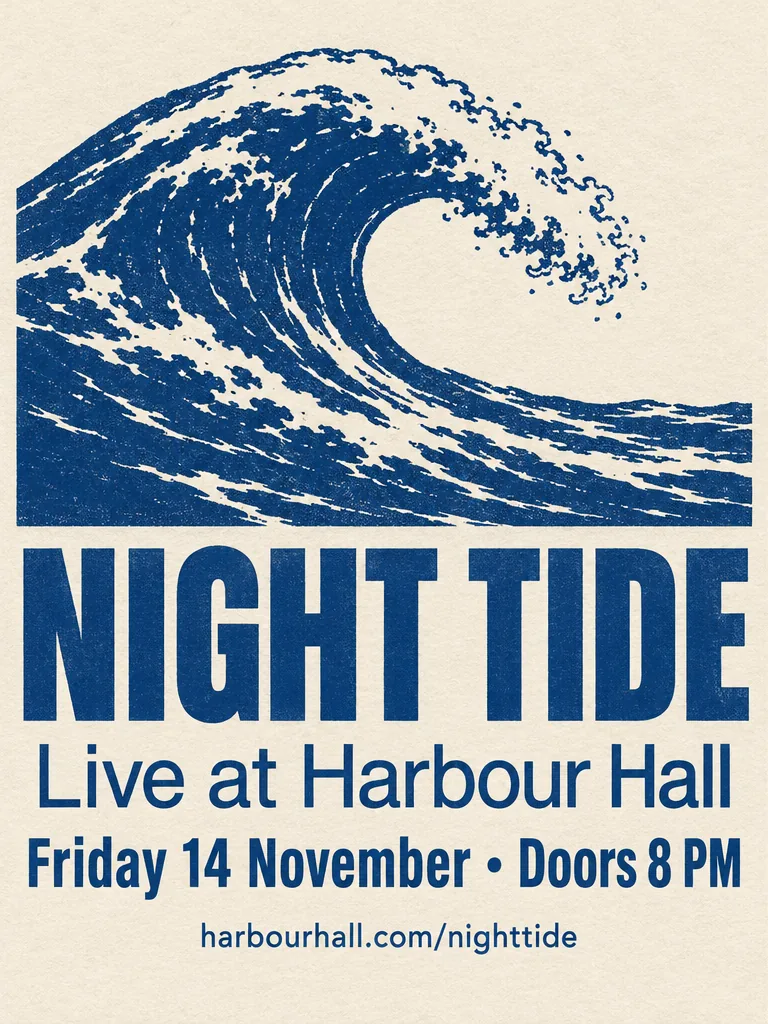
“A minimalist screen-printed concert poster on off-white paper. A large deep-blue wave shape fills the top half. Below it, the headline "NIGHT TIDE" in a bold condensed sans-serif, then "Live at Harbour Hall" in a lighter weight, then "Friday 14 November · Doors 8 PM", and at the bottom "harbourhall.com/nighttide" in small type. No other text.”GPT Image 2.6, 15 credits
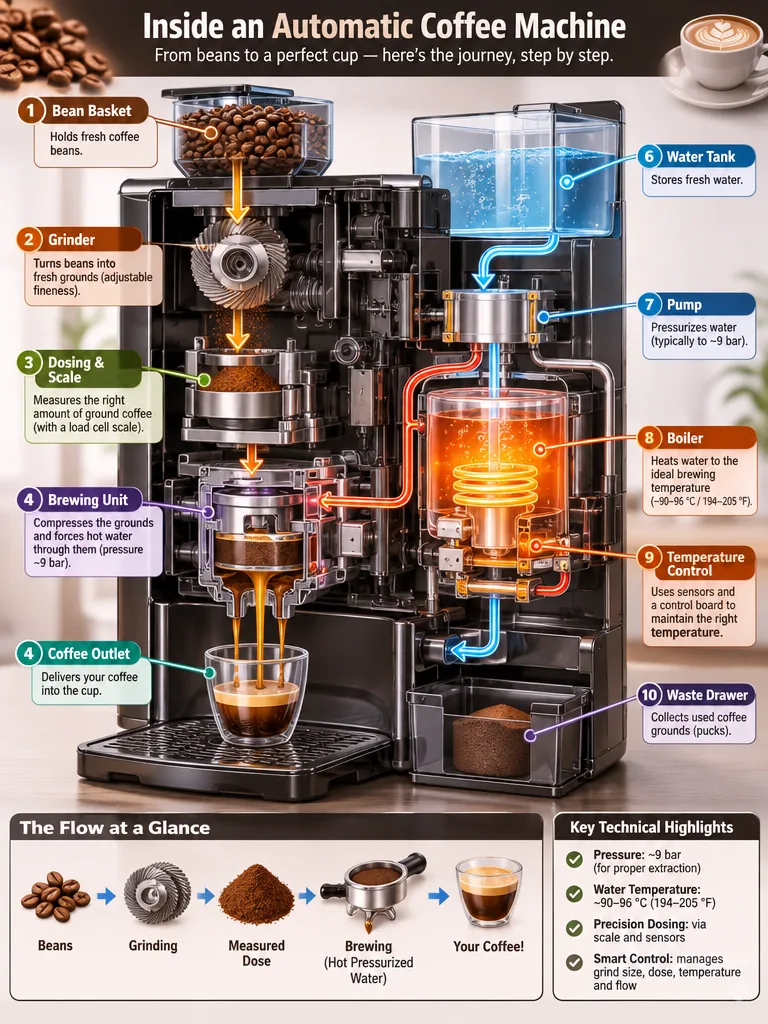
“Create a detailed Infographic of the functioning and flow of an automatic coffee machine.
From bean basket, to grinding, to scale, water tank, boiler, etc.
I'd like to understand technically and visually the flow.”GPT Image 2.6, 15 credits
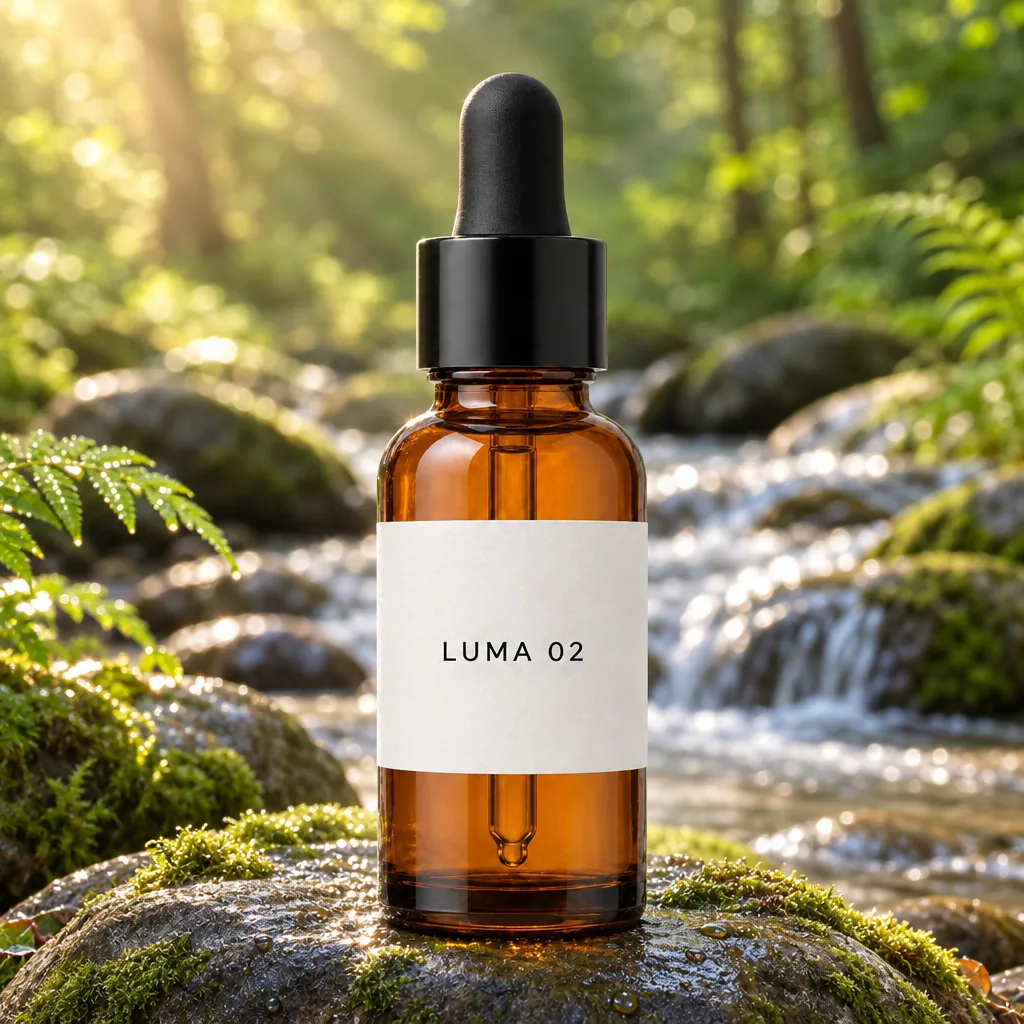
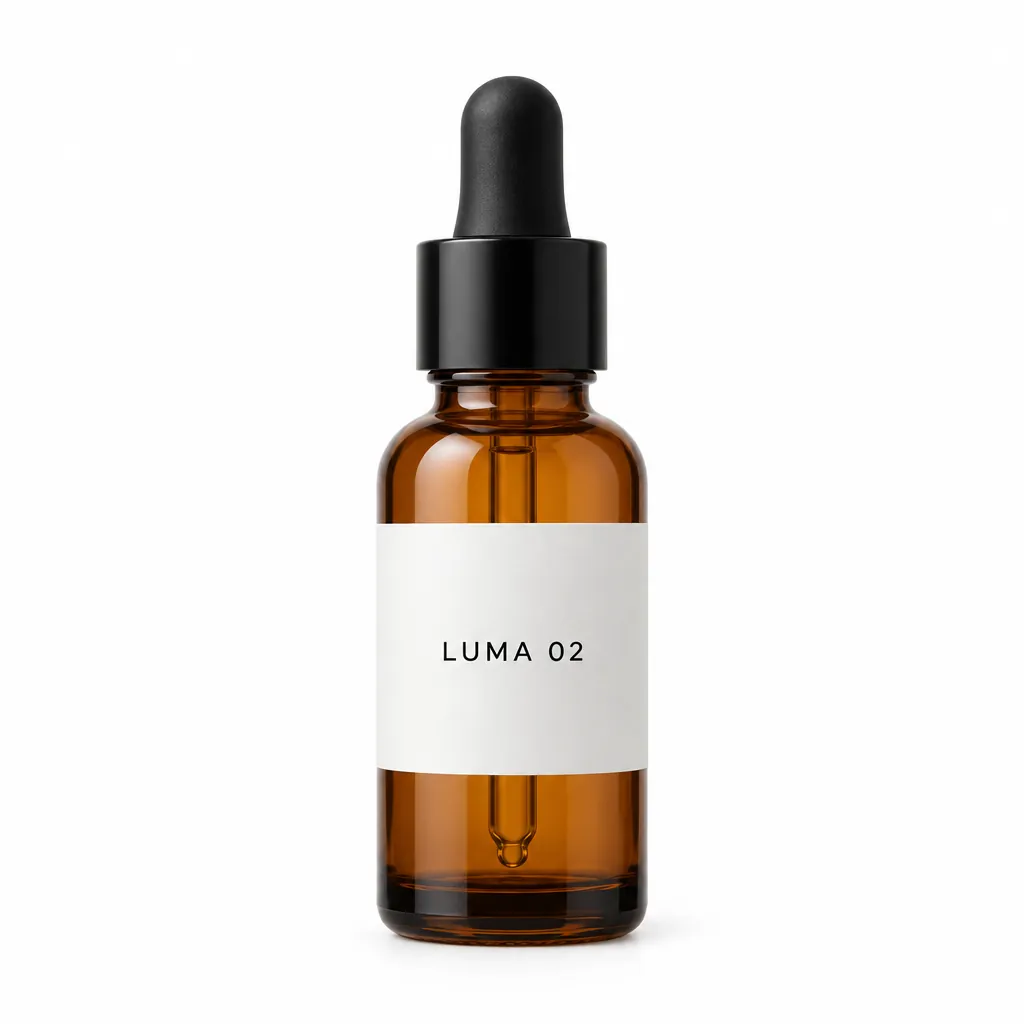
“Place this exact bottle on a wet, moss-covered river stone outdoors in soft morning sunlight, with a blurred forest stream behind it. Change only the setting and lighting. Keep the bottle's shape, amber glass, black dropper cap and the label text "LUMA 02" exactly as they are.”GPT Image 2.6, edit, 15 credits, input image made with GPT Image 2.5
Each one comes with the settings and the prompt we would start from, and what it costs. Use it as is or edit it.
GIF
Animated GIFs from a prompt
A neon sign in the rain, nine frames: over the loop the sign switches off and back on, OPEN stays readable and the rain keeps falling. The sign’s outline shifts slightly between frames, a small jitter.
Text to image
Animated GIF · 9 frames
1:1
“A neon sign that reads 'OPEN' flickers and buzzes on a dark brick wall at night, light rain falling in front of it, the pink glow reflecting on the wet wall. Seamless loop.”
Tip: Say “seamless loop” and describe one movement. Put short words on something that doesn’t move, and play the GIF through before you post it.
30 credits
GIF
A cosy loop for social posts
Four frames, at the lowest GIF price: the cat blinks and flicks its tail while snow falls. With so few frames the motion steps visibly, and the loop jumps from closed eyes back to open.
Text to image
Animated GIF · 4 frames
1:1
“A small orange cat on a windowsill slowly blinks and flicks its tail while snow falls outside the window, soft warm illustration style. Seamless loop.”
Tip: For a smoother blink, try 6 or 9 frames, or ask for the eyes to open again before the loop ends.
15 credits
Product shots with readable packaging
SUMMIT ROAST came out spelled right on a wide pouch with large type. But 2.6 also added copy nobody asked for, such as “ELEVATE YOUR COFFEE EXPERIENCE” and a “100% ARABICA” panel, with a stray full stop in its bottom line.
Text to image
High
1:1
“A premium product photo of a matte black coffee bag labeled SUMMIT ROAST with mountain line-art on rustic wood, soft window light, sharp readable packaging typography, photoreal commercial mockup”
Tip: Add “No other text” and put every word you want on the pack in quotes.
15 credits
Posters with exact copy
All four lines of set text came out right, including the date and the web address, under a detailed woodcut-style wave with heavy type. One change: the requested middle dot “·” became a larger bullet “•”.
Text to image
High
3:4
“A minimalist screen-printed concert poster on off-white paper. A large deep-blue wave shape fills the top half. Below it, the headline "NIGHT TIDE" in a bold condensed sans-serif, then "Live at Harbour Hall" in a lighter weight, then "Friday 14 November · Doors 8 PM", and at the bottom "harbourhall.com/nighttide" in small type. No other text.”
Tip: Check punctuation as well as spelling. For a flatter, more minimal look, compare GPT Image 2.5 on the same prompt.
15 credits
Diagrams and infographics
An explainer of an espresso machine’s inside, from beans to cup, with fewer, larger labels that are easy to read. It numbered two different steps “4”, so check the numbering.
Text to image
High
3:4
“Create a detailed Infographic of the functioning and flow of an automatic coffee machine.
From bean basket, to grinding, to scale, water tank, boiler, etc.
I'd like to understand technically and visually the flow.”
Tip: List the steps in order in your prompt, and read every label and number before you publish.
15 credits
input image made with GPT Image 2.5
Your product in a new setting
The bottle moved onto a mossy stone by a stream with its amber glass, black dropper cap and “LUMA 02” label unchanged. The scene came out bright, with strong sun rays and a fern added in the foreground.
Edit image
High
1:1
“Place this exact bottle on a wet, moss-covered river stone outdoors in soft morning sunlight, with a blurred forest stream behind it. Change only the setting and lighting. Keep the bottle's shape, amber glass, black dropper cap and the label text "LUMA 02" exactly as they are.”
Tip: List everything that must stay, and say “add nothing else” if you don’t want new props.
15 credits
What sets GPT Image 2.6 apart
Animated GIFs
GPT Image 2.6 draws every frame of a GIF on one sheet and returns a looping animation. Simple, repeating motion works best: a sign that flickers, a cup that steams, snow that falls, a character that blinks.
How to use it: Choose “Animated GIF” under Output, pick the number of frames and write one clear motion with “seamless loop”. Use 4 frames for a blink or a pulse, 9 for smoother movement.
Headlines, labels and packaging text come out as written, which makes it the safer choice for posters, ads and product mockups.
How to use it: Put the exact words in quotes, say where they go and add “No other text”. Use high quality for small print and read every line before you publish.
What GPT Image 2.6 is good at, and where it struggles
Good at
Animated GIFs straight from a prompt: 4, 6 or 9 frames, looping, in five aspect ratios. A 9-frame GIF took about 30 seconds in our test.
Fast on Flare: a 1024×1024 image at high quality took 14 seconds in our test on 5 November 2026, against 27 seconds for GPT Image 2.5 Flare with the same prompt.
Text in images: headlines, labels and packaging lettering. On our concert poster all four requested lines came out right, and in Kingy AI’s day-one test 2.6 Sunburst got every requested text string right in all three tasks (a thumbnail, a product graphic and a product edit).
Edits that keep your product: in our test the bottle, its black dropper cap and the “LUMA 02” label stayed unchanged in a new scene. On the website you can add up to four reference images (a product, a logo, a second photo), named by number in the prompt.
Transparent PNG backgrounds for logos, stickers and product cutouts, at no extra cost.
Limits
Low and medium quality cost more than on GPT Image 2.5 (high costs the same), so drafting cheaply is less of a saving than before; the price shows on the button.
Without “No other text” it adds copy of its own: on our coffee bag it wrote slogans and a spec panel nobody asked for, with a stray full stop in one line. It can also change small details: on our poster a middle dot became a bullet, and our infographic numbered two steps “4”.
GIFs are short loops drawn as one sheet of frames, so each frame is smaller than a still image (816×816 for a square GIF) and motion is simple: a flicker, a spin, a blink, falling snow. On our 4-frame GIF the motion stepped visibly, and on the 9-frame one the sign’s outline jittered slightly between frames.
GIFs are made from a prompt only; you can’t upload a photo and animate it into a GIF here. For that, use image to video with one of our video models.
Sunburst is about three times slower than Flare (46 against 14 seconds in our test) for the same price.
OpenAI’s content rules apply: real public figures, sexual or violent content are refused, and the credits come back automatically.
A good first result with GPT Image 2.6, step by step
Draft cheap, finish high. Each step shows its settings and cost.
1
Try the idea on Flare
Flare is fast: run the prompt a couple of times to settle the layout and wording.
High
1:1
2 runs × 15 = 30 credits
2
Fix one detail with an edit
Upload the image you like and change only what is still wrong, instead of starting over.
High
1:1
15 credits
3
Make a looping GIF of it
Describe the same scene with one movement and “seamless loop”, as a 6-frame GIF.
Animated GIF · 6 frames
1:1
20 credits
About 65 credits ($0.65 at the standard rate) for the whole job. Failed runs are refunded, so they don’t count.
Settings, explained
What each option does and what it does to the price.
Versions
Flare is OpenAI’s fast model, Sunburst the one for fine detail; same price here. Sunburst took about three times longer in our test, so draft on Flare.
Same price: 15 credits (High)
Modes
Generate starts from your words; Edit changes an image you upload (new background, swapped object, corrected text). GIFs are made in Generate.
Same price: 15 credits (High)
Quality
Low and medium are for quick drafts, high for small text, faces and fine detail. On 2.6, low and medium cost more than on 2.5 and high the same, so high is often the best value. GIFs always use high.
Say what the image is for (a product photo, a poster, a sticker), then the subject, the layout and what must not appear.
Put exact text in quotes, say where it goes and add “No other text”.
For GIFs, describe one movement and ask for a seamless loop. Keep the background simple and the subject the same in every frame.
For edits, say “change only X” and list what must stay: shape, colours, label text, lighting.
Name reference images by number and role: “image 1 is the product, image 2 is the logo”.
When a result goes wrong
The usual problems with GPT Image 2.6, why they happen and what to change.
The GIF flickers or the subject changes between frames
Why: Every frame is drawn anew; big movements and many details make frames disagree.
Fix: Describe one small, repeating movement, keep the scene simple, and ask for a “seamless loop” with the same subject in every frame. Try fewer frames.
The GIF loop jumps at the end
Why: The last frame doesn’t lead back to the first.
Fix: Ask for a cycle that returns to its start (“a full turn”, “blinks once and opens again”, “flickers on and off”).
A word is misspelled or extra text appears
Why: Small, dense text is still the hardest part.
Fix: Quote the exact text, add “No other text”, use high quality and fewer, larger lines. Fix one wrong word with an edit.
An edit changed something it shouldn’t have
Why: Broad or repeated edits can drift on fine details.
Fix: List what must stay the same, change one thing per edit and compare with the original.
The request was refused
Why: OpenAI checks the prompt and the result.
Fix: Nothing is charged: the credits come back. Reword the prompt or use an image without a real person.
GPT Image 2.6 vs GPT Image 2.5
GPT Image 2.6 (4 November 2026) comes, like 2.5, as Flare and Sunburst, both on zzo.ai. What changed, from OpenAI’s documentation and our own test on 5 November 2026:
New: animated GIF output from a prompt (2 to 64 frames at OpenAI; 4, 6 or 9 on zzo.ai).
New at OpenAI, not on zzo.ai yet: vector (SVG) output.
Faster: Flare made a 1024×1024 high-quality image in 14 seconds against 27 for 2.5 Flare in our test (one run each).
Quality levels: low, medium and high; 2.5’s extra-high and max are gone. High costs the same as on 2.5, low and medium more.
GPT Image 2.6 on zzo.ai costs 15 credits ($0.15) per image at High quality. No subscription: buy credits once and they never expire. Depending on quality, one image costs 5 to 15 credits ($0.05 to $0.15 at the standard rate); more images or reference images add to that, and the button shows the total first. As low as $0.05 with the $199.99 pack. Failed generations are refunded automatically.
Do I need a subscription to use GPT Image 2.6?
No. zzo.ai has no subscription: buy a credit pack once and spend it on GPT Image 2.6 or any other model. Credits never expire.
What can I make with GPT Image 2.6?
GPT Image 2.6 generates new images and edits uploaded ones, up to 4 per request, in 1:1, 4:3, 3:4, 16:9, 9:16 aspect ratios.
Can I use GPT Image 2.6 through an API or in Claude?
Yes. Create an API key in Settings, then use GPT Image 2.6 from Claude, Cursor or your own code through the zzo.ai MCP server. It draws from the same balance at the same prices as the website.
What is GPT Image 2.6?
OpenAI’s image model released on 4 November 2026, in ChatGPT as “Images 2.6” and for developers as two models, gpt-image-2.6-flare and gpt-image-2.6-sunburst. It generates and edits images, keeps text accurate, and can return an animated GIF or a transparent PNG. zzo.ai runs both versions without a subscription.
Is GPT Image 2.6 the same as MAI-Image-2.6?
No. GPT Image 2.6 is OpenAI’s model. MAI-Image-2.6 is a different image model from Microsoft with a similar name. zzo.ai offers OpenAI’s GPT Image 2.6.
Is GPT Image 2.6 faster than 2.5?
OpenAI says the 2.6 models generate images 50% faster than before. In our own test on 5 November 2026 (one 1024×1024 high-quality image each), 2.6 Flare took 14 seconds and 2.5 Flare 27. Sunburst was slower: 46 seconds. Complex prompts can take up to two minutes.
Flare or Sunburst: which should I use?
Start with Flare. Both cost the same here; Flare is OpenAI’s fast model and Sunburst the one for fine detail. In our test the same 1024×1024 high-quality image took 14 seconds on Flare and 46 on Sunburst. Switch to Sunburst for a final when a small detail still isn’t right.
What changed from GPT Image 2.5?
Animated GIF output is new, Flare was about twice as fast in our test, and OpenAI added a vector (SVG) output, which zzo.ai doesn’t offer yet. High quality costs the same as on 2.5; low and medium cost more. The extra-high and max quality levels of 2.5 are gone. See the full comparison: GPT Image 2.6 vs 2.5.
How much does GPT Image 2.6 cost per image?
The exact price in credits is on the Generate button before you start, and in the price table on this page. High quality costs the same as on GPT Image 2.5; each reference image in an edit adds a little. There is no subscription: you buy a credit pack once and the credits never expire.
Can GPT Image 2.6 make GIFs?
Yes. Choose “Animated GIF” under Output and pick 4, 6 or 9 frames. The price grows with the number of frames and shows before you generate. Ask for a “seamless loop” and one simple motion; a 9-frame square GIF was 2.3 MB in our test.
Can I use GPT Image 2.6 without paying?
Not on zzo.ai: every image is paid for with credits, and the button shows the price first. There is no subscription and credits never expire. Failed or refused generations are refunded automatically.
Can GPT Image 2.6 make transparent backgrounds?
Yes, for still images. Switch on Transparent background and you get a PNG with a real alpha channel. Check hair, glass and soft shadows before you use it. GIFs come with a background.
What is the maximum resolution here?
1024×1024 for square images and up to 1280×720 for wide or tall ones, at every quality. GIF frames are 816×816 for square, 1088×608 for 16:9 and 608×1088 for 9:16. OpenAI’s model can go larger; we keep these sizes so the price stays low and predictable.
Can I edit a photo with GPT Image 2.6?
Yes. Choose Edit, upload your photo and say what to change and what must stay: “Change only the background to a beach. Keep the person, clothes and lighting exactly the same.” You can add more reference images, such as a logo or a second product, and name each by number.
Is GPT Image 2.6 better than Nano Banana 2.1?
They are good at different things. GPT Image 2.6 is the pick for exact text, careful edits, transparent PNGs and GIFs; Nano Banana 2.1 goes up to 4K and is strong at real places and wide formats. Both are on zzo.ai, so you can run the same prompt on each.
Can I use the images commercially?
Yes. Images you make on zzo.ai are yours to use, including commercially, as long as the content doesn’t break our terms or anyone else’s rights.