Flickering neon sign GIF

AI GIF Generator: Describe It, Get an Animated GIF

GPT Image 2.6 draws animated GIFs from a text prompt: 4, 6, or 9 frames, 200 ms each, looping every 0.8–1.8 seconds. A GIF starts at 15 credits ($0.15), with no subscription and credits that never expire.

Type a sticker, an emote, a pixel-art loop or a birthday message, and GPT Image 2.6, OpenAI’s image model, draws it frame by frame and returns a looping GIF. You see the price before each GIF, pay from a one-time credit pack, and credits never expire.

Prompt from this image. Edit it or write your own.

Made with these models

Each one shows the prompt, model and what it costs here. Pick one to start from it.

Flickering neon sign GIF
GIF
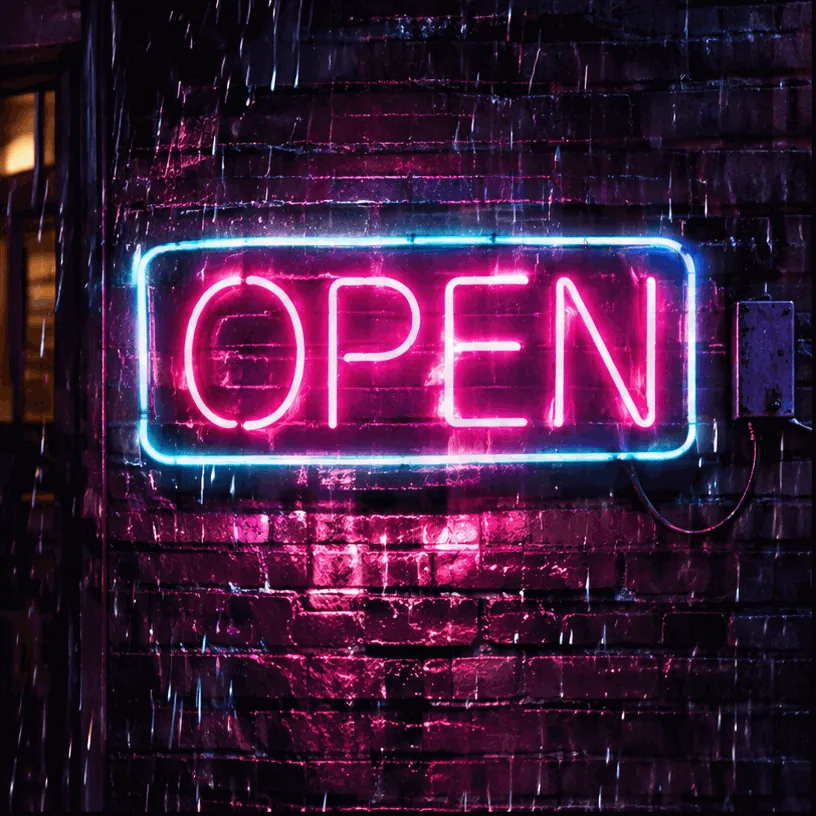
“A neon sign that reads 'OPEN' flickers and buzzes on a dark brick wall at night, light rain falling in front of it, the pink glow reflecting on the wet wall. Seamless loop.”GPT Image 2.6, 30 credits
Cat at a snowy window GIF
GIF
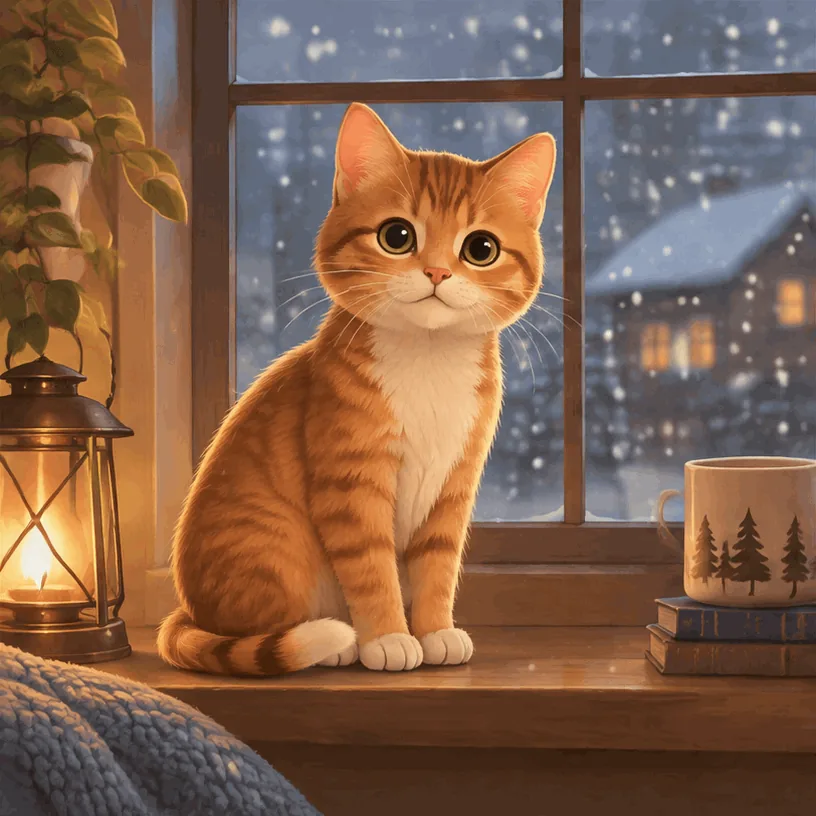
“A small orange cat on a windowsill slowly blinks and flicks its tail while snow falls outside the window, soft warm illustration style. Seamless loop.”GPT Image 2.6, 15 credits

How to make a GIF with AI in 3 steps

  1. 1

    Describe one movement

    Write the subject, the one thing it does and how it gets back to the start: “the cat blinks, flicks its tail and returns to its starting pose”. The generator opens on a 9-frame GIF; Output switches between a still image and 4, 6 or 9 frames.

  2. 2

    Pick the frames and the shape

    Use 4 frames for a blink or a flash and 9 for anything that moves further. Choose 1:1 for chats and stickers, 16:9 for a banner, 9:16 for a phone screen. The button shows the price before you generate.

  3. 3

    Generate, check and download

    A GIF took about 20 to 30 seconds in our tests. Play it through, watch the jump from the last frame back to the first, and download it. A failed generation costs nothing.

Frames, loop length and price per GIF

Each frame shows for 200 ms and the GIF repeats. More frames give smoother motion and a longer loop, and cost more. Frame size by shape: 816 × 816 (1:1), 944 × 704 (4:3), 704 × 944 (3:4), 1088 × 608 (16:9), 608 × 1088 (9:16).

Updated 2026-11-05

ModelFramesLoopPer GIF
GPT Image 2.640.8 s15 credits$0.15
GPT Image 2.661.2 s20 credits$0.20
GPT Image 2.691.8 s30 credits$0.30

What you can make, with real samples

Each sample comes with its exact prompt, settings and price. Use any of them in the generator above as is, or edit it first.

Flickering neon sign GIF
GIF

GPT Image 2.6

Neon sign in the rain

Nine frames: over the loop the sign switches off and back on, OPEN stays readable and the rain keeps falling. Look closely and the sign’s outline shifts slightly from frame to frame, a small jitter. The GIF loops forever and shows no visible watermark.

  • Text to image
  • Animated GIF · 9 frames
  • 1:1

“A neon sign that reads 'OPEN' flickers and buzzes on a dark brick wall at night, light rain falling in front of it, the pink glow reflecting on the wet wall. Seamless loop.”

Tip: Put one short word on something that doesn’t move, and use 9 frames for a flicker.

30 credits
Cat at a snowy window GIF
GIF

GPT Image 2.6

Cat at a snowy window

Four frames: the cat blinks and flicks its tail while snow falls. With only four frames the motion steps visibly, and the loop jumps from closed eyes back to open.

  • Text to image
  • Animated GIF · 4 frames
  • 1:1

“A small orange cat on a windowsill slowly blinks and flicks its tail while snow falls outside the window, soft warm illustration style. Seamless loop.”

Tip: Four frames suit a quick flash. For a smoother blink, try 6 or 9 frames and ask for the eyes to open again before the loop ends.

15 credits

How to make a looping GIF with AI

What to put in the prompt, in the order the models read it best.

One subject, one small motion that ends where it began

A blink, a flicker, a sway, a bounce, a wave of one hand. The model draws a handful of separate pictures of the same scene, so the motion steps from pose to pose like a flipbook; small, repeating movements suit it best.

“The cat blinks, flicks its tail, and returns to its starting pose.”

Say the loop in words

OpenAI’s own example asks the subject to go back “to its starting pose” and ends with “Make the motion loop smoothly.” Felo’s published prompt does the same: “returns to its original pose”.

Keep the camera still and the background plain

Every frame redraws the whole picture, so a busy background is where flicker shows first. Write “keep the camera still” and name a simple setting.

Match the frames to the motion

Four frames are enough for a blink, a pulse or a flashing sign. A wave, a bounce or a turn needs 9; big movements over few frames look jerky at any speed.

Avoid a change that can’t undo itself

A glass that fills, a candle that burns down or a door that opens can’t return to the start without a visible reset. Pick something that cycles.

Make the first frame work on its own

Outlook for Windows shows only the first frame of a GIF, and WhatsApp stickers stop on it after looping. Put the message or the face where it reads in frame one.

GIFs you can make

GPT Image 2.6 draws a GIF the way a flipbook artist would: a handful of pictures of one scene, played in a loop. That suits small, repeating motion with a clear subject.

  • Animated stickers and reaction GIFs: a character waving, laughing or giving a slow thumbs-up and going back to rest, in 4 to 6 frames. You get a GIF to send in any chat; sticker packs need another format (see the table below).
  • Discord and Slack emotes: the picture, yes; the file has to be shrunk to emoji size before you upload it.
  • Pixel-art GIFs: an idle animation, a blink, a flickering torch. Few frames is how pixel animation works anyway. You get the GIF, not a sprite sheet.
  • Birthday and greeting GIFs: “Happy Birthday, Ana!” over falling confetti. Keep the words short and check every letter.
  • Email and website banner GIFs: “SALE” flashing, a product turning a little and back. Put the offer in the first frame.
  • Logo animations: a new wordmark whose letters appear one by one. To animate a logo you already have, use image to video, which makes a video, not a GIF.
  • Ambience loops: a neon sign in the rain, a candle, steam from a cup, snow behind a window.
  • Animal reactions: a cat clapping, a dog shrugging. Not real people, celebrities or scenes from films and TV, which can be refused.

The model behind it is GPT Image 2.6, OpenAI’s image model released on 4 November 2026; its model page covers stills, edits and the Flare and Sunburst versions. Our GIF tests ran on Flare, the fast version; Sunburst costs the same and is slower.

GIF size for Discord, Slack, WhatsApp and email

In our tests on 5 November 2026, a square GIF (816 × 816 pixels per frame) came out at 1.1 MB with 4 frames and 2.3 MB with 9. We haven’t measured 6 frames or the wide and tall shapes yet. Here is where a file that size can go as it is, and where it has to be shrunk or converted first. Each limit is quoted from the platform’s own page.

WhereThe platform’s limitA GIF from hereSource, checked
Discord custom emoji256 KB; 128 × 128 pixels; JPEG, PNG, GIF, WebP or AVIFAbout 4 to 9 times too big: resize to 128 pixels firstDiscord blog, 2026-11-05
Slack custom emojiSquare images under 128 KB work best; JPG, PNG or GIF; up to 50 framesAbout 8 to 18 times too big: resize to 128 pixels firstSlack Help Center, 2026-11-05
WhatsApp animated stickersWebP, exactly 512 × 512 pixels, 500 KB or less; the animation stops on the first frame after loopingNot as it is: convert to a 512 × 512 WebP under 500 KBWhatsApp sticker guide, 2026-11-05
Telegram video stickersWEBM (VP9), one side exactly 512 pixels, up to 3 seconds, 256 KB or lessNot as it is: convert to WEBMTelegram sticker rules, 2026-11-05
iMessage sticker packsPNG, APNG or GIF; 300, 408 or 618 pixels square; 500 KB or smallerToo big: resize and shrink under 500 KBApple Human Interface Guidelines, 2026-11-05
LINE animated stickersAPNG, within 320 × 270 pixels, 5 to 20 frames, up to 4 secondsNot as it is: convert to APNG; 4 frames is under LINE’s minimumLINE Creators Market, 2026-11-05
Posts on XAnimated GIFs up to 15 MB; up to 1280 × 1080 pixels recommended; one GIF per postFits. A 9:16 GIF is 1088 pixels tall, just over the recommended heightX developer docs, 2026-11-05
EmailOutlook for Windows 2007 to 2019 shows only the first frame; Litmus recommends 1 MB at the largestHeavy for an email: use 4 frames and put the message in frame oneCan I email, Litmus, 2026-11-05

Sending the GIF in a Discord or Slack message, posting it on X or Reddit, or putting it on a web page or in slides works as it is. For an emoji or a sticker, shrink it in a GIF editor that keeps the animation: resize it, cut the colours, and keep the frame count low.

Text in your GIF

GPT Image models are good at lettering, and short words in a GIF mostly hold: in Kingy AI’s day-one test, two short labels stayed readable in all 10 frames. In our neon-sign GIF, OPEN stayed readable as the sign switched off and on. But the letters are redrawn in every frame, so they can wobble.

  • Keep it to a word or two: a name, “OPEN”, “SALE”, “Happy Birthday”.
  • Put the text in quotes and on something that doesn’t move, like a sign, a banner or a cake.
  • Check names letter by letter in every frame before you send it.
  • For a caption that must stay perfectly still, like a meme line, make the GIF without it and add the text afterwards in a GIF editor.

For lettering that doesn’t need to move, a still poster or card is sharper: use the AI poster generator.

A GIF or a video?

A GIF from this page is 4 to 9 drawn frames, under two seconds, with no sound. It plays almost everywhere a picture does, which makes it right for chat reactions, emotes, pixel art and small banners.

A video clip has smooth, continuous motion, can have sound and runs for several seconds. Pick a video when you need realistic movement, a camera move or a character walking or dancing, or a post for Instagram or TikTok, which take videos, not GIF files:

For a still sticker or emoji with a transparent background, use the AI image generator instead.

GIF prompts you can copy

Each is word for word from its source.

Neon sign in the rain (ours: 9 frames, 816 × 816, ready in 30 seconds, 2.3 MB, on 5 November 2026):

A neon sign that reads 'OPEN' flickers and buzzes on a dark brick wall at night, light rain falling in front of it, the pink glow reflecting on the wet wall. Seamless loop.

Cat at a snowy window (ours: 4 frames, 816 × 816, ready in 20 seconds, 1.1 MB, on 5 November 2026):

A small orange cat on a windowsill slowly blinks and flicks its tail while snow falls outside the window, soft warm illustration style. Seamless loop.

Monkey with a lantern (OpenAI’s own GIF example in its prompting guide, made with 9 frames):

A little monkey in an olive-green hooded coat stands in a snowy pine forest at dusk. A wooden cabin glows in the background. The monkey holds a glowing amber paper lantern at chest height, slowly lifts it, looks up and blinks, then lowers it back to its starting pose. Keep the lantern in its hands and the camera still. Make the motion loop smoothly.

Paper bird on a branch (published by Felo as an example prompt for GPT Image 2.6):

Create a short, seamless looping GIF of a small blue paper bird perched on a branch. It gently opens its wings, blinks, and returns to its original pose. Keep the camera still, the background simple, and the bird's appearance consistent throughout the loop.

Bottle with a label (Kingy AI’s API test, without its last two sentences, which were instructions for ChatGPT; both labels stayed readable, but the steps were uneven and the loop jumped):

Generate an actual animated GIF file, not a still picture, sprite sheet, video, or Python-coded animation. Square 512 by 512 pixels, a seamless 2-second loop. A bright orange reusable water bottle with a charcoal screw cap and a small turquoise circular badge remains centered on a pale gray studio background. The bottle rocks gently left and right and returns to its starting pose; the camera and background stay fixed. The bottle reads exactly "KINGY LAB" and "750 mL" throughout. No other text or objects.

On this page the frame size and count come from the settings, not the prompt: a GIF of the bottle here is 816 × 816 pixels with the frames you choose.

Price per GIF, no subscription

The table near the top shows what one GIF costs for each frame count, from the same price list as the rest of the site. The price depends only on the number of frames: more frames means more for the model to draw. The shape and the choice of Flare or Sunburst don’t change it, and GIFs always use high quality.

There is no subscription. You buy a credit pack once on the pricing page, spend it on GIFs, images or videos, and the credits never expire. The button shows the price before every GIF, and a failed or refused generation is refunded automatically.
When a result goes wrong

The usual problems, why they happen and what to change.

Details flicker or change from frame to frame

Why: Each frame is drawn as a separate picture. Early testers saw “noise between frames” and a door that flickered; fur, hands and fine patterns are the first to shift. In our neon-sign GIF the sign’s outline shifted slightly from frame to frame.

Fix: Make the subject large and simple, the background plain and the motion small. Name what must stay the same (“the same cat in every frame”).

The loop jumps at the end

Why: The last frame doesn’t lead back to the first. In Kingy AI’s day-one test the jump from the last pose back to the first was “noticeable”. Our 4-frame cat GIF jumps from closed eyes back to open.

Fix: Ask for a cycle that returns to its starting pose, use more frames for bigger motion, and play the GIF through before you post it.

The motion steps unevenly

Why: The model doesn’t space the poses evenly in time, so one step can be bigger than the next.

Fix: Use 9 frames for anything that travels, or choose a motion with fewer poses, like a blink.

Letters wobble or change

Why: The words are redrawn in every frame, not pasted.

Fix: Keep text to one or two short words on something that doesn’t move, in quotes. Add longer captions afterwards in a GIF editor.

Something appears that you didn’t ask for

Why: In Kingy AI’s test a badge gained a small mark nobody asked for, even with “no other text or objects” in the prompt.

Fix: Say what must not appear, check every frame, and generate again if a stray mark stays.

The file is too big for where it’s going

Why: A square GIF here was 1.1 to 2.3 MB in our tests; emoji and sticker slots take a few hundred KB at most.

Fix: Resize it and reduce its colours in a GIF editor that keeps the animation, or convert it to the format the platform asks for (see the size table).

The request was refused

Why: OpenAI checks GIFs more strictly than still images, because movement can carry a meaning a single frame doesn’t. Violent motion is refused.

Fix: Nothing is charged: the credits come back. Reword the prompt, and leave out real people, brands and film characters.

Questions

Updated 2026-11-05

Can AI make a GIF from a text prompt?

Yes. Describe one subject and one movement that returns to where it started, choose 4, 6 or 9 frames under Output, and GPT Image 2.6 draws all the frames on one sheet and returns a looping animated GIF. In our tests on 5 November 2026 that took about 20 seconds for 4 frames and 30 seconds for 9.

Can ChatGPT make GIFs? How is this different?

Yes: since 4 November 2026, ChatGPT Images 2.6 makes animated GIFs from a prompt or a photo. It came out together with GPT Image 2.6, OpenAI’s model for developers, and that model is what zzo.ai runs, so you can make a GIF from a text prompt here without a ChatGPT plan and pay per GIF. ChatGPT doesn’t say which model or settings it uses, and in Kingy AI’s day-one test its GIF came out smaller and with more frames than the API’s, so results won’t match exactly.

Can I turn my photo or a video into a GIF here?

No. This page makes GIFs from a text description only: OpenAI’s model returns GIFs from a prompt, not from an uploaded image. To animate your own photo or logo, use image to video, which makes a short video file (MP4), not a GIF. Turning a video you already have into a GIF is a job for a GIF converter.

What does an AI GIF cost? Can I make one without paying?

Every GIF here is paid for with credits: 15 credits for 4 frames, 20 for 6 and 30 for 9, and the button shows the price before you generate. There is no subscription: packs start at $4.99, credits never expire, and a failed generation is refunded automatically.
What size is the GIF, and will it work as a Discord or Slack emoji?

In our tests a square GIF (816 × 816 pixels per frame) came out at 1.1 MB with 4 frames and 2.3 MB with 9. That is fine for a Discord or Slack message, a post on X or a web page, but too big for a custom emoji: Discord allows 256 KB (128 × 128 recommended) and Slack recommends under 128 KB. Resize it to 128 pixels and reduce its colours in a GIF editor before you upload it.

Can I make WhatsApp stickers or LINE stickers with it?

Not directly. You get a GIF, which you can send in a chat. A WhatsApp sticker must be a 512 × 512 WebP file of 500 KB or less, and LINE animated stickers are APNG files with 5 to 20 frames, so convert and shrink the GIF first, and use 6 or 9 frames for LINE. The size table on this page lists each platform’s rules.

Do the GIFs loop seamlessly?

Not always. The GIF repeats forever, but the jump from the last frame back to the first can show: Kingy AI’s day-one test called it “not a seamless loop”. In our two test GIFs, the 9-frame neon sign switches off and back on within the loop, while the 4-frame cat jumps from closed eyes back to open. Ask for a motion that ends where it began (a blink, a flicker, a sway), keep the camera still and the background plain, and play the GIF through before you post it.

Can I get a GIF with a transparent background?

No. GIFs come with a background here. For a sticker or emoji with a see-through background, choose Still image under Output and switch on Transparent background, which gives you a PNG.

How many frames does a GIF have, and how long is it?

4, 6 or 9 frames, each shown for 0.2 seconds, so the loop lasts 0.8, 1.2 or 1.8 seconds and then repeats. Frames are 816 × 816 pixels for a square GIF, 944 × 704 for 4:3 and 1088 × 608 for 16:9, and the same sizes turned upright for 3:4 and 9:16. Nine frames is also OpenAI’s own default.

Can I put text or a name in the GIF?

Yes, short words work best. Put them in quotes and place them on something that doesn’t move, like a sign or a banner. The model redraws the letters in every frame, so they can wobble; in Kingy AI’s test two short labels stayed readable across all 10 frames. Check names letter by letter, and add a long caption afterwards in a GIF editor.

Can I post the GIF on Instagram or TikTok?

Not as a GIF file: Instagram and TikTok posts are videos. For those, make a short clip with text to video, which also adds smoother motion and sound. X, Discord, Slack, Reddit, slides and websites take GIFs as they are.

Can I use the GIFs for my business?

Our terms allow commercial use. Don’t copy brands, film or TV characters or real people, which can also be refused. In the US, the Copyright Office says images made purely by AI can’t be copyrighted (January 2025), so others may reuse a GIF you didn’t change by hand.

Is there a watermark on the GIFs?

zzo.ai adds no watermark or logo of its own, and our two test GIFs show no visible watermark. OpenAI marks its images with C2PA metadata and an invisible SynthID watermark; it hasn’t said whether GIFs carry them, and we haven’t checked our GIF files for them yet.

Free image tools

Generated images are big PNGs: a 2K image can be 7 MB. Make yours fit any upload limit or size, free in your browser. Nothing is uploaded.

More tools