AI Image Generator: Nano Banana 2.1 & GPT Image 2.5
2 models make images at up to 4K, up to 4 per run. Images start at 5 credits ($0.05) each, with no subscription and credits that never expire. On the Artificial Analysis Text to Image Arena (checked October 30, 2026), GPT Image 2.5 is #1 (Elo 1,222), Nano Banana 2.1 #4.
Describe the picture and get it in about half a minute from the two leading image models. You see the price before you generate, pay per image with credits from a one-time pack, and failed images are refunded automatically.
Prompt from this image. Edit it or write your own.
Made with these models
Each one shows the prompt, model and what it costs here. Pick one to start from it.
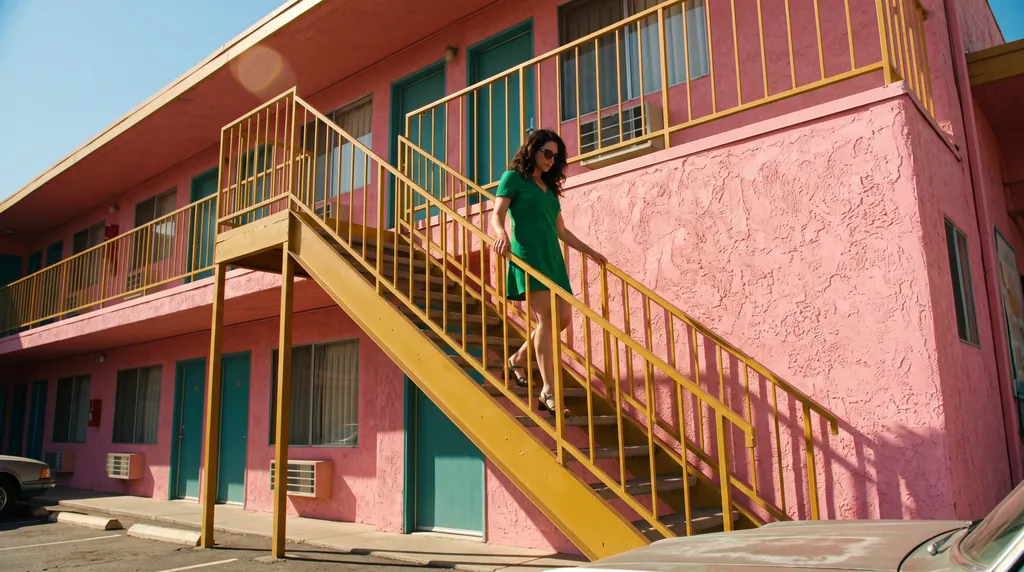
“A 16:9 horizontal cinematic still, shot from street level looking up at the sharp diagonal steel exterior staircase of a two-story retro motel painted vibrant mustard-yellow against a flamingo-pink stucco facade. An adult woman in an emerald-green mini dress descends the staircase, her hand trailing along the yellow railing. The bright yellow, pink, and green color clash creates a delightful, sun-drenched cinematic mood.”Nano Banana 2.1, 15 credits
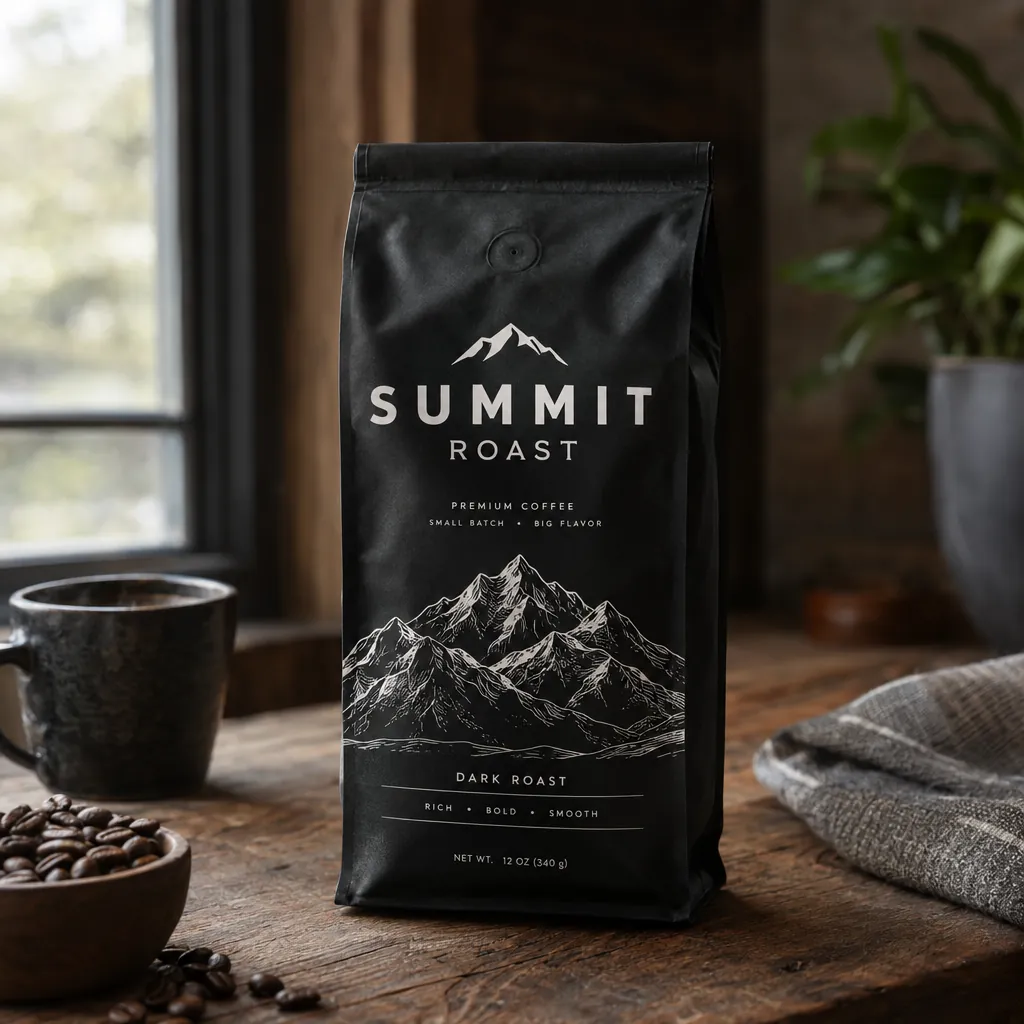
“A premium product photo of a matte black coffee bag labeled SUMMIT ROAST with mountain line-art on rustic wood, soft window light, sharp readable packaging typography, photoreal commercial mockup”GPT Image 2.5, 15 credits
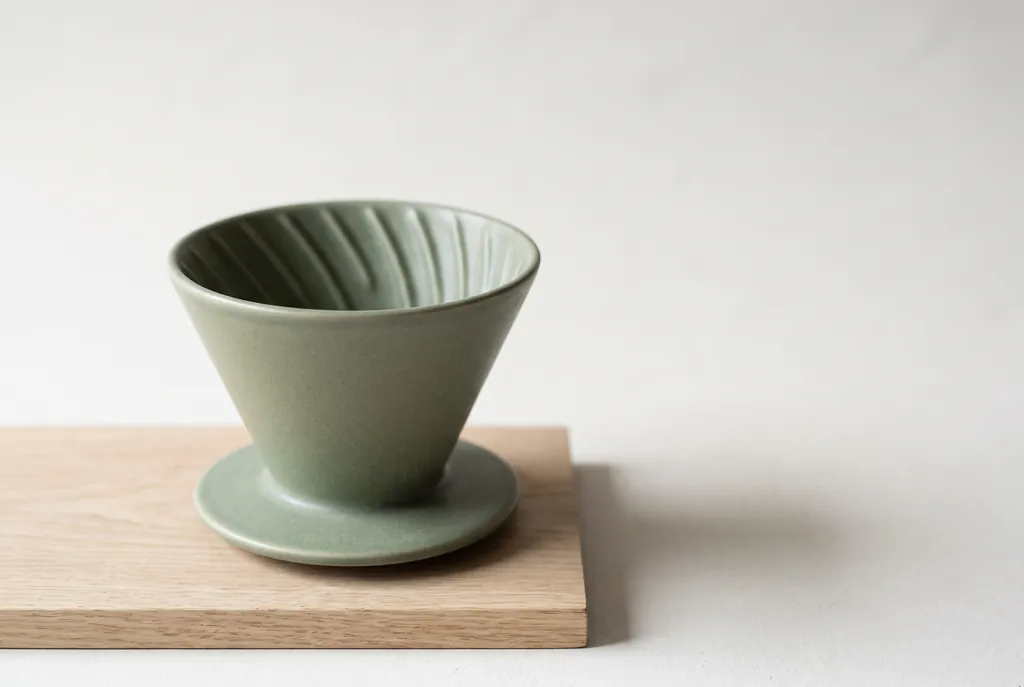
“Studio product photograph of a matte sage-green ceramic pour-over coffee dripper sitting on a pale oak board. Soft window light from the left, a gentle shadow to the right, clean off-white background, with empty space on the right third of the frame for ad copy. Real photograph, no props.”Nano Banana 2.1, 15 credits
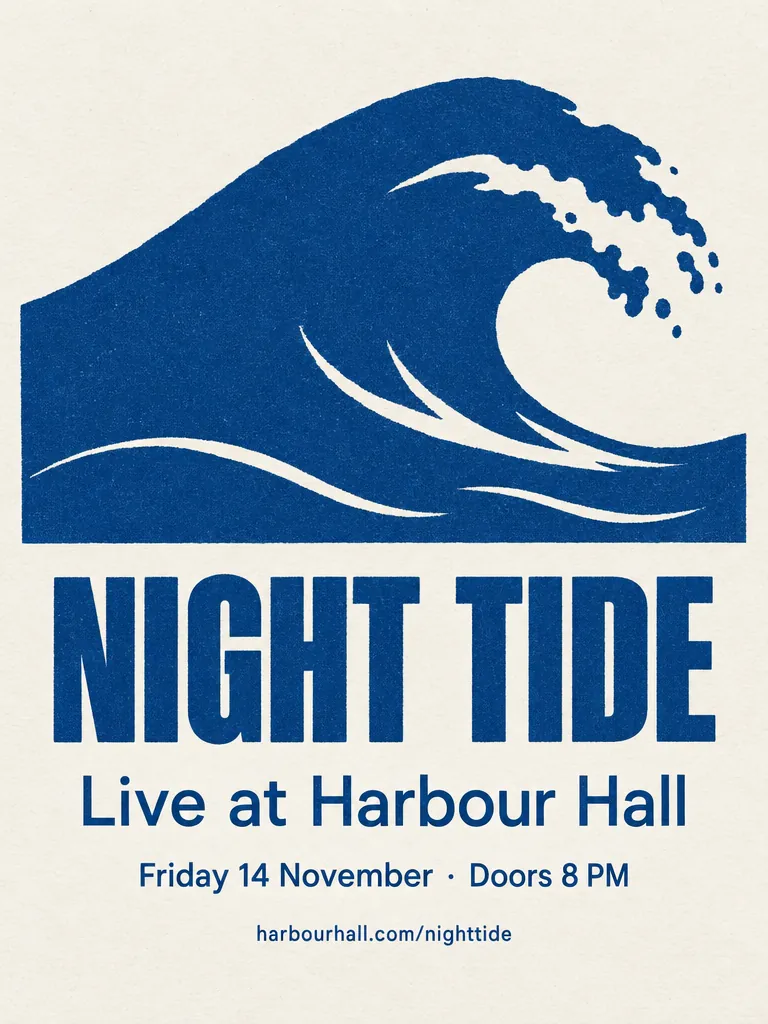
“A minimalist screen-printed concert poster on off-white paper. A large deep-blue wave shape fills the top half. Below it, the headline "NIGHT TIDE" in a bold condensed sans-serif, then "Live at Harbour Hall" in a lighter weight, then "Friday 14 November · Doors 8 PM", and at the bottom "harbourhall.com/nighttide" in small type. No other text.”GPT Image 2.5, 15 credits
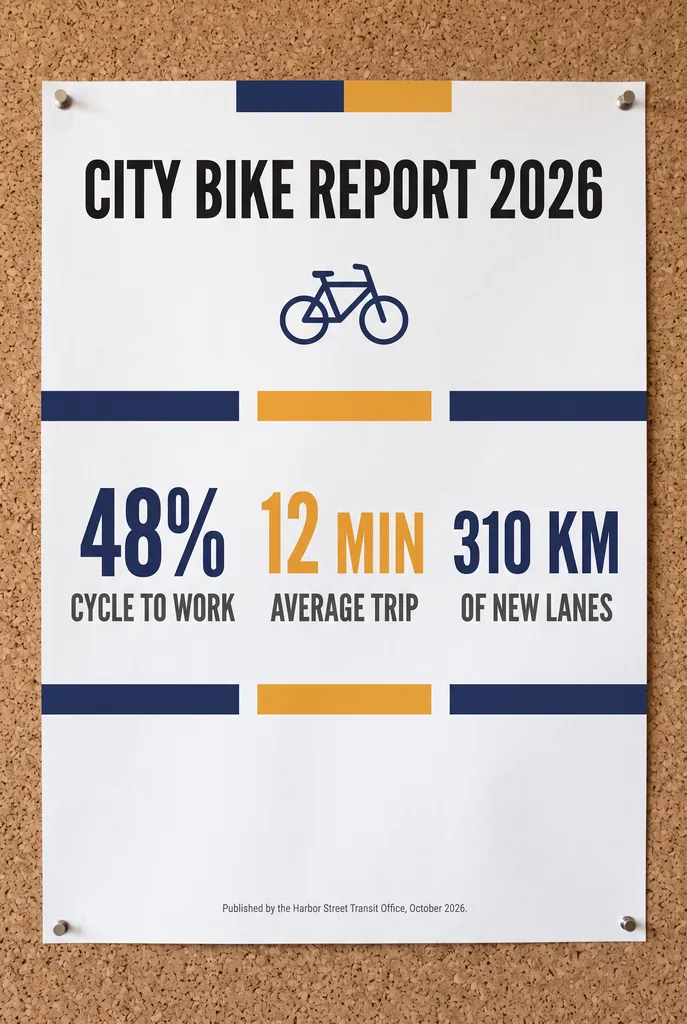
“A clean A2 infographic poster pinned to a cork board in a bright office, photographed straight on. Headline at the top in bold black sans-serif: CITY BIKE REPORT 2026. Below it, three large statistics in a row, each with a short label underneath: 48% CYCLE TO WORK, 12 MIN AVERAGE TRIP, 310 KM OF NEW LANES. At the bottom a small gray footer line: Published by the Harbor Street Transit Office, October 2026. Flat navy and amber color blocks, one simple bicycle icon, generous white space, no other words anywhere on the poster. Photorealistic matte print texture, soft daylight.”Nano Banana 2.1, 15 credits
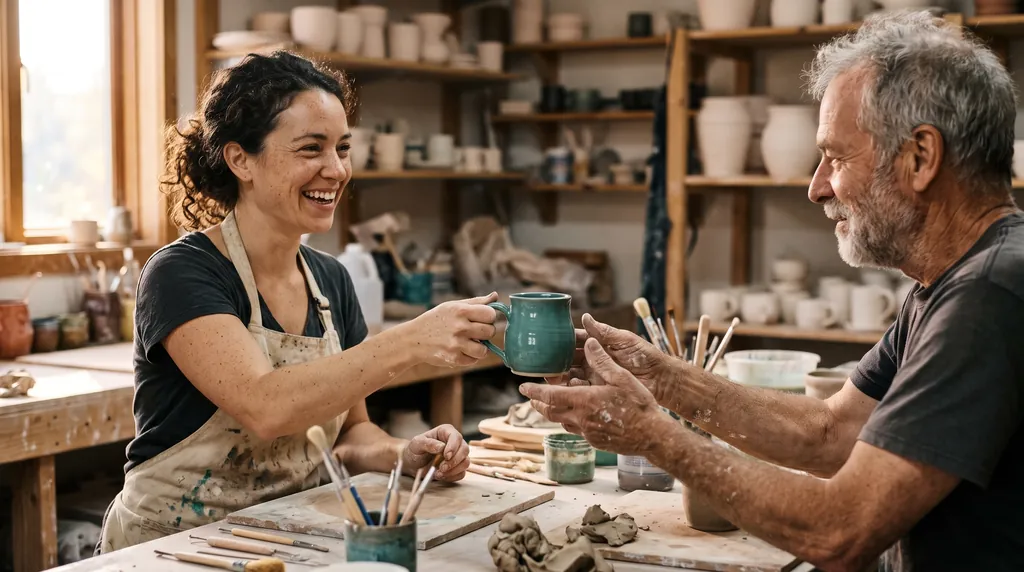
“Candid documentary photograph inside a small ceramics studio. A woman in her early thirties with freckles and curly dark hair laughs while handing a freshly glazed teal mug across a worktable to an older man with a short gray beard and clay-dusted hands. Both faces fully visible and in sharp focus, natural skin texture with visible pores and fine lines, no retouching. Late afternoon window light from the left, dust in the air, shelves of unglazed pots softly blurred behind them. Shot on a 50mm lens at f/2, warm film grain.”Nano Banana 2.1, 15 credits
“A panoramic banner of a Mediterranean coastal town at sunset, colorful houses along the harbor, film photography. No text.”Nano Banana 2.1, 15 credits
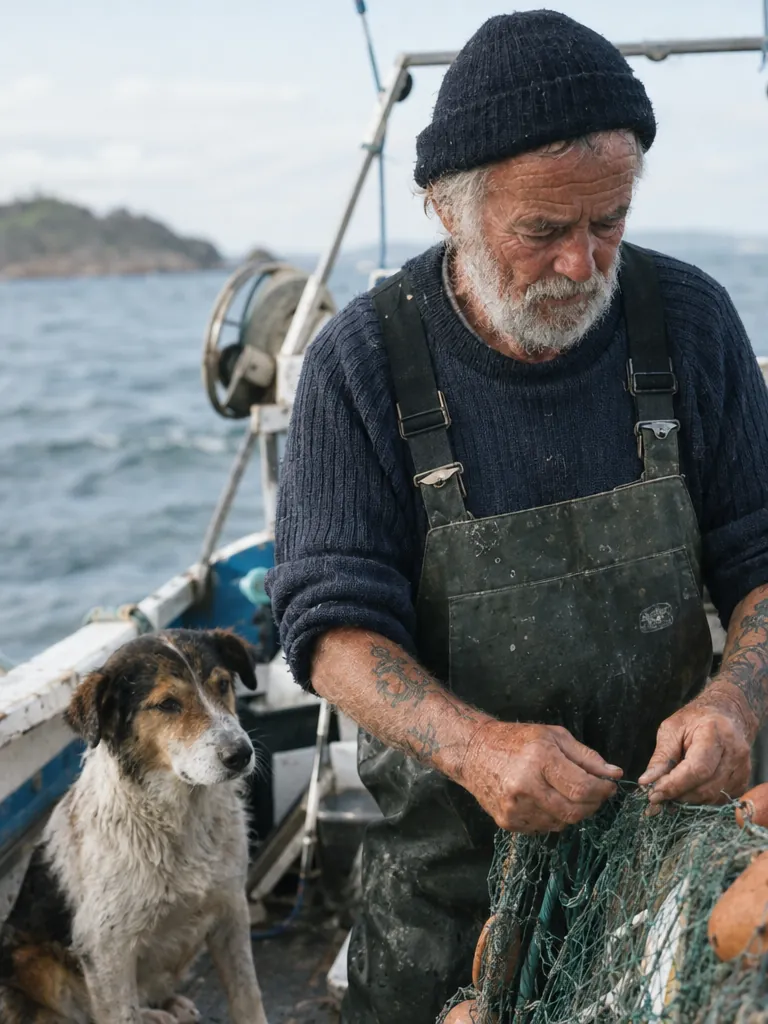
“Create a photorealistic candid photograph of an elderly sailor standing on a small fishing boat.
He has weathered skin with visible wrinkles, pores, and sun texture, and a few faded traditional sailor tattoos on his arms.
He is calmly adjusting a net while his dog sits nearby on the deck. Shot like a 35mm film photograph, medium close-up at eye level, using a 50mm lens.
Soft coastal daylight, shallow depth of field, subtle film grain, natural color balance.
The image should feel honest and unposed, with real skin texture, worn materials, and everyday detail. No glamorization, no heavy retouching.”GPT Image 2.5, 15 credits
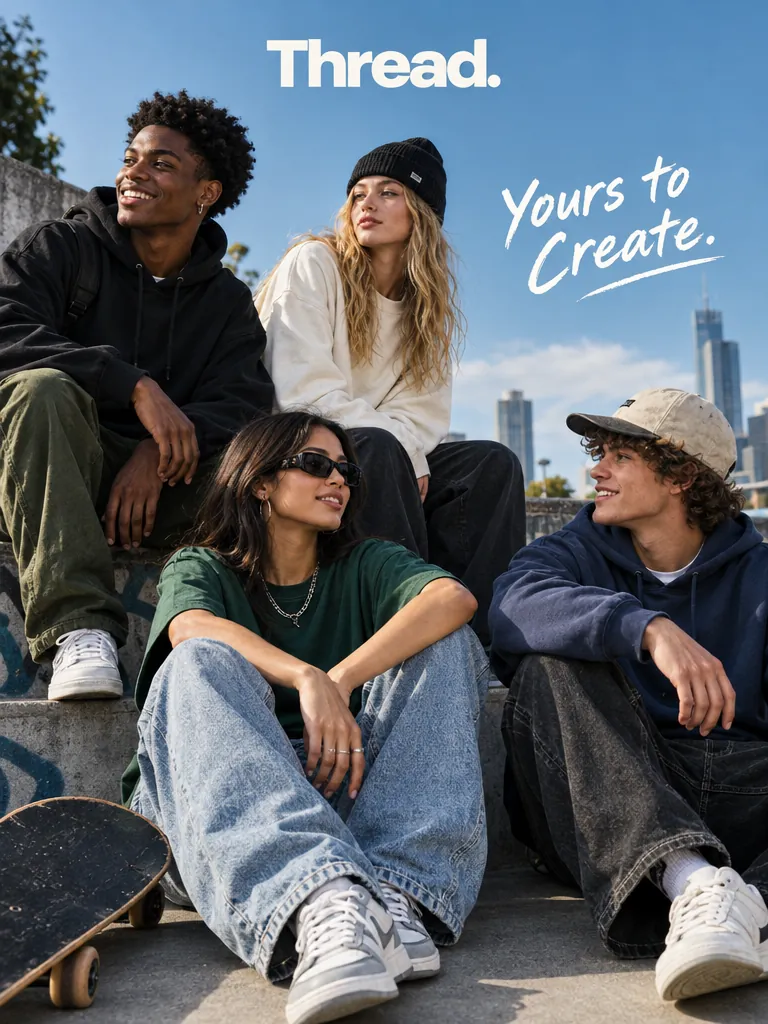
“Give me a cool in culture ad / fashion shot for a brand called Thread.
It's a hip young street brand. The ad shows a group of friends hanging out together with the tagline "Yours to Create."
Make it feel like a polished campaign image for a youth streetwear audience: stylish, contemporary, energetic, and tasteful.
Use clean composition, strong color direction, natural poses, and premium fashion photography cues.
Render the tagline exactly once, clearly and legibly, integrated into the ad layout.
No extra text, no watermarks, no unrelated logos.”GPT Image 2.5, 15 credits
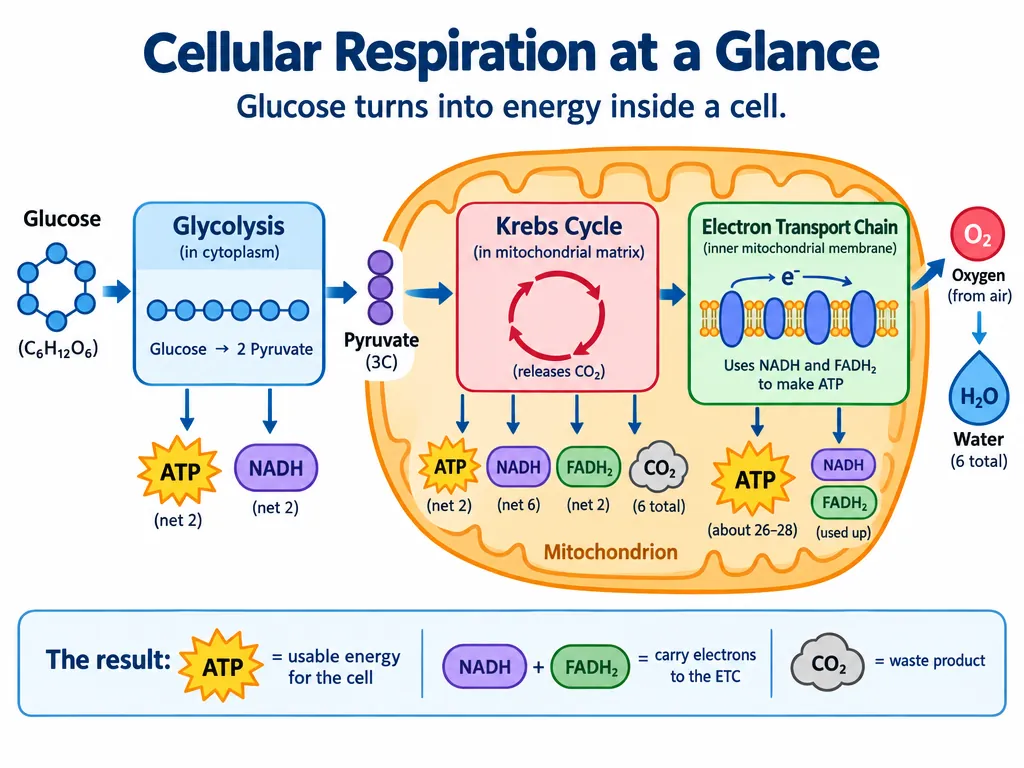
“Create a simple biology diagram titled "Cellular Respiration at a Glance" for high school students.
Show how glucose turns into energy inside a cell. Include glycolysis, the Krebs cycle, and the electron transport chain.
Use arrows to connect the steps, and label the main molecules: glucose, pyruvate, ATP, NADH, FADH2, CO2, O2, and H2O.
Make it look like a clean classroom handout or slide, with a white background, simple icons, clear labels, and easy-to-read text.
Avoid tiny text, extra decoration, or anything that makes the diagram hard to understand.”GPT Image 2.5, 15 credits
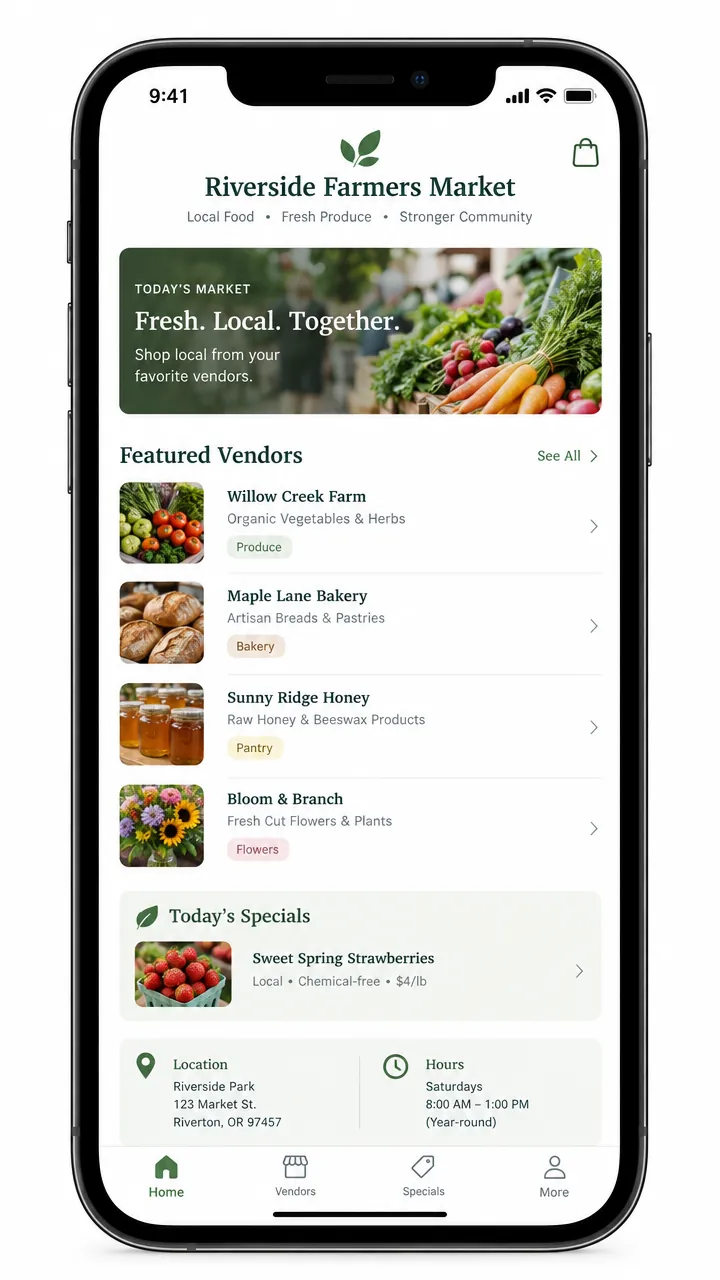
“Create a realistic mobile app UI mockup for a local farmers market.
Show today’s market with a simple header, a short list of vendors with small photos and categories, a small “Today’s specials” section, and basic information for location and hours.
Design it to be practical, and easy to use. White background, subtle natural accent colors, clear typography, and minimal decoration.
It should look like a real, well-designed, beautiful app for a small local market.
Place the UI mockup in an iPhone frame.”GPT Image 2.5, 15 credits
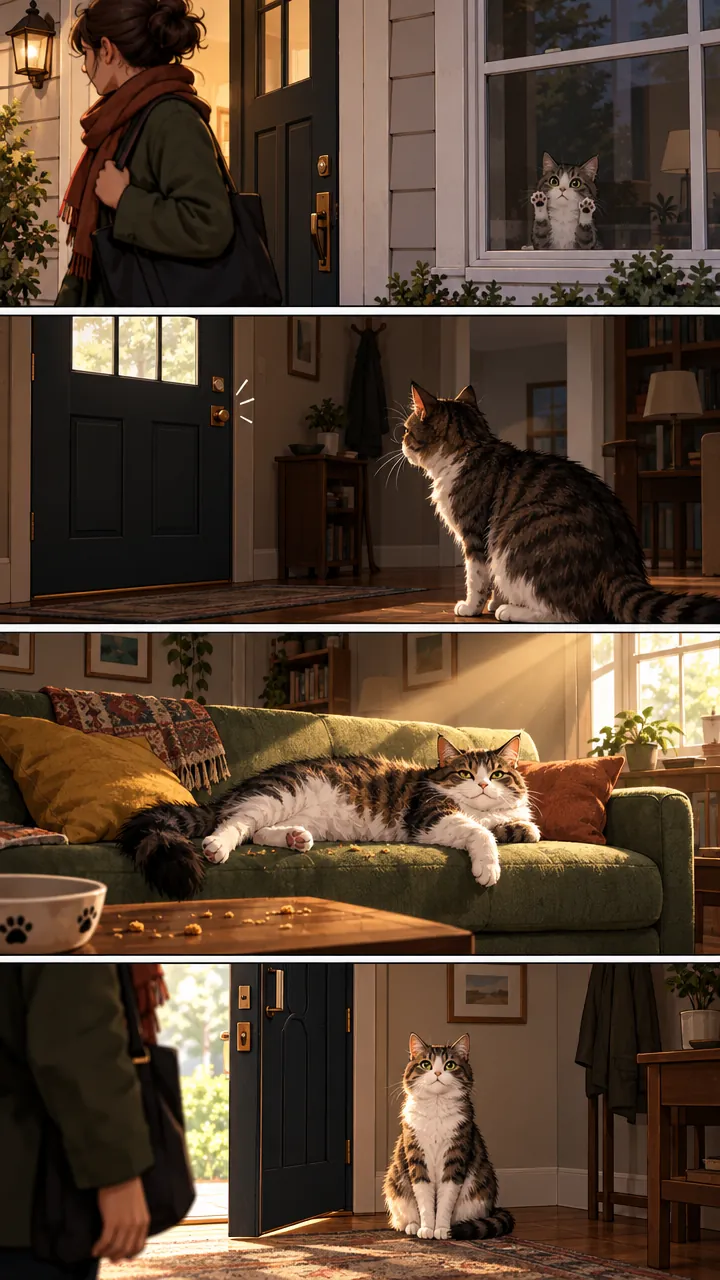
“Create a short vertical comic-style reel with 4 panels.
Panel 1: The owner leaves through the front door. The pet is framed in the window behind them, small against the glass, eyes wide, paws pressed high, the house suddenly quiet.
Panel 2: The door clicks shut. Silence breaks. The pet slowly turns toward the empty house, posture shifting, eyes sharp with possibility.
Panel 3: The house transformed. The pet sprawls across the couch like it owns the place, crumbs nearby, sunlight cutting across the room like a spotlight.
Panel 4: The door opens. The pet is seated perfectly by the entrance, alert and composed, as if nothing happened.”GPT Image 2.5, 15 credits
How to generate an image from text
1
Describe the image
Say what kind of picture it is (photo, poster, sticker, diagram), then the subject, the setting and the light. Put any words that must appear in quotes.
2
Pick model, quality and shape
Nano Banana 2.1 is selected to start with; switch to GPT Image 2.5 for exact copy or a transparent background. Choose the quality, aspect ratio and how many images. The price updates before you spend anything.
3
Generate
Most images take 15 to 40 seconds. They stay in your history, where you can download the full-size file.
4
Refine or reuse
Change one thing in the prompt and run it again, edit the result in the AI photo editor, or turn it into a video with image to video.
Per image, from the lowest to the highest quality setting; several images in one run cost that much each. Arena rank is the position and Elo score from blind side-by-side votes (AA-Image-T2I v2.1, checked October 30, 2026) on the Artificial Analysis Text to Image Arena
Same prompt, both models
Four prompts from published tests, run once on each model at the same price per image (Nano Banana 2.1 at 2K, GPT Image 2.5 at high quality). Nothing was re-run to get a better take.
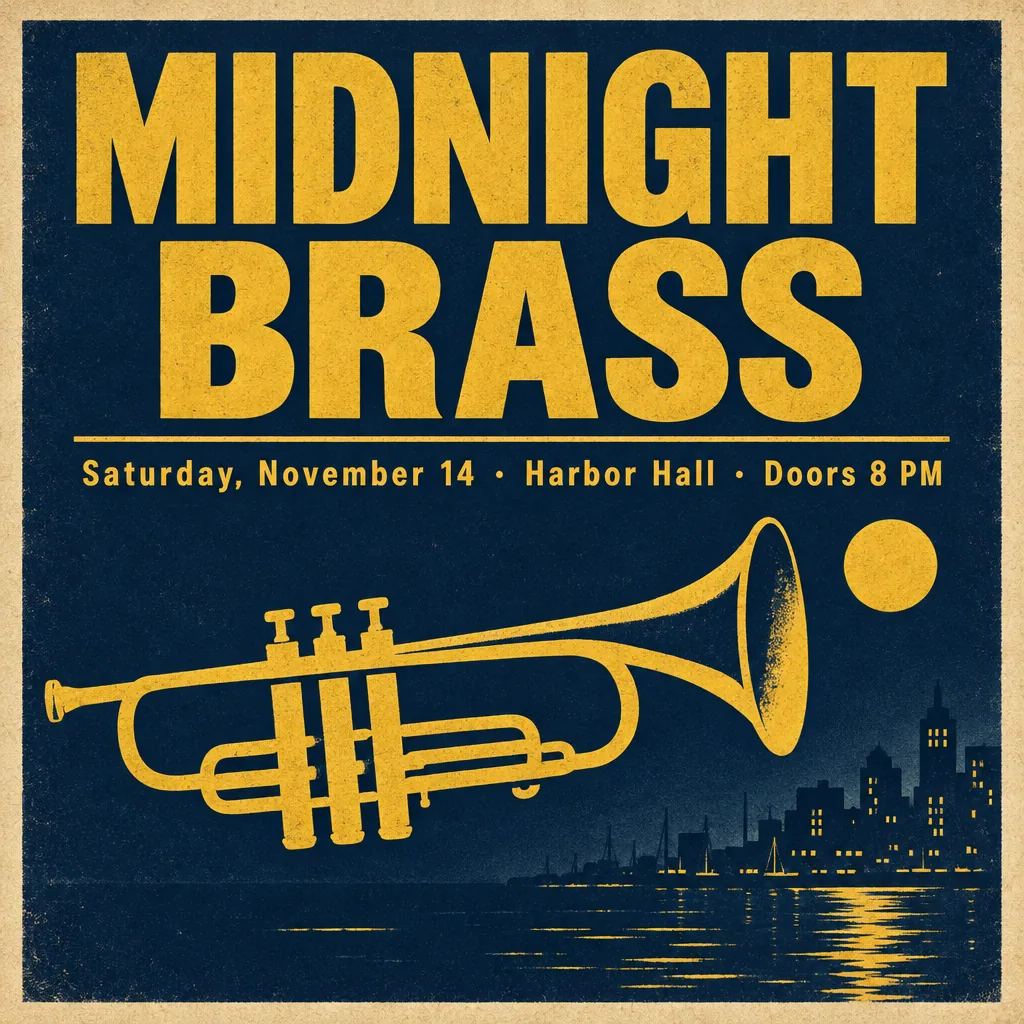
Exact text on a poster
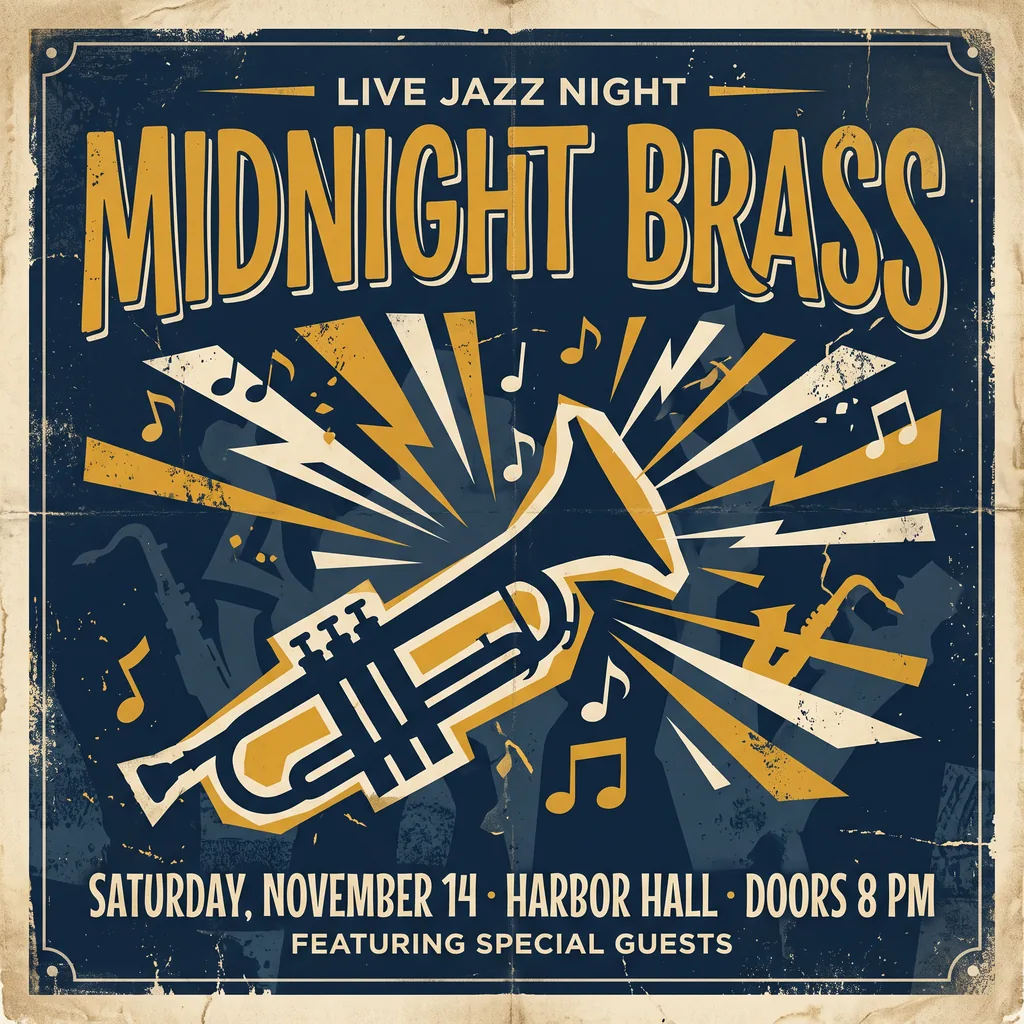
Both spelled MIDNIGHT BRASS and the date line. GPT Image 2.5 used exactly the requested text; Nano Banana 2.1 added two lines of its own, as it did in BulkImagen’s test of this prompt. End with “No other text” to stop it.
“A vintage-style concert poster for a fictional jazz night. Headline in large bold letters: "MIDNIGHT BRASS". Below it, smaller: "Saturday, November 14 · Harbor Hall · Doors 8 PM". A stylized trumpet silhouette, deep navy and mustard yellow palette, subtle paper grain.”
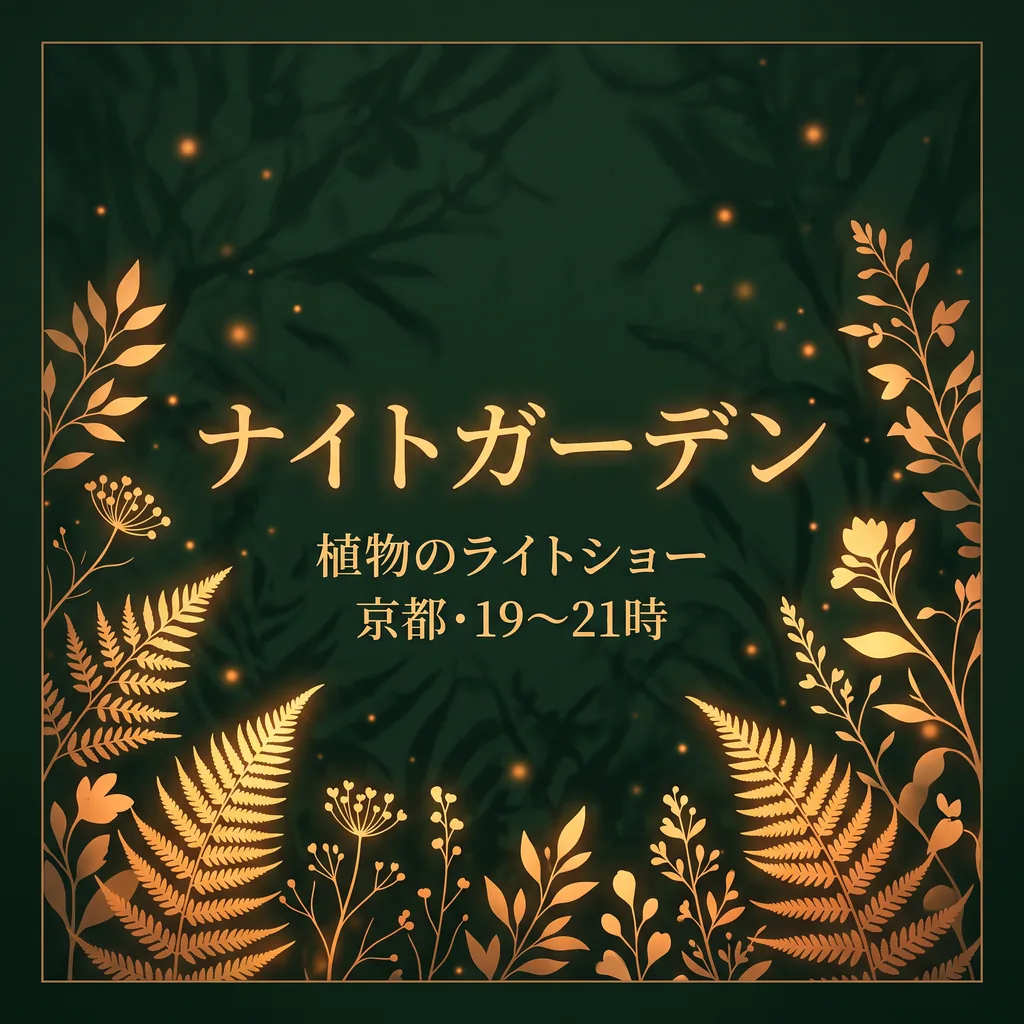
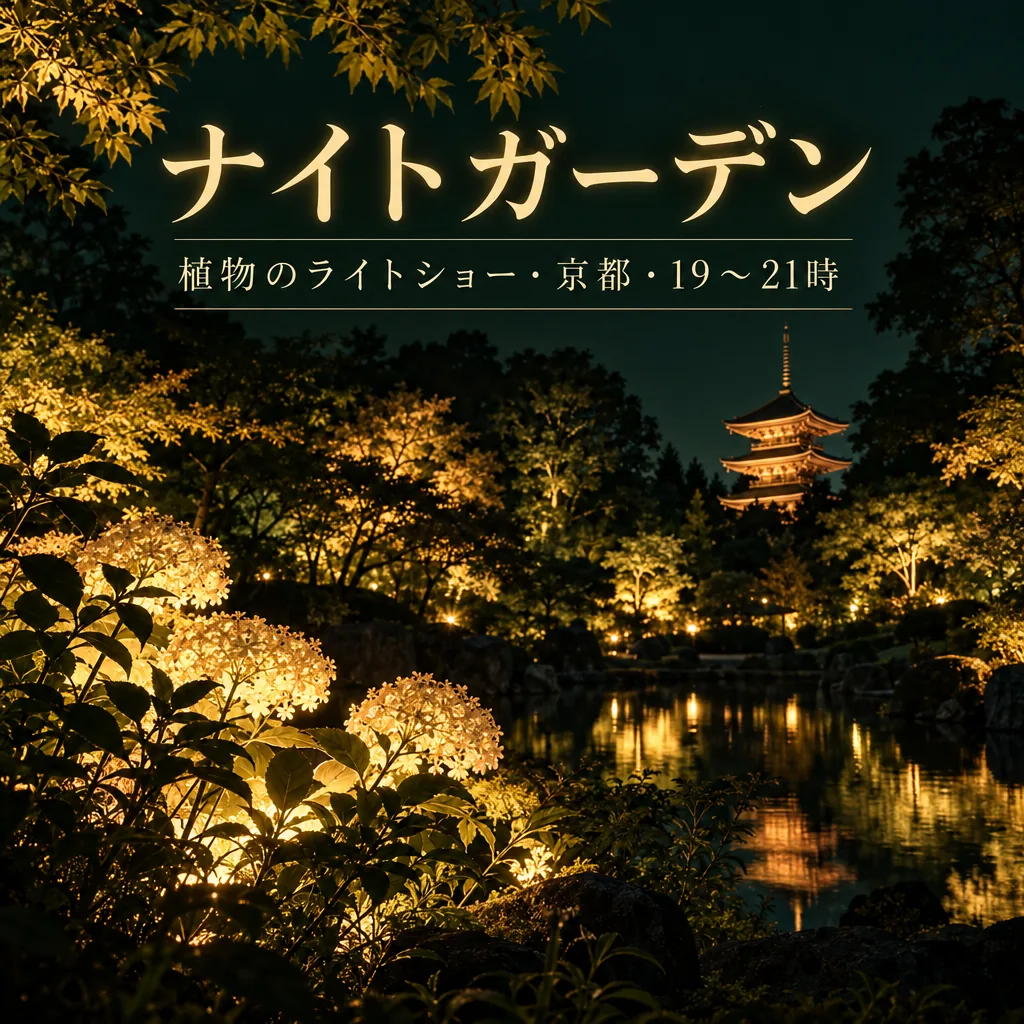
Both wrote the Japanese title and subtitle correctly (checked by a native reader). Nano Banana 2.1 broke the subtitle over two lines; GPT Image 2.5 kept it on one and added a pagoda to the garden.
“Design a square event poster with exactly this Japanese headline: "ナイトガーデン". Add exactly this subtitle: "植物のライトショー・京都・19〜21時". Use luminous botanical silhouettes, deep forest green and warm amber, refined editorial typography, clear contrast, balanced margins, all text fully inside the canvas. Use natural Japanese typography and line breaks without changing any characters. No other words, no translations, no logos, no watermark.”
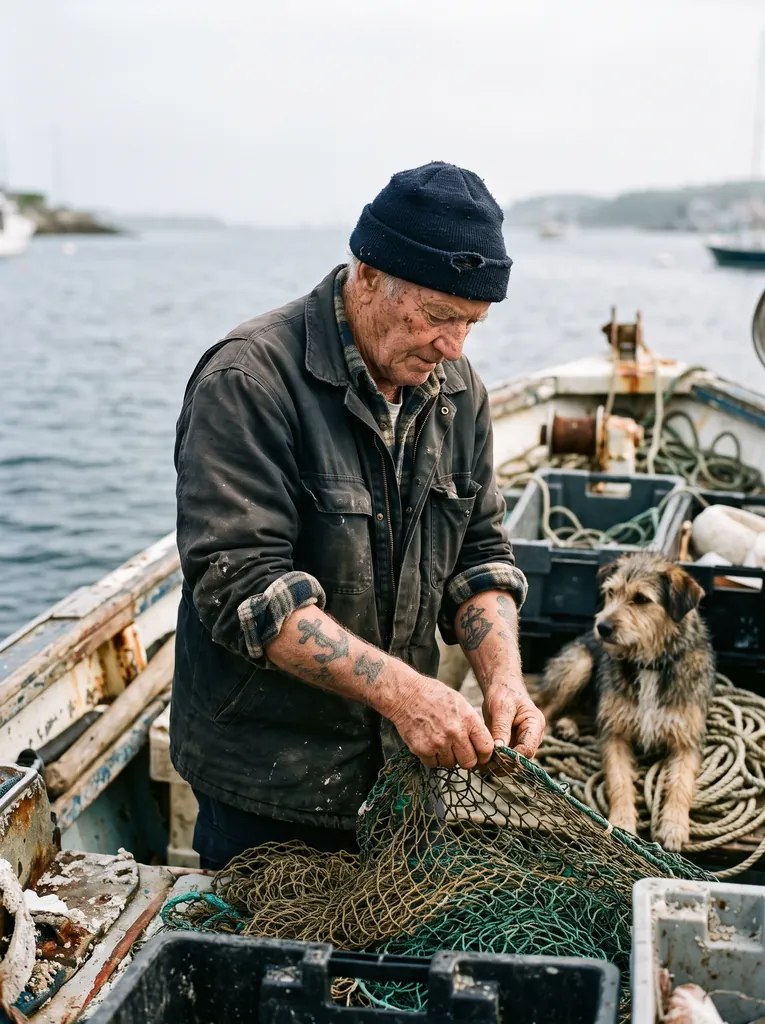
Both have the wrinkles, the tattoos, the net and the dog. GPT Image 2.5 is sharper and closer, with heavier skin detail; Nano Banana 2.1 reads more like a documentary photo.
“Create a photorealistic candid photograph of an elderly sailor standing on a small fishing boat.
He has weathered skin with visible wrinkles, pores, and sun texture, and a few faded traditional sailor tattoos on his arms.
He is calmly adjusting a net while his dog sits nearby on the deck. Shot like a 35mm film photograph, medium close-up at eye level, using a 50mm lens.
Soft coastal daylight, shallow depth of field, subtle film grain, natural color balance.
The image should feel honest and unposed, with real skin texture, worn materials, and everyday detail. No glamorization, no heavy retouching.”
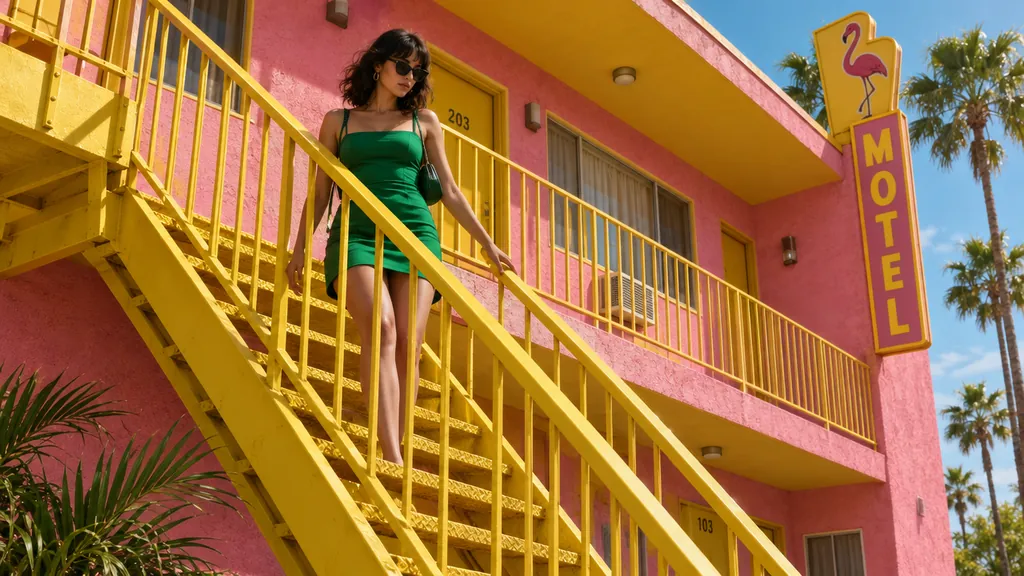
Both have the yellow staircase, the pink stucco and the green dress. GPT Image 2.5 shot lower and closer and added a MOTEL sign and room numbers nobody asked for; Nano Banana 2.1 stayed wider and plainer.
“A 16:9 horizontal cinematic still, shot from street level looking up at the sharp diagonal steel exterior staircase of a two-story retro motel painted vibrant mustard-yellow against a flamingo-pink stucco facade. An adult woman in an emerald-green mini dress descends the staircase, her hand trailing along the yellow railing. The bright yellow, pink, and green color clash creates a delightful, sun-drenched cinematic mood.”
Product shots that follow a written brief, documentary-style photos, 4K prints and very wide banners.
Posters and packaging with exact copy, diagrams and mockups, transparent cutouts, and edits that keep the rest of the photo.
Text in the image
Spelled every line on all five of our posters, Japanese included, but sometimes adds words you didn’t ask for.
Spelled every line on all five of our posters and kept to the requested copy.
Size
Up to 4K, enough for large prints.
Up to 1280 pixels on the long side here: fine for screens and small prints, not for posters on a wall.
Shapes
From 9:16 to 21:9, plus 4:1 and 8:1 banners.
Square, 4:3, 3:4, 16:9 and 9:16.
Transparent background
No: the background is always filled.
Yes: a PNG with a real alpha channel.
Quality settings
1K, 2K and 4K.
Low to max, in two versions: Flare (faster) and Sunburst (slower, for the final).
Speed
About 31 seconds at 2K (CellCog’s median); 15 to 36 seconds in our runs.
About 29 seconds at high (CellCog’s median); 19 to 32 seconds in our runs.
AI image examples, with prompts
Each sample comes with its exact prompt, settings and price. Use any of them in the generator above as is, or edit it first.
Nano Banana 2.1
Stickers and illustrations
Google’s own sticker example, word for word: a die-cut sticker with a white border, bold outlines and flat cel shading on a white background.
Text to image
2K
1:1
“A kawaii-style sticker of a happy red panda wearing a tiny bamboo hat. It's munching on a green bamboo leaf. The design features bold, clean outlines, simple cel-shading, and a vibrant color palette. The background must be white.”
Tip: Name the style (“kawaii”, “cel-shading”) and ask for a white background so the sticker is easy to cut out.
15 credits
Nano Banana 2.1
Product photos from a brief
Fuser’s product prompt, which Nano Banana 2.1 won. Our run matched every line: a separate oak board, light from the left, the shadow to the right and the right third left empty for ad copy.
Text to image
2K
3:2
“Studio product photograph of a matte sage-green ceramic pour-over coffee dripper sitting on a pale oak board. Soft window light from the left, a gentle shadow to the right, clean off-white background, with empty space on the right third of the frame for ad copy. Real photograph, no props.”
Tip: Write the set, the light direction and where the empty space goes; it takes them literally.
15 credits
Nano Banana 2.1
Very wide banners
An 8:1 panorama at 2K: one continuous harbour from end to end, with no repeating tiles or seams. GPT Image 2.5 can’t make this shape.
Text to image
2K
8:1
“A panoramic banner of a Mediterranean coastal town at sunset, colorful houses along the harbor, film photography. No text.”
Tip: Use 2K or 4K for 4:1 and 8:1; Google fixed the tiling of very wide images at those sizes.
15 credits
Nano Banana 2.1
Infographic posters
Atlas Cloud’s 26-word poster, a round Nano Banana 2.1 won. Every word and number came out right, down to the small footer line.
Text to image
2K
2:3
“A clean A2 infographic poster pinned to a cork board in a bright office, photographed straight on. Headline at the top in bold black sans-serif: CITY BIKE REPORT 2026. Below it, three large statistics in a row, each with a short label underneath: 48% CYCLE TO WORK, 12 MIN AVERAGE TRIP, 310 KM OF NEW LANES. At the bottom a small gray footer line: Published by the Harbor Street Transit Office, October 2026. Flat navy and amber color blocks, one simple bicycle icon, generous white space, no other words anywhere on the poster. Photorealistic matte print texture, soft daylight.”
Tip: Use 2K for small text, and end with “no other words anywhere”.
15 credits
GPT Image 2.5
Posters and flyers with exact text
Four lines of text, every word spelled as written, middle dot included, in a flat screen-print style. Fuser, whose test this prompt comes from, called it ready to send to a printer.
Text to image
High
3:4
“A minimalist screen-printed concert poster on off-white paper. A large deep-blue wave shape fills the top half. Below it, the headline "NIGHT TIDE" in a bold condensed sans-serif, then "Live at Harbour Hall" in a lighter weight, then "Friday 14 November · Doors 8 PM", and at the bottom "harbourhall.com/nighttide" in small type. No other text.”
Tip: Quote each line, say its weight and order, and end with “No other text”.
15 credits
GPT Image 2.5
Classroom diagrams
All three stages with arrows between them and all eight molecules labelled, in large, clean type. The prompt is from OpenAI’s guide.
Text to image
High
4:3
“Create a simple biology diagram titled "Cellular Respiration at a Glance" for high school students.
Show how glucose turns into energy inside a cell. Include glycolysis, the Krebs cycle, and the electron transport chain.
Use arrows to connect the steps, and label the main molecules: glucose, pyruvate, ATP, NADH, FADH2, CO2, O2, and H2O.
Make it look like a clean classroom handout or slide, with a white background, simple icons, clear labels, and easy-to-read text.
Avoid tiny text, extra decoration, or anything that makes the diagram hard to understand.”
Tip: Check every name and arrow before you hand it out: complex flows can be connected wrongly.
15 credits
GPT Image 2.5
App and website mockups
A believable phone screen with a header, vendor list, specials and opening hours, all legible. OpenAI’s advice: describe the product as if it already exists.
Text to image
High
9:16
“Create a realistic mobile app UI mockup for a local farmers market.
Show today’s market with a simple header, a short list of vendors with small photos and categories, a small “Today’s specials” section, and basic information for location and hours.
Design it to be practical, and easy to use. White background, subtle natural accent colors, clear typography, and minimal decoration.
It should look like a real, well-designed, beautiful app for a small local market.
Place the UI mockup in an iPhone frame.”
Tip: It is a picture, not a design file: use it to pitch an idea, then build it in your design tool.
15 credits
GPT Image 2.5
Comic strips
Four panels that follow the story beat by beat, with the same cat in every panel. The prompt, from OpenAI’s guide, gives each panel one clear moment.
Text to image
High
9:16
“Create a short vertical comic-style reel with 4 panels.
Panel 1: The owner leaves through the front door. The pet is framed in the window behind them, small against the glass, eyes wide, paws pressed high, the house suddenly quiet.
Panel 2: The door clicks shut. Silence breaks. The pet slowly turns toward the empty house, posture shifting, eyes sharp with possibility.
Panel 3: The house transformed. The pet sprawls across the couch like it owns the place, crumbs nearby, sunlight cutting across the room like a spotlight.
Panel 4: The door opens. The pet is seated perfectly by the entrance, alert and composed, as if nothing happened.”
Tip: Write one short paragraph per panel and number them.
15 credits
Which aspect ratio to pick
Choose the shape before you generate; cropping later loses pixels. Sizes are what each model returns at its largest setting.
What to put in the prompt, in the order the models read it best.
Say what kind of image it is first
Open with the medium: studio product photo, candid 35mm photo, flat vector illustration, screen-printed poster, labelled diagram. It sets the look before any detail.
“A minimalist screen-printed concert poster on off-white paper…”
Describe the subject, setting and light concretely
Name colours, materials, the time of day and where the light comes from. Words like “beautiful” or “stunning” give the model nothing to work with.
“A matte sage-green ceramic coffee dripper on a separate oak board, soft light from the left, shadow falling to the right.”
Quote every word that must appear
Write the exact text in quotes, line by line, with its size or weight, and finish with “No other text” so nothing extra is added.
“Headline: "MIDNIGHT BRASS". Below it, smaller: "Friday 14 November · Doors 8 PM". No other text.”
Give the layout
Say where things go and where to leave room: product centred, logo top left, the right third empty for copy. Both models follow positions well.
“The product sits on the left third; leave the right third empty for text.”
Ask for real texture when you want a photo
Image models tend to smooth skin and polish surfaces. Name the camera and lens, and ask for no retouching.
“Shot like a 35mm film photograph, 50mm lens, eye level. Real skin texture. No glamorization, no heavy retouching.”
Use a higher quality for small text and print
Small labels blur at the lowest settings. Use 2K or 4K on Nano Banana 2.1, or high and above on GPT Image 2.5, when the image has small print or will be printed.
Nano Banana 2.1 or GPT Image 2.5?
They are the two strongest image models we can offer, and independent testers disagree on which is better overall, so pick by job.
CellCog (24 prompts, 25 October 2026): GPT Image 2.5 won 9, Nano Banana 2.1 won 5, with 10 ties.
Fuser (5 tasks, 6 October 2026): GPT Image 2.5 won the character task clearly and the photo and edit tasks narrowly; Nano Banana 2.1 won the product shot; the poster was a tie.
Atlas Cloud (4 rounds, October 2026): Nano Banana 2.1 took or shared three of the four.
Our own 18 same-prompt tests: GPT Image 2.5 did better on four edits and one poster, Nano Banana 2.1 on two photo restorations, and the rest were ties.
The practical split: GPT Image 2.5 for exact copy, edits and cutouts; Nano Banana 2.1 for size, very wide shapes and product shots from a brief. The full comparison has every pair, with notes.
Text, logos and brands
Both models write short text well, in English and other languages. They still slip on small print, and Nano Banana 2.1 likes to add its own words, so quote the copy, say “No other text” and proofread. Don’t ask for real brand logos or famous characters: the models often refuse them, and you couldn’t use them commercially anyway. Describe your own brand instead, or put your logo on a product with the AI photo editor.
From image to poster, product photo or video
This page makes images from text. For a specific job, the other tools start you off with the right settings and samples: the AI poster generator for posters, flyers and print sizes, the AI product photo generator to turn a phone photo of your product into store-ready shots, and image to video to animate any image you make here.
Copyright and commercial use
You can use what you generate commercially, within our terms. Copyright in AI images is a separate question: the US Copyright Office’s AI reports say that output generated from a prompt alone is not protected, while human-authored parts of a work can be. Other countries differ.
How we made the samples on this page
Every sample shows the prompt, model and settings it was made with, and its price on zzo.ai today. The prompts come from published tests and the makers’ own guides, credited on each card, and each was run once on zzo.ai with the site’s settings. None of the images were edited, and where an image missed part of the prompt or added something, the note says so.
When a result goes wrong
The usual problems, why they happen and what to change.
There are words you didn’t ask for
Why: Nano Banana 2.1 in particular adds taglines and small print to posters and packaging; GPT Image 2.5 did it on a product shot too.
Fix: End the prompt with “No other text” (or “No other text on the packaging”).
Small text is garbled
Why: Fine print is the hardest part of an image, especially at low quality settings.
Fix: Use fewer, larger labels and a higher quality setting, and proofread every line before you publish or print.
The person looks too smooth or plastic
Why: Both models lean toward retouched, glossy skin.
Fix: Describe it as a candid photo, name the camera and lens, and add “real skin texture, no heavy retouching”.
The background isn’t transparent
Why: Only GPT Image 2.5 returns a real transparent background, and only with the setting on; Nano Banana 2.1 always fills the background.
Fix: Choose GPT Image 2.5 and switch on Transparent background, and don’t describe a backdrop.
The image is too small to print
Why: GPT Image 2.5 returns at most 1280 pixels on the long side here.
Fix: Use Nano Banana 2.1 at 4K for prints; the AI poster generator page lists how large each setting prints.
The image was refused or failed
Why: The model’s filter or our policy check blocked the prompt or the result, often for real people, famous characters, brand logos or sexual content.
Fix: Nothing is charged: the credits come back automatically. Describe an original character or brand instead, and see the Acceptable Use Policy.
Questions
Updated 2026-10-30
What is the best AI image generator right now?
On the Artificial Analysis text to image leaderboard, built from blind side-by-side votes, GPT Image 2.5 is first and Nano Banana 2.1 is fourth (the ranks and the date we checked them are at the top of this page). In our own same-prompt tests the two were close: pick by job, using the comparison above.
Nano Banana 2.1 or GPT Image 2.5: which should I use?
Nano Banana 2.1 for 4K prints, very wide banners and product shots that follow a written brief. GPT Image 2.5 for posters with exact copy, diagrams, mockups and transparent PNGs. When the look matters, run the same prompt on both; one account and one balance cover both.
How much does an AI image cost?
It depends on the model and the quality setting. The table on this page lists the price per image for each, and the generator shows the exact total before you start. You pay with credits from a one-time pack; there is no subscription.
Can AI put readable text in an image?
Yes. Both models spelled every line correctly on all five of our test posters, including one in Japanese. Put the words in quotes, keep them short, and end with “No other text”. Proofread small print before you use it.
Can I get 4K or print-quality images?
Yes, with Nano Banana 2.1 at 4K. GPT Image 2.5 stops at 1280 pixels on the long side here, which suits screens and small prints. The AI poster generator page shows how large each setting prints.
Can I make a PNG with a transparent background?
Yes, with GPT Image 2.5: switch on Transparent background and you get a PNG with a real alpha channel, at the same price. Nano Banana 2.1 doesn’t offer it.
Can I generate several images at once?
Yes, up to four per run on either model. Each image is charged separately, and the generator shows the total first.
Can I edit a photo or use a reference image?
Yes, on the AI photo editor page: upload up to four photos and describe the change. This page is for generating from text only.
Can I keep the same character across several images?
Upload the character as a reference in the AI photo editor and describe the new scene. In Fuser’s test GPT Image 2.5 carried a face over more clearly, but neither model keeps a face pixel for pixel.
Can I use the images commercially?
Yes. The images you generate are yours to use, including in ads, products and client work, as long as they follow our terms and don’t copy someone else’s brand, character or likeness.
Are AI images copyrighted?
It depends on the country. In the US, the Copyright Office has said that material generated by AI from a prompt alone is not protected by copyright; your own edits and creative arrangement can be. If you need to own the rights to a design, such as a logo, ask a lawyer.
Will someone else get the same image?
Very unlikely. Each run creates a new image, so even the same prompt gives a different result every time.
What happens if an image fails or is blocked?
The credits go back to your balance automatically, whether the model failed, timed out or refused the prompt, or our policy check blocked the result.
Do I need a subscription?
No. zzo.ai sells one-time credit packs only. Credits never expire and work on every model, on the website and through the API.