Gemini Omni 1.2 Flash on zzo.ai costs 85 credits ($0.85) for a 5-second 720p clip with audio. No subscription: buy credits once and they never expire.
Gemini Omni 1.2 Flash is Google DeepMind’s video model, released on 5 November 2026. It makes 3- to 15-second clips with sound from text, a photo (as the first frame, with an optional last frame) or up to six reference images. It renders at 360p or 720p; 1080p and 4K are Google’s upscales of the 720p take. zzo.ai is an independent site that runs it; it is not Google’s own app.
3–15 s clips
Up to 4K
Sound included
Prompt from this video. Edit it or write your own.
With audio
Made with Gemini Omni 1.2 Flash
Open any sample to see its prompt and settings, or start from it.
Misty mountain village at dawnGemini Omni 1.2 Flash, 5 s, sound, 85 credits
12
Kitchen selfie to Christmas portraitGemini Omni 1.2 Flash, photo to video, 8 s, sound, 135 credits, input image made with GPT Image 2.6
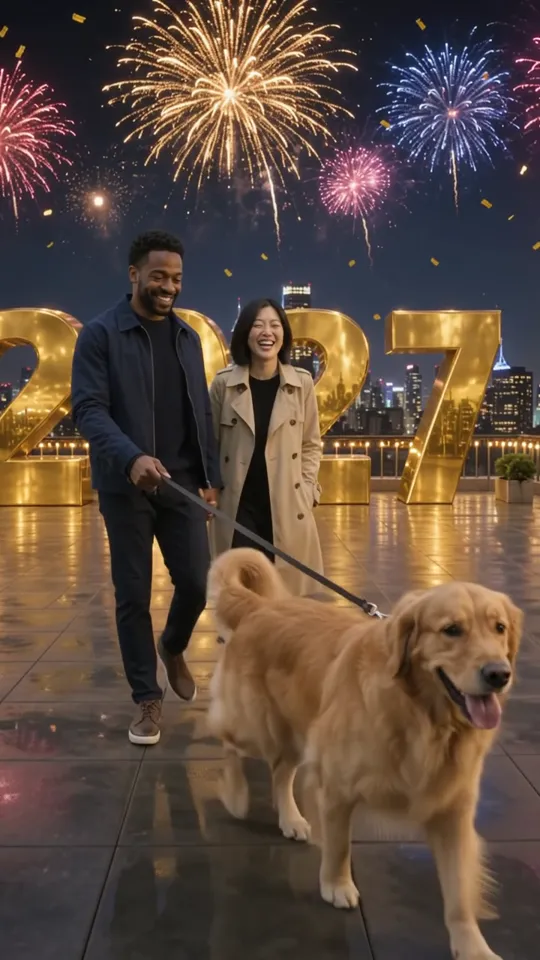
Couple and dog on a New Year rooftopGemini Omni 1.2 Flash, 5 s, sound, 85 credits, input image made with GPT Image 2.6
Strawberry splash in 4KGemini Omni 1.2 Flash, 3 s, sound, 150 credits
Two friends talking in a café, 15 sGemini Omni 1.2 Flash, 15 s, sound, 250 credits
Each one comes with the settings and the prompt we would start from, and what it costs. Use it as is or edit it.
A cinematic scene from one paragraph
Five seconds at 720p from text alone: a slow dolly shot through a misty Japanese mountain village at dawn, with an old man sweeping leaves outside a shop. The motion looks natural and the sound is generated in the same pass.
Text to video
720p
5 s
sound
16:9
“A cinematic slow dolly shot through a quiet Japanese mountain village at dawn. Mist drifts between wooden houses with dark tiled roofs, warm lantern light glows in a few windows, and an elderly man in a blue apron sweeps fallen maple leaves in front of a small shop. The camera glides forward at walking height. Sound: soft birdsong, the scratch of the broom, a distant temple bell. Photorealistic, natural colours, gentle film grain. No text.”
Tip: Write the scene as one paragraph in this order: camera move, place, people and action, then a “Sound:” line naming what should be heard.
85 credits
12
input image made with GPT Image 2.6
From one photo to another
An 8-second first-and-last-frame clip: it starts on a kitchen selfie of an AI-made woman and ends on a Christmas portrait of the same woman. The clip lands on the last frame, and her face held through the change of room.
Image to video
720p
8 s
sound
16:9
“She smiles at the camera in her kitchen, then turns and walks out of frame; the scene changes smoothly into a cozy living room with a decorated Christmas tree, and she ends in the exact pose and outfit of the last frame. Warm light, natural motion, one continuous shot. Sound: soft room tone, a few footsteps, gentle music-box notes as the tree appears. No text.”
Tip: Use two images of the same person with the same framing, and say how to get from one to the other (“turns and walks out of frame; the scene changes into …”). Keep it to 10 seconds or less.
135 credits
input image made with GPT Image 2.6
People, a pet and a place from references
Five seconds in 9:16 from three reference images: a young couple, their golden retriever, and a rooftop with giant gold numbers. Both faces, the dog and the gold “2027” numbers stayed as in the references while fireworks went off behind them.
Reference to video
720p
5 s
sound
9:16
“The young couple from the photo walk their golden retriever across the rooftop terrace with the giant gold numbers at night, laughing as the dog trots ahead; colourful fireworks burst over the city skyline behind them. Keep both faces, their clothes and the dog's fur exactly as in the reference photos. Handheld camera, vertical framing, photorealistic. Sound: fireworks, the dog's paws on the deck, light laughter. No text other than the numbers.”
Tip: Describe each reference by what it shows (“the couple”, “the golden retriever”, “the rooftop with the gold numbers”) and add “keep both faces, their clothes and the dog’s fur exactly as in the reference photos”.
85 credits
A macro shot in 4K
Three seconds of a strawberry dropping into sparkling water in slow motion, upscaled to 4K from the 720p take. The bubbles and droplets came out crisp.
Text to video
4K
3 s
sound
16:9
“Extreme close-up of a ripe red strawberry being dropped into a glass of sparkling water in slow motion, bubbles rising and catching sunlight, droplets splashing outward against a soft white background. Crisp macro detail, studio lighting. Sound: a gentle splash and fizzing bubbles. No text.”
Tip: Short, simple shots suit 4K best: one subject, one movement, a clean background. Try the idea at 360p or 720p first, since a 4K run costs the most.
150 credits
What sets Gemini Omni 1.2 Flash apart
Up to 15 seconds, with sound always on
Any whole length from 3 to 15 seconds in one take. Speech, music and effects come with every clip and are included in the price; Google’s launch post highlights better dialogue and lip-sync in 1.2.
How to use it: Add a “Sound:” line to the prompt and put any spoken line in quotation marks, in English for the most reliable result. For a long clip, give each part its own time range, such as “[0-5s] …, [5-10s] …, [10-15s] …”.
Image to video starts on your photo and can end on a second one; with a last frame, clips run up to 10 seconds. Reference to video takes up to six images of people, products or places and keeps them consistent.
How to use it: In Image to video, add the last frame in its own slot after the first. In Reference to video, upload the images and describe each one by what it shows. Name what must not change: “keep her face and outfit the same”.
Draft at 360p, finish upscaled
Google’s own suggested workflow: try ideas cheaply at 360p or 720p, then render the final at 1080p or 4K. The higher resolutions are upscaled from a 720p render, not native.
How to use it: Test the prompt at 360p until the action is right. Each run is a new take, so the final at 1080p or 4K will differ a little from the draft; keep the same prompt and settings.
What Gemini Omni 1.2 Flash is good at, and where it struggles
Good at
Up to 15 seconds in one take, with speech, music and effects generated with the picture and included in the price. On zzo.ai it costs less per second at 720p than Seedance 2.5 or Kling 4.0.
First and last frame: in our test (11 November 2026, one run) an 8-second clip went from a kitchen selfie to a Christmas portrait, landed on the last frame, and the person’s face held throughout.
Reference images keep details: from three images, our vertical rooftop clip kept both faces, the golden retriever and the gold “2027” numbers.
Quick drafts and sharp finals: 360p for cheap tests, then 1080p or 4K upscaled from the 720p take. Our 3-second 4K strawberry macro came out with crisp detail.
Fast for a video model: our four test clips took from 45 seconds to about 2 minutes each.
Limits
Two aspect ratios only, 16:9 and 9:16: no square, 4:3 or 21:9.
Sound is always on, with no switch, and you can’t upload your own audio. Mute the clip in an editor if you want silence.
1080p and 4K are upscaled from a 720p render, not native: they look sharper, but no new detail is filmed in.
With a last frame, clips are at most 10 seconds; reference to video takes at most six images.
Google evaluates English prompts only; other languages, in the prompt or in dialogue, have not been tested by Google.
Photos of certain recognizable people may be refused, and Google refuses photos of minors in the EEA, Switzerland and the UK.
Google names its weak spots: fast sports action, complex physics and exact text on screen.
Editing a video you already have, extending a clip and multi-turn edits are features of Google’s own API and are not offered here yet.
A good first result with Gemini Omni 1.2 Flash, step by step
Draft cheap, finish high. Each step shows its settings and cost.
1
Find the shot at 360p
Run the idea at 360p and 5 seconds, changing one thing per take until the action and framing are right.
360p
5 s
sound
16:9
3 runs × 30 = 90 credits
2
Make the full length at 720p
Generate the length you need at 720p, the model’s native resolution. For Reels, TikTok and Shorts choose 9:16; for YouTube and the web, 16:9.
720p
10 s
sound
16:9
165 credits
3
Render the final upscaled
Pick 1080p, or 4K for big screens. It is a new take upscaled from its own 720p render, so it can differ slightly from the 720p version.
1080p
10 s
sound
16:9
250 credits
About 505 credits ($5.05 at the standard rate) for the whole job. Failed runs are refunded, so they don’t count.
Settings, explained
What each option does and what it does to the price.
Modes
Text to video starts from your words. Image to video uses your photo as the first frame, with an optional last frame (then up to 10 seconds). Reference to video takes up to six images to keep people, products or places consistent.
Same price: 85 credits (720p, 5 s)
Resolution
360p for drafts, 720p (native) for most posts, 1080p and 4K for finals. 1080p and 4K are upscaled from the 720p take, and the price rises with resolution.
Any whole second from 3 to 15; with a last frame, up to 10. The price scales with length, so match it to the action: a long script in a short clip is rushed.
3 s: 50 · 5 s: 85 · 15 s: 250 credits (720p)
Audio
Always on and included in the price; Google has no switch for it. Describe the sound you want, or mute the clip afterwards.
Aspect ratios
16:9 for YouTube and the web, 9:16 for Reels, TikTok and Shorts; there are no other shapes. In Image to video you choose too, and the generator presets it from your photo’s shape.
16:9, 9:16 · no price difference
Gemini Omni 1.2 Flash specs
Updated 2026-11-11
Developer
Google
Released
2026-11-05
Type
Video
Modes
Text to video, Image to video, Reference to video
Clip length
3–15s
Resolution
360p, 720p, 1080p, 4K
Audio
Always on
Aspect ratios
16:9, 9:16
Commercial use
Allowed, under our terms
Failed generations
Credits refunded automatically
Starts at
20 ($0.20)
Gemini Omni 1.2 Flash price per generation
Credits are charged only when a generation starts, and refunded if it fails. The cheapest option is 20 credits.
Released on 5 November 2026 by Google DeepMind, generally available on Google’s API and Google Cloud.
Price on Google’s own API: 30% below Gemini Omni 1.1 Flash per second at 720p (Google, 5 November 2026). On zzo.ai you pay per clip in credits, with no subscription.
Inputs on zzo.ai: text, a first frame with an optional last frame, or up to six reference images.
Length: 3 to 15 seconds; 3 to 10 with a last frame.
Resolution: 360p and 720p native; 1080p and 4K upscaled from the 720p take.
Shapes: 16:9 and 9:16.
Sound: always generated (speech, music, effects); no audio upload.
Watermark: Google adds an invisible SynthID watermark to every clip.
Prompting tips
Google’s guide and our own test runs agree on a few rules:
Write it as one scene: camera move, place, who is doing what, then a “Sound:” line. Our misty-village prompt is a good template.
Time the beats for longer clips: “[0-5s] … [5-10s] … [10-15s] …”, one main action per range.
Name what must not change. Google’s guide uses “keep everything else the same” for edits; in image and reference to video, say it about the face, the outfit or the product.
Write negatives into the prompt (“no text”, “no music”): Google’s API has no separate negative prompt.
Prompt in English, the only language Google has evaluated, and put spoken lines in quotation marks.
Go easy on speed: slow, smooth movement holds up better than sprints, sports or complex physics.
When a result goes wrong
The usual problems with Gemini Omni 1.2 Flash, why they happen and what to change.
The photo is refused
Why: Google doesn’t support uploads of certain recognizable people, or of minors in the EEA, Switzerland and the UK, and its filters vary by region.
Fix: Use an AI-made or illustrated character, or describe the person in a text-to-video prompt. The credits for the refused run come back automatically.
A last-frame clip can’t be longer than 10 seconds
Why: Google limits first-and-last-frame clips to 3 to 10 seconds.
Fix: Choose 10 seconds or less, or drop the last frame to go up to 15.
Fast action or physics looks wrong
Why: Google names fast sports action and complex physics as weak spots.
Fix: Slow the action down (“slowly”, “in slow motion”), keep one main movement per time range, and generate again.
Words on screen are misspelled
Why: Exact text remains a challenge, according to Google’s model card.
Fix: Keep text short, or add it in an editor. For numbers that must be exact, give them in a reference image: our rooftop sample kept “2027” that way.
Dialogue in another language sounds off
Why: Google evaluates English only; other languages haven’t been tested.
Fix: Write spoken lines in English for the most reliable result, or add a voice-over in your language afterwards.
Unwanted music or text appears
Why: Google’s API takes no negative prompt, so the model fills gaps itself.
Fix: Write the constraints into the prompt (“no music”, “no text”), and say exactly which sounds you want.
The run failed or timed out
Why: The model returned an error or took too long.
Fix: Nothing is charged: the credits return to your balance. Try again, or try a shorter clip.
Gemini Omni 1.2 Flash vs Gemini Omni 1.1 Flash
Gemini Omni 1.2 Flash replaced 1.1 on 5 November 2026. Google keeps 1.1 for a four-week transition and routes its requests to 1.2 from 3 December 2026, billed at 1.2’s rates. zzo.ai runs only the newest version.
Clips of up to 15 seconds in one take, the headline of Google’s launch post.
A price per second on Google’s API 30% below 1.1’s.
Better dialogue, lip-sync and multi-speaker scenes, according to Google.
The same shapes (16:9, 9:16) and resolutions: 360p and 720p native, 1080p and 4K upscaled.
Video editing, extension and multi-turn edits on Google’s own API; zzo.ai offers text, image and reference to video for now.
Gemini Omni 1.2 Flash on zzo.ai costs 85 credits ($0.85) for a 5-second 720p clip with audio. No subscription: buy credits once and they never expire. Depending on resolution and length, a generation costs 20 to 740 credits ($0.20 to $7.40 at the standard rate). As low as $0.18 with the $199.99 pack. Failed generations are refunded automatically.
Do I need a subscription to use Gemini Omni 1.2 Flash?
No. zzo.ai has no subscription: buy a credit pack once and spend it on Gemini Omni 1.2 Flash or any other model. Credits never expire.
How long can Gemini Omni 1.2 Flash videos be, and at what resolution?
On zzo.ai, Gemini Omni 1.2 Flash makes clips from 3 to 15 seconds at 360p, 720p, 1080p, 4K, in 16:9, 9:16 aspect ratios.
How much does a 10-second Gemini Omni 1.2 Flash video cost?
A 10-second 720p clip with sound costs 165 credits: $1.65 at the standard rate, or $1.50 with the $199.99 pack. There is no subscription.
Can Gemini Omni 1.2 Flash make 4K video?
Yes. 4K costs 250 credits ($2.50 at the standard rate) for 5 seconds. Settle the prompt at a lower resolution first, then run it in 4K: each run is a new take, not an upscale of an earlier one.
Can I use Gemini Omni 1.2 Flash through an API or in Claude?
Yes. Create an API key in Settings, then use Gemini Omni 1.2 Flash from Claude, Cursor or your own code through the zzo.ai MCP server. It draws from the same balance at the same prices as the website.
What is Gemini Omni 1.2 Flash?
Google DeepMind’s video model, released and generally available on 5 November 2026. It makes 3- to 15-second clips with sound from text, a photo or reference images, at 720p, with 1080p and 4K upscaled. It replaces Gemini Omni 1.1 Flash.
Can I use Gemini Omni without paying?
Not on zzo.ai: every clip costs credits, and the button shows the price first. Google includes limited use in some of its own apps, such as 15-second clips in Google Vids, under Google’s own terms.
What decides the price of a clip?
Length and resolution: you pay per second, sound is always included, 360p is the cheapest and 4K the dearest. There is no subscription, and credits never expire.
How do I use Gemini Omni Flash?
Pick Text to video, Image to video or Reference to video, write the prompt, choose the length, resolution and shape, then generate. For several beats, time them: “[0-5s] …, [5-10s] …”. Write the sounds you want into the prompt.
Gemini Omni Flash or Veo 3.1?
Veo 3.1 makes clips of up to 8 seconds; Omni 1.2 Flash makes up to 15, and Google now offers Omni in Flow, Google Vids and the Gemini app. zzo.ai doesn’t offer Veo 3.1.
Gemini Omni Flash or Seedance 2.5?
Seedance 2.5 renders 1080p natively, offers six aspect ratios and lets you switch sound off. Omni 1.2 Flash costs much less per second at 720p, goes to 15 seconds with sound always on, and adds a 360p draft and 4K upscale. We haven’t run same-prompt tests yet.
What changed from Gemini Omni 1.1 Flash?
Clips of up to 15 seconds, better dialogue and lip-sync, and a price on Google’s API 30% below 1.1’s, according to Google. From 3 December 2026 Google routes 1.1 requests to 1.2. zzo.ai runs 1.2.
How long does a generation take?
In our four test runs (11 November 2026), from 45 seconds to about 2 minutes, depending on length and resolution.
Is the 4K output native 4K?
No. Google renders at 360p or 720p and upscales the 720p take to 1080p or 4K. A 4K run is a new take, not an upscale of a draft you made earlier.
Can I use a photo of myself or another real person?
It may be refused: Google doesn’t support uploads of certain recognizable people, or of minors in the EEA, Switzerland and the UK. Refused runs are refunded automatically. AI-made people worked in our tests; only upload someone’s photo with their permission.
Can it edit or extend a video I already have?
Not here yet. Google’s own API can edit a clip by instruction and extend it; zzo.ai offers text, image and reference to video for now.
Can I use the videos commercially?
Yes. Videos you generate on zzo.ai are yours to use, including in commercial work, as long as the content itself doesn’t break our terms or anyone else’s rights.
What if a clip fails?
Nothing is charged: if the model returns an error, times out or refuses the request, the credits go back to your balance automatically.