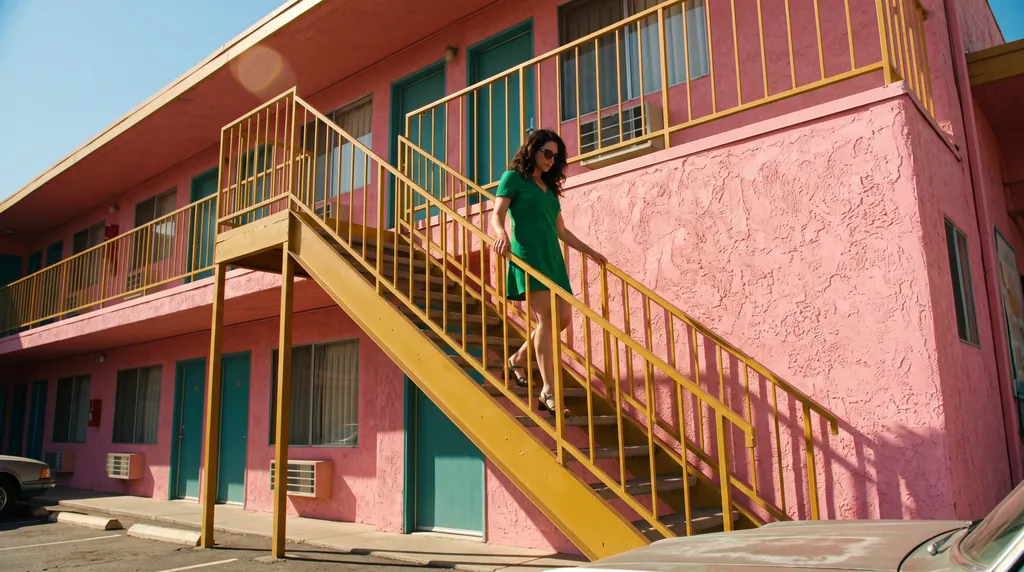
映画のワンシーンのようなスチル
モデル / Google

Nano Banana 2.1(ナノバナナ)をブラウザで使う

zzo.aiのNano Banana 2.1は、1K品質の画像1枚で10クレジット($0.10)です。サブスクはなく、一度購入したクレジット(生成に使う残高)に有効期限はありません。

Nano Banana 2.1(ナノバナナ)は、GoogleのGeminiの画像生成・編集モデルです。2026年10月6日に、Nano Banana 2のアップデートとしてリリースされました。Googleによると、画質、プロンプトへの忠実さ、画像内の文字、編集を重ねても同じキャラクターを保つ力が向上しており、1回の編集で複数の参考写真を使えます。

  • 最大4K
  • 1回で最大4枚
この画像のプロンプトです。書き換えても、一から書いてもかまいません。

Nano Banana 2.1で作ったサンプル

それぞれにプロンプト、モデル、zzo.aiでの料金を表示しています。選ぶと、その内容から始められます。

映画のワンシーンのようなスチル
“A 16:9 horizontal cinematic still, shot from street level looking up at the sharp diagonal steel exterior staircase of a two-story retro motel painted vibrant mustard-yellow against a flamingo-pink stucco facade. An adult woman in an emerald-green mini dress descends the staircase, her hand trailing along the yellow railing. The bright yellow, pink, and green color clash creates a delightful, sun-drenched cinematic mood.”Nano Banana 2.1, 15クレジット
指示文から作る商品画像
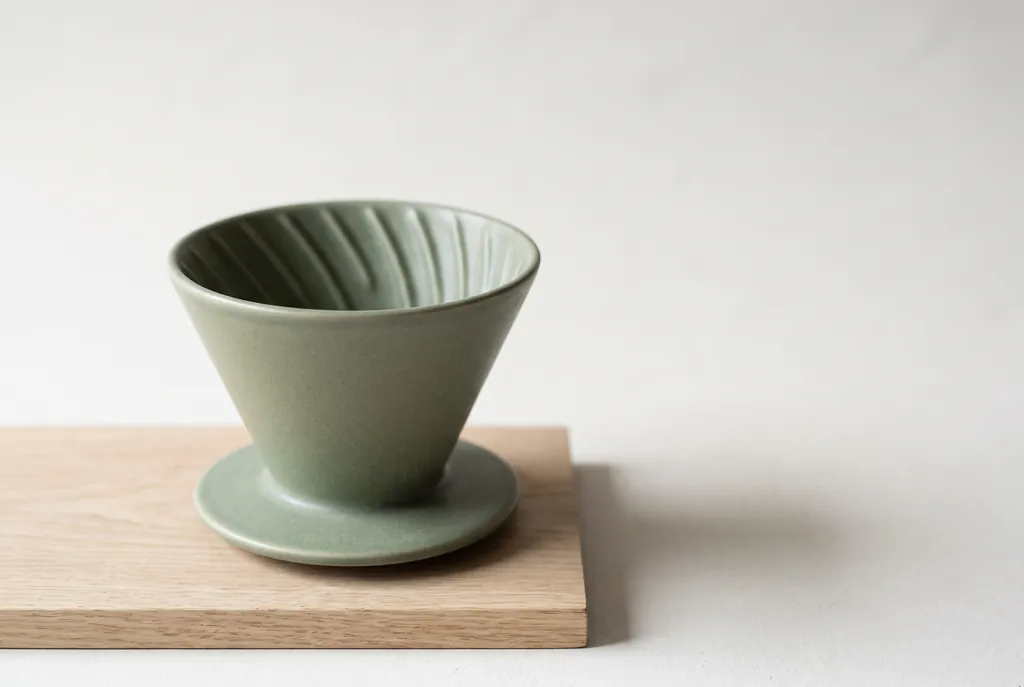
“Studio product photograph of a matte sage-green ceramic pour-over coffee dripper sitting on a pale oak board. Soft window light from the left, a gentle shadow to the right, clean off-white background, with empty space on the right third of the frame for ad copy. Real photograph, no props.”Nano Banana 2.1, 15クレジット
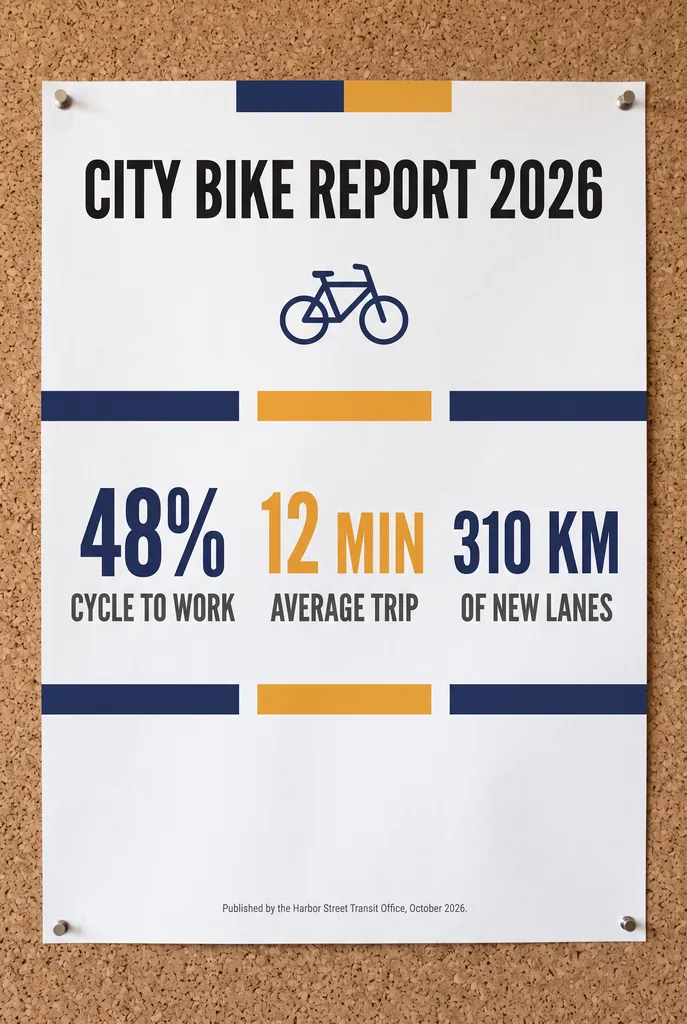
インフォグラフィックのポスター
“A clean A2 infographic poster pinned to a cork board in a bright office, photographed straight on. Headline at the top in bold black sans-serif: CITY BIKE REPORT 2026. Below it, three large statistics in a row, each with a short label underneath: 48% CYCLE TO WORK, 12 MIN AVERAGE TRIP, 310 KM OF NEW LANES. At the bottom a small gray footer line: Published by the Harbor Street Transit Office, October 2026. Flat navy and amber color blocks, one simple bicycle icon, generous white space, no other words anywhere on the poster. Photorealistic matte print texture, soft daylight.”Nano Banana 2.1, 15クレジット
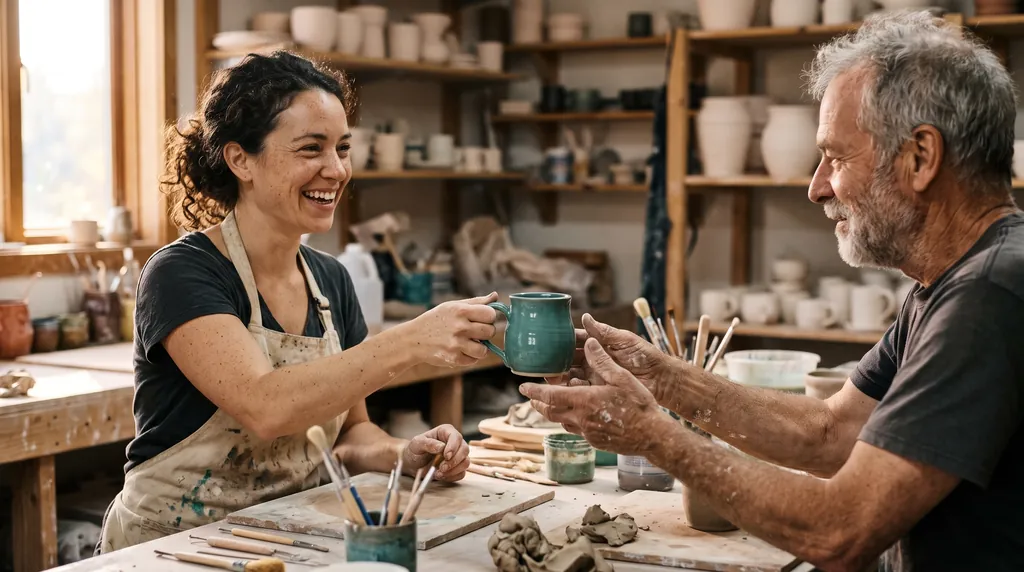
ドキュメンタリー風の写真
“Candid documentary photograph inside a small ceramics studio. A woman in her early thirties with freckles and curly dark hair laughs while handing a freshly glazed teal mug across a worktable to an older man with a short gray beard and clay-dusted hands. Both faces fully visible and in sharp focus, natural skin texture with visible pores and fine lines, no retouching. Late afternoon window light from the left, dust in the air, shelves of unglazed pots softly blurred behind them. Shot on a 50mm lens at f/2, warm film grain.”Nano Banana 2.1, 15クレジット
8:1のパノラマバナー
“A panoramic banner of a Mediterranean coastal town at sunset, colorful houses along the harbor, film photography. No text.”Nano Banana 2.1, 15クレジット
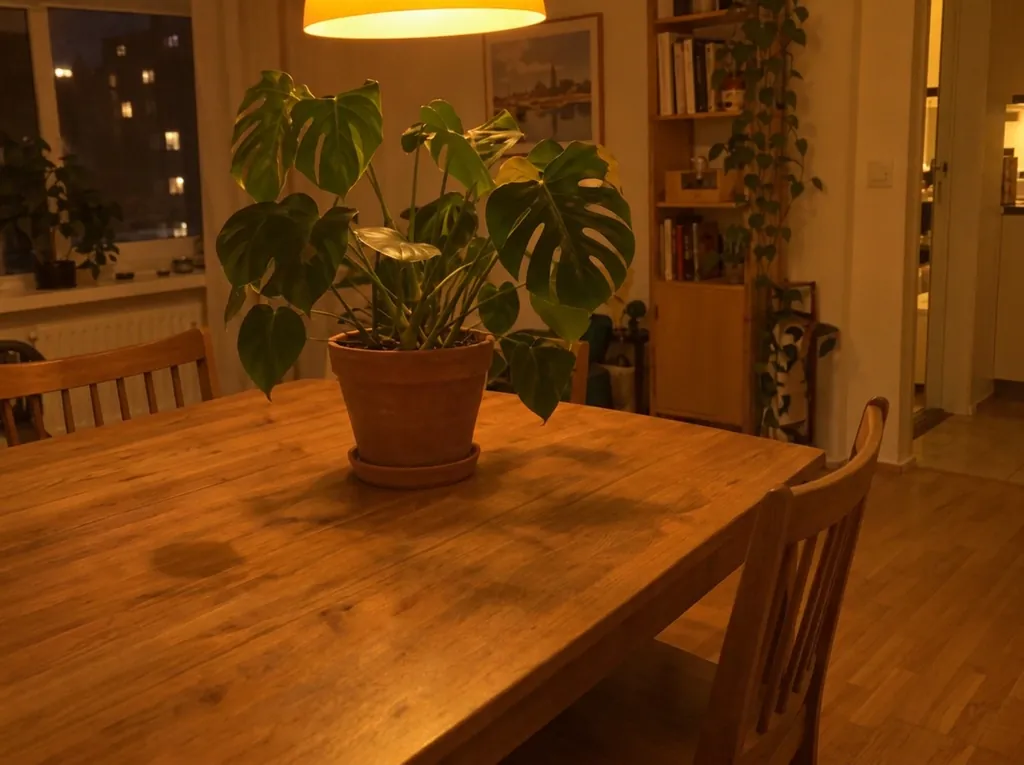
写真をすっきり整える
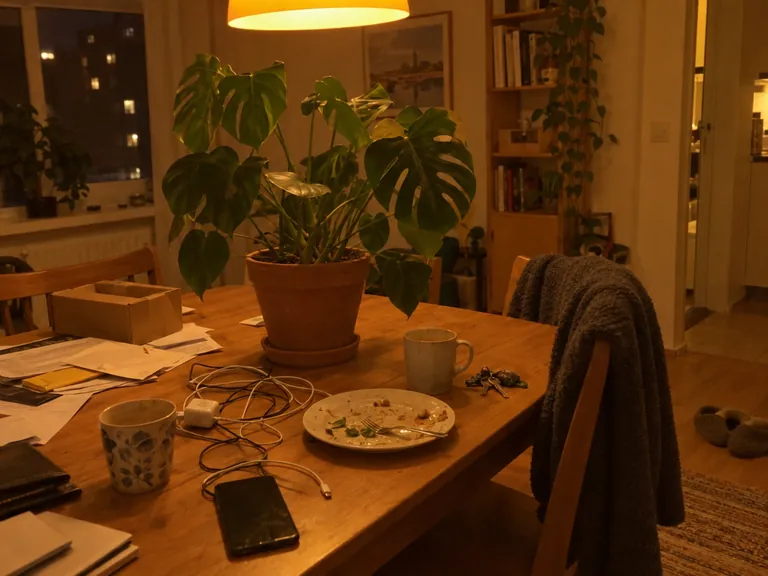
“Clean up this photo: remove the loose clutter around the plant (cables, mugs, dishes, food, papers, envelopes, boxes, clothes, laundry rack, vacuum, cleaning bottles, keys, slippers, toys, tissues) and fill the gaps naturally with the same surface, floor and wall. Keep the furniture, the room, the lighting and any date stamp as they are. Keep the plant, every leaf, the pot and the camera angle exactly as they are in the reference photo; do not add, remove or redesign any leaves, and do not change the pot.”Nano Banana 2.1, 編集, 10クレジット, 入力画像はGPT Image 2.5で生成
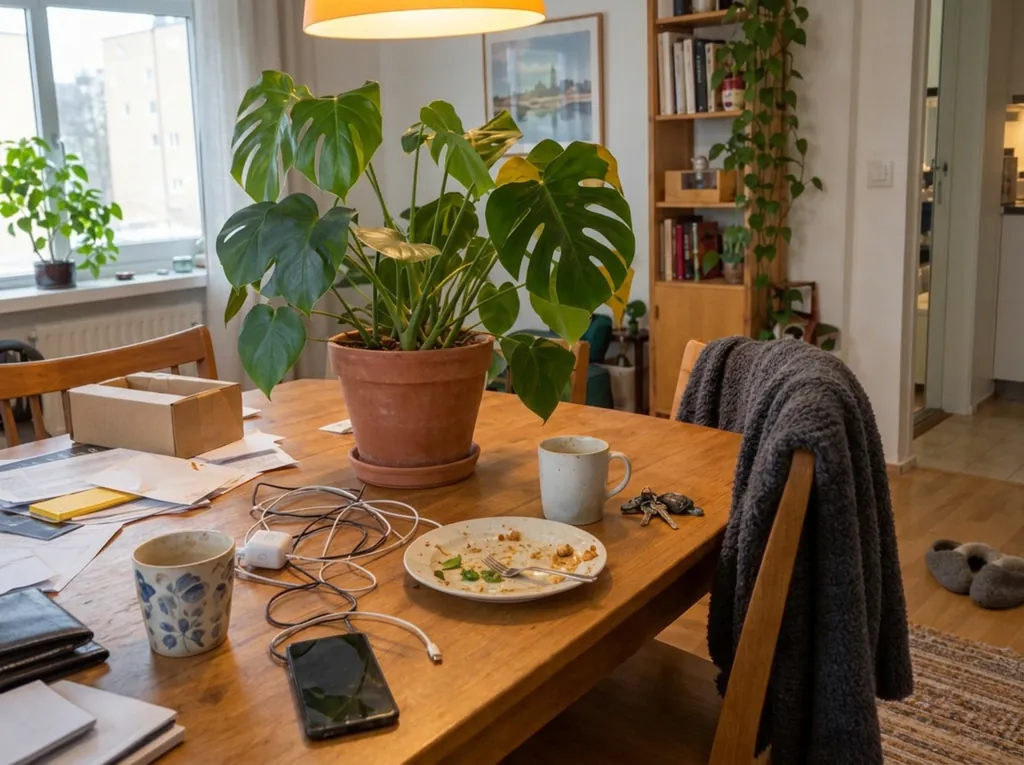
光の補正
“Fix the lighting and color of this photo: correct the yellow-orange cast to a neutral white balance, brighten the exposure so it looks like soft daylight, and make it slightly sharper. Do not add, remove or move any object; keep the room, the clutter, the framing and any date stamp exactly as they are. Keep the plant, every leaf, the pot and the camera angle exactly as they are in the reference photo; do not add, remove or redesign any leaves, and do not change the pot.”Nano Banana 2.1, 編集, 10クレジット, 入力画像はGPT Image 2.5で生成
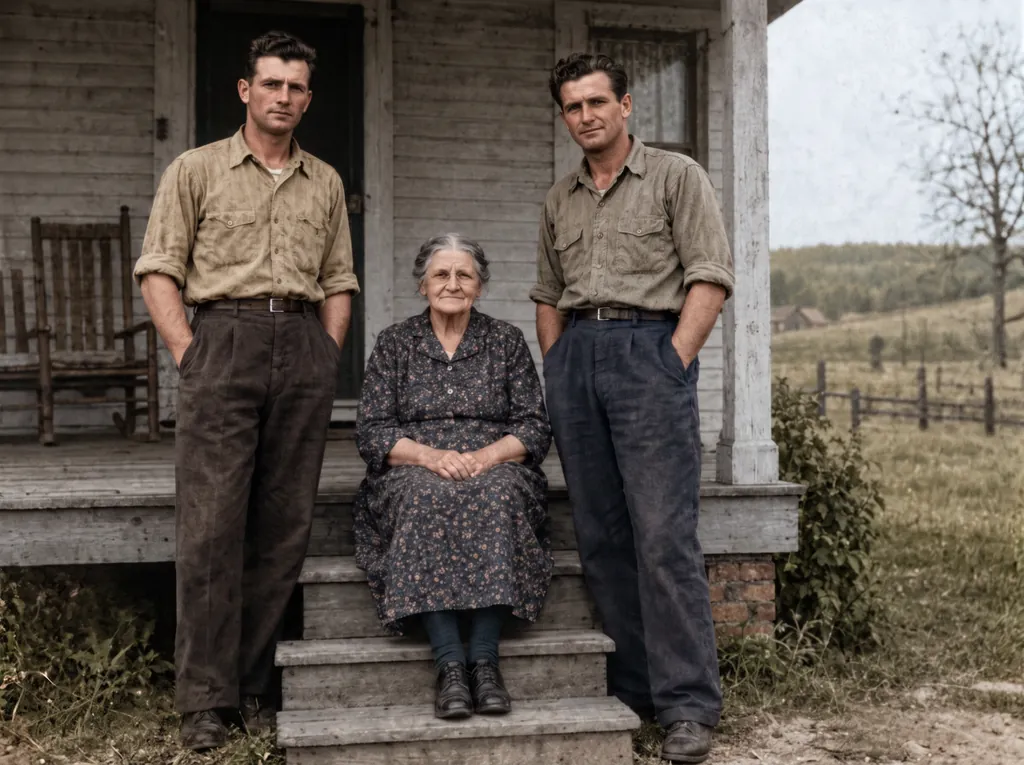
古い写真の修復とカラー化
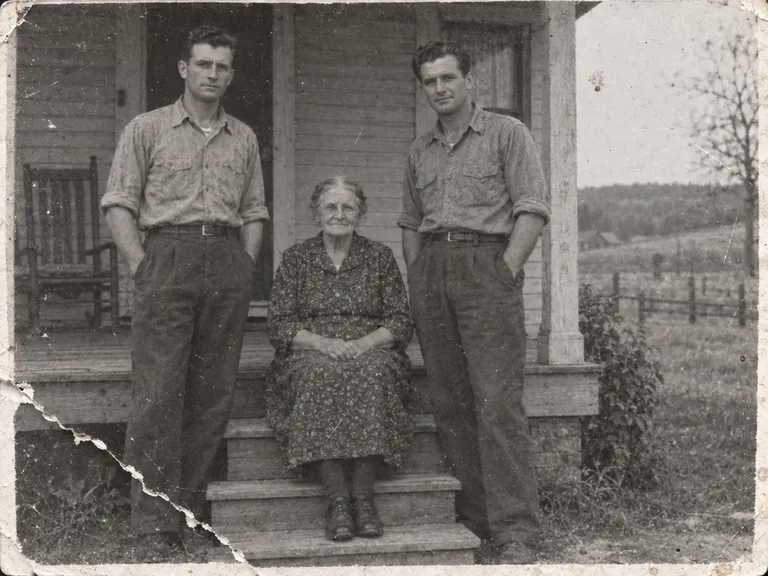
“Restore this damaged 1948 black-and-white family photograph while preserving the exact identities, ages, facial proportions, poses, clothing, porch architecture, framing, and historical period. Repair the lower-left tear, remove scratches and dust, recover balanced contrast and fine facial detail, and add restrained historically plausible natural color: weathered gray porch boards, muted cream and brown clothing, natural skin tones, and subdued green countryside. Do not beautify faces, change expressions, invent jewelry, alter clothing, add people, remove people, crop, modernize, add text, logo, or watermark. Keep subtle film grain so it remains an archival photograph rather than a modern digital portrait.”Nano Banana 2.1, 編集, 15クレジット, 入力画像はGPT Image 2.5で生成
古い写真の修復
“Restore the old photograph from the reference image. Show only the photo itself, filling the frame: no table, no paper border, no background around it. Remove all creases, folds, scratches, dust, stains and tears, rebuild any missing corner, and fix the faded and shifted colors. Colorize it with natural, realistic skin tones and period-appropriate clothing colors. Keep every person exactly as they are: same face, same features, same expression, same age, same hairstyle, same pose and same clothing. Do not beautify, slim, smooth or modernize anyone. Keep the original composition and framing. The result should look like a clean, well-preserved original photograph from the same era, not a modern photo.”Nano Banana 2.1, 編集, 10クレジット, 入力画像はGPT Image 2.5で生成
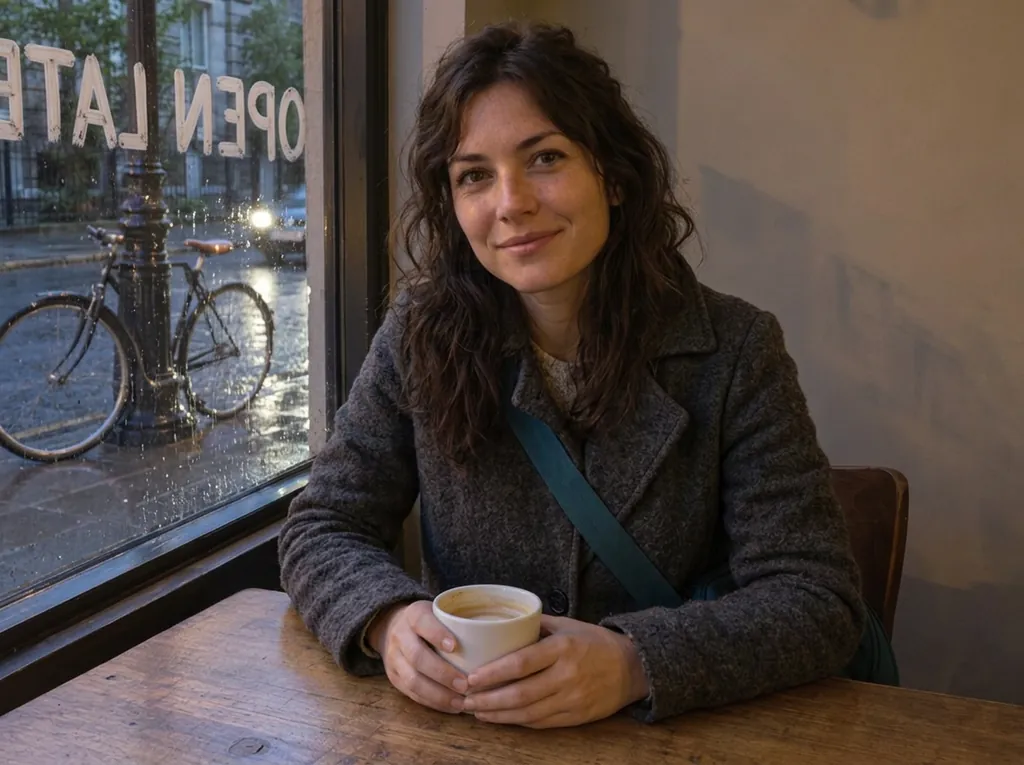
コート、雨、窓の文字を変更
“Change her yellow rain jacket to a charcoal-grey wool coat. Make it a rainy evening outside the window, with wet street reflections. Write the words OPEN LATE in white painted letters on the window glass. Keep her face, hair, pose, the coffee cup, the table and the bicycle exactly the same.”Nano Banana 2.1, 編集, 10クレジット, 入力画像はGPT Image 2.5で生成
ポートレートのレタッチ
“Retouch this photo professionally: even out skin tone, reduce blemishes, sharpen focus, and balance lighting and color. Do not change the person's face shape, features, proportions, hairstyle, or expression. Keep the result looking like a real, unedited photo of the same person.”Nano Banana 2.1, 編集, 10クレジット, 入力画像はGPT Image 2.5で生成
スタジオでの物撮り
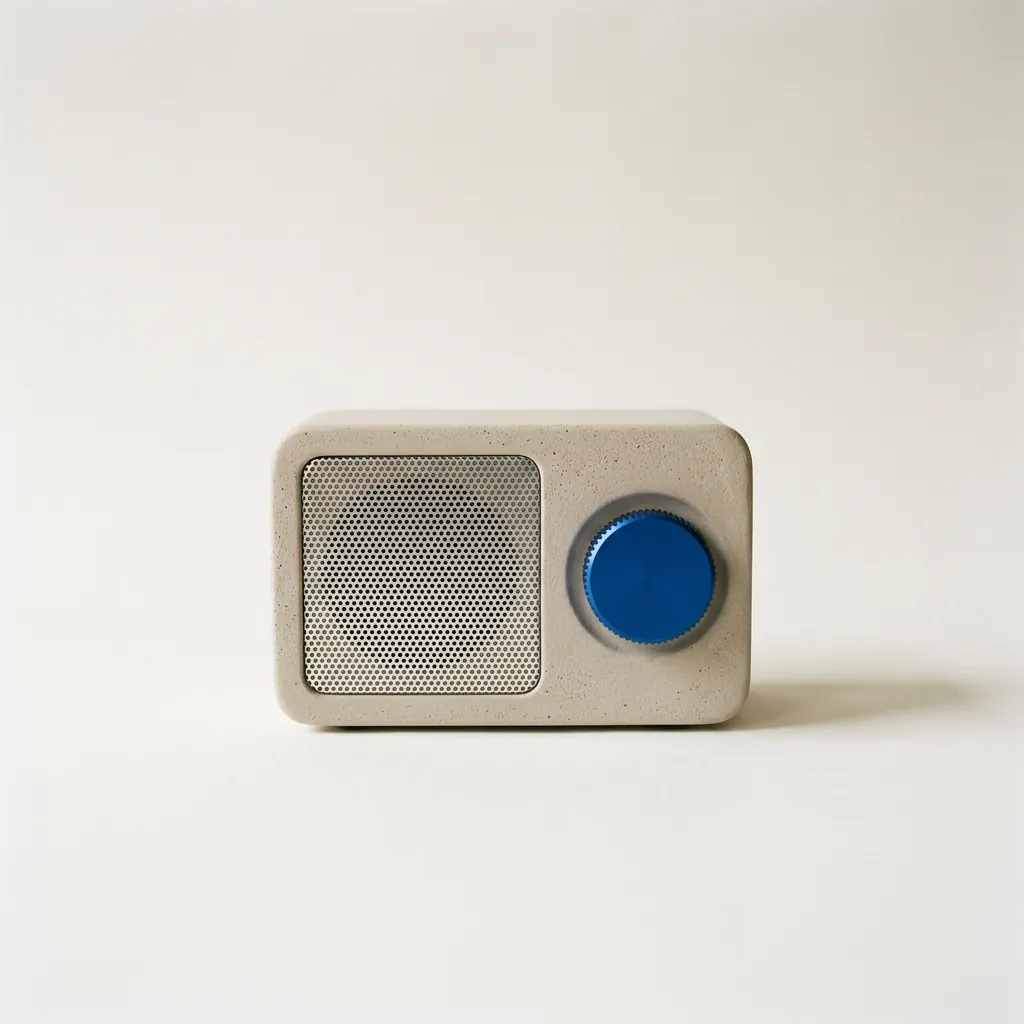
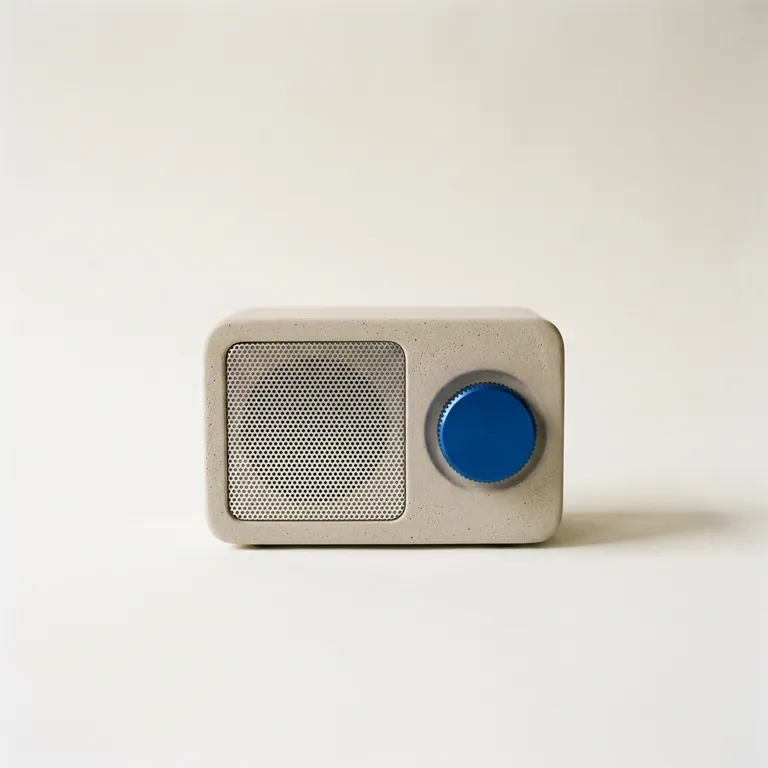
“A studio product photograph of a compact tabletop radio with a pale warm-grey plaster-textured body, a perforated aluminium speaker grille and a single cobalt-blue tuning dial, standing on seamless off-white paper. Soft north-window light from the left gives a gentle falloff and a short, soft shadow to the right. Shot straight-on at eye level on medium-format film, with the radio in the centre of a square frame and generous space around it. Sharp focus on the dial's knurled edge. No logos or text anywhere.”Nano Banana 2.1, 10クレジット

Nano Banana 2.1で作れるもの

それぞれに、最初に試す設定とプロンプト、かかるクレジットを載せています。そのまま使うことも、編集して使うこともできます。

指示文から作る商品画像

指示どおりの商品写真

Fuserの商品写真のプロンプトで、Nano Banana 2.1がGPT Image 2.5、Nano Banana 2、Proに勝った回のものです。私たちの生成でも指示はすべて守られました。別に置いたオークのボード、左からの光、右に落ちる影、広告のコピーを入れるために空けた右側3分の1。

  • テキストから画像
  • 2K
  • 3:2

“Studio product photograph of a matte sage-green ceramic pour-over coffee dripper sitting on a pale oak board. Soft window light from the left, a gentle shadow to the right, clean off-white background, with empty space on the right third of the frame for ad copy. Real photograph, no props.”

ヒント:セット、光の向き、余白の位置を書きます。書いたとおりに受け取ってくれます。

15クレジット
インフォグラフィックのポスター

文字が正確なポスターやインフォグラフィック

Atlas Cloudの26語のポスターで、2.1が勝った回のものです。私たちの生成でも、小さなフッターの行まで単語と数字がすべて正確で、余計なものも加わりませんでした。

  • テキストから画像
  • 2K
  • 2:3

“A clean A2 infographic poster pinned to a cork board in a bright office, photographed straight on. Headline at the top in bold black sans-serif: CITY BIKE REPORT 2026. Below it, three large statistics in a row, each with a short label underneath: 48% CYCLE TO WORK, 12 MIN AVERAGE TRIP, 310 KM OF NEW LANES. At the bottom a small gray footer line: Published by the Harbor Street Transit Office, October 2026. Flat navy and amber color blocks, one simple bicycle icon, generous white space, no other words anywhere on the poster. Photorealistic matte print texture, soft daylight.”

ヒント:小さな文字には2Kを使い、最後に「no other words anywhere」と書きます。

15クレジット
ドキュメンタリー風の写真

自然なドキュメンタリー風の写真

Atlas Cloudの検証のプロンプトどおり、2人の顔がどちらもくっきりし、肌の質感はリアルで、男性の手には粘土が付き、左の窓から光が入っています。そこでの評価はGPT Image 2.5と引き分けで、2.1のほうが構図が広めでした。

  • テキストから画像
  • 2K
  • 16:9

“Candid documentary photograph inside a small ceramics studio. A woman in her early thirties with freckles and curly dark hair laughs while handing a freshly glazed teal mug across a worktable to an older man with a short gray beard and clay-dusted hands. Both faces fully visible and in sharp focus, natural skin texture with visible pores and fine lines, no retouching. Late afternoon window light from the left, dust in the air, shelves of unglazed pots softly blurred behind them. Shot on a 50mm lens at f/2, warm film grain.”

15クレジット
映画のワンシーンのようなスチル

映画のワンシーンのような静止画

Google自身の2.1の例です。黄色の階段、ピンクの漆喰、緑のドレスが説明どおりに出て、強い日差しの中を下から撮っています。

  • テキストから画像
  • 2K
  • 16:9

“A 16:9 horizontal cinematic still, shot from street level looking up at the sharp diagonal steel exterior staircase of a two-story retro motel painted vibrant mustard-yellow against a flamingo-pink stucco facade. An adult woman in an emerald-green mini dress descends the staircase, her hand trailing along the yellow railing. The bright yellow, pink, and green color clash creates a delightful, sun-drenched cinematic mood.”

15クレジット
8:1のパノラマバナー

超横長のバナー(8:1)

reAPIの比較検証の8:1のパノラマを2Kで生成しました。端から端まで1つの港が続き、タイル状の繰り返しや継ぎ目はありません。GPT Image 2.5ではこの形は作れません。

  • テキストから画像
  • 2K
  • 8:1

“A panoramic banner of a Mediterranean coastal town at sunset, colorful houses along the harbor, film photography. No text.”

ヒント:4:1と8:1には2Kか4Kを使います。Googleは、この2つのサイズで超横長画像のタイル状の繰り返しを修正しました。

15クレジット
写真をすっきり整える元の画像編集後
入力画像はGPT Image 2.5で生成

写真を片付ける

BulkImagenの片付けのプロンプトで、彼らの6枚の写真すべてでうまくいったものです。私たちの写真でも、ケーブル、皿、紙はすべて消え、植物、鉢、ランプはそのままです。ただし2つミスがあり、ラグまで消え、マグカップがあった場所にうっすら暗い跡が残りました。

  • 画像を編集
  • 1K
  • 4:3

“Clean up this photo: remove the loose clutter around the plant (cables, mugs, dishes, food, papers, envelopes, boxes, clothes, laundry rack, vacuum, cleaning bottles, keys, slippers, toys, tissues) and fill the gaps naturally with the same surface, floor and wall. Keep the furniture, the room, the lighting and any date stamp as they are. Keep the plant, every leaf, the pot and the camera angle exactly as they are in the reference photo; do not add, remove or redesign any leaves, and do not change the pot.”

ヒント:消すものだけでなく、残すもの(ラグ、椅子)も書いてください。

10クレジット
光の補正元の画像編集後
入力画像はGPT Image 2.5で生成

光と色を直す

同じ写真で光だけを変えました。オレンジの色かぶりが消えて明るくなり、散らかった物はそのままです。ただ、プロンプトで頼んでいないのに、窓の外の夜が昼になりました。

  • 画像を編集
  • 1K
  • 4:3

“Fix the lighting and color of this photo: correct the yellow-orange cast to a neutral white balance, brighten the exposure so it looks like soft daylight, and make it slightly sharper. Do not add, remove or move any object; keep the room, the clutter, the framing and any date stamp exactly as they are. Keep the plant, every leaf, the pot and the camera angle exactly as they are in the reference photo; do not add, remove or redesign any leaves, and do not change the pot.”

10クレジット
古い写真の修復とカラー化元の画像編集後
入力画像はGPT Image 2.5で生成

古い写真を復元・カラー化する

WeShopの復元のプロンプトで、この用途について公開されている唯一の2.1の検証です。破れは消え、色は落ち着いた時代らしいもので、3人の顔、ポーズ、服は元の写真と一致しています。

  • 画像を編集
  • 2K
  • 4:3

“Restore this damaged 1948 black-and-white family photograph while preserving the exact identities, ages, facial proportions, poses, clothing, porch architecture, framing, and historical period. Repair the lower-left tear, remove scratches and dust, recover balanced contrast and fine facial detail, and add restrained historically plausible natural color: weathered gray porch boards, muted cream and brown clothing, natural skin tones, and subdued green countryside. Do not beautify faces, change expressions, invent jewelry, alter clothing, add people, remove people, crop, modernize, add text, logo, or watermark. Keep subtle film grain so it remains an archival photograph rather than a modern digital portrait.”

ヒント:元の写真のスキャンは残しておきましょう。復元は古いファイルの修理ではなく、新しい画像です。

15クレジット
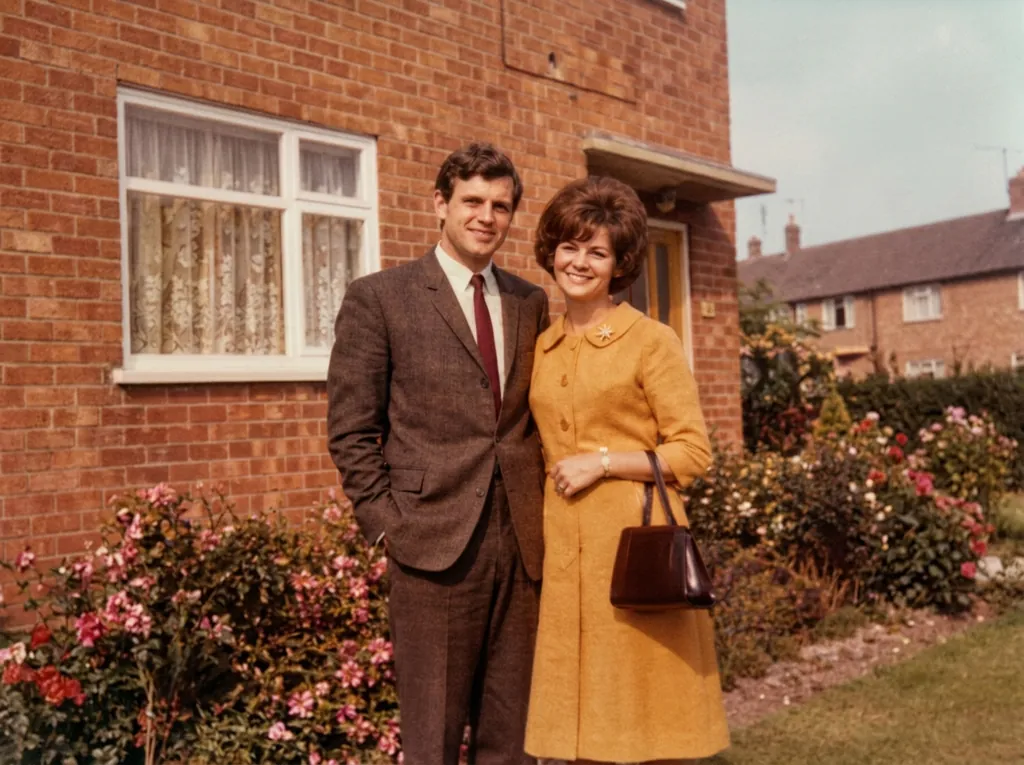
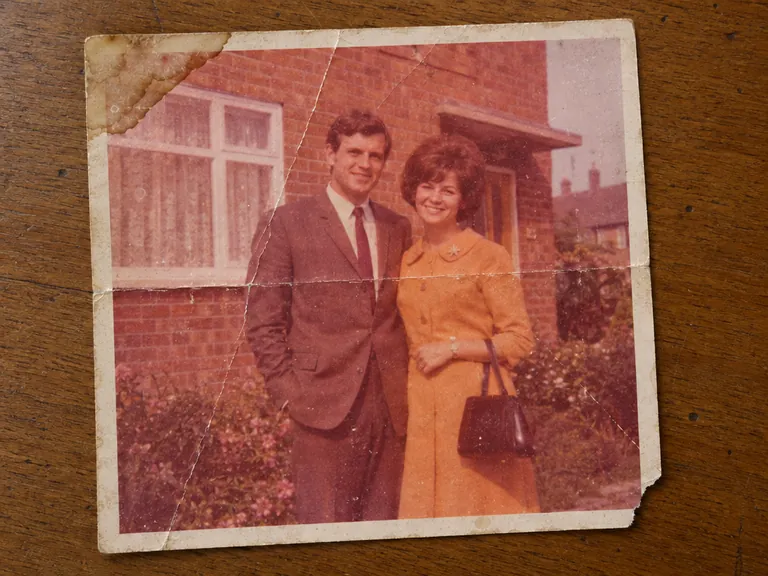
古い写真の修復
入力画像はGPT Image 2.5で生成

色あせたカラー写真を復元する

BulkImagenの検証にある古い写真のプロンプトを、同じプリントで両方のモデルに使いました。Nano Banana 2.1は構図、顔、茶色のスーツを保ちましたが、GPT Image 2.5はトリミングし、顔をより強く描き直し、スーツをグレーにしました。

  • 画像を編集
  • 1K
  • 4:3

“Restore the old photograph from the reference image. Show only the photo itself, filling the frame: no table, no paper border, no background around it. Remove all creases, folds, scratches, dust, stains and tears, rebuild any missing corner, and fix the faded and shifted colors. Colorize it with natural, realistic skin tones and period-appropriate clothing colors. Keep every person exactly as they are: same face, same features, same expression, same age, same hairstyle, same pose and same clothing. Do not beautify, slim, smooth or modernize anyone. Keep the original composition and framing. The result should look like a clean, well-preserved original photograph from the same era, not a modern photo.”

10クレジット
商品にロゴを入れる
入力画像はNano Banana 2.1で生成

商品にロゴを入れる

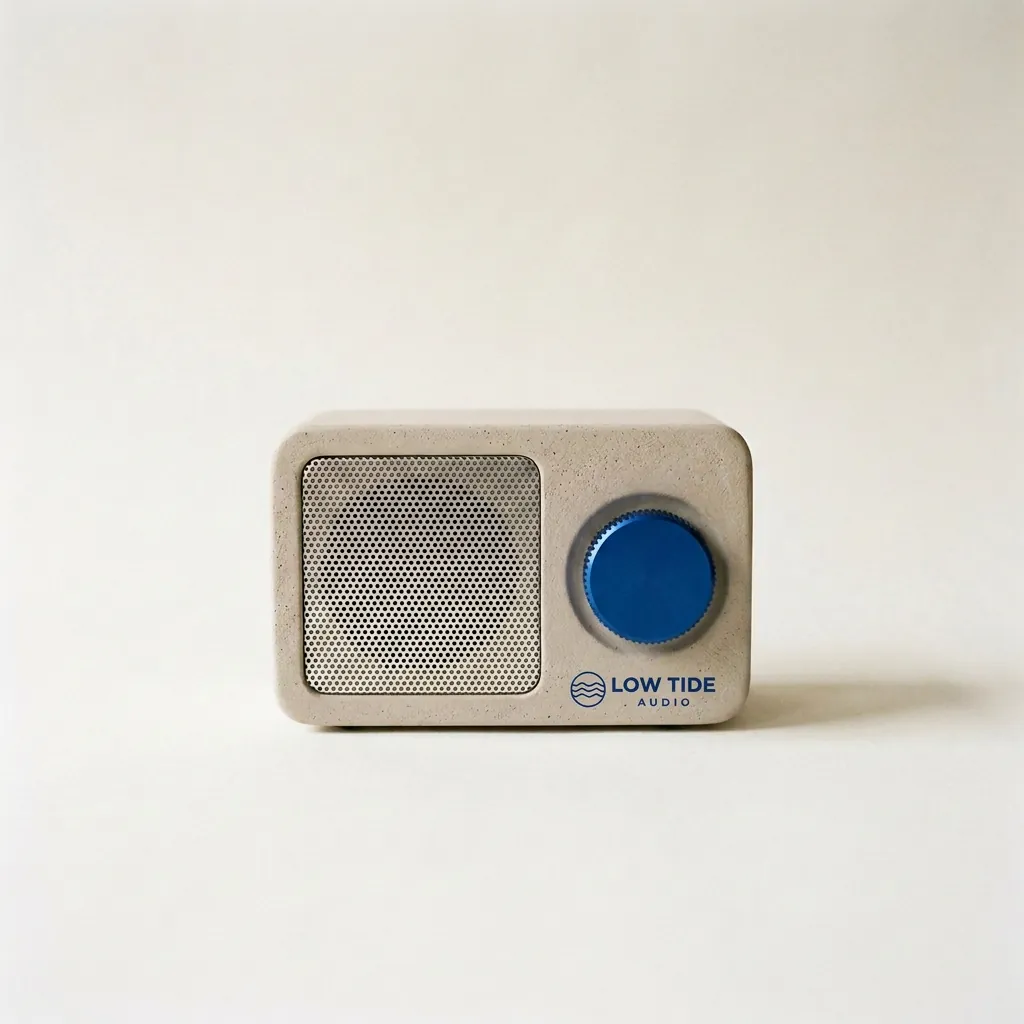
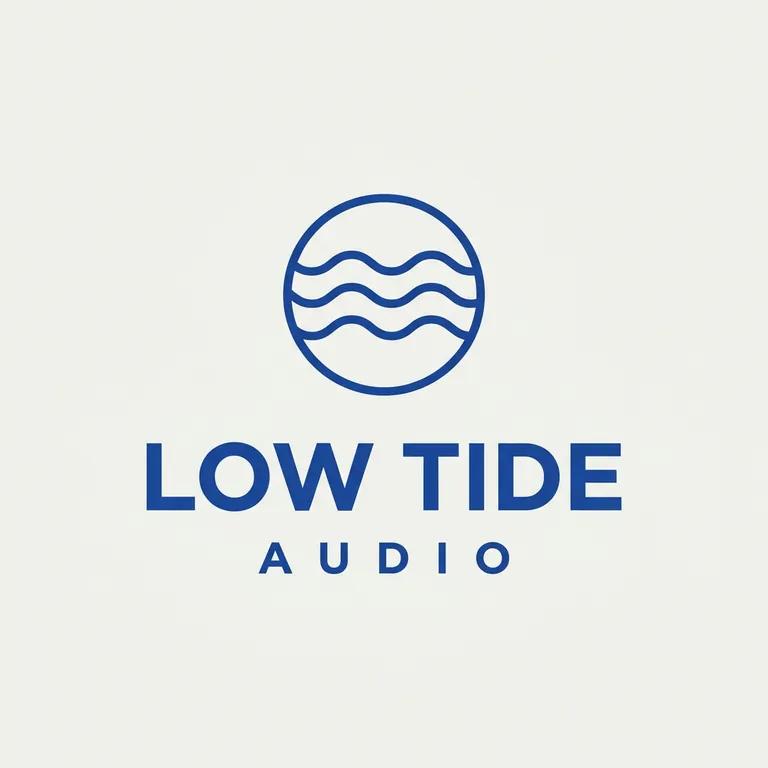
Fuserの3ステップの最後です。ラジオとロゴをどちらも2.1で作り、それを組み合わせました。ロゴはダイヤルの下に小さな印刷として入り、ラジオ、背景、影は動いていません。

  • 画像を編集
  • 1K
  • 1:1

“Take the radio from the first image. Print the LOW TIDE AUDIO logo from the second image onto the radio's front panel, below the cobalt dial, as a small, crisp cobalt-blue screen print that sits flat on the plaster texture. Keep the radio's shape, the cobalt dial, the speaker grille, the paper backdrop, the window light and the shadow exactly the same.”

ヒント:先に商品、次にロゴの順でアップロードし、ロゴの位置を書きます。

10クレジット

Nano Banana 2.1の得意なこと・苦手なこと

得意なこと

  • 指示で編集できます。変えるものと残すものを書くだけです。私たちの検証では、散らかったテーブルを片付け、色かぶりを直し、古い写真2枚を復元しても、顔と構図はそのままでした。
  • 複数の画像で同じキャラクターや商品を保つ力が向上しました。Google自身の比較評価では、複数のキャラクターの一貫性で、Nano Banana 2をもっとも大きく上回りました。
  • 印刷や大きな画面に使える最大4Kの出力と、4:1や8:1の超横長のバナーに対応します。Googleによると、2Kと4Kでの超横長画像の問題は修正済みです。
  • 1回の編集で複数の写真を組み合わせられます。1枚目の人物、2枚目のジャケット、3枚目の部屋、といった使い方です。

苦手なこと

  • 1Kでは小さな文字がぼやけることがあり、長い文章も安定しません。Googleもどちらも既知の制限としています。小さな文字には2Kか4Kを使い、校正してください。
  • 顔が元の写真とまったく同じになるとは限らず、新しいポーズを指示しても元のポーズのままになることがあります(Googleのモデルカード)。
  • 頼んでいない言葉を加えることがあり、写真の背景の看板はでたらめな文字になりがちです。「use only the text given above」と書いてください。
  • 編集はピクセルを固定するのではなく描き直しです。写真がトリミングし直されたり、場面の配置が変わったりすることがあり、正確な数も守られないことがあります。
  • 左右を取り違えることがあります。位置は平易な言葉で書き、結果を確認してください。
  • 編集する範囲に印を付けると、その印が画像に残ることがあります。消すよう指示してください。
  • 物を加えたり消したりすると、不自然になることがあります。私たちの編集では、花を消したあとも手が花を握る形のまま残り、加えた犬はベンチの上に実物より大きく立っていました。こうした編集では、私たちの比較検証でGPT Image 2.5のほうが良い結果でした。
  • 私たちが生成した例では、水の循環の図解に「Condensation」という段階が2つ入り、カフェの窓の「OPEN LATE」が、通りから見たように左右反転して書かれました。
  • すべての画像に、Googleの目に見えないSynthIDの透かしが入ります。

設定の解説

各オプションで何が変わり、料金がどう変わるか。

モード

生成は、文章から新しい画像を作ります。編集は、アップロードした写真を変えます。1枚を変えることも、複数枚を組み合わせることもできます。

料金は同じ:10クレジット(1K)

品質

1Kはアイデアを試すときや、ほとんどのSNS投稿向けです。小さな文字が入るとき(Googleによると1Kではぼやけることがあります)や、印刷・大きな画面で使うときは、2Kか4Kを使ってください。

1K: 10 · 2K: 15 · 4K: 30 クレジット(1枚)

アスペクト比

1:1はフィード投稿や商品画像、3:4や2:3はポスター、16:9はバナーやサムネイル、9:16はストーリーズ、21:9は横長のヘッダー、4:1と8:1はWebサイトのバナーやパノラマ向けです。Googleは超横長画像のタイル状の繰り返しを2Kと4Kで修正したので、4:1と8:1ではそのどちらかを使ってください。編集では、写真と同じ形を選ぶと構図が保たれます。

1:1, 16:9, 9:16, 4:3, 3:4, 3:2, 2:3, 21:9, 4:1, 8:1 · 料金は変わりません

1回の枚数

1回のリクエストで最大4枚です。Googleによると、プロンプトで頼んだ枚数どおりに返らないことがあるので、枚数はここで設定してください。編集では、1枚ごとにアップロードした写真の分も改めて加算され、合計は生成ボタンに表示されます。

1回に1〜4枚・1枚ごとの料金

Nano Banana 2.1のスペック

2026年10月27日更新

開発元Google
リリース日2026-10-06
種類画像
モードテキストから画像, 画像を編集
品質1K, 2K, 4K
1回の枚数4
アスペクト比1:1, 16:9, 9:16, 4:3, 3:4, 3:2, 2:3, 21:9, 4:1, 8:1
商用利用可(利用規約の範囲内)
失敗した生成クレジットは自動で戻ります
最低料金10 ($0.10)

Nano Banana 2.1の1回あたりの料金

クレジットは生成を開始したときにだけ消費され、失敗した場合は戻ります。いちばん安い設定は10クレジットです。

品質クレジット標準価格$199.99のパックの場合
1K10$0.10$0.09
2K15$0.15$0.14
4K30$0.30$0.27

$199.99なら$0.09で生成できます。

プロンプトのコツ

Googleの画像生成ガイドと、Nano Banana 2.1のモデルカードから:

  • 具体的に書く。 「fantasy armor」ではなく、素材、模様、形を説明します。画像の用途も書きます。「a logo」より「a logo for a high-end, minimalist skincare brand」のほうが狙いどおりになります。
  • してほしくないことではなく、してほしいことを書く。 「no cars」より「An empty, deserted street with no signs of traffic」のほうがうまくいきます。
  • 構図はカメラの言葉で指定する: wide-angle shot、macro shot、low-angle perspective。
  • 込み入ったシーンは段階に分ける: まず背景、次に手前、最後に細部。
  • 編集では、変えないものを書き、 複数の写真はアップロードした順番で指定します。
  • 作り直すのではなく、続けて編集して仕上げる: 「Keep everything the same, but change the character’s expression to be more serious.」

うまくいかないとき

Nano Banana 2.1でよくある問題と、その原因、変えるべきところ。

小さな文字がぼやける、つづりが違う

原因: Googleは、1Kでの小さな文字、長い文章、ページ全体の文章をモデルの制限に挙げています。

対処: 2Kか4Kを使い、文字は短くし、正確な言葉を引用符で囲みます。Googleは、先に文章を書いてから、その文章を使った画像を頼む方法を勧めています。

顔が写真と少し違う

原因: Googleのモデルカードによると、入力と結果の間のキャラクターの一貫性は「常に完璧ではない」とされています。

対処: 残すもの(顔、顔立ち、髪型、表情)を書き、1回の編集で変えるのは1つにし、次の編集は編集後の画像ではなく元の写真から始めてください。

ポーズが変わらない

原因: 編集では、モデルがポーズを含めて入力写真の構造を保つことがあります。

対処: 新しいポーズを具体的に書くか、欲しいポーズの写真を2枚目の参考画像として加えてください。

左右が入れ替わっている

原因: Googleによると、まれに左右を取り違えることがあります。

対処: 位置は平易な言葉で書き(「in the bottom-right corner」「on her left hand」)、使う前に結果を確認してください。

付けた印が画像に残っている

原因: 変えたい範囲を丸で囲んだり塗ったりすると、その線が残ることがあります(Googleのモデルカード)。

対処: プロンプトに「edit only inside the marked area and remove the mark」と書いてください。

余計な言葉やロゴが入った

原因: BulkImagenの検証では、文字入りの画像3枚のうち2枚に行が加わり、MeltFlexの検証では、参考写真のデザイナーのロゴを29枚中5枚にコピーしました。

対処: プロンプトの最後に「Use only the text given above. Do not add any other words.」と書きます。参考写真は、ロゴやサインの入っていないものを使ってください。

編集で写真がトリミングし直された

原因: CellCogの検証では、どの変更も正しく行われたものの、すべての写真がよりきつくトリミングされました。

対処: 写真と同じアスペクト比を選び、「keep the framing and the camera angle」と書くか、構図を絶対に動かしたくないならGPT Image 2.5を使ってください。

リクエストが拒否された

原因: Googleはプロンプトとアップロードした画像をチェックしています。

対処: クレジットは消費されず、戻ってきます。プロンプトを言い換えるか、特定できる実在の人物が写っていない写真を使ってください。

Nano Banana 2.1とNano Banana 2の比較

Googleは2026年10月6日に、Nano Banana 2のアップデートとしてNano Banana 2.1をリリースし、同じ日にNano Banana 2を非推奨にしました。Googleによると、Flashモデルの速さを保ちながら、Nano Banana 2から次の点が改善されています。

  • 1K・2K・4Kでの画質とリアルさの向上。
  • プロンプトへのより忠実な追従と、文字・インフォグラフィックのレイアウトの改善。
  • 編集を重ねてもキャラクターの一貫性が高く、1回のリクエストで最大4人のキャラクターと10個の物に対応。
  • 印を付けた範囲の編集(写真に描き込んでから、変更内容を書く)。
  • 2Kと4Kでの超横長・超縦長画像のタイル状の繰り返しを修正。
  • 初期設定で、描く前に少し多く推論します。Nano Banana 2にあった小さな0.5Kのサイズはなくなりました。

出典: Google:Gemini APIの変更履歴(2026年10月6日), Google:Nano Banana 2.1のモデルページ, Google DeepMind:Nano Banana 2.1のモデルカード, Google:画像生成ガイド · 2026-10-27確認

Nano Banana 2.1とほかのモデルの比較

Nano Banana 2.1GPT Image 2.5Seedance 2.5
開発元GoogleOpenAIByteDance
リリース日2026-10-06——
種類画像画像動画
モードテキストから画像, 画像を編集テキストから画像, 画像を編集テキストから動画, 画像から動画, 参照画像から動画
動画の長さ——4–15s
解像度——480p, 720p, 1080p
音声音声なし音声なしオン・オフを選択可
品質1K, 2K, 4K低, 中, 高, 超高, 最高—
1回の枚数441
アスペクト比1:1, 16:9, 9:16, 4:3, 3:4, 3:2, 2:3, 21:9, 4:1, 8:11:1, 4:3, 3:4, 16:9, 9:1616:9, 9:16, 1:1, 4:3, 3:4, 21:9
バージョン—GPT Image 2.5 Flare, GPT Image 2.5 Sunburst—
商用利用可(利用規約の範囲内)可(利用規約の範囲内)可(利用規約の範囲内)
失敗した生成クレジットは自動で戻りますクレジットは自動で戻りますクレジットは自動で戻ります
最低料金10 ($0.10)5 ($0.05)115 ($1.15)

Nano Banana 2.1の使い方

  1. 1
    モードを選ぶ

    テキストから生成するか、画像をアップロードして編集します。

  2. 2
    プロンプトを書く

    作りたい画像や編集の内容を書きます。品質や枚数を変えると、料金もその場で更新されます。

  3. 3
    生成してダウンロード

    生成結果はワークスペースに届き、そのままダウンロードできます。生成に失敗した場合はクレジットが戻ります。

よくある質問

Nano Banana 2.1の料金はいくらですか?

zzo.aiのNano Banana 2.1は、1K品質の画像1枚で10クレジット($0.10)です。サブスクはなく、一度購入したクレジット(生成に使う残高)に有効期限はありません。品質によって、画像1枚は10から30クレジット(標準レートで$0.10から$0.30)です。枚数や参照画像を増やすとその分が加算され、合計は生成前にボタンに表示されます。$199.99なら$0.09で生成できます。失敗した生成のクレジットは自動で戻ります。

Nano Banana 2.1を使うのにサブスクは必要ですか?

必要ありません。zzo.aiにはサブスクがありません。クレジットパックを一度購入すれば、Nano Banana 2.1にもほかのモデルにも使えます。クレジットに有効期限はありません。

Nano Banana 2.1では何ができますか?

Nano Banana 2.1では、新しい画像の生成と、アップロードした画像の編集ができます。1回のリクエストで最大4枚、アスペクト比は1:1, 16:9, 9:16, 4:3, 3:4, 3:2, 2:3, 21:9, 4:1, 8:1から選べます。

Nano Banana 2.1はAPIやClaudeから使えますか?

使えます。設定でAPIキーを作成すると、zzo.aiのMCPサーバーを通じて、Claude、Cursor、ご自身のコードからNano Banana 2.1を使えます。サイトと同じ残高から、同じ料金で消費されます。

ナノバナナ(Nano Banana 2.1)とは?

Nano Banana 2.1(gemini-nano-banana-2.1)は、Googleの画像生成・編集モデルです。2026年10月6日にNano Banana 2のアップデートとしてリリースされ、初日から一般提供されています。Gemini 3.6 Flashをもとに作られています。Geminiアプリでは有料のGoogle AIプランで使えます。zzo.aiはGoogleの公式サイトではありません。サブスクなしで1枚ごとに使える独立したサイトです。

Nano Banana 2.1はどこの会社のAI?

Nano Banana 2.1は、米国のGoogleが開発しています。zzo.aiは複数の画像・動画生成AIを同じクレジット(生成に使う残高)で使える独立したサイトで、Googleとは別の運営です。生成のため、プロンプトとアップロードした画像はモデルを動かす提供元に送られ、そこからモデルの開発元に渡されます。そのデータの扱いは各社の規約とプライバシーポリシーに従います。また、利用ポリシーに沿った内容かを確認するため、OpenAIのモデレーションAPIにも送られます。詳しくはプライバシーポリシーをご覧ください。

Nano Banana 2からの変更点は?

Googleは、画質とリアルさの向上、プロンプトへのより忠実な追従、文字とインフォグラフィックのレイアウトの改善、編集を重ねたときのキャラクターの一貫性、2Kと4Kでの超横長画像のタイル状の繰り返しの修正を挙げています。Google自身の比較評価では、すべての項目で2.1がNano Banana 2より好まれ、特に複数キャラクターの一貫性と、印を付けた範囲の編集で差が大きくなりました。これはGoogle自身の評価で、独立した検証ではありません。

Nano Banana 2はまだ使えますか?

Googleは2.1の公開当日にNano Banana 2を非推奨とし、新しい用途にはすべて2.1を勧めていますが、2026年10月27日時点で終了日は発表していません。zzo.aiでは現在、Nano Banana 2の代わりにNano Banana 2.1を提供しており、Nano Banana 2へのリンクはこのページに移動します。

Nano Banana 2.1はNano Banana Proより優れていますか?

Google自身の比較評価(2026年10月)では、思考モードありのNano Banana 2.1が、すべての項目でNano Banana Proを上回りました。たとえばテキストから画像の総合的な好みでは、1050対935です。これはGoogle自身の評価で、独立した検証ではありません。zzo.aiではNano Banana Proは提供していません。

Nano Banana 2.1とGPT Image 2.5、どちらを使えばいい?

ほとんどの写真の編集と背景透過の切り抜きにはGPT Image 2.5、4Kの出力、超横長のバナー、古い写真の復元にはNano Banana 2.1が向いています。私たちの14件の同一プロンプト検証では、編集4件でGPT Image 2.5が、復元2件でNano Banana 2.1が上回り、残りは引き分けでした。CellCogの24プロンプトの検証(2026年10月25日)では、GPT Image 2.5の9勝5敗、引き分け10でした。どちらもzzo.aiで使えるので、同じプロンプトで両方試せます。

日本語のプロンプトや、画像内の日本語の文字は使えますか?

Googleの画像生成ガイドでは、性能を発揮しやすい言語の一覧に日本語(ja-JP)が含まれています。一方、画像の中に入れる日本語の文字がどれだけ正確に出るかは、Googleの資料でも私たちが調べた検証でも確認できておらず、zzo.aiでも検証していません。Googleは1Kでの小さな文字や長い文章を既知の制限に挙げているので、入れる文字は短くして引用符で囲み、2K以上で生成し、使う前に必ず確認してください。

Geminiの画像生成の回数制限を気にせず使えますか?

zzo.aiのNano Banana 2.1は、GeminiアプリやGoogle AIプランとは別のサービスです。Googleのアカウントやプランは使わず、1枚ごとにクレジットを消費して生成します。月額料金はなく、必要なときに必要な分だけクレジットを購入できます。

Nano Banana 2.1で4Kの画像は作れますか?

はい。1K・2K・4Kで出力でき、4Kは正方形で4096×4096ピクセルです。Nano Banana 2にあった512ピクセルの小さいサイズはなくなりました。

Nano Banana 2.1で背景透過の画像は作れますか?

いいえ。GoogleはNano Banana 2.1で透過の出力を提供していないため、背景は必ず塗りつぶされます。透過PNGが必要なら、「背景透過」をオンにしてGPT Image 2.5を使ってください。

Nano Banana 2.1で顔が変わる、プロンプトの一部が無視されるのはなぜ?

Googleのモデルカードは、これらを既知の制限としています。キャラクターの一貫性は「常に完璧ではない」こと、左右を取り違えることがあること、印を付けた範囲の編集は指示に一部しか従わないことです。必須の要素を先に書き、正確に入れたい文字は短くし、1回の編集で変えるのは1つにして、元の写真から始め直してください。失敗した生成のクレジットは自動で戻りますが、気に入らなかった結果は対象外です。

自分の写真をNano Banana 2.1で編集できますか?

はい。「編集」に切り替えて写真をアップロードし(組み合わせるなら最大4枚)、変更内容と、変えてはいけないものを書きます。アップロードした写真の分も含めた料金が、始める前に生成ボタンに表示されます。

料金は日本円でいくらですか?

料金は米ドル建てで、このページの料金表と生成ボタンに表示されます。日本円での請求額は、お使いのカード会社の為替レートによって決まります。税は決済画面で別途計算され、支払い前に表示されます。

Nano Banana 2.1で作った画像は商用利用できますか?

はい。zzo.aiで生成した画像は、商用を含めてご自身で利用できます。ただし、内容が利用規約や第三者の権利を侵害しないこと、アップロードする写真について必要な権利をお持ちであることが条件です。

Nano Banana 2.1の画像にウォーターマーク(透かし)は入りますか?

zzo.aiでは目に見えるウォーターマークは入りません。Googleはすべての画像に目に見えないSynthIDの透かしを埋め込んでおり、一部のプラットフォームはそれを検出できます。Geminiアプリの画像で見かける目に見えるマークは、そのアプリだけが付けているものです。

Nano Banana 2.1のリクエストが拒否されたのはなぜ?

Googleの安全フィルターは、性的な内容や実在の人物を欺くような編集など、一部のプロンプトと画像をブロックします。リクエストが拒否された場合、クレジットは自動で戻ります。たいていはプロンプトを言い換えるか、別の写真を使えば生成できます。

ほかのモデル