2026年10月27日更新

Nano Banana 2.1 vs GPT Image 2.5:どっちを使う?

Nano Banana 2.1(ナノバナナ)はGoogleのGeminiの画像生成モデル、GPT Image 2.5はChatGPTの画像生成と同じ世代のOpenAIのモデルです。写真の編集ならGPT Image 2.5。同じ写真での10件の編集では、GPT Image 2.5が4件、Nano Banana 2.1が2件で上回り、4件は引き分けでした。例外は古い写真の修復で、Nano Banana 2.1は2回とも顔と構図を保ちました。プロンプトからの生成は、同じ料金での8件のテストでほぼ互角でした(GPT Image 2.5の1勝は、ポスターに余計な文字を足さなかった分)。そのため出力の形式で選ぶのがおすすめです。4Kや横長のバナーならNano Banana 2.1、背景透過の切り抜きならGPT Image 2.5です。

zzo.aiのNano Banana 2.1は、1K品質の画像1枚で10クレジット($0.10)です。zzo.aiのGPT Image 2.5は、高品質の画像1枚で15クレジット($0.15)です。
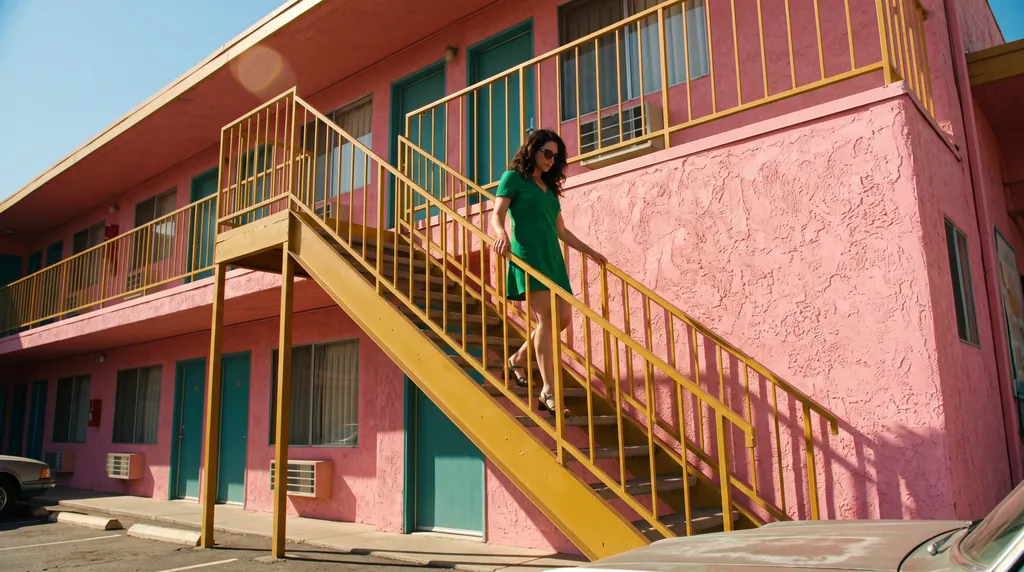
映画のワンシーンのようなスチル
Nano Banana 2.1
Google
10クレジット · $0.10 · 1Kで1枚あたり
100枚:1,000クレジット、$199.99なら$9.09
Nano Banana 2.1を試す
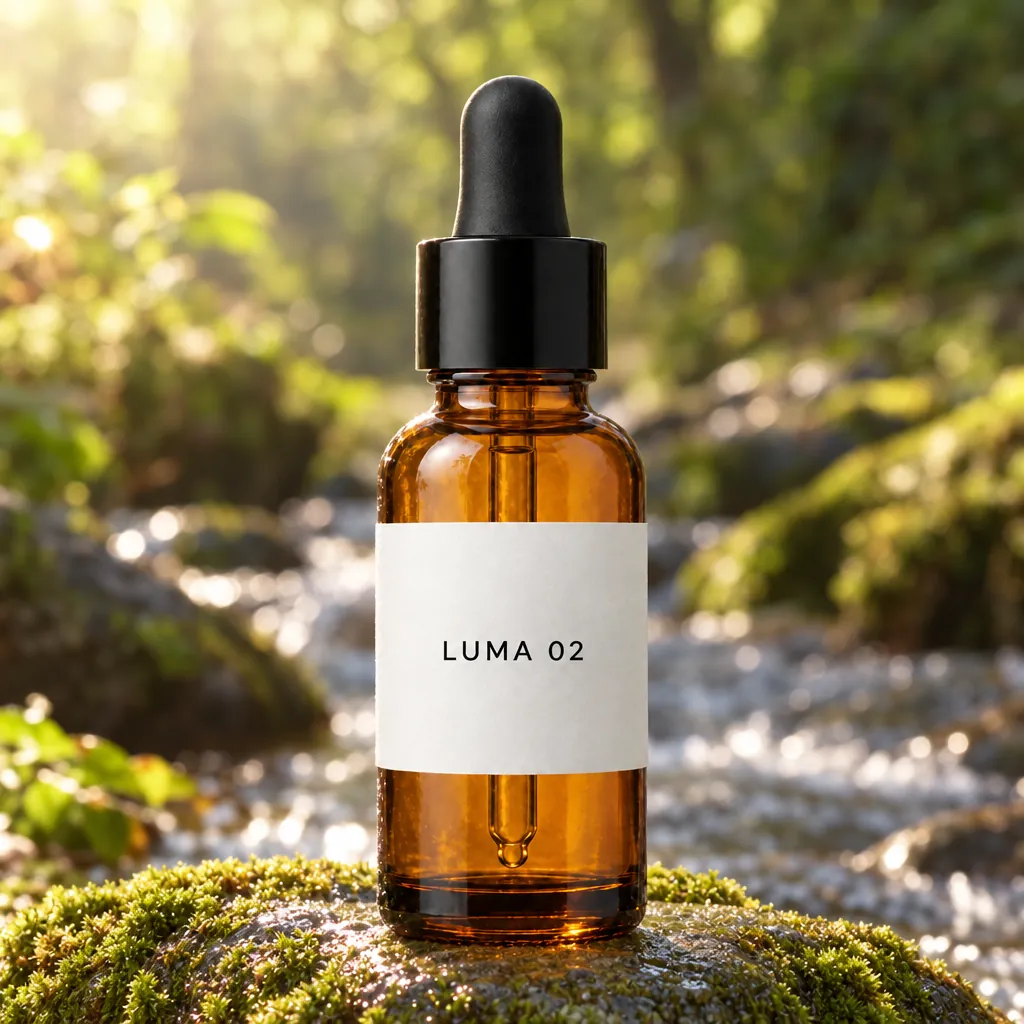
同じボトルを別の場所に
GPT Image 2.5
OpenAI
15クレジット · $0.15 · 高で1枚あたり
100枚:1,500クレジット、$199.99なら$13.64
GPT Image 2.5を試す

同じプロンプトで両方のモデルを比較

どれもzzo.aiで実際に生成しました。同じプロンプト(編集の場合は同じ写真)を使い、サイトの設定のまま各モデル1回ずつです。よい結果を選ぶための生成し直しはしていません。

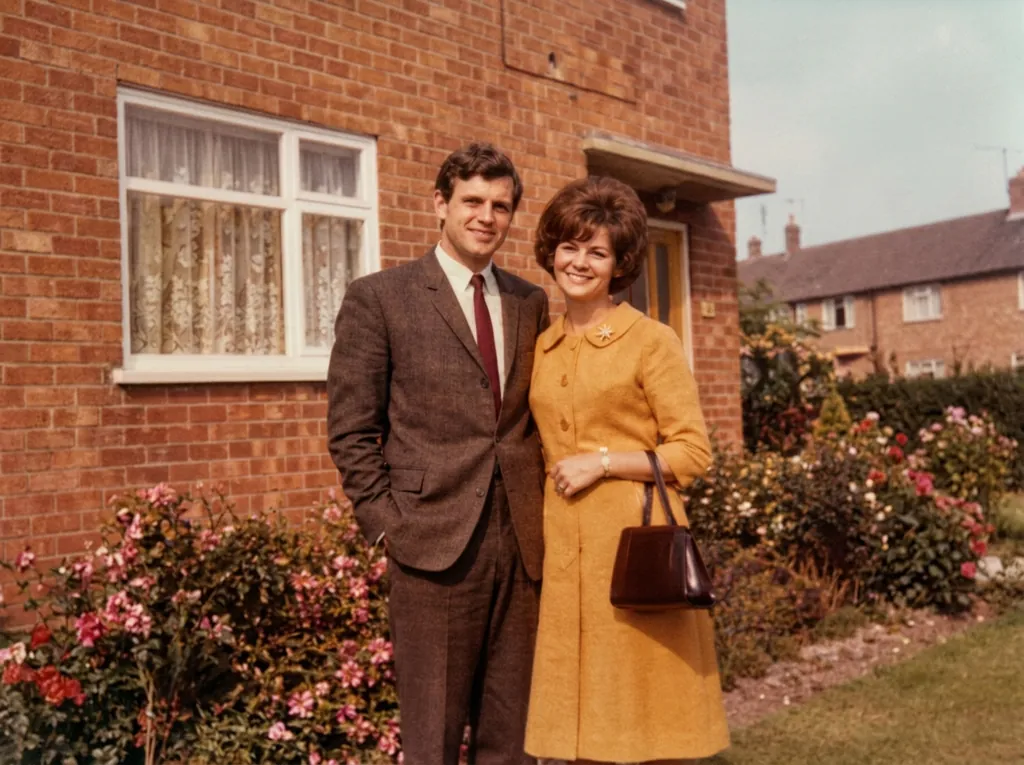
色あせたカラー写真の修復:Nano Banana 2.1

Nano Banana 2.1は構図全体、2人の顔、茶色のスーツを保ったまま、指示どおりテーブルと縁を消しました。GPT Image 2.5も両方を消しましたが、プロンプトで服・顔・構図を保つよう指示しているのに、画面を切り詰め、顔を描き直し、スーツをグレーに変えました。
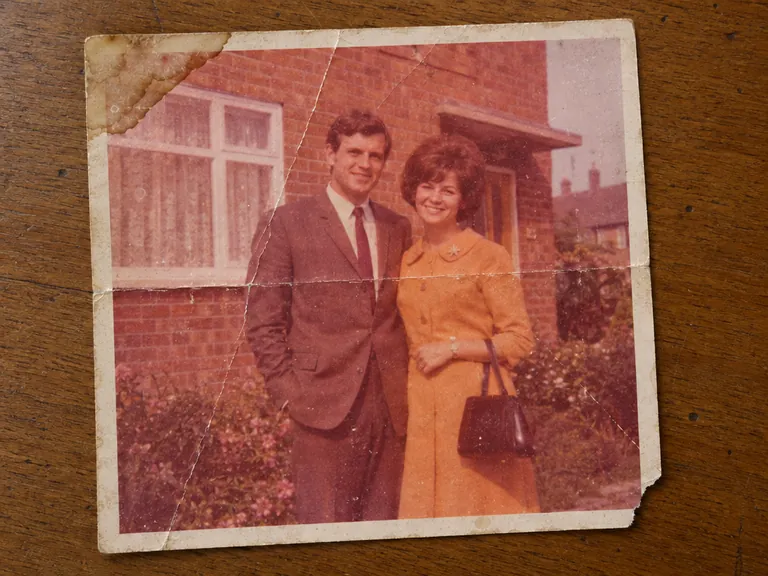
編集した写真
編集した写真 · 入力画像はGPT Image 2.5で生成
Nano Banana 2.1: 古い写真の修復
Nano Banana 2.11K · 10クレジット
GPT Image 2.5: 古い写真の修復
GPT Image 2.5高 · 15クレジット
プロンプト: “Restore the old photograph from the reference image. Show only the photo itself, filling the frame: no table, no paper border, no background around it. Remove all creases, folds, scratches, dust, stains and tears, rebuild any missing corner, and fix the faded and shifted colors. Colorize it with natural, realistic skin tones and period-appropriate clothing colors. Keep every person exactly as they are: same face, same features, same expression, same age, same hairstyle, same pose and same clothing. Do not beautify, slim, smooth or modernize anyone. Keep the original composition and framing. The result should look like a clean, well-preserved original photograph from the same era, not a modern photo.”

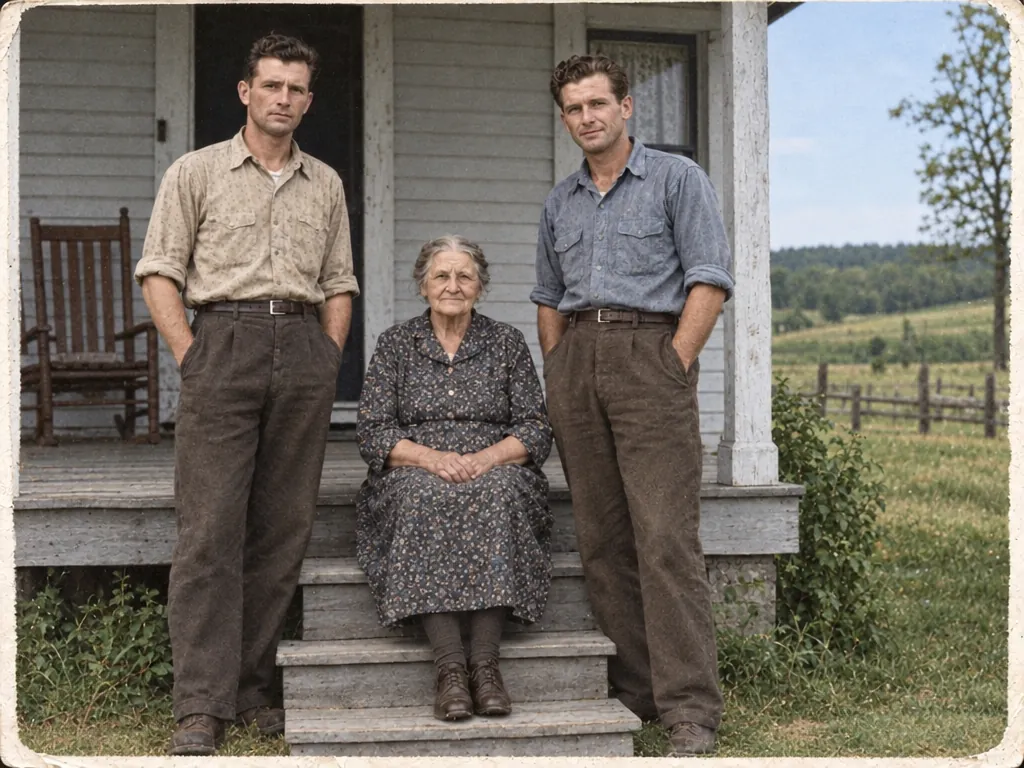
破れた1948年の写真を修復・カラー化:Nano Banana 2.1

どちらも破れと傷を直し、控えめな色を選びました。Nano Banana 2.1は3人の顔を元の写真に近いまま残しました。GPT Image 2.5は古びた縁と粒子感を残しましたが、右の男性をなめらかで若い顔に描き直しました。
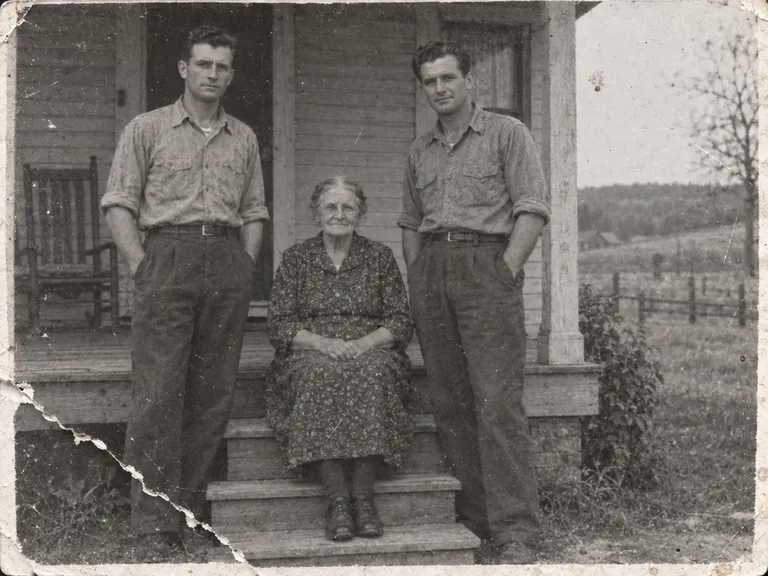
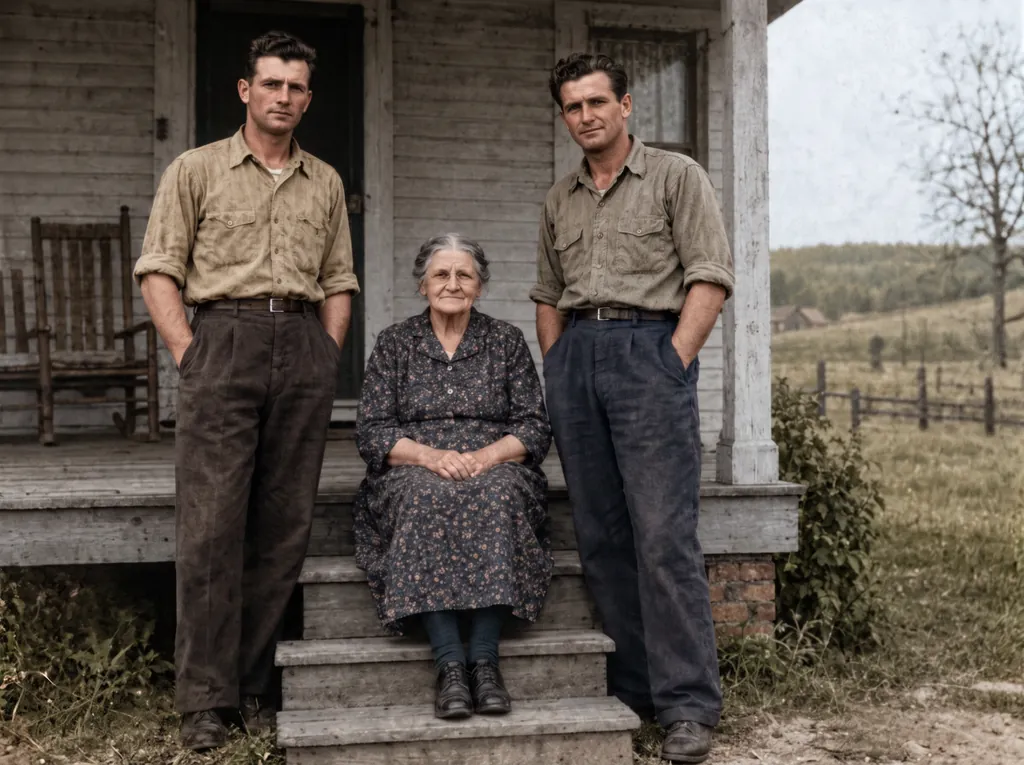
編集した写真
編集した写真 · 入力画像はGPT Image 2.5で生成
Nano Banana 2.1: 古い写真の修復とカラー化
Nano Banana 2.12K · 15クレジット
GPT Image 2.5: 古い写真の修復とカラー化
GPT Image 2.5高 · 15クレジット
プロンプト: “Restore this damaged 1948 black-and-white family photograph while preserving the exact identities, ages, facial proportions, poses, clothing, porch architecture, framing, and historical period. Repair the lower-left tear, remove scratches and dust, recover balanced contrast and fine facial detail, and add restrained historically plausible natural color: weathered gray porch boards, muted cream and brown clothing, natural skin tones, and subdued green countryside. Do not beautify faces, change expressions, invent jewelry, alter clothing, add people, remove people, crop, modernize, add text, logo, or watermark. Keep subtle film grain so it remains an archival photograph rather than a modern digital portrait.”

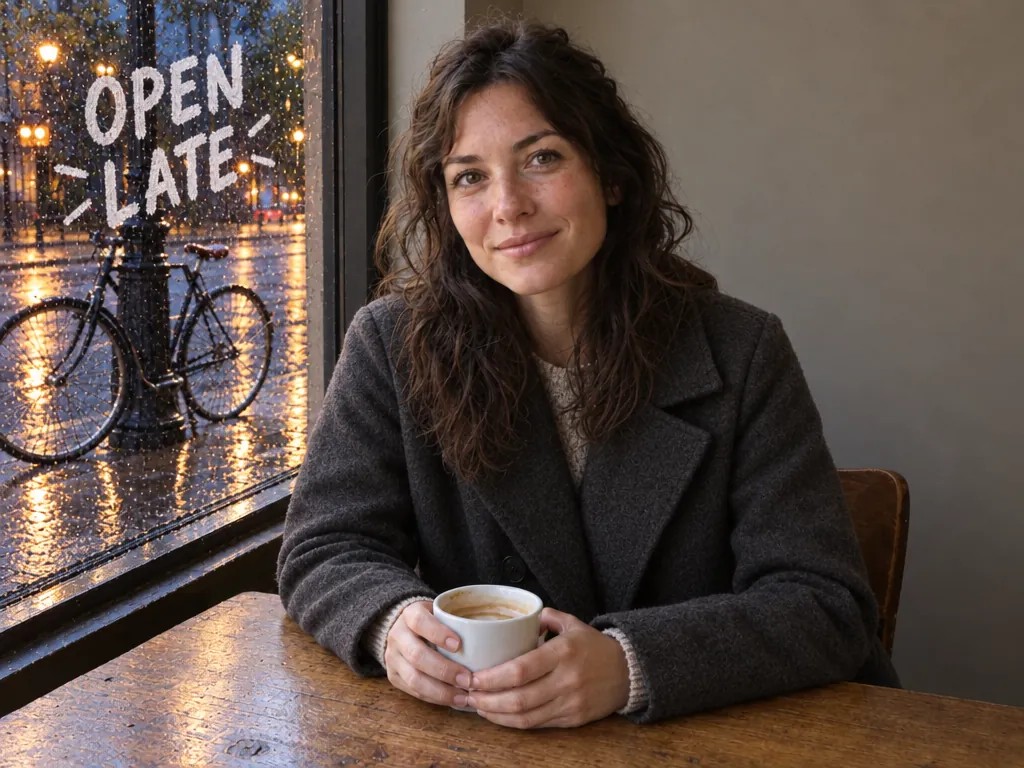
コートを替え、雨を降らせ、窓に文字を入れる:引き分け

どちらもコートを替えて雨を降らせ、顔、カップ、自転車、無地の奥の壁を保ちました。GPT Image 2.5は夕方の景色にして、OPEN LATEを店内から読める向きで書きましたが、青緑のバッグのストラップが消えました。Nano Banana 2.1はストラップを残しましたが、文字を通りから読む向きに描いたため店内からは鏡文字になり、昼の明るさも多めに残りました。
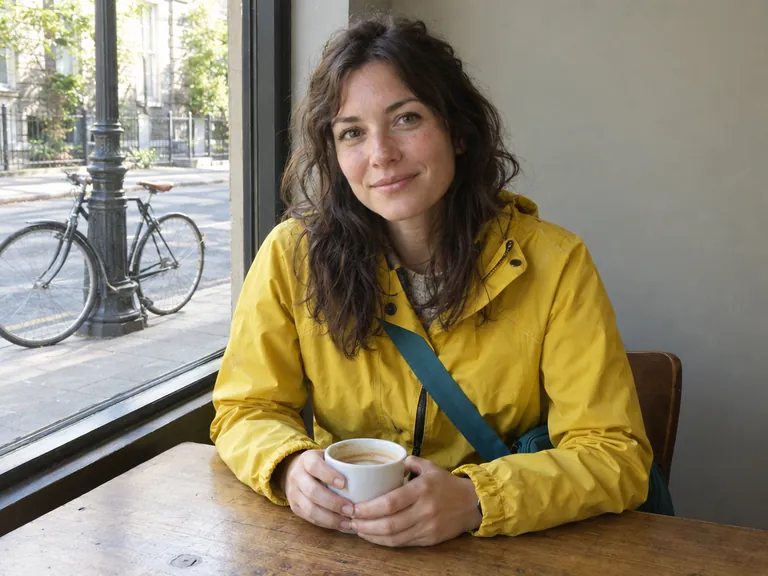
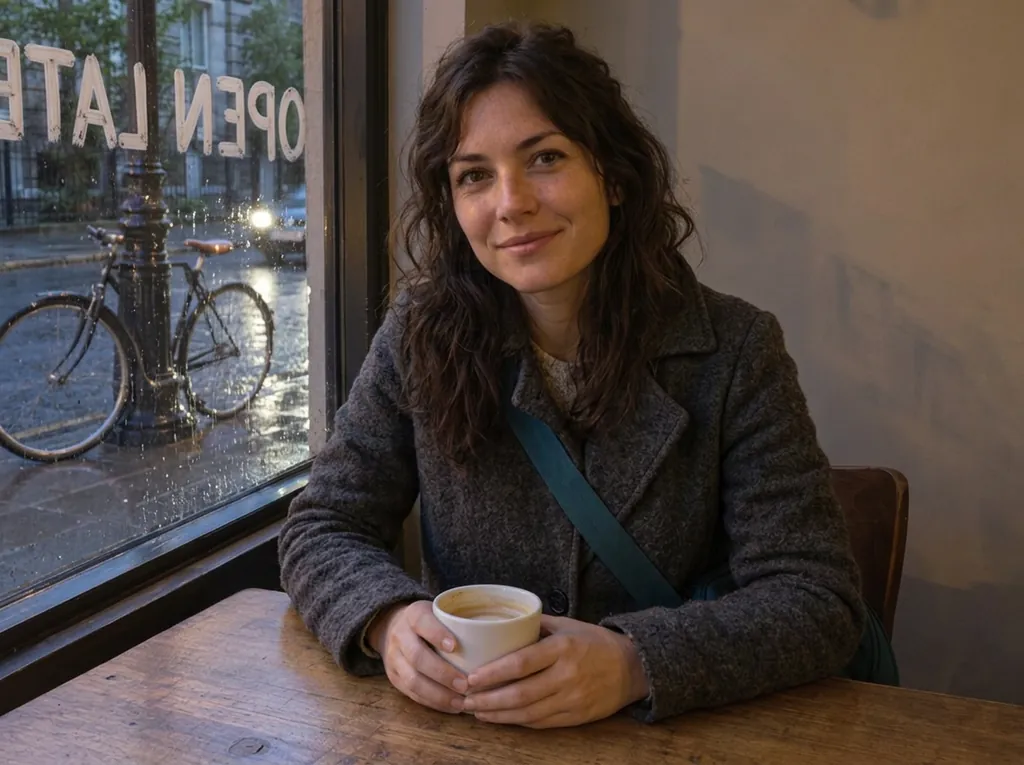
編集した写真
編集した写真 · 入力画像はGPT Image 2.5で生成
Nano Banana 2.1: コート、雨、窓の文字を変更
Nano Banana 2.11K · 10クレジット
GPT Image 2.5: コート、雨、窓の文字を変更
GPT Image 2.5高 · 15クレジット
プロンプト: “Change her yellow rain jacket to a charcoal-grey wool coat. Make it a rainy evening outside the window, with wet street reflections. Write the words OPEN LATE in white painted letters on the window glass. Keep her face, hair, pose, the coffee cup, the table and the bicycle exactly the same.”

物を消す:GPT Image 2.5

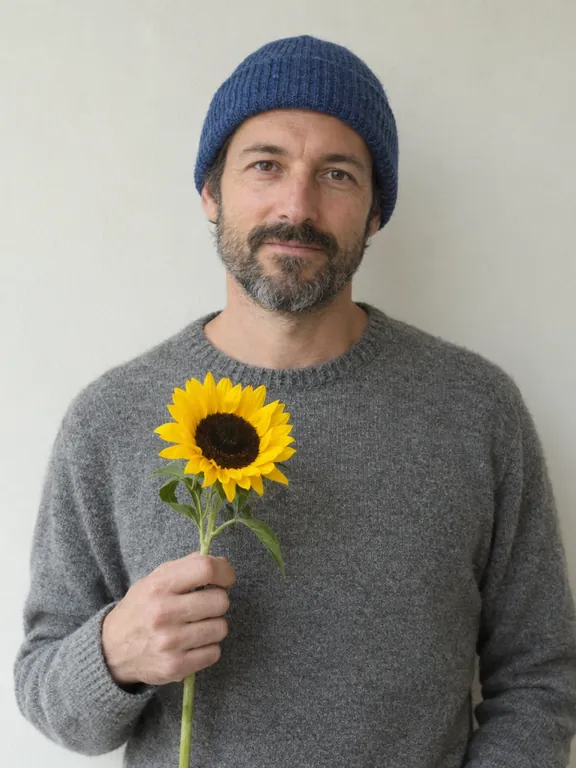
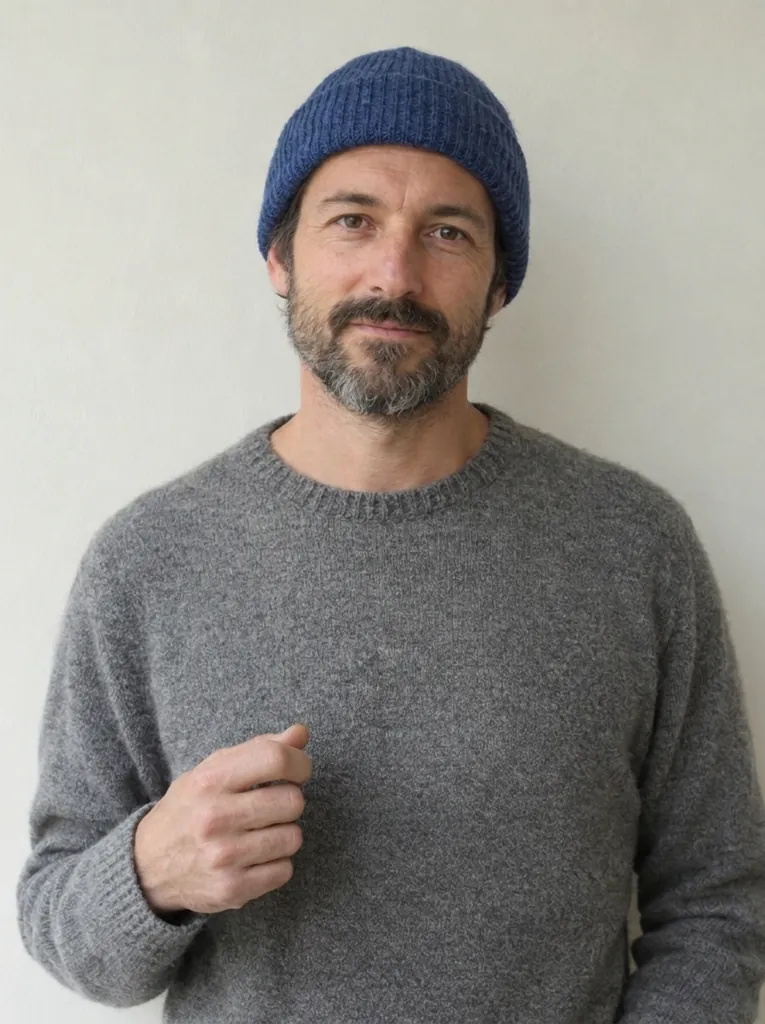
どちらもひまわりを消し、顔、帽子、壁を保ちました。GPT Image 2.5は男性の手を下ろして画面の外に出しました。Nano Banana 2.1は手を胸の前に残したままで、何もない空間を握っています。
編集した写真
編集した写真 · 入力画像はGPT Image 2.5で生成
Nano Banana 2.1: 写真から物を消す
Nano Banana 2.11K · 10クレジット
GPT Image 2.5: 写真から物を消す
GPT Image 2.5高 · 15クレジット
プロンプト: “Remove the flower from man's hand. Do not change anything else.”

別の写真の犬を加える:GPT Image 2.5

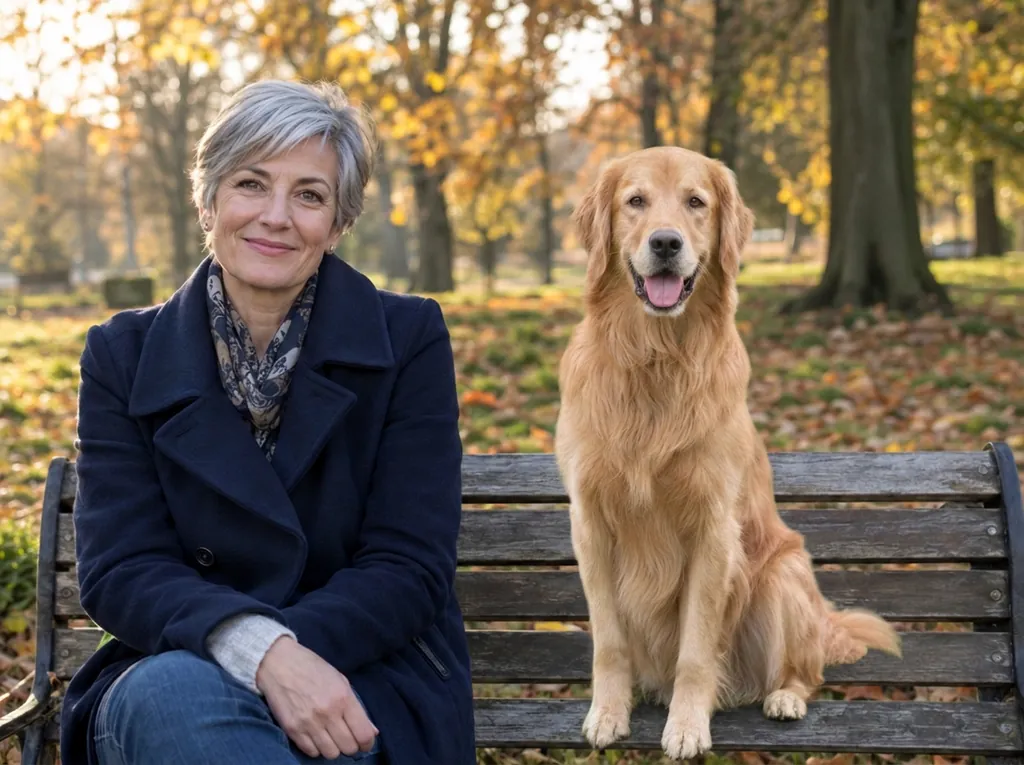
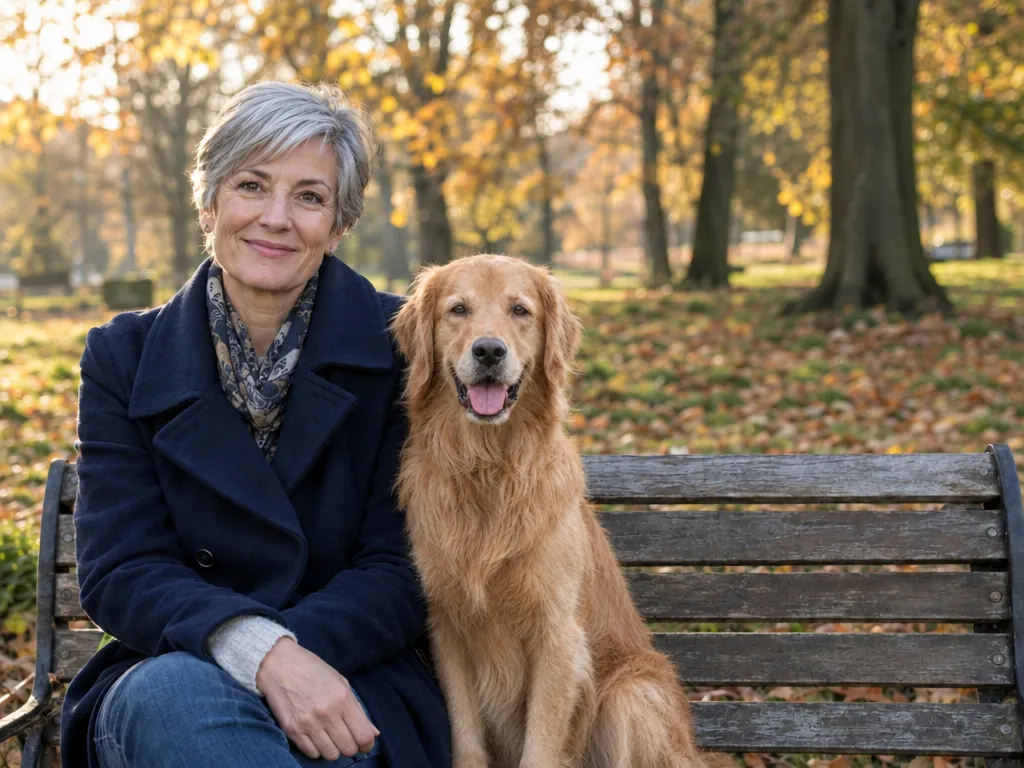
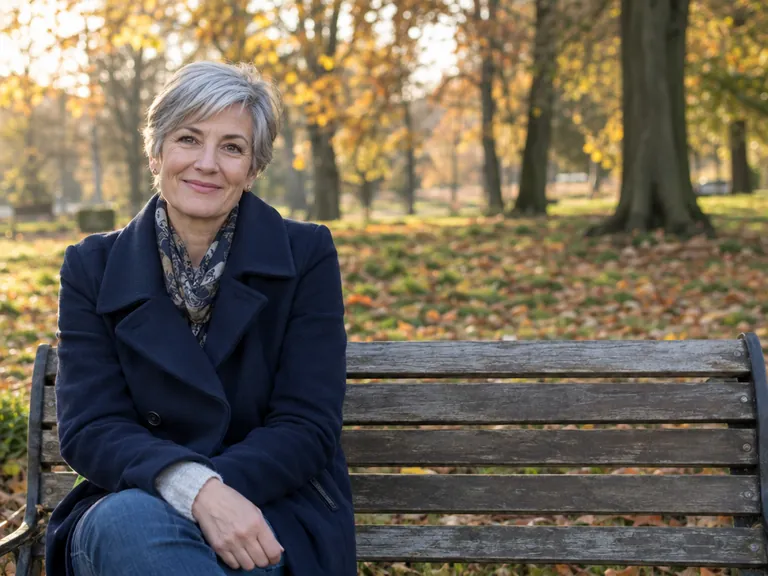
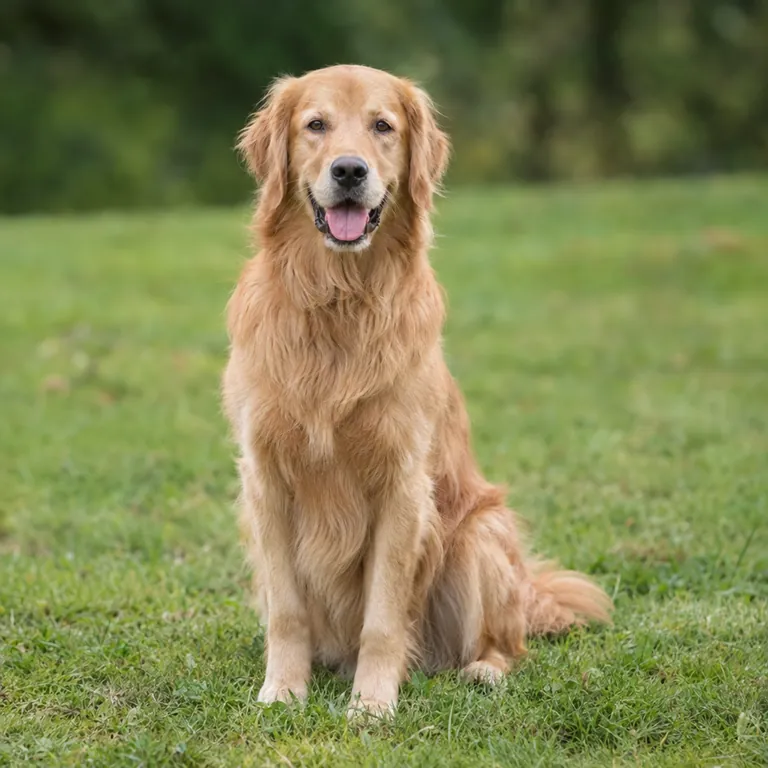
GPT Image 2.5は犬を女性の横に、ちょうどいい大きさで、同じ光の中に座らせました。Nano Banana 2.1は犬をベンチの上に立たせ、大きく平たく描いたため、貼り付けたように見えます。女性と公園はどちらも変わりませんでした。
編集した写真
1
編集した写真
2
使った写真(順番どおり) · 入力画像はGPT Image 2.5で生成
Nano Banana 2.1: 別の写真から犬を追加
Nano Banana 2.11K · 10クレジット
GPT Image 2.5: 別の写真から犬を追加
GPT Image 2.5高 · 15クレジット
プロンプト: “Place the dog from the second image into the setting of image 1, right next to the woman, use the same style of lighting, composition and background. Do not change anything else.”

散らかったテーブルを片付ける:GPT Image 2.5

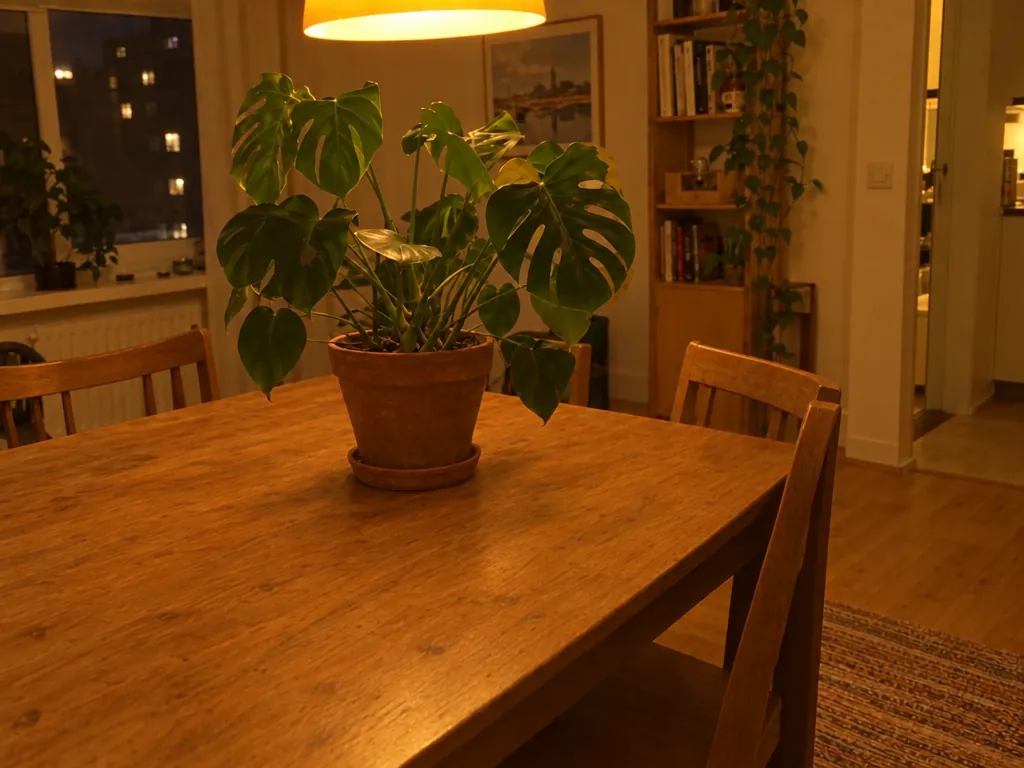
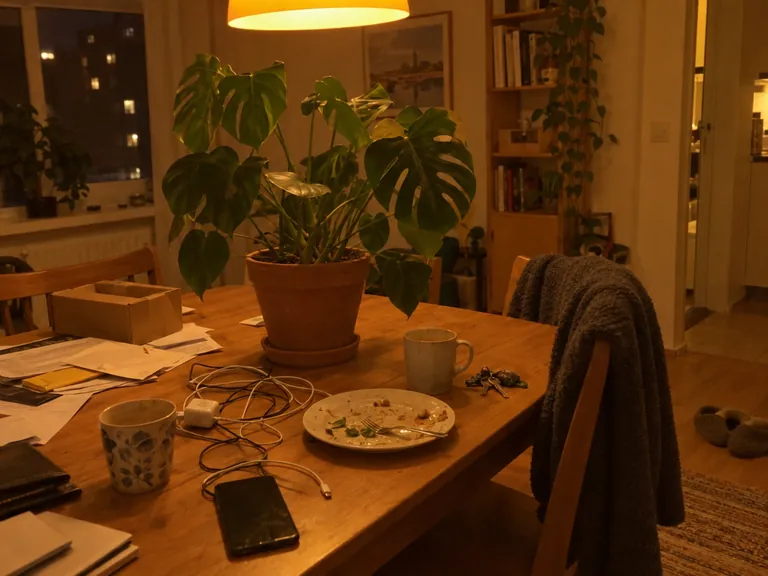
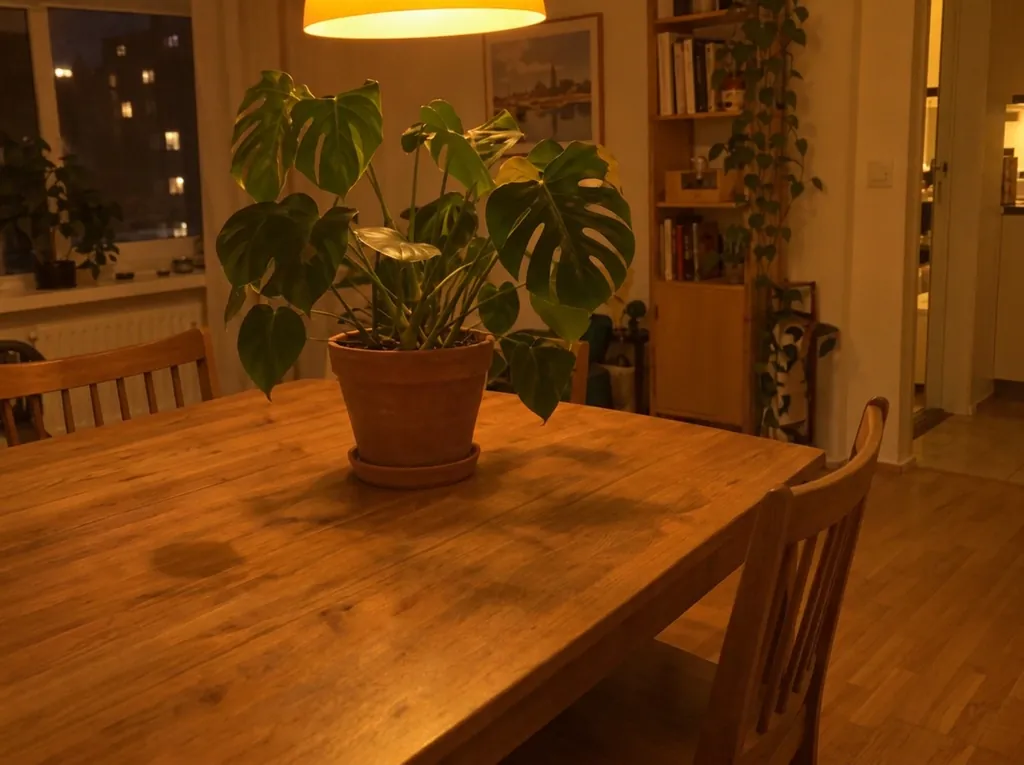
どちらもケーブル、皿、書類をすべて消し、植物とランプを残しました。GPT Image 2.5はラグを残し、すっきりしたテーブルにしました。Nano Banana 2.1はラグまで消し、マグカップがあった場所にうっすらと黒いしみが残りました。
編集した写真
編集した写真 · 入力画像はGPT Image 2.5で生成
Nano Banana 2.1: 写真をすっきり整える
Nano Banana 2.11K · 10クレジット
GPT Image 2.5: 写真をすっきり整える
GPT Image 2.5高 · 15クレジット
プロンプト: “Clean up this photo: remove the loose clutter around the plant (cables, mugs, dishes, food, papers, envelopes, boxes, clothes, laundry rack, vacuum, cleaning bottles, keys, slippers, toys, tissues) and fill the gaps naturally with the same surface, floor and wall. Keep the furniture, the room, the lighting and any date stamp as they are. Keep the plant, every leaf, the pot and the camera angle exactly as they are in the reference photo; do not add, remove or redesign any leaves, and do not change the pot.”

夏を冬に変える:GPT Image 2.5

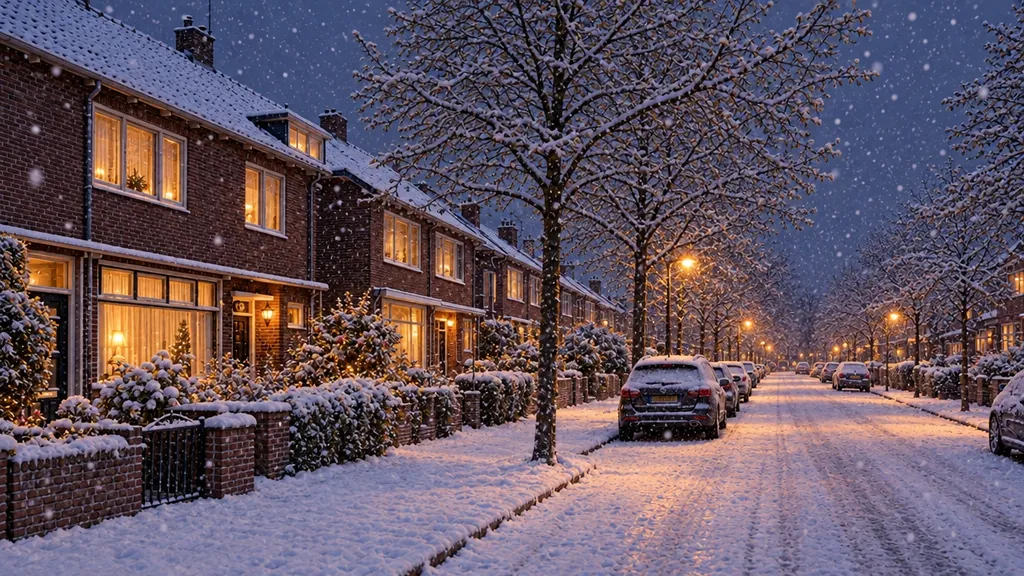
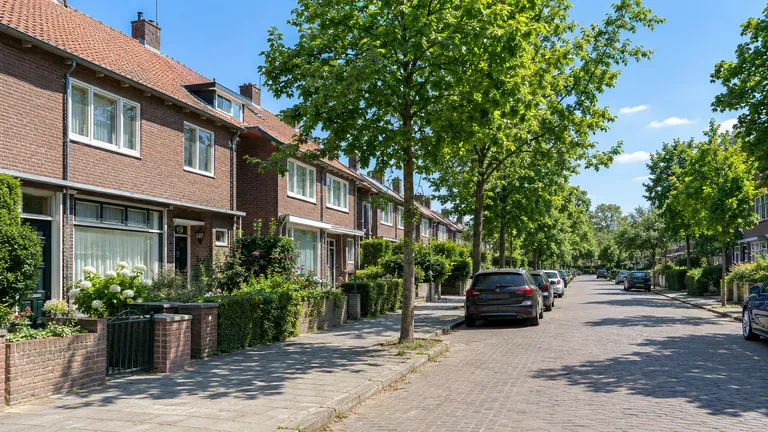
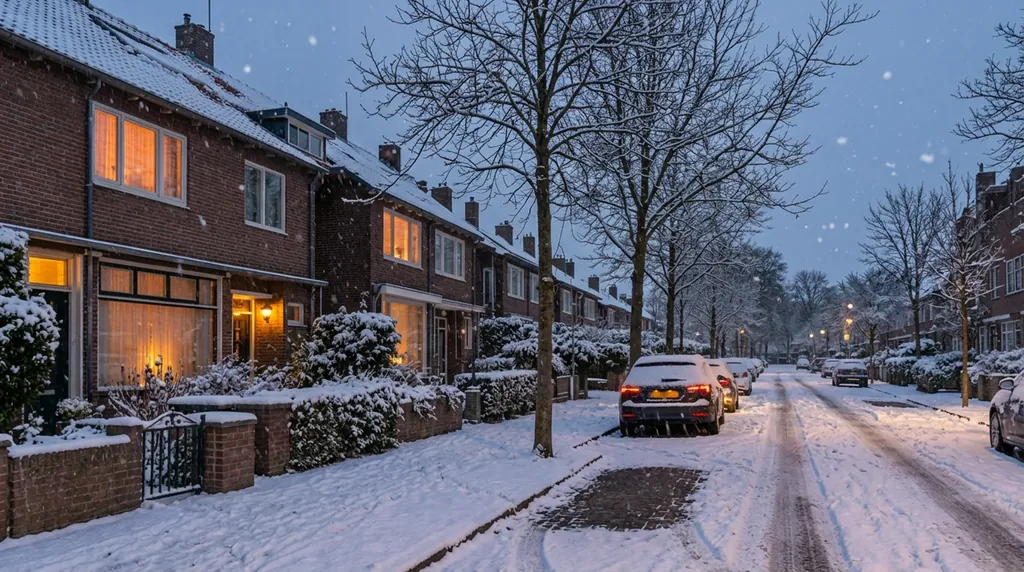
どちらも家並み、止めてある車、構図を保ちました。GPT Image 2.5は窓に明かりがともり雪が舞う、冬の夕方にしました。Nano Banana 2.1も冬らしい夕暮れにしましたが、降る雪は少なく、道路に黒い四角形が残りました。
編集した写真
編集した写真 · 入力画像はGPT Image 2.5で生成
Nano Banana 2.1: 夏から冬へ
Nano Banana 2.11K · 10クレジット
GPT Image 2.5: 夏から冬へ
GPT Image 2.5高 · 15クレジット
プロンプト: “Make it look like a winter evening with snowfall.”

ポートレートのレタッチ:引き分け

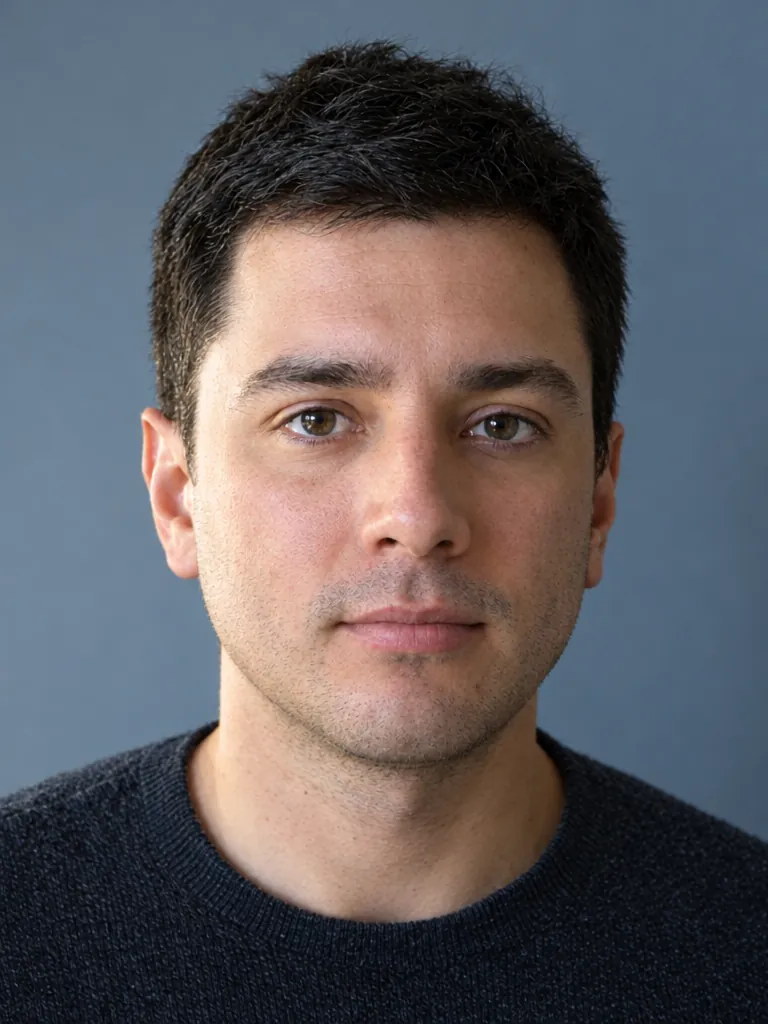
どちらもシミと赤みを消し、顔立ち、髪、表情を保ちました。GPT Image 2.5は顔の光をより均一にし、背景を青寄りにしました。Nano Banana 2.1は肌の質感を少し多めに残しました。
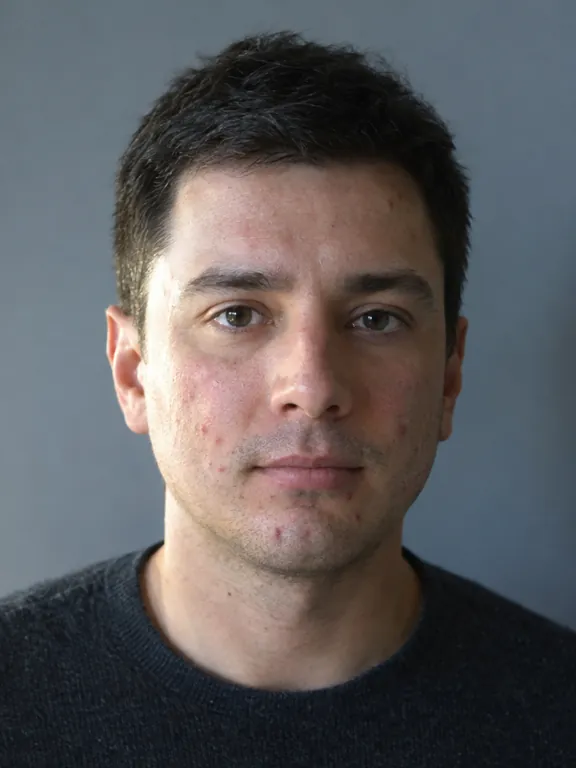
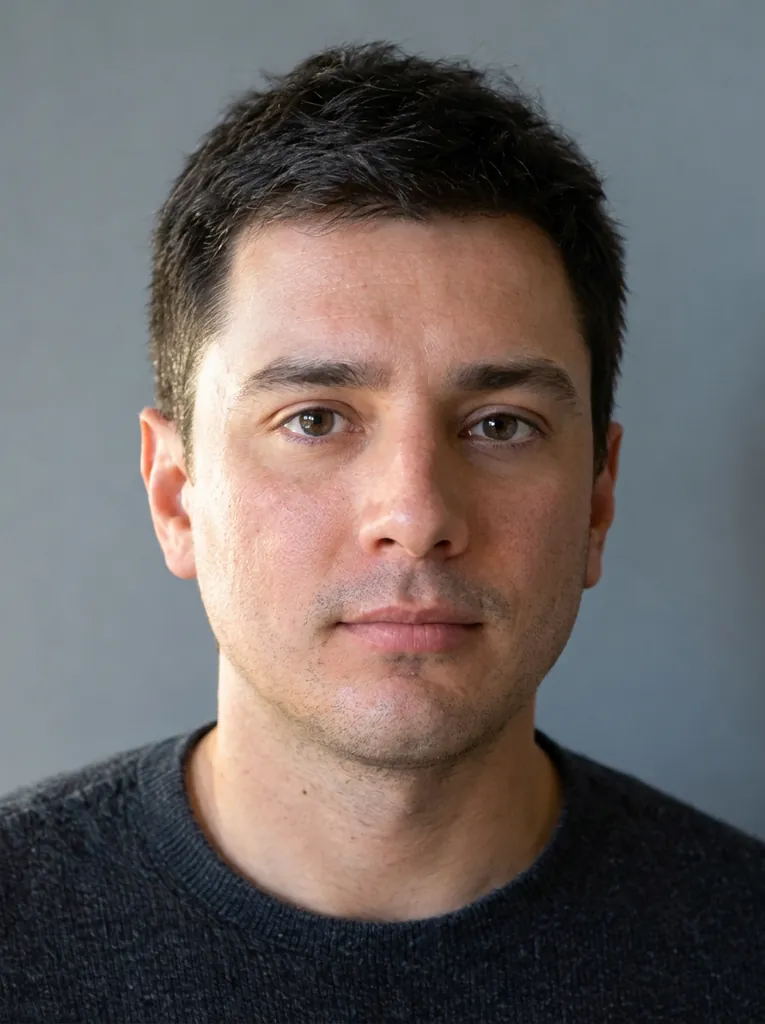
編集した写真
編集した写真 · 入力画像はGPT Image 2.5で生成
Nano Banana 2.1: ポートレートのレタッチ
Nano Banana 2.11K · 10クレジット
GPT Image 2.5: ポートレートのレタッチ
GPT Image 2.5高 · 15クレジット
プロンプト: “Retouch this photo professionally: even out skin tone, reduce blemishes, sharpen focus, and balance lighting and color. Do not change the person's face shape, features, proportions, hairstyle, or expression. Keep the result looking like a real, unedited photo of the same person.”

商品にロゴを入れる:引き分け

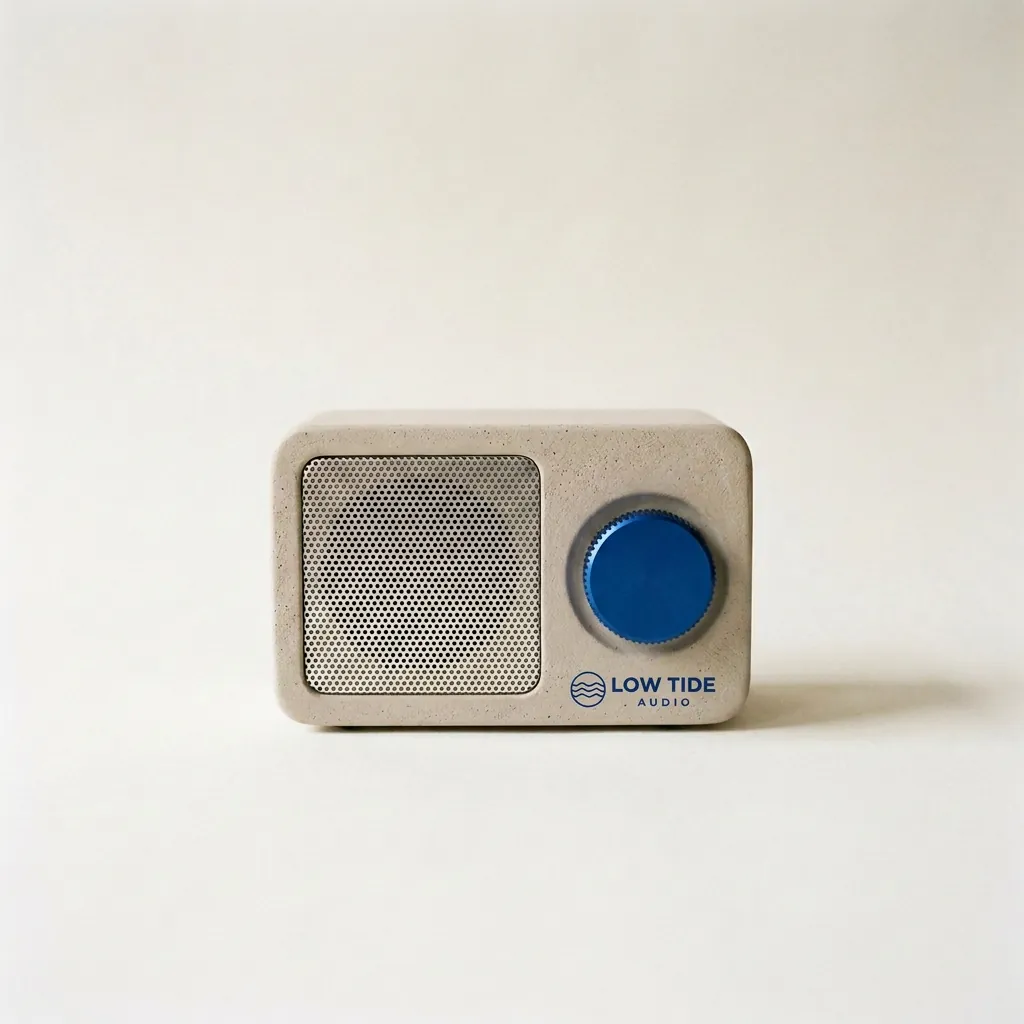
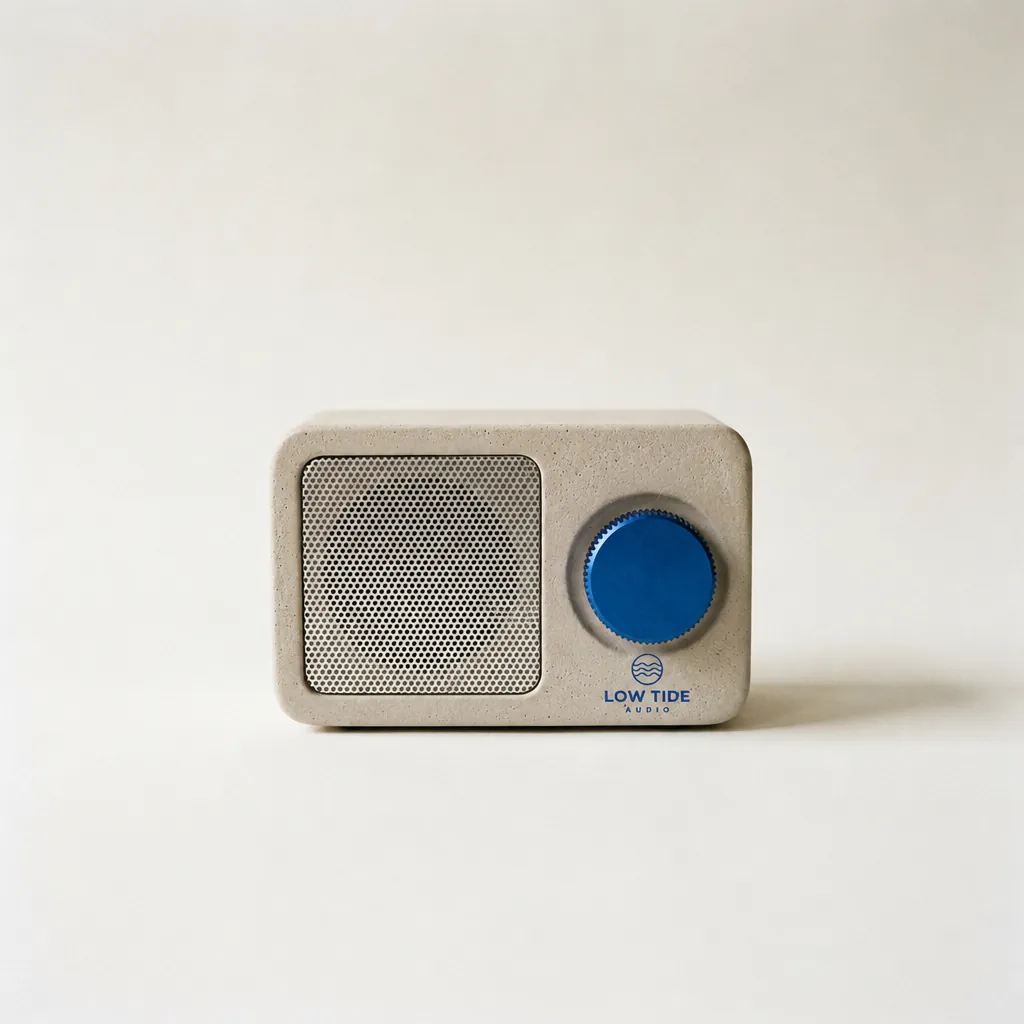
どちらもダイヤルの下にロゴを入れ、ラジオ、背景、影には手を加えませんでした。Nano Banana 2.1は1行で、GPT Image 2.5は小さめに2段で組みました。
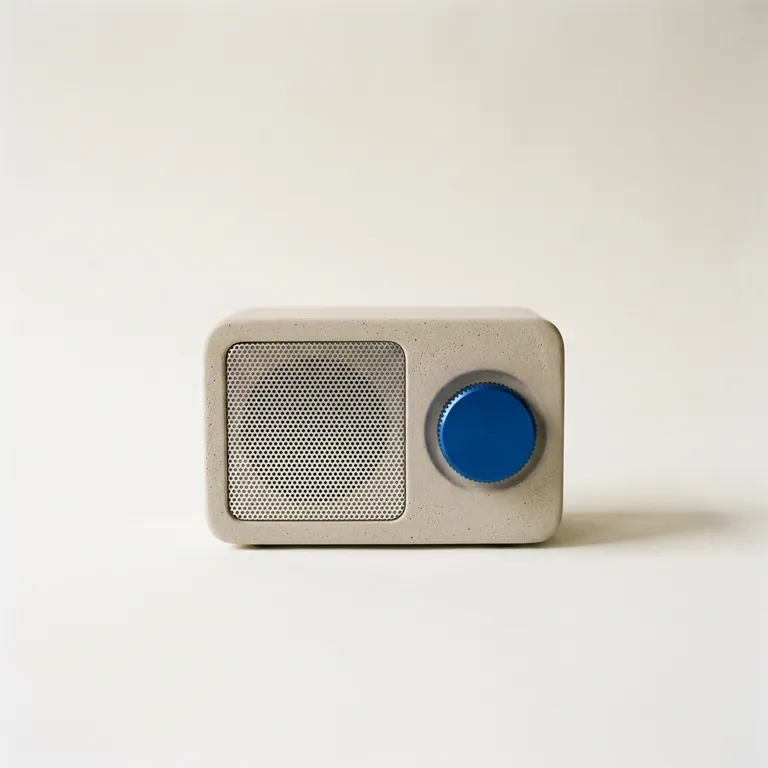
編集した写真
1
編集した写真
2
使った写真(順番どおり) · 入力画像はNano Banana 2.1で生成
Nano Banana 2.1: 商品にロゴを入れる
Nano Banana 2.11K · 10クレジット
GPT Image 2.5: 商品にロゴを入れる
GPT Image 2.5高 · 15クレジット
プロンプト: “Take the radio from the first image. Print the LOW TIDE AUDIO logo from the second image onto the radio's front panel, below the cobalt dial, as a small, crisp cobalt-blue screen print that sits flat on the plaster texture. Keep the radio's shape, the cobalt dial, the speaker grille, the paper backdrop, the window light and the shadow exactly the same.”

ポスターの日付を直す:引き分け

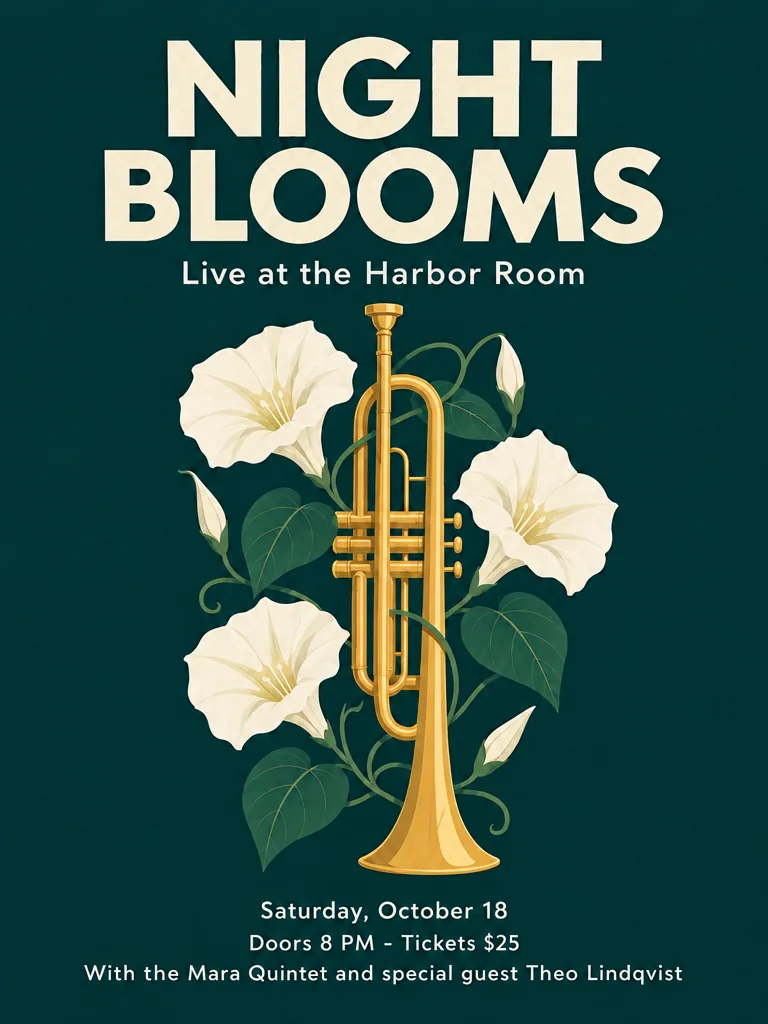
どちらもFriday, October 17をSaturday, October 18に変え、ほかの行はすべて残しました。ただし、どちらもそれ以外の部分を完全には保てず、日付の行以外で約4%のピクセルがはっきり変わり、GPT Image 2.5のほうは全体が少し暗くなりました。ポスター全体を元の画像と見比べてください。
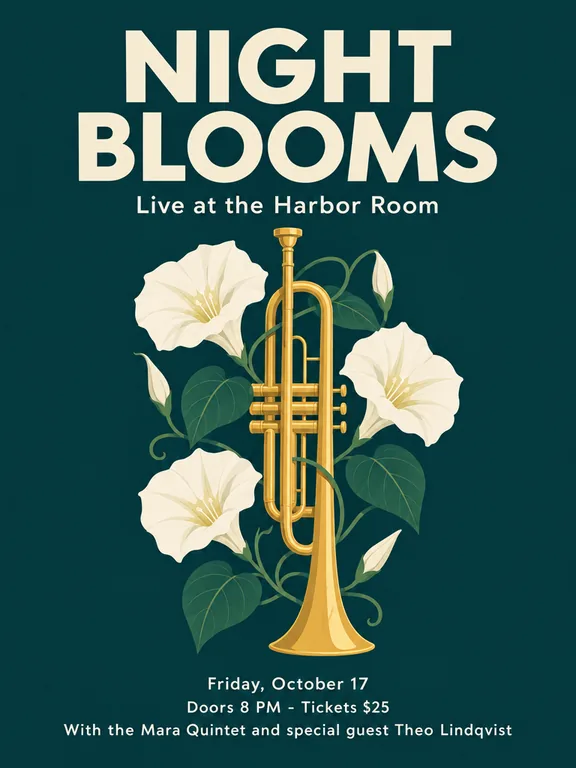
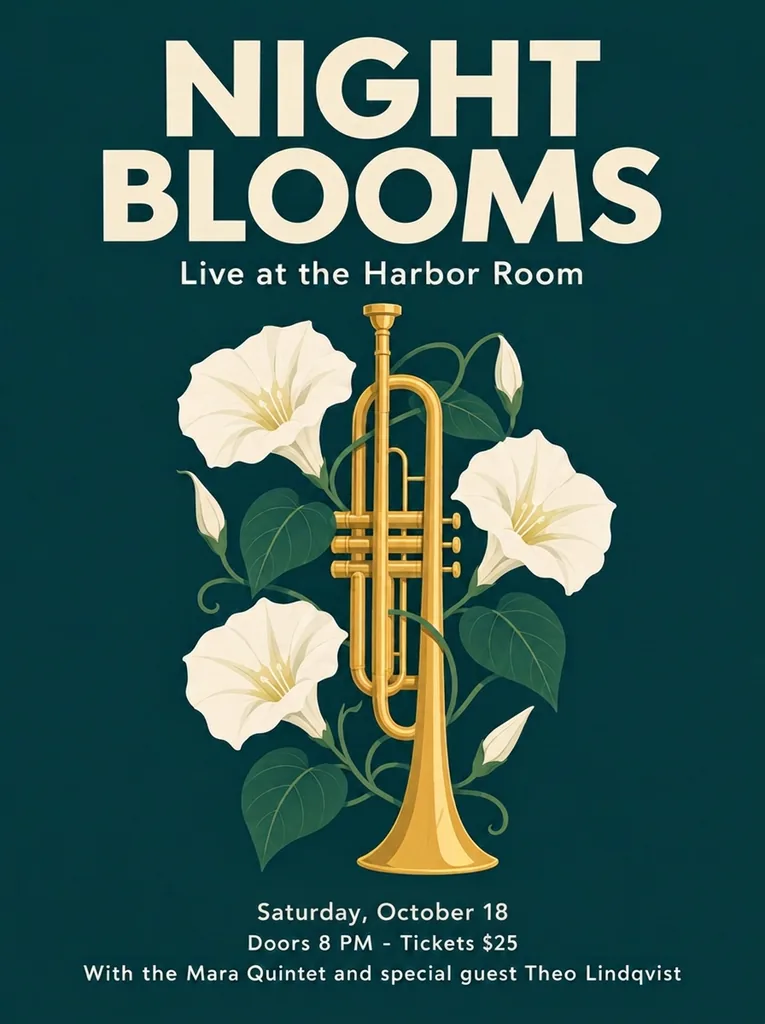
編集した写真
編集した写真 · 入力画像はGPT Image 2.5で生成
Nano Banana 2.1: ポスターの日付を修正
Nano Banana 2.11K · 10クレジット
GPT Image 2.5: ポスターの日付を修正
GPT Image 2.5高 · 15クレジット
プロンプト: “Change the date line "Friday, October 17" so it reads "Saturday, October 18". Keep everything else exactly as it is.”

文字を指定したライブのポスター:引き分け

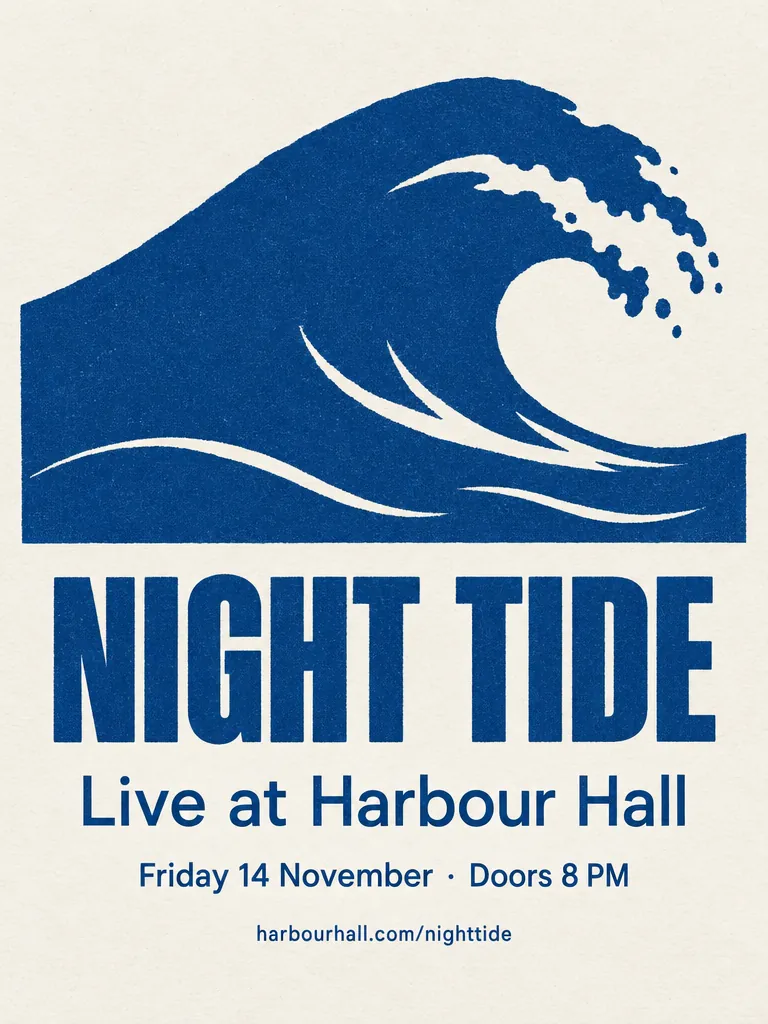
どちらも中黒(・)まで含めてすべての行を正しく綴り、余計な文字も足しませんでした。GPT Image 2.5は紙面いっぱいの平面的なアートワークに、Nano Banana 2.1はポスターを台の上に置いた1枚の紙として描きました。Fuserのテストでも同じ結果でした。
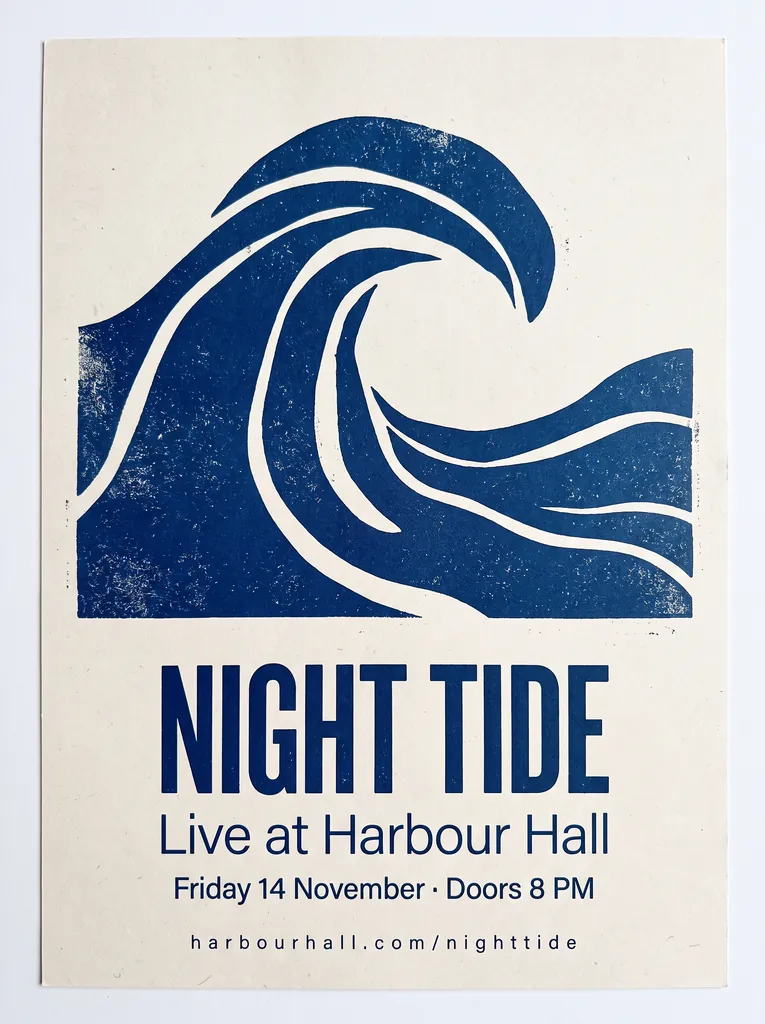
Nano Banana 2.1: コンサートのポスター
Nano Banana 2.12K · 15クレジット
GPT Image 2.5: コンサートのポスター
GPT Image 2.5高 · 15クレジット
プロンプト: “A minimalist screen-printed concert poster on off-white paper. A large deep-blue wave shape fills the top half. Below it, the headline "NIGHT TIDE" in a bold condensed sans-serif, then "Live at Harbour Hall" in a lighter weight, then "Friday 14 November · Doors 8 PM", and at the bottom "harbourhall.com/nighttide" in small type. No other text.”

コーヒー袋の商品画像:引き分け

どちらもSUMMIT ROASTを正しく綴り、どちらも独自に小さな文字(内容量、焙煎度)を足しましたが、綴りはすべて正確でした。書いた文字だけを袋に載せたい場合は、プロンプトに「no other text on the packaging」を加えてください。
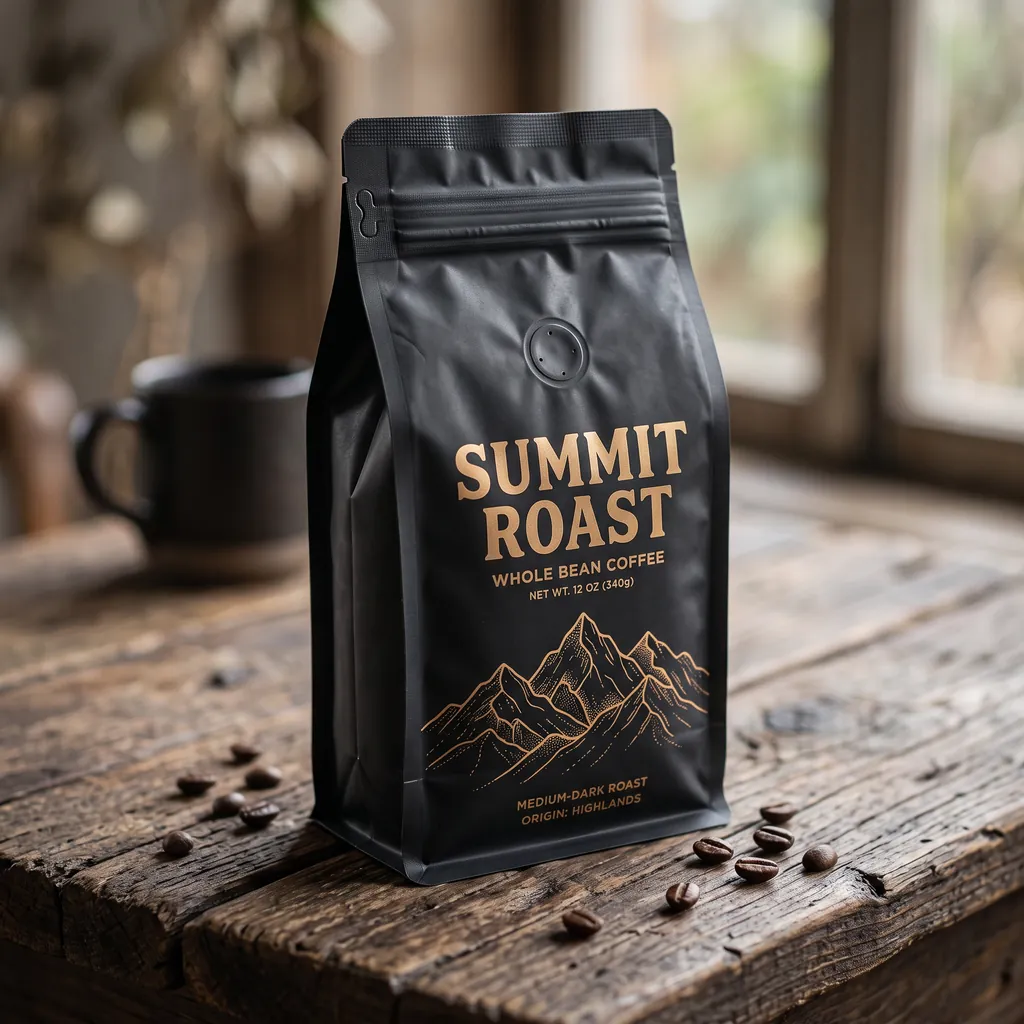
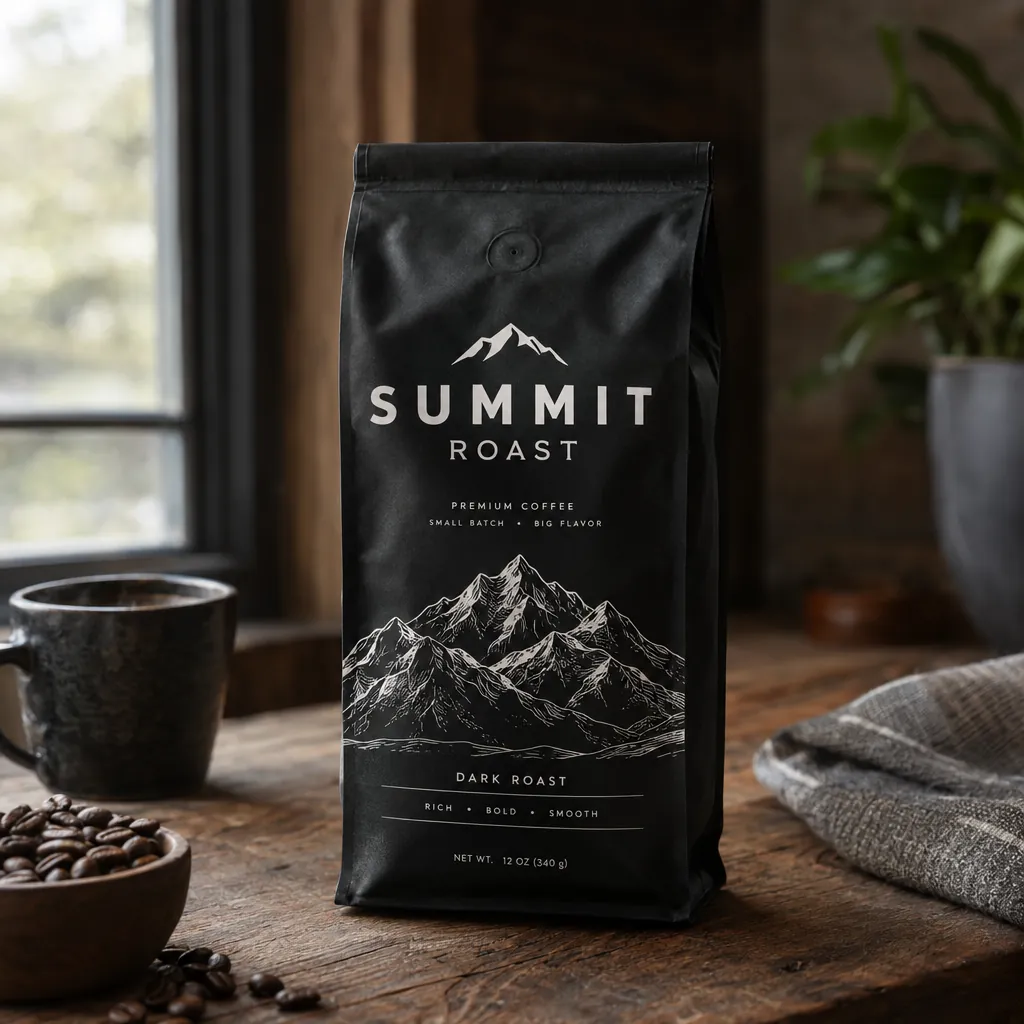
Nano Banana 2.1: コーヒー袋の商品画像
Nano Banana 2.12K · 15クレジット
GPT Image 2.5: コーヒー袋の商品画像
GPT Image 2.5高 · 15クレジット
プロンプト: “A premium product photo of a matte black coffee bag labeled SUMMIT ROAST with mountain line-art on rustic wood, soft window light, sharp readable packaging typography, photoreal commercial mockup”

自然な雰囲気のポートレート:引き分け

どちらにもしわ、タトゥー、網、犬が描かれています。GPT Image 2.5はより鮮明で寄りの構図、肌の描き込みも濃いめです。Nano Banana 2.1はドキュメンタリー写真に近い印象で、CellCogも同じ見方でした。
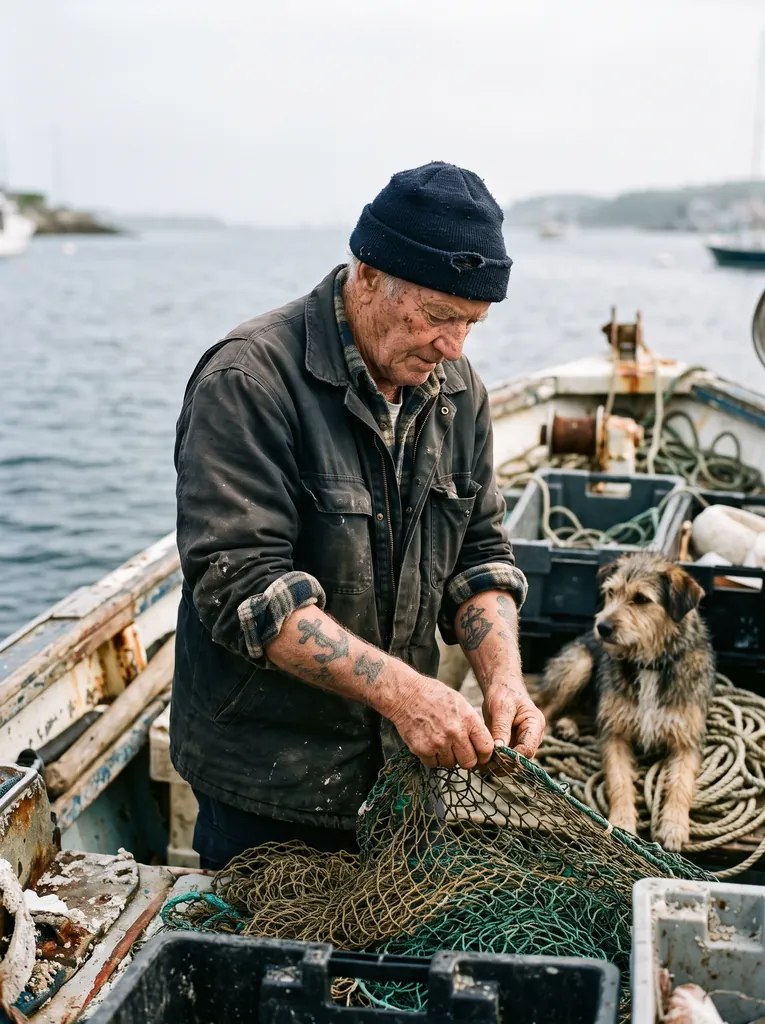
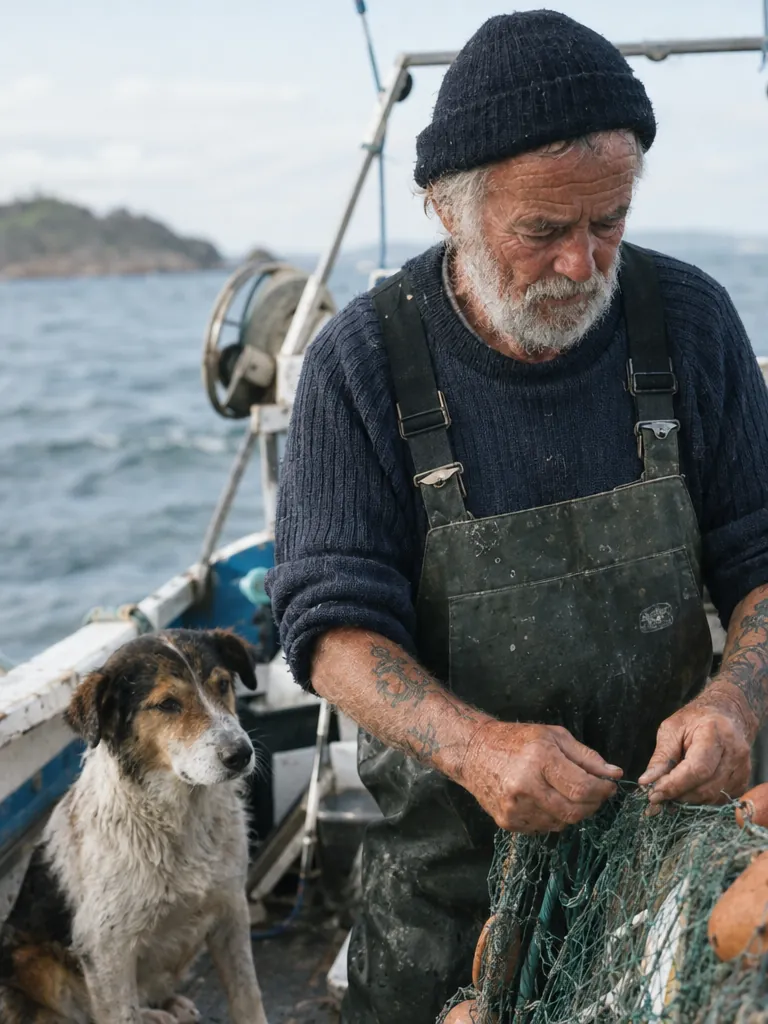
Nano Banana 2.1: 自然な表情のポートレート
Nano Banana 2.12K · 15クレジット
GPT Image 2.5: 自然な表情のポートレート
GPT Image 2.5高 · 15クレジット
プロンプト: “Create a photorealistic candid photograph of an elderly sailor standing on a small fishing boat. He has weathered skin with visible wrinkles, pores, and sun texture, and a few faded traditional sailor tattoos on his arms. He is calmly adjusting a net while his dog sits nearby on the deck. Shot like a 35mm film photograph, medium close-up at eye level, using a 50mm lens. Soft coastal daylight, shallow depth of field, subtle film grain, natural color balance. The image should feel honest and unposed, with real skin texture, worn materials, and everyday detail. No glamorization, no heavy retouching.”

陶芸工房の2人:引き分け

どちらの画像も2人の顔がくっきりしていて、男性の手には粘土、左の窓から光が入っています。Nano Banana 2.1は引きの構図で2人とも画面に収め、GPT Image 2.5は寄りの構図で、端の男性が切れました。
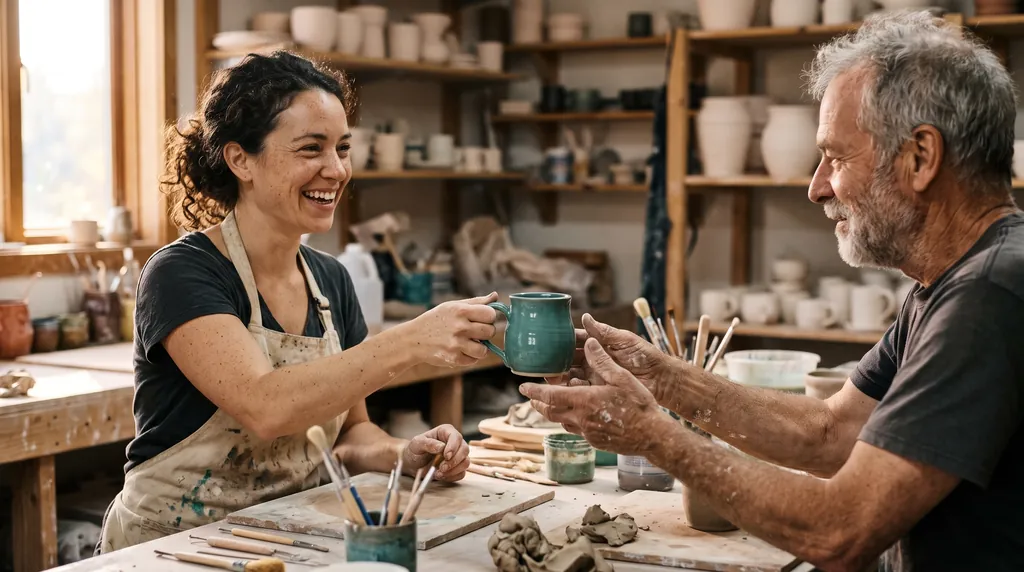
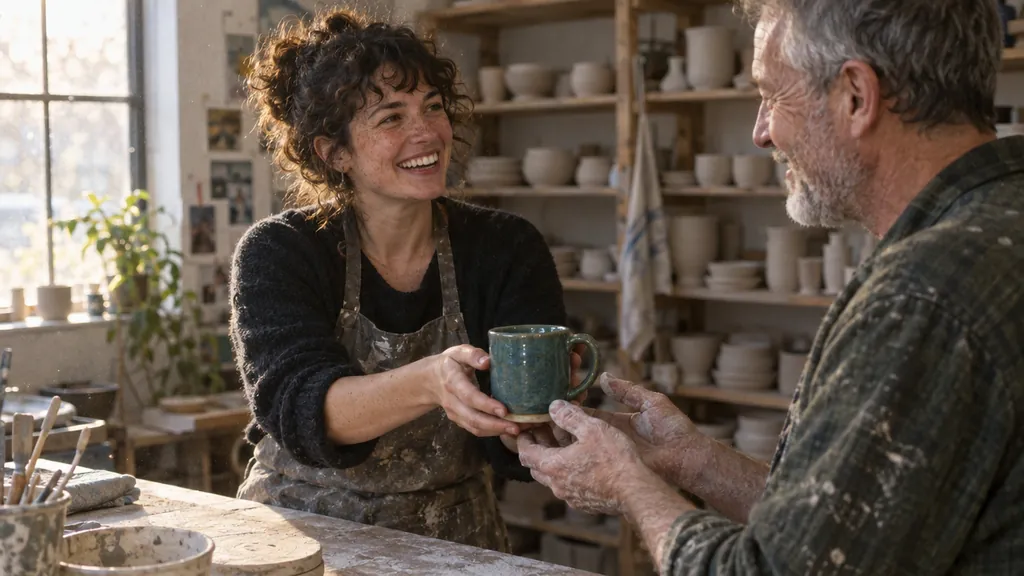
Nano Banana 2.1: ドキュメンタリー風の写真
Nano Banana 2.12K · 15クレジット
GPT Image 2.5: ドキュメンタリー風の写真
GPT Image 2.5高 · 15クレジット
プロンプト: “Candid documentary photograph inside a small ceramics studio. A woman in her early thirties with freckles and curly dark hair laughs while handing a freshly glazed teal mug across a worktable to an older man with a short gray beard and clay-dusted hands. Both faces fully visible and in sharp focus, natural skin texture with visible pores and fine lines, no retouching. Late afternoon window light from the left, dust in the air, shelves of unglazed pots softly blurred behind them. Shot on a 50mm lens at f/2, warm film grain.”

映画のワンシーン風:引き分け

どちらにも黄色い階段、ピンクの漆喰壁、緑のドレスがあります。GPT Image 2.5は低い位置から寄って撮り、頼んでいないMOTELの看板と部屋番号を加えました。Nano Banana 2.1は引きのまま、すっきりした画にしました。
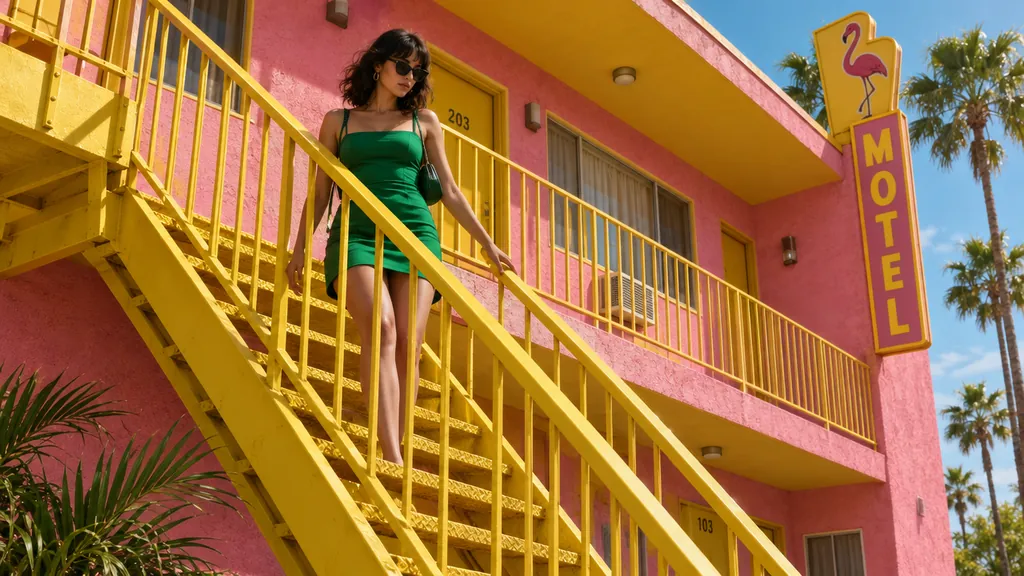
Nano Banana 2.1: 映画のワンシーンのようなスチル
Nano Banana 2.12K · 15クレジット
GPT Image 2.5: 映画のワンシーンのようなスチル
GPT Image 2.5高 · 15クレジット
プロンプト: “A 16:9 horizontal cinematic still, shot from street level looking up at the sharp diagonal steel exterior staircase of a two-story retro motel painted vibrant mustard-yellow against a flamingo-pink stucco facade. An adult woman in an emerald-green mini dress descends the staircase, her hand trailing along the yellow railing. The bright yellow, pink, and green color clash creates a delightful, sun-drenched cinematic mood.”

ジャズのポスター、文字を足すか:GPT Image 2.5

どちらもMIDNIGHT BRASSと日付の行を正しく綴りました。GPT Image 2.5は指定した文字だけを使いました。Nano Banana 2.1は日付の行を大文字にし、LIVE JAZZ NIGHTとFEATURING SPECIAL GUESTSの2行を独自に足しました。このプロンプト(「No other text」の一文がないもの)を使ったBulkImagenのテストと同じ結果です。
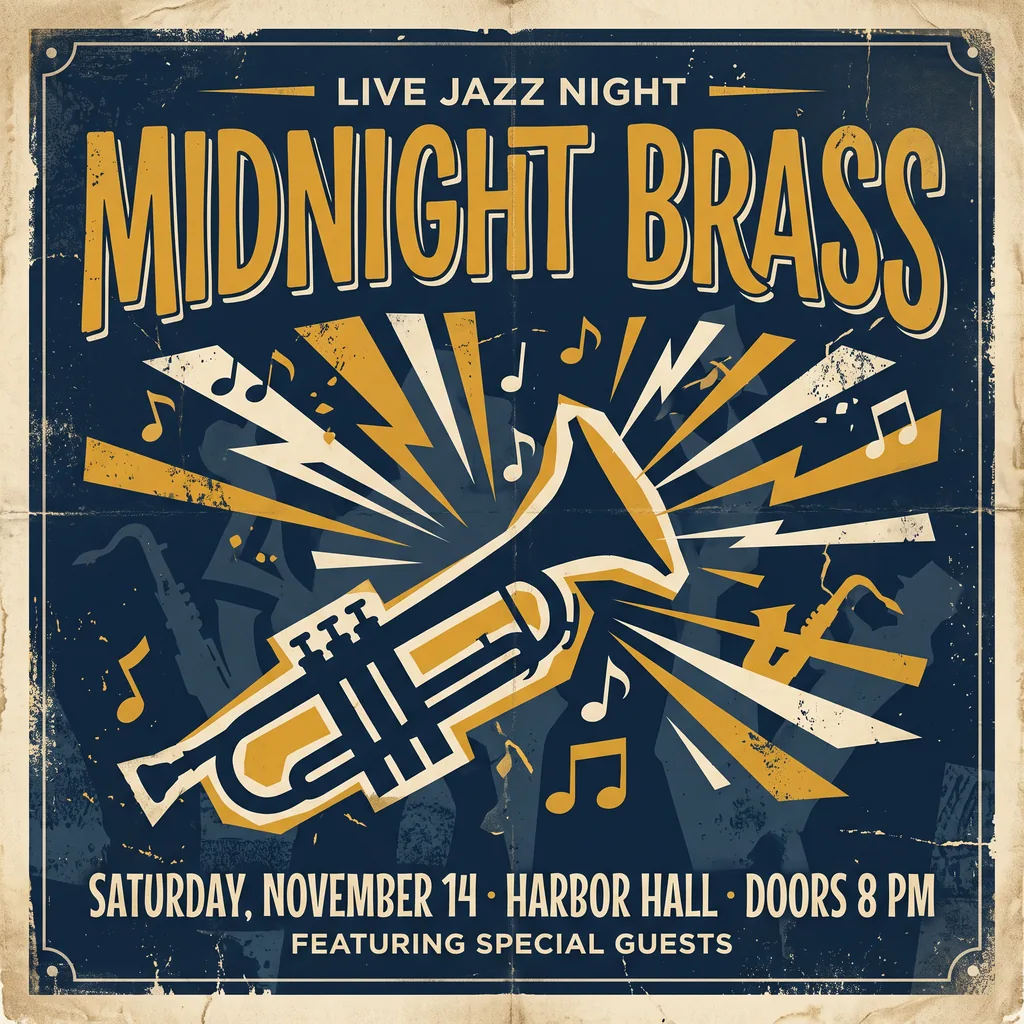
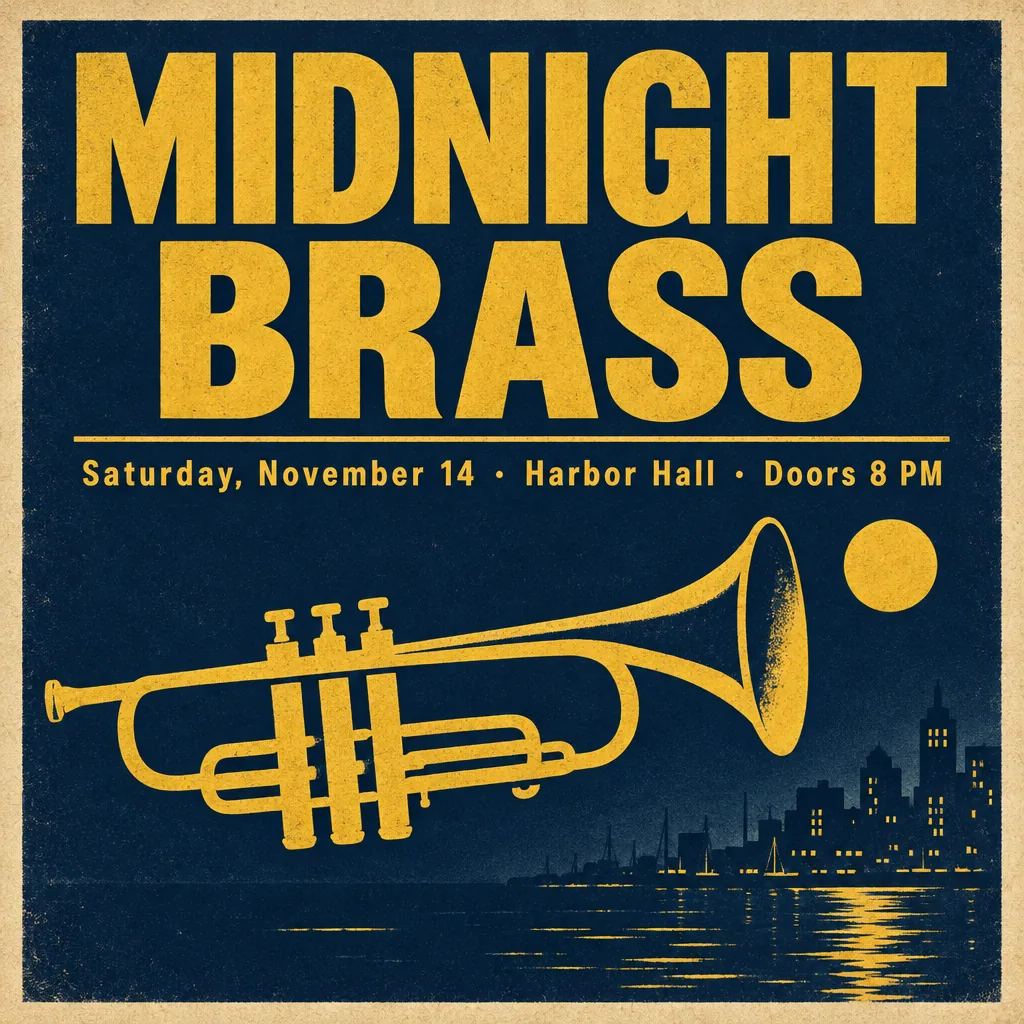
Nano Banana 2.1: ジャズナイトのポスター
Nano Banana 2.12K · 15クレジット
GPT Image 2.5: ジャズナイトのポスター
GPT Image 2.5高 · 15クレジット
プロンプト: “A vintage-style concert poster for a fictional jazz night. Headline in large bold letters: "MIDNIGHT BRASS". Below it, smaller: "Saturday, November 14 · Harbor Hall · Doors 8 PM". A stylized trumpet silhouette, deep navy and mustard yellow palette, subtle paper grain.”

ライトショーのポスター:引き分け

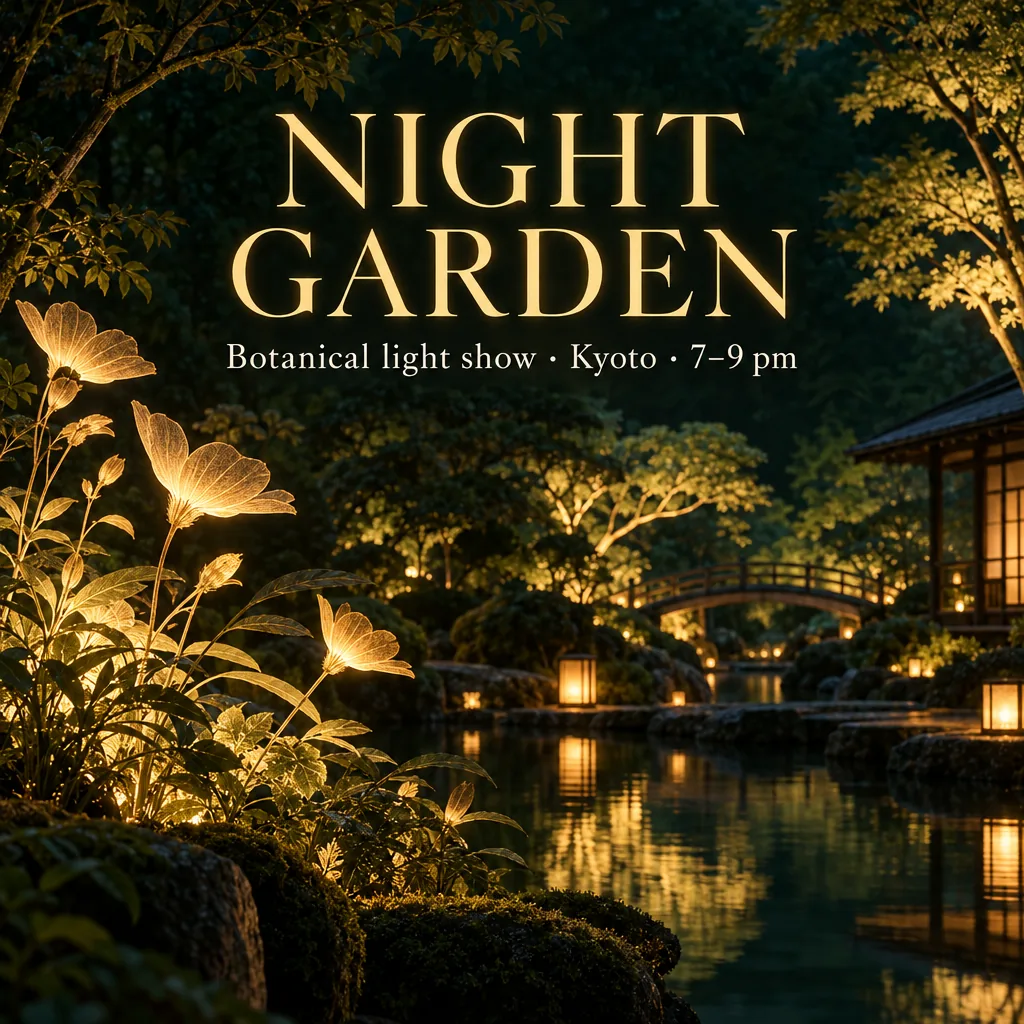
どちらも見出しとサブタイトルを、中黒とエンダッシュまで正確に綴りました。GPT Image 2.5は橋と東屋のある雰囲気のある庭を描き、Nano Banana 2.1は平面的に光る葉でタイトルを囲みました。このプロンプトの出典であるFeloも同じ分かれ方を確認しています。雰囲気ならGPT、グラフィックなポスターなら2.1です。
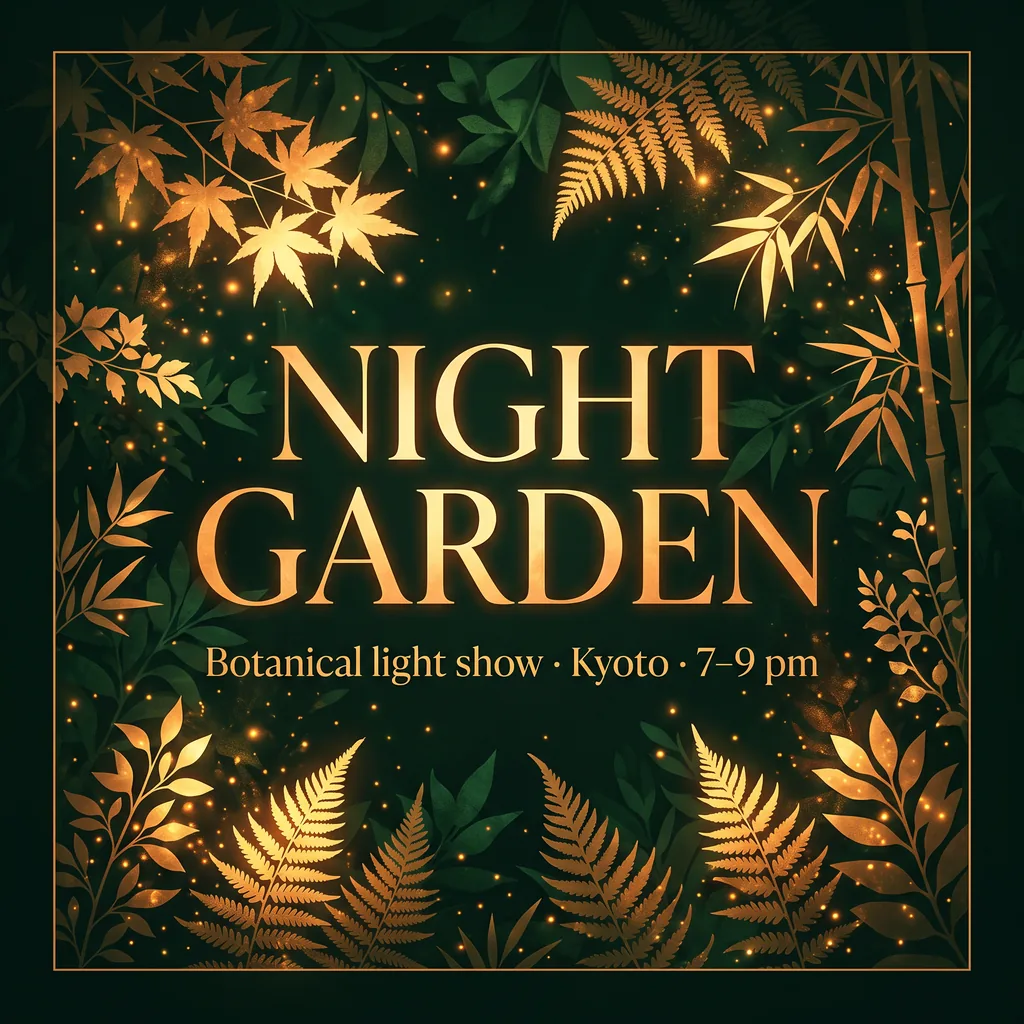
Nano Banana 2.1: ライトショーのポスター
Nano Banana 2.12K · 15クレジット
GPT Image 2.5: ライトショーのポスター
GPT Image 2.5高 · 15クレジット
プロンプト: “Design a square event poster with exactly this English headline: "NIGHT GARDEN". Add exactly this subtitle: "Botanical light show · Kyoto · 7–9 pm". Use luminous botanical silhouettes, deep forest green and warm amber, refined editorial typography, clear contrast, balanced margins, all text fully inside the canvas. Use natural English typography and line breaks without changing any characters. No other words, no translations, no logos, no watermark.”

同じポスターを日本語で:引き分け

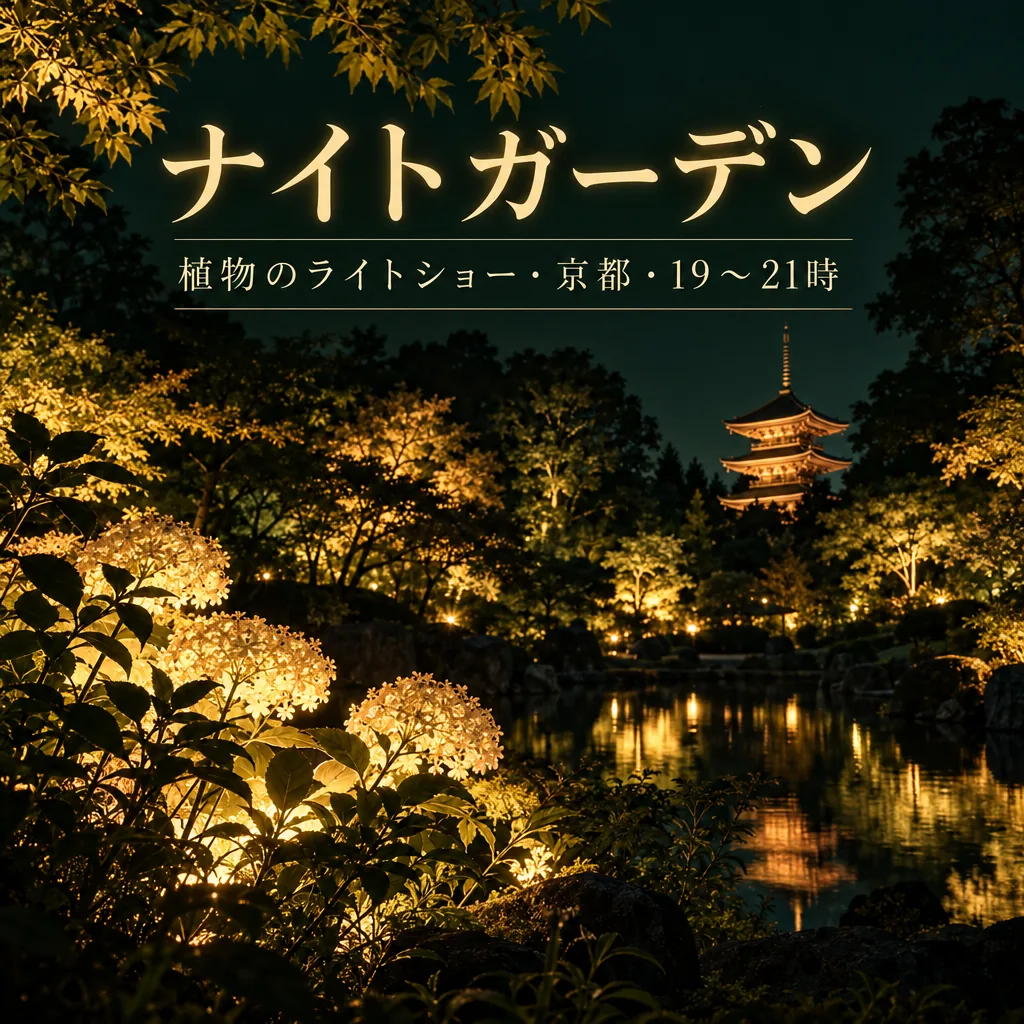
どちらも「ナイトガーデン」と「植物のライトショー・京都・19〜21時」を正しく書きました(公開前に日本語の表記を確認しています)。Nano Banana 2.1はサブタイトルを2行に分け、改行位置の中黒を落としました。GPT Image 2.5は1行のまま収め、庭に五重塔を加えました。Feloのテストでも両モデルとも日本語の文字を保っていましたが、ご自身の画像も公開前に一字ずつ確認してください。
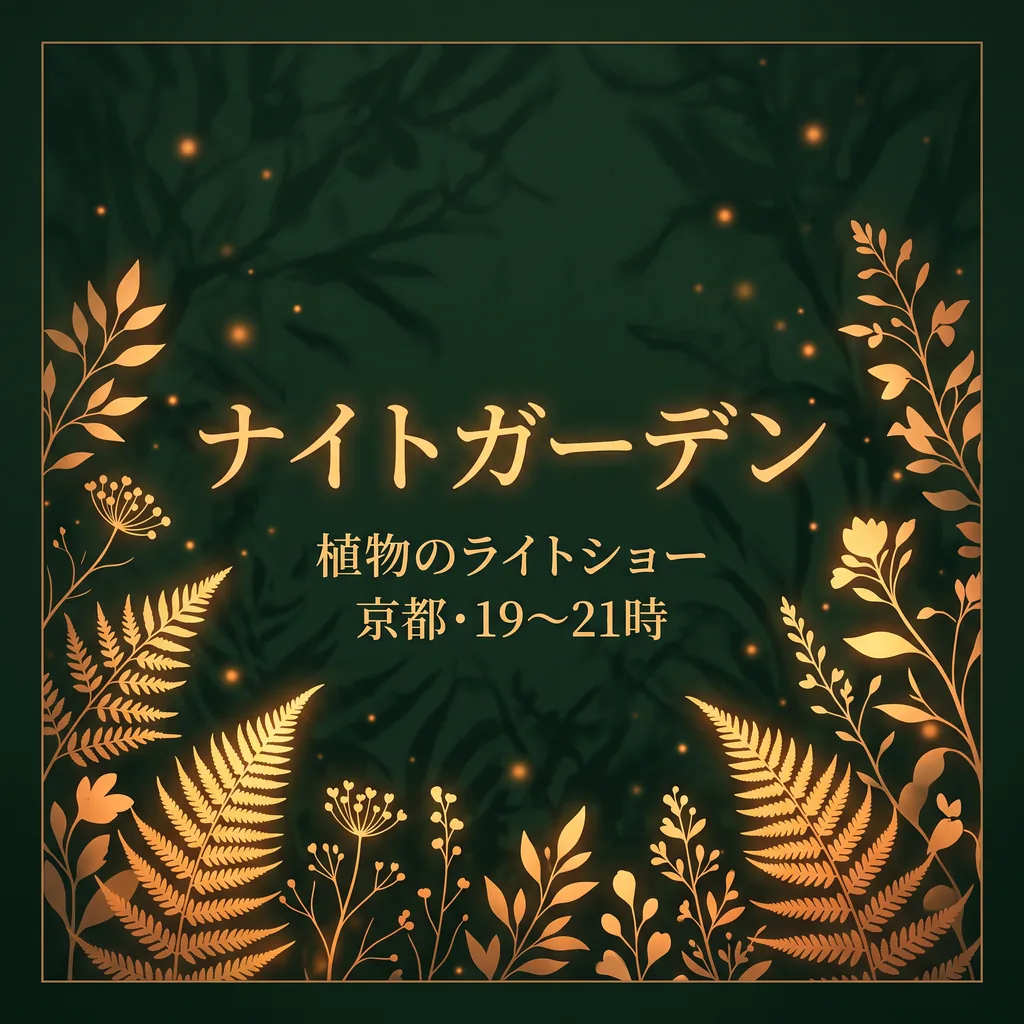
Nano Banana 2.1: 日本語のイベントポスター
Nano Banana 2.12K · 15クレジット
GPT Image 2.5: 日本語のイベントポスター
GPT Image 2.5高 · 15クレジット
プロンプト: “Design a square event poster with exactly this Japanese headline: "ナイトガーデン". Add exactly this subtitle: "植物のライトショー・京都・19〜21時". Use luminous botanical silhouettes, deep forest green and warm amber, refined editorial typography, clear contrast, balanced margins, all text fully inside the canvas. Use natural Japanese typography and line breaks without changing any characters. No other words, no translations, no logos, no watermark.”

どちらを選ぶか

zzo.aiは両方のモデルを、このページの料金で提供しています。おすすめは、ここに載せたスペックと制限に基づいています。

用途おすすめ理由
一部だけ直して、ほかは残すGPT Image 2.5上のテストでは、10件の編集のうち4件でGPT Image 2.5が上回り、Nano Banana 2.1は2件でした。CellCog(2026年10月25日)も同じ結果で、GPT Image 2.5は「壁、植物、影、構図をほぼそのまま残した」一方、Nano Banana 2.1はどの写真も狭めにトリミングしました。
古い写真の修復Nano Banana 2.1上の2件の修復で、GPT Image 2.5が変えてしまった顔と構図を、どちらも保ちました。WeShopによる2.1の修復テストでも、3人とも本人らしさが保たれていました。
写真の顔をそのまま使うたいていGPT Image 2.5Fuserのテストでは、GPT Image 2.5は「顔をはっきり引き継いだ」一方、2.1は巻き毛がゆるみ、そばかすが薄くなりました。ただし毎回ではなく、BulkImagenのハロウィンのテストでは2.1のほうが顔をよく保ちました。
文章の指示から商品画像を作るわずかにNano Banana 2.1FuserとBulkImagenでは、セット、光、余白の指示に最も文字どおり従ったのは2.1でした。Atlas Cloudは引き分けとし、CellCogは2.1が影を逆側に落としたためGPT Image 2.5を選びました。
商品はそのままで、別の場面に置くGPT Image 2.5Fuserのボトルの編集では、GPT Image 2.5は「残すよう指示したものを何も変えなかった」のに対し、2.1はラベルは保ったものの、キャップのデザインを変えました。
ポスターと正確な文字どちらでも(文字指定ならGPT Image 2.5)5枚のポスターすべてで、日本語の1枚も含め、どちらも全行を正しく綴りました。ただしMIDNIGHT BRASSでは、Nano Banana 2.1がBulkImagenのテストと同じく頼んでいない2行を足し、GPT Image 2.5は指定どおりでした。FuserとCellCogは引き分け、Atlas Cloudはフッターを正確に再現した2.1を選んでいます。プロンプトの最後に「No other text」と書き添えてください。
自然でドキュメンタリー風の写真どちらでも上の2枚のポートレートでも互角でした。GPT Image 2.5はより鮮明で肌の描き込みが濃く、Nano Banana 2.1はドキュメンタリー写真に近い印象です(CellCogも同じ見方)。Fuserはわずかの差でGPT Image 2.5を選びました。
写真にペットや物を加える両方試す上の犬のテストではGPT Image 2.5が自然に配置し、Nano Banana 2.1は貼り付けたようになりました。CellCogの猫のテストでは逆で、2.1の猫が「いちばん自然」でした。
グラフ・インフォグラフィックNano Banana 2.1(要確認)CellCogのテストでは、棒の長さを正しい比率で描いたのは2.1だけでした。ただし文字を足すことがあり、BulkImagenでは綴りの誤りを含む余計な一文が入り、私たちの水の循環のテストでは2つの段階に「Condensation」と付けていました。
背景透過(透過PNG)GPT Image 2.5本当の背景透過で出力できるのはGPT Image 2.5だけです。Nano Banana 2.1は必ず背景を塗りつぶします。
4Kや横長のバナーNano Banana 2.1Nano Banana 2.1は4Kまで、また4:1や8:1のバナーまで出力できます。GPT Image 2.5はzzo.aiでは長辺1280ピクセル、16:9までです。

スペックを並べて比較

Nano Banana 2.1GPT Image 2.5
開発元GoogleOpenAI
リリース日2026-10-06—
種類画像画像
モードテキストから画像, 画像を編集テキストから画像, 画像を編集
品質1K, 2K, 4K低, 中, 高, 超高, 最高
1回の枚数44
アスペクト比1:1, 16:9, 9:16, 4:3, 3:4, 3:2, 2:3, 21:9, 4:1, 8:11:1, 4:3, 3:4, 16:9, 9:16
バージョン—GPT Image 2.5 Flare, GPT Image 2.5 Sunburst
商用利用可(利用規約の範囲内)可(利用規約の範囲内)
失敗した生成クレジットは自動で戻りますクレジットは自動で戻ります
最低料金10 ($0.10)5 ($0.05)

テストの方法

上の各ペアは、1つのプロンプト(編集の場合は1枚の写真も)を、zzo.aiでサイトの設定のまま各モデルで1回ずつ生成したものです。編集はGPT Image 2.5を高品質、Nano Banana 2.1を標準の1K(1948年の写真のみ2K)で行いました。プロンプトからの生成は、1枚あたり同じ料金になる設定で、GPT Image 2.5は高品質、Nano Banana 2.1は2Kです。入力に使った写真は架空のもので、AIで作成しました。プロンプトはすべて公開されたガイドやテスト(OpenAI、Google、Fuser、Atlas Cloud、BulkImagen、WeShop、Redditのユーザー)から取り、よりよい結果を得るための生成し直しはしていません。各モデル1回ずつの結果なので、ベンチマークではなく傾向として見てください。

第三者のテスト結果

  • CellCog(24プロンプト、2026年10月25日):GPT Image 2.5が9勝、Nano Banana 2.1が5勝、引き分け10件。透過のタスクを除いた平均点は4.67と4.62でした。
  • Fuser(5タスク、2026年10月6日):キャラクターのタスクはGPT Image 2.5がはっきり勝ち、写真と編集のタスクも僅差でGPT Image 2.5。商品画像はNano Banana 2.1が勝ち、ポスターは引き分けでした。
  • Atlas Cloud(4ラウンド、2026年10月):4ラウンド中3ラウンドで、Nano Banana 2.1が勝つか引き分けました。
  • BulkImagen(6プロンプト、2026年10月7日):目に見える欠陥がなかったのはGPT Image 2.5だけでした。
  • Arenaのユーザー投票(2026年10月19日時点の報道、まだ暫定):テキストから画像、1枚の画像の編集のどちらでも、GPT Image 2.5 SunburstがNano Banana 2.1を約100ポイント上回っています。

テストを行った4サイトはいずれもこれらのモデルを提供しているサービスで、各プロンプトを1回ずつ実行しています。

それぞれの弱点

  • Nano Banana 2.1: 編集時にトリミングし直したり構図を変えたりする、頼んでいない文字を足す、看板の文字を鏡文字にしたり勝手に作ったりすることがあります。1Kでは小さな文字がぼやけます。
  • GPT Image 2.5: 小さなディテール(バッグのストラップ、チョークの下線)を落としたり、修復で服を変えたりすることがあります。広い無地の部分に細かい粒子が出ることもあります。4Kはなく、16:9より横長にはできません。

よくある質問

Nano Banana 2.1とGPT Image 2.5はどちらが安いですか?

zzo.aiのNano Banana 2.1は、1K品質の画像1枚で10クレジット($0.10)です。zzo.aiのGPT Image 2.5は、高品質の画像1枚で15クレジット($0.15)です。サブスクはありません。一度購入したクレジットをどちらのモデルにも使え、失敗した生成のクレジットは自動で戻ります。

Nano Banana 2.1とGPT Image 2.5(GeminiとChatGPTの画像生成)、どちらがいいですか?

全体としてどちらが上ということはありません。同じプロンプトでの18件のテストでは、GPT Image 2.5が編集4件とポスター1件、Nano Banana 2.1が修復2件で上回り、残りは引き分けでした。CellCogの24プロンプト(2026年10月25日)ではGPT Image 2.5の9勝5敗、引き分け10件。Atlas Cloudの4ラウンドは2.1寄りでした。編集と切り抜きならGPT Image 2.5、修復・4K・横長のバナーならNano Banana 2.1を選んでください。

写真の編集に向いているのはどちらですか?

ほとんどの編集はGPT Image 2.5です。物を消す、写真を片付ける、季節を変える、ペットを加えるといった編集は、私たちのテストでGPT Image 2.5が上回りました。ほかのテストでも、Nano Banana 2.1はトリミングし直したり描き直したりすることが多いと報告されています。古い写真の修復はNano Banana 2.1で、2回とも顔を保ちました。zzo.aiでは、どちらも1回の編集で最大4枚の写真を使えます。

顔が変わらないのはどちらですか?

たいていはGPT Image 2.5ですが、毎回ではありません。また、どちらも顔をピクセル単位で保つわけではありません。残したいもの(顔、顔立ち、髪、表情)を指示に書き、1回の編集で変えるのは1か所にして、元の写真と見比べてください。

背景透過の画像を作れるのはどちらですか?

GPT Image 2.5だけです。背景透過をオンにすると、本当のアルファチャンネルを持つPNGが出力されます。Nano Banana 2.1には透過出力がありません。

生成が速いのはどちらですか?

ほぼ同じです。CellCogの計測では、中央値でNano Banana 2.1(2K)が約31秒、GPT Image 2.5(高品質)が29秒でした。私たちのサンプル生成では、Nano Banana 2.1はほとんどが15〜36秒(1枚だけ82秒)、GPT Image 2.5は19〜32秒でした。

1つのアカウントで両方使えますか?

使えます。1つのアカウントと1つのクレジット(生成に使う残高)で、ウェブサイトでもAPIでも両方のモデルを使えます。同じプロンプトをそれぞれで生成し、気に入ったほうを残してください。

ほかの比較