
Insights
Best Lofi Dusk Filter Prompt for AI Photo Editing
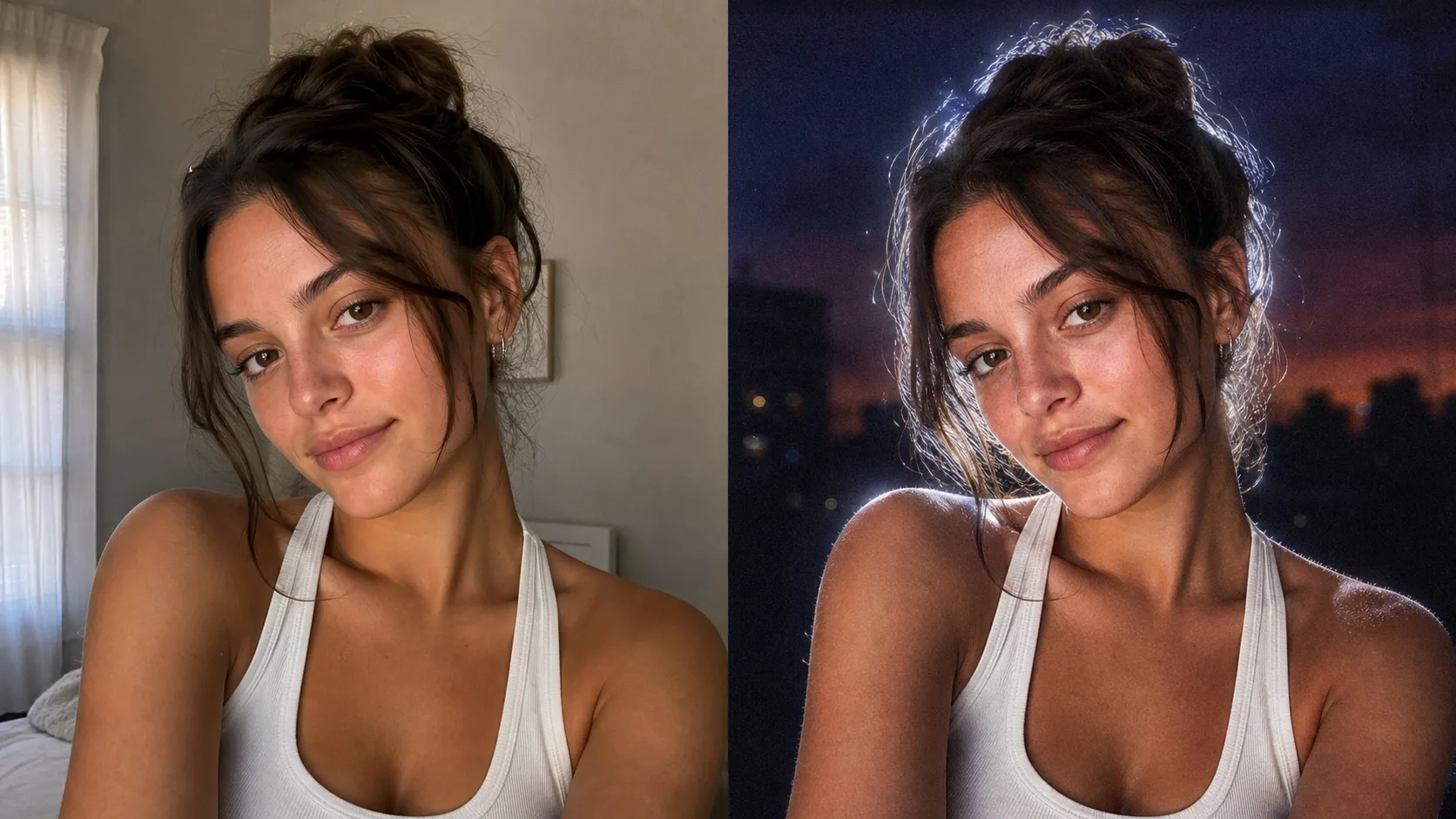
The Lofi Dusk filter is not just a normal color filter. The look works because the image is relit: the background becomes darker, the face gets a direct flash feel, and a bright white rim light wraps around the subject.
If you want to try it immediately, use the Lofi Dusk Filter AI Photo Editor. It opens in image-to-image mode with the prompt already filled in.
Copy This Lofi Dusk Filter Prompt
Relight the uploaded image in a viral Lofi Dusk filter style. Preserve the subject's identity, facial structure, expression, hairstyle, clothing, and pose.

Create a deep muted dusk or night background with darker tones at the top, subtle blur, and realistic grain. Use a bold night-flash aesthetic combining natural ambient light with direct front-facing flash. Add tiny specular highlights, strong backlighting, and a bright white rim light around the subject. Keep a soft front fill light, cinematic high contrast, gentle peachy skin tones, muted shadows, soft bloom, halation, and vintage CCD camera texture. Make it look like a realistic Instagram low-light portrait, not an over-edited fantasy image.
Why This Lofi Dusk Filter Prompt Works
The first sentence tells the AI what should not change: identity, face shape, expression, hair, clothing, and pose. This matters because users want their own photo transformed, not a new person who only looks vaguely similar.
The rest of the prompt describes the Lofi Dusk look in lighting terms:
- A dark muted dusk or night background
- Direct front-facing flash
- Strong backlighting
- A bright white rim light around the subject
- Gentle peachy skin tones
- Film grain, bloom, and CCD-style texture
That combination gives the image the viral low-light portrait feeling.
Best Photos for the Lofi Dusk Filter
Choose a clear portrait where the face, hair, and shoulders are visible. Selfies, headshots, and half-body portraits usually work best. Avoid source photos that are already very dark, heavily blurred, or crowded with multiple people.
How to Refine the Lofi Dusk Filter Result
If the result is too dark, add:
Make the face slightly brighter, keep the dark dusk background, and soften the shadows.
If the effect is too subtle, add:
Use a stronger white rim light, more visible front flash, and slightly more film grain.
If the model changes the face too much, add:
Preserve the exact facial identity and expression. Do not beautify, reshape, age, or change the person.
Try the Lofi Dusk Filter Online
The fastest way to recreate the look is to upload your photo to the Lofi Dusk Filter AI Photo Editor. The page uses GPT Image in image-to-image mode and preloads the prompt above.