
洞察
最佳 Lofi Dusk 滤镜 AI 照片编辑提示词
•约 4 分钟
AI 照片编辑Lofi Dusk 滤镜提示词
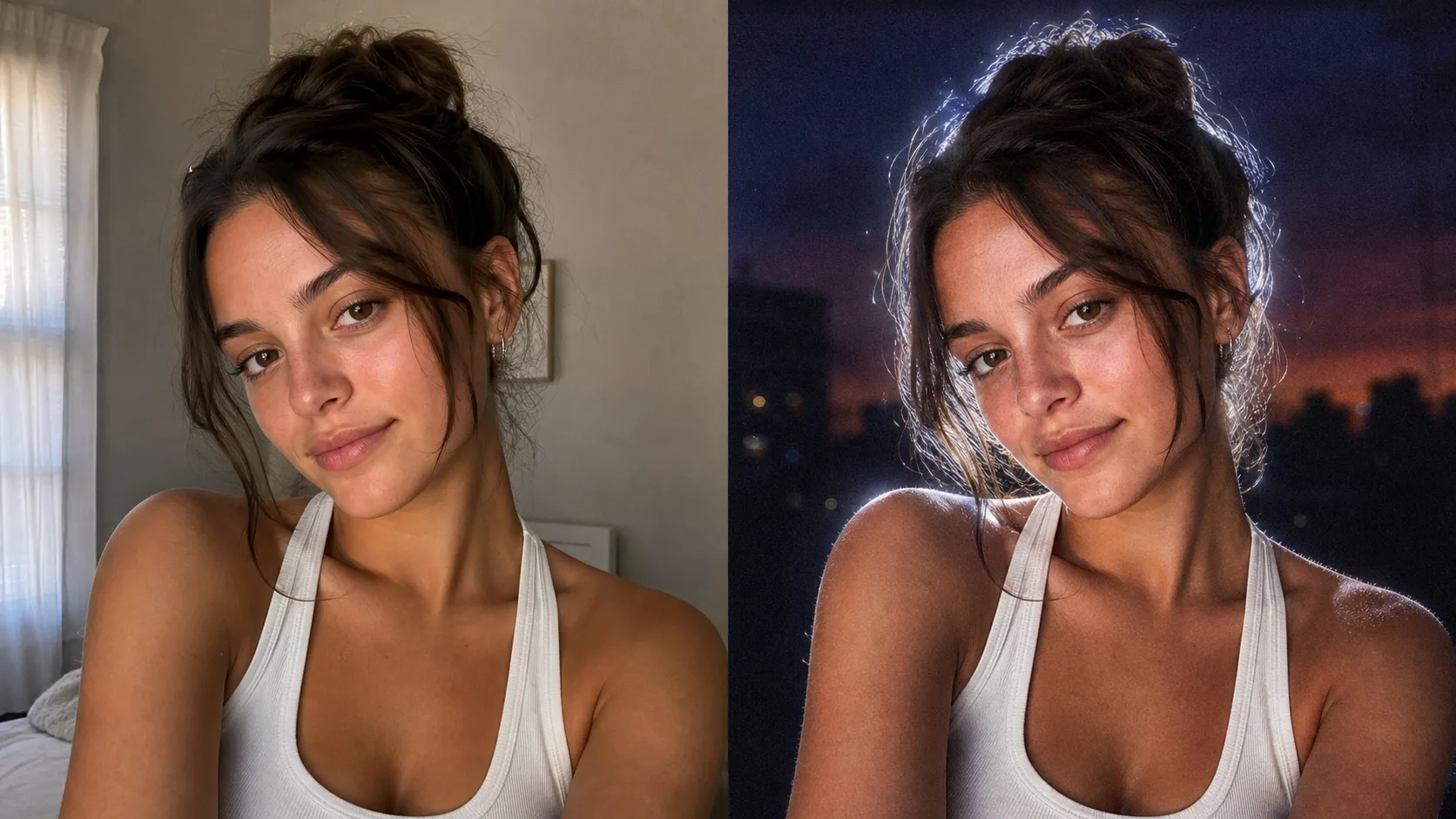
Lofi Dusk 滤镜不仅仅是一个普通的色彩滤镜。这个风格之所以有效,是因为图像被重新打光了:背景变得更暗,面部获得直射闪光效果,明亮的白色轮廓光环绕着被摄体。
如果您想立即尝试,请使用 Lofi Dusk 滤镜 AI 照片编辑器。它会以图像到图像模式打开,提示词已经预填。
复制这个 Lofi Dusk 滤镜提示词
Relight the uploaded image in a viral Lofi Dusk filter style. Preserve the subject's identity, facial structure, expression, hairstyle, clothing, and pose.

Create a deep muted dusk or night background with darker tones at the top, subtle blur, and realistic grain. Use a bold night-flash aesthetic combining natural ambient light with direct front-facing flash. Add tiny specular highlights, strong backlighting, and a bright white rim light around the subject. Keep a soft front fill light, cinematic high contrast, gentle peachy skin tones, muted shadows, soft bloom, halation, and vintage CCD camera texture. Make it look like a realistic Instagram low-light portrait, not an over-edited fantasy image.
为什么这个 Lofi Dusk 滤镜提示词有效
第一句话告诉 AI 什么不应该改变:身份、脸型、表情、发型、服装和姿势。这很重要,因为用户想要的是自己照片的变换,而不是一个只是隐约相似的新人。
提示词的其余部分用灯光术语描述了 Lofi Dusk 风格:
- 深沉的黄昏或夜晚背景
- 直射前置闪光
- 强烈的背光
- 被摄体周围的明亮白色轮廓光
- 柔和的桃色肤色
- 胶片颗粒、光晕和 CCD 风格纹理
这种组合赋予了图像爆火的弱光人像感觉。
Lofi Dusk 滤镜的最佳照片选择
选择一张面部、头发和肩膀清晰可见的人像照片。自拍、头像和半身人像通常效果最好。避免使用已经非常暗、严重模糊或有多人的源照片。
如何优化 Lofi Dusk 滤镜效果
如果结果太暗,添加:
Make the face slightly brighter, keep the dark dusk background, and soften the shadows.
如果效果太微妙,添加:
Use a stronger white rim light, more visible front flash, and slightly more film grain.
如果模型过多改变了面部,添加:
Preserve the exact facial identity and expression. Do not beautify, reshape, age, or change the person.
在线试用 Lofi Dusk 滤镜
再现这个风格最快的方式是将您的照片上传到 Lofi Dusk 滤镜 AI 照片编辑器。该页面使用 GPT Image 的图像到图像模式,并预加载了上述提示词。