
Perspectivas
Mejor Prompt de Lofi Dusk Filter para Edición de Fotos con IA
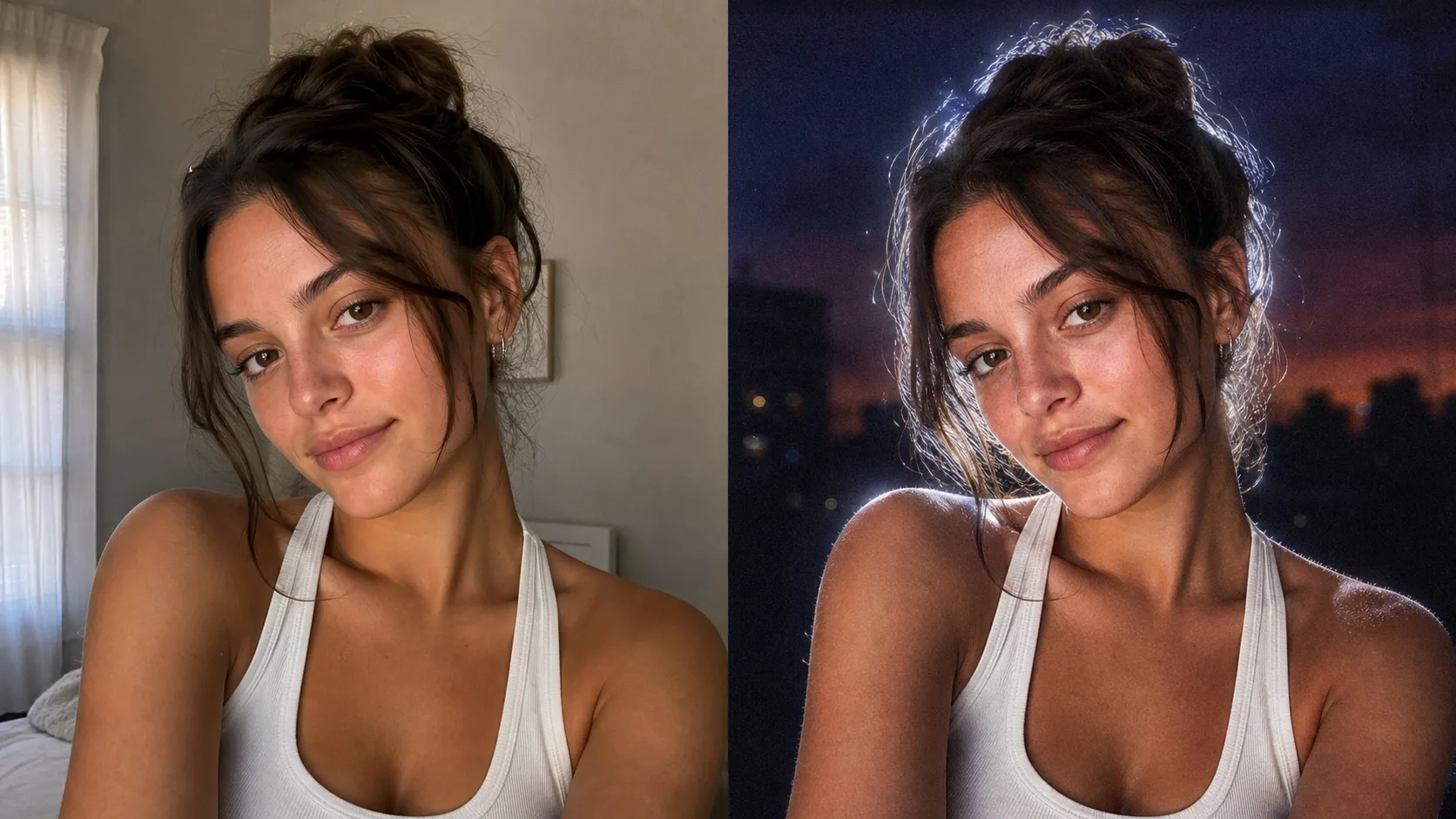
El filtro Lofi Dusk no es solo un filtro de color normal. El look funciona porque la imagen es reiluminada: el fondo se vuelve más oscuro, el rostro recibe una sensación de flash directo, y una luz de contorno blanca brillante envuelve al sujeto.
Si quieres probarlo inmediatamente, usa el Editor de Fotos AI Lofi Dusk Filter. Se abre en modo imagen a imagen con el prompt ya completado.
Copia Este Prompt del Filtro Lofi Dusk
Relight the uploaded image in a viral Lofi Dusk filter style. Preserve the subject's identity, facial structure, expression, hairstyle, clothing, and pose.

Create a deep muted dusk or night background with darker tones at the top, subtle blur, and realistic grain. Use a bold night-flash aesthetic combining natural ambient light with direct front-facing flash. Add tiny specular highlights, strong backlighting, and a bright white rim light around the subject. Keep a soft front fill light, cinematic high contrast, gentle peachy skin tones, muted shadows, soft bloom, halation, and vintage CCD camera texture. Make it look like a realistic Instagram low-light portrait, not an over-edited fantasy image.
Por Qué Este Prompt del Filtro Lofi Dusk Funciona
La primera oración le dice a la IA qué no debe cambiar: identidad, forma del rostro, expresión, cabello, ropa y pose. Esto importa porque los usuarios quieren que su propia foto sea transformada, no una persona nueva que solo se ve vagamente similar.
El resto del prompt describe el look Lofi Dusk en términos de iluminación:
- Un fondo oscuro del atardecer o nocturno silenciado
- Flash frontal directo
- Contrailuminación fuerte
- Una luz de contorno blanca brillante alrededor del sujeto
- Tonos de piel melocotón suaves
- Grano de película, bloom y textura estilo CCD
Esa combinación le da a la imagen la sensación viral de retrato en poca luz.
Mejores Fotos para el Filtro Lofi Dusk
Elige un retrato nítido donde el rostro, el cabello y los hombros sean visibles. Los selfies, headshots y retratos de medio cuerpo suelen funcionar mejor. Evita fotos de origen que ya estén muy oscuras, borrosas o concurridas con múltiples personas.
Cómo Refinar el Resultado del Filtro Lofi Dusk
Si el resultado es muy oscuro, agrega:
Make the face slightly brighter, keep the dark dusk background, and soften the shadows.
Si el efecto es muy sutil, agrega:
Use a stronger white rim light, more visible front flash, and slightly more film grain.
Si el modelo cambia demasiado el rostro, agrega:
Preserve the exact facial identity and expression. Do not beautify, reshape, age, or change the person.
Prueba el Filtro Lofi Dusk Online
La forma más rápida de recrear el look es subir tu foto al Editor de Fotos AI Lofi Dusk Filter. La página usa GPT Image en modo imagen a imagen y precarga el prompt anterior.